
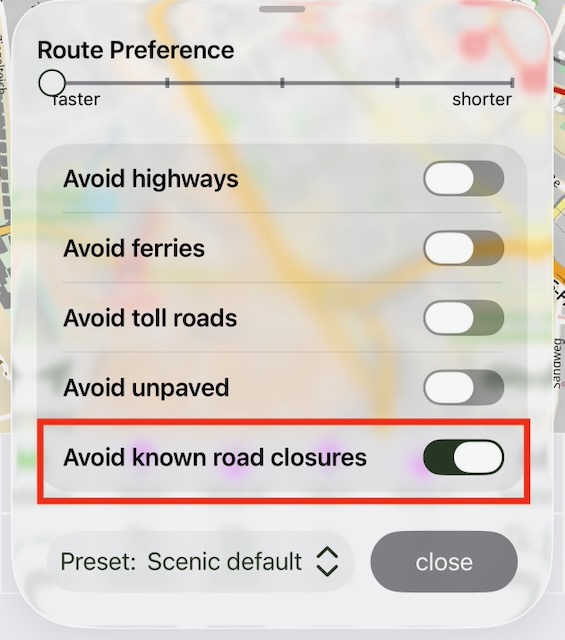
Avoid known road closures

Quote from MartinW on 15.07.2026, 09:32Hi!
Although I was interested in Scenic for a long time, it wasn't an option because I use an Android phone for navigation. Luckily, times have changed, so I'll give it a try and have a closer look.
I already signed up for a subscription to get access to all premium features and started fiddling around a bit. My first "real" navigation led me into two closed roads, which was a bit surprising, as I had seen both closures on the map. After some research, I found the related help article and learned that closures are shown on the map but are not taken into account for planning and navigation. OK - but I still have two questions:
- Do I see only road closures provided by TomTom, or also those known by OSM? If so, do they appear different on the map?
- If closures are not taken into account when navigating at all, what is this toggle good for?
Thanks for help!
Hi!
Although I was interested in Scenic for a long time, it wasn't an option because I use an Android phone for navigation. Luckily, times have changed, so I'll give it a try and have a closer look.
I already signed up for a subscription to get access to all premium features and started fiddling around a bit. My first "real" navigation led me into two closed roads, which was a bit surprising, as I had seen both closures on the map. After some research, I found the related help article and learned that closures are shown on the map but are not taken into account for planning and navigation. OK - but I still have two questions:
- Do I see only road closures provided by TomTom, or also those known by OSM? If so, do they appear different on the map?
- If closures are not taken into account when navigating at all, what is this toggle good for?
Thanks for help!

Quote from Guido on 15.07.2026, 09:36Road closures as shown in the map (Sourced by TomTom) are not yet taken into account in the route calculation.
The “avoid known road closures" setting only avoids long term road closures that OpenStreetMap is aware of. not the ones reported by TomTom.
more info here: https://scenic.app/help/closures-and-incidents/
Road closures as shown in the map (Sourced by TomTom) are not yet taken into account in the route calculation.
The “avoid known road closures" setting only avoids long term road closures that OpenStreetMap is aware of. not the ones reported by TomTom.
more info here: https://scenic.app/help/closures-and-incidents/

Quote from blackhawk1618 on 15.07.2026, 09:36Ditto! I experienced the same issue yesterday while navigating. The road was closed due to construction but Scenic navigation didn't account for the closure, so I had to turn around and take a detour to reach my destination. I have both "Avoid known road closures" and "Avoid unpaved roads" enabled, but neither option seemed to work.
Ditto! I experienced the same issue yesterday while navigating. The road was closed due to construction but Scenic navigation didn't account for the closure, so I had to turn around and take a detour to reach my destination. I have both "Avoid known road closures" and "Avoid unpaved roads" enabled, but neither option seemed to work.
Quote from blackhawk1618 on 15.07.2026, 09:42Quote from Guido on 15.07.2026, 09:36Road closures as shown in the map (Sourced by TomTom) are not yet taken into account in the route calculation.
The “avoid known road closures" setting only avoids long term road closures that OpenStreetMap is aware of. not the ones reported by TomTom.
more info here: https://scenic.app/help/closures-and-incidents/
Thanks Guido for the clarification. Do you have a plan to take road closure and other critical hazards into an account during navigation so that Scenic can automatically suggest an alternative route. This would be a very helpful feature and would help riders avoid unexpected surprises along the way.
Quote from Guido on 15.07.2026, 09:36Road closures as shown in the map (Sourced by TomTom) are not yet taken into account in the route calculation.
The “avoid known road closures" setting only avoids long term road closures that OpenStreetMap is aware of. not the ones reported by TomTom.
more info here: https://scenic.app/help/closures-and-incidents/
Thanks Guido for the clarification. Do you have a plan to take road closure and other critical hazards into an account during navigation so that Scenic can automatically suggest an alternative route. This would be a very helpful feature and would help riders avoid unexpected surprises along the way.
Quote from MartinW on 15.07.2026, 09:49Quote from Guido on 15.07.2026, 09:36Road closures as shown in the map (Sourced by TomTom) are not yet taken into account in the route calculation.
The “avoid known road closures" setting only avoids long term road closures that OpenStreetMap is aware of. not the ones reported by TomTom.
more info here: https://scenic.app/help/closures-and-incidents/
Hi Guido, thanks for your reply! That is the article I was referring to.
To sum it up:
- The maps show only TomTom info (not OSM)
- When planning, all information (TomTom and OSM) is ignored for route calculation
- When navigating, OSM info is considered, but not TomTom
Did I get this right?
Quote from Guido on 15.07.2026, 09:36Road closures as shown in the map (Sourced by TomTom) are not yet taken into account in the route calculation.
The “avoid known road closures" setting only avoids long term road closures that OpenStreetMap is aware of. not the ones reported by TomTom.
more info here: https://scenic.app/help/closures-and-incidents/
Hi Guido, thanks for your reply! That is the article I was referring to.
To sum it up:
- The maps show only TomTom info (not OSM)
- When planning, all information (TomTom and OSM) is ignored for route calculation
- When navigating, OSM info is considered, but not TomTom
Did I get this right?
Quote from Redclayrider on 20.07.2026, 17:03This issue should really be fixed. The app should either have the “Avoid road closures” toggle removed or incorporate the TomTom identified road closures also. The route planning is unreliable otherwise—and a different routing app is used instead. Sorry, but that’s my honest opinion. :/
This issue should really be fixed. The app should either have the “Avoid road closures” toggle removed or incorporate the TomTom identified road closures also. The route planning is unreliable otherwise—and a different routing app is used instead. Sorry, but that’s my honest opinion. :/
Quote from MartinW on 21.07.2026, 08:29I'm still struggling with these "non-visual" road closures. OSM provides different types: potential closures, seasonal closures, closures related to particular vehicles or freight, and so on. Does Scenic always consider all these closures, or is there some filter logic in place? Do I get any info on closures that have been taken into account when planning a route? I could imagine running into a scenario where I notice routing results with deviations for no visible reason.
Furthermore, I learned that OSM maps/data are refreshed every one or two months, which means road closures caused by road construction are likely not up to date most of the time.
So, all in all, is it worth enabling "avoid (OSM) road closures"? Are there any experiences or hints to get the best out of it?
Sorry if these questions have been asked many times before, but I haven't found any related posts or in-depth articles. If there are some, please provide a link. Thanks.
I'm still struggling with these "non-visual" road closures. OSM provides different types: potential closures, seasonal closures, closures related to particular vehicles or freight, and so on. Does Scenic always consider all these closures, or is there some filter logic in place? Do I get any info on closures that have been taken into account when planning a route? I could imagine running into a scenario where I notice routing results with deviations for no visible reason.
Furthermore, I learned that OSM maps/data are refreshed every one or two months, which means road closures caused by road construction are likely not up to date most of the time.
So, all in all, is it worth enabling "avoid (OSM) road closures"? Are there any experiences or hints to get the best out of it?
Sorry if these questions have been asked many times before, but I haven't found any related posts or in-depth articles. If there are some, please provide a link. Thanks.
Quote from HighPeakRider on 14.08.2026, 12:38@guidomm Any updates on this development of this issue??
@guidomm Any updates on this development of this issue??


