
Arrow frozen in Overview mode

Quote from Bixio on 22.04.2026, 08:44Hello Guido,
Concerning the overview mode, I would like to report what seems to be a small bug and I would also like to make a suggestion for a small layout modification.
When I am not leading the group, I like to ride in overview mode to enjoy the "big picture" and know where I am on the map. In this mode, the route becomes green as I advance (as it should) but the arrow that normally shows my position remains stuck. A side effect is that the position of the map does not recenter, and after a while my current position is outside the borders of the map. (I am using an iPhone).
The suggestion concerns the overview mode as well. My phone is in landscape mode (so as not to cover the motorcycle display), which means that the vertical size of the display is already small and it would be nice to be able to use all of it to see as much ahead as possible. To maximize the usable display, it would be nice to have the "CLOSE" and the "Edit/Change Route" on the side (rather than on the bottom) when the phone is in landscape mode. There is no need to make them so big. They would fit above or below the "+" and "-" buttons located on the left, or they cold be placed on the right of the display. There is an abundance of space horizontally, loosing a bit is not a problem.
It was great to meeting you in Thailand.
Cheers, Bixio
Hello Guido,
Concerning the overview mode, I would like to report what seems to be a small bug and I would also like to make a suggestion for a small layout modification.
When I am not leading the group, I like to ride in overview mode to enjoy the "big picture" and know where I am on the map. In this mode, the route becomes green as I advance (as it should) but the arrow that normally shows my position remains stuck. A side effect is that the position of the map does not recenter, and after a while my current position is outside the borders of the map. (I am using an iPhone).
The suggestion concerns the overview mode as well. My phone is in landscape mode (so as not to cover the motorcycle display), which means that the vertical size of the display is already small and it would be nice to be able to use all of it to see as much ahead as possible. To maximize the usable display, it would be nice to have the "CLOSE" and the "Edit/Change Route" on the side (rather than on the bottom) when the phone is in landscape mode. There is no need to make them so big. They would fit above or below the "+" and "-" buttons located on the left, or they cold be placed on the right of the display. There is an abundance of space horizontally, loosing a bit is not a problem.
It was great to meeting you in Thailand.
Cheers, Bixio

Quote from Guido on 22.04.2026, 13:53Hi Bixio,
Hope you are well, and have your next motorcycle planned already 🙂.
I understand your points regarding overview mode. The thing is that the overview mode is not really meant for riding around. It's more meant for getting a quick overview of where you are along the route, or, if you are not following a route, for getting a feel for where you are on the map.
What I would recommend is to stay in navigation mode, but switch to manual zoom or perhaps manual + turn zoom. Since Thailand I added that last zoom mode. Here's a help article: https://scenic.app/help/zoom-modes/
This will give you the zoom buttons on the map, and the ability to zoom in/out with your remote controller (which you have if I remember correctly) DURING navigation mode. Then you have just about the same functionality as in overview mode, but you'll have more vertical space as the buttons aren't there, and the map will move with your position indicator as well.
Would that work for you? Or are there more reasons why you prefer overview mode?
Cheers,
Guido
Hi Bixio,
Hope you are well, and have your next motorcycle planned already 🙂.
I understand your points regarding overview mode. The thing is that the overview mode is not really meant for riding around. It's more meant for getting a quick overview of where you are along the route, or, if you are not following a route, for getting a feel for where you are on the map.
What I would recommend is to stay in navigation mode, but switch to manual zoom or perhaps manual + turn zoom. Since Thailand I added that last zoom mode. Here's a help article: https://scenic.app/help/zoom-modes/
This will give you the zoom buttons on the map, and the ability to zoom in/out with your remote controller (which you have if I remember correctly) DURING navigation mode. Then you have just about the same functionality as in overview mode, but you'll have more vertical space as the buttons aren't there, and the map will move with your position indicator as well.
Would that work for you? Or are there more reasons why you prefer overview mode?
Cheers,
Guido
Quote from Bixio on 23.04.2026, 09:21Hi Guido,
I went out to test the various zoom possibilities. They are brilliant, and the manual + turn zoom is better than what I was hoping for. Both manual zooms work great with the WonderWheel. Thanks a lot for letting me know. (BTW, what is the best way to keep up with the new features introduced in updates?)
As you know, I am a big fan of Scenic, and I speak very enthusiastically about it. A am confident that a few riding bodies sill sign up once Scenic for Android is official.
Cheers
Bixio
Hi Guido,
I went out to test the various zoom possibilities. They are brilliant, and the manual + turn zoom is better than what I was hoping for. Both manual zooms work great with the WonderWheel. Thanks a lot for letting me know. (BTW, what is the best way to keep up with the new features introduced in updates?)
As you know, I am a big fan of Scenic, and I speak very enthusiastically about it. A am confident that a few riding bodies sill sign up once Scenic for Android is official.
Cheers
Bixio
Quote from Guido on 23.04.2026, 09:28Thanks Bixio. Happy you like the new zoom modes 🙂.
The best way to know what's new in a version is to check the "what's new" text in the App Store: https://apps.apple.com/app/id1089668246
This only gives you the "what's new" of the latest version though. Maybe I'll add a release notes section on the website soon, so there's a history. That will take a while though. Currently quite busy with Android 🙂
Thanks Bixio. Happy you like the new zoom modes 🙂.
The best way to know what's new in a version is to check the "what's new" text in the App Store: https://apps.apple.com/app/id1089668246
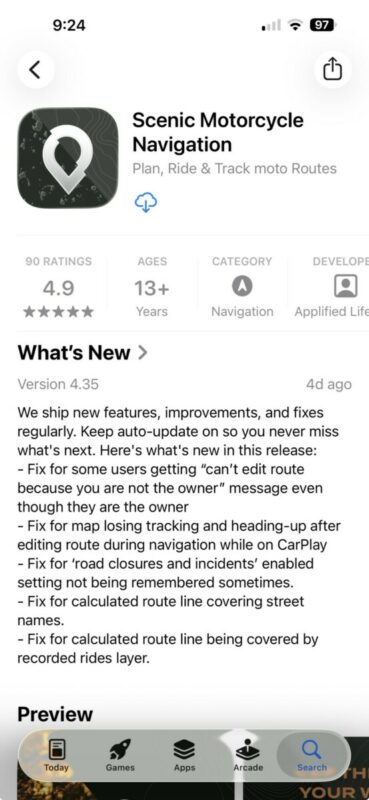
This only gives you the "what's new" of the latest version though. Maybe I'll add a release notes section on the website soon, so there's a history. That will take a while though. Currently quite busy with Android 🙂


