
All new Scenic WebApp / Web Planner in open beta

Quote from Guido on 31.10.2026, 10:43Hi everyone, Guido here.
Winter is coming, and that’s the perfect time to plan next season’s rides. So we have something new for you: the all-new Scenic web planner.
It’s basically Scenic on the big screen. You can create, edit and discover great routes from your computer, and easily share them with your riding buddies. Then just grab your phone and ride.
Over the years many of you have wished that we could make Scenic's route planning experience as good on desktop as it was in the app. Well, your wishes are hereby granted!
Introducing our completely new web planner. This gives you all of the functionality of Scenic's power planner on the web, and we've made it available for everyone with- or without a Scenic account. It's built on an entirely new architecture, so the UI is cleaner, discovering user routes is easier, and sharing your own routes is more intuitive than ever.
This has been a long time coming, and we're proud to finally release the open beta of our completely rebuilt desktop experience. It's already been tested by 100+ Scenic beta testers, and their feedback has been processed. So now, we're opening it up to everyone as an Open Beta.
Go to https://webapp.scenicapp.space and simply log in with your Scenic account.
P.S. the planner is new and still being polished. You may hit rough edges, and things may still change. Found a problem? Let us know via scenic.app/help. Mention your browser, browser version, and whether you're on Mac or Windows. We read everything, but we don't reply to every message so our time goes into fixing things. Check back now and then to see whether your feedback has been addressed.
Hi everyone, Guido here.
Winter is coming, and that’s the perfect time to plan next season’s rides. So we have something new for you: the all-new Scenic web planner.
It’s basically Scenic on the big screen. You can create, edit and discover great routes from your computer, and easily share them with your riding buddies. Then just grab your phone and ride.
Over the years many of you have wished that we could make Scenic's route planning experience as good on desktop as it was in the app. Well, your wishes are hereby granted!
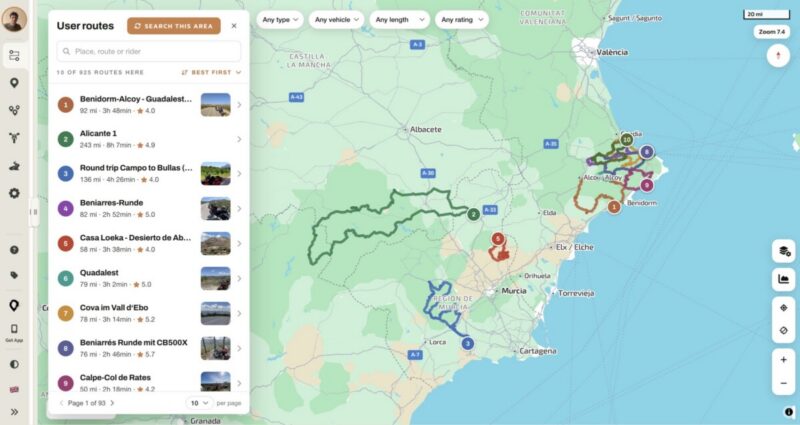
Introducing our completely new web planner. This gives you all of the functionality of Scenic's power planner on the web, and we've made it available for everyone with- or without a Scenic account. It's built on an entirely new architecture, so the UI is cleaner, discovering user routes is easier, and sharing your own routes is more intuitive than ever.
This has been a long time coming, and we're proud to finally release the open beta of our completely rebuilt desktop experience. It's already been tested by 100+ Scenic beta testers, and their feedback has been processed. So now, we're opening it up to everyone as an Open Beta.
Go to https://webapp.scenicapp.space and simply log in with your Scenic account.
P.S. the planner is new and still being polished. You may hit rough edges, and things may still change. Found a problem? Let us know via scenic.app/help. Mention your browser, browser version, and whether you're on Mac or Windows. We read everything, but we don't reply to every message so our time goes into fixing things. Check back now and then to see whether your feedback has been addressed.

Quote from Karlchen on 31.10.2026, 11:00Thanks, Guido,
I’ll get started first thing tomorrow morning.
Where can I send my feedback, or raise any questions or report any errors?
Here, or is there a specific chat?Best regards,
Karlchen
Thanks, Guido,
I’ll get started first thing tomorrow morning.
Where can I send my feedback, or raise any questions or report any errors?
Here, or is there a specific chat?
Best regards,
Karlchen
Quote from Guido on 31.10.2026, 11:03I prefer email. Preferably all feedback collected in one email in stead of many short emails. That will help keep my inbox manageable.
I prefer email. Preferably all feedback collected in one email in stead of many short emails. That will help keep my inbox manageable.

Quote from jimbojsb on 31.10.2026, 20:02Dude. Friggin awesome. Amazing work. I have a couple notes that I'll email but this is a game changer for the product. So excited.
Dude. Friggin awesome. Amazing work. I have a couple notes that I'll email but this is a game changer for the product. So excited.
Quote from DarrenS on 01.11.2026, 08:49Only just noticed the new webapp, but my initial thoughts are quite simply 'wow' - excellent work. Much easier than using the 'iOS/iPad version on the Mac'
Only just noticed the new webapp, but my initial thoughts are quite simply 'wow' - excellent work. Much easier than using the 'iOS/iPad version on the Mac'
Quote from SteveM on 02.11.2026, 10:16I just tried the new webapp for designing a route and I must say, it's impressive!
I did encounter one problem though. As I set the waypoints it kept numbering them increasing incrementally as it should. But a few times as I progressed down the road, it rerouted everything. So, my last valid waypoint would have been #5. When I went to add #6 further down the road, it put in #3 instead and changed everything prior to now go the opposite way to #3. I had to undo the newly added waypoint and try again a little closer to waypoint 5, or simply drag waypoint 5 further along the route. Sometimes it would change waypoint 5 to #3 again and I'd have to undo my last action. I noticed it changed my routing from standard to shortest, without me do so. I changed it back to standard and was able to add new waypoints without issue until it changed it again by itself.
I just tried the new webapp for designing a route and I must say, it's impressive!
I did encounter one problem though. As I set the waypoints it kept numbering them increasing incrementally as it should. But a few times as I progressed down the road, it rerouted everything. So, my last valid waypoint would have been #5. When I went to add #6 further down the road, it put in #3 instead and changed everything prior to now go the opposite way to #3. I had to undo the newly added waypoint and try again a little closer to waypoint 5, or simply drag waypoint 5 further along the route. Sometimes it would change waypoint 5 to #3 again and I'd have to undo my last action. I noticed it changed my routing from standard to shortest, without me do so. I changed it back to standard and was able to add new waypoints without issue until it changed it again by itself.
Quote from Guido on 02.11.2026, 10:48Scenicbuses auto-placement. If it makes more sense to put a waypoint between existing waypoints it will do so based on distance from existing g waypoints.
another way to correct this is dragging the waypoints to another position in the waypoint list.
Scenicbuses auto-placement. If it makes more sense to put a waypoint between existing waypoints it will do so based on distance from existing g waypoints.
another way to correct this is dragging the waypoints to another position in the waypoint list.

Quote from Dad-rideagain on 04.11.2026, 19:11Thanks for all the work that went to the web version. It looks amazing. I just started using it because "Discover" on the Mac SCENIC was not working today. In the first few minutes of using: The web User Routes does exactly what I've been wanting along. It is very easy to use visually and especially being able to click on the route to get it. Oh, when one click on a route folder it shows all the routes in the folder, surprise! The whole interface looks easy, complete, and efficient. I'm looking forward to discovering some of the new features.
Wishing you continue to get better
(PS now a few more minutes the comments above are nothing compared to the few other improvements I've had a chance to look at)
Thanks for all the work that went to the web version. It looks amazing. I just started using it because "Discover" on the Mac SCENIC was not working today. In the first few minutes of using: The web User Routes does exactly what I've been wanting along. It is very easy to use visually and especially being able to click on the route to get it. Oh, when one click on a route folder it shows all the routes in the folder, surprise! The whole interface looks easy, complete, and efficient. I'm looking forward to discovering some of the new features.
Wishing you continue to get better
(PS now a few more minutes the comments above are nothing compared to the few other improvements I've had a chance to look at)

Quote from tcherpeti on 05.11.2026, 12:13Guido , this is really great . And I have just realised that you can have within a second with right click an Google vieuw of the place . That’s really impressive 👍
the fact also that you let this open to people who don’t have the app is really great . That could be a good way to implicate te other riders to create a journey.
thanks
Guido , this is really great . And I have just realised that you can have within a second with right click an Google vieuw of the place . That’s really impressive 👍
the fact also that you let this open to people who don’t have the app is really great . That could be a good way to implicate te other riders to create a journey.
thanks
Quote from DM on 07.11.2026, 05:44The "big screen" version is great. It builds routes easier than the two or three others I've had or tried.
I know there will be some bugs, so here's one I ran into and maybe it's unique to me: I use a Windows system and logged in using both Edge and Chrome. While I can build the routes just fine, it does nothing when I hit Save (regardless of the browser).
The "big screen" version is great. It builds routes easier than the two or three others I've had or tried.
I know there will be some bugs, so here's one I ran into and maybe it's unique to me: I use a Windows system and logged in using both Edge and Chrome. While I can build the routes just fine, it does nothing when I hit Save (regardless of the browser).
Quote from DM on 07.11.2026, 06:07Quote from DM on 07.11.2026, 05:44The "big screen" version is great. It builds routes easier than the two or three others I've had or tried.
I know there will be some bugs, so here's one I ran into and maybe it's unique to me: I use a Windows system and logged in using both Edge and Chrome. While I can build the routes just fine, it does nothing when I hit Save (regardless of the browser).
Some diagnostics on my end that might help:
Save fails in both Edge and Chrome. Developer tools show Cloudflare Turnstile-related errors, CSP violations involving URLs, and failed origin messaging betweenwebapp.scenicapp.spaceandchallenges.cloudflare.com. No popup-blocking evidence was observed.
Quote from DM on 07.11.2026, 05:44The "big screen" version is great. It builds routes easier than the two or three others I've had or tried.
I know there will be some bugs, so here's one I ran into and maybe it's unique to me: I use a Windows system and logged in using both Edge and Chrome. While I can build the routes just fine, it does nothing when I hit Save (regardless of the browser).
Some diagnostics on my end that might help:
webapp.scenicapp.space and challenges.cloudflare.com. No popup-blocking evidence was observed.Quote from Karlchen on 07.11.2026, 06:55Hello DM,
It saves for me in Chrome and Edge.
And in the Scenic app on the iPhone as well.
Just so you know.Best regards
Hello DM,
It saves for me in Chrome and Edge.
And in the Scenic app on the iPhone as well.
Just so you know.
Best regards
Quote from DM on 08.11.2026, 04:58Quote from DM on 07.11.2026, 05:44The "big screen" version is great. It builds routes easier than the two or three others I've had or tried.
I know there will be some bugs, so here's one I ran into and maybe it's unique to me: I use a Windows system and logged in using both Edge and Chrome. While I can build the routes just fine, it does nothing when I hit Save (regardless of the browser).
Thanks to those who let me know it was working properly, and I thought I would let you know this one is on me (sort of). I had not yet decided on a destination when I was trying to save the route I built. After adding a destination it saved just fine.
Hopefully this will help anyone encountering the same issue.
Great tool!
Quote from DM on 07.11.2026, 05:44The "big screen" version is great. It builds routes easier than the two or three others I've had or tried.
I know there will be some bugs, so here's one I ran into and maybe it's unique to me: I use a Windows system and logged in using both Edge and Chrome. While I can build the routes just fine, it does nothing when I hit Save (regardless of the browser).
Thanks to those who let me know it was working properly, and I thought I would let you know this one is on me (sort of). I had not yet decided on a destination when I was trying to save the route I built. After adding a destination it saved just fine.
Hopefully this will help anyone encountering the same issue.
Great tool!
Quote from Guido on 09.11.2026, 14:00Satellite maps will be added in the future. no date yet.
Street view: rich click on the map > street view
Satellite maps will be added in the future. no date yet.
Street view: rich click on the map > street view
Quote from KM on 09.11.2026, 14:02Quote from Guido on 09.11.2026, 14:00Satellite maps will be added in the future. no date yet.
Street view: rich click on the map > street view
Thanks
Quote from Guido on 09.11.2026, 14:00Satellite maps will be added in the future. no date yet.
Street view: rich click on the map > street view
Thanks
Quote from Wibschen on 17.11.2026, 13:17Hi All,
Amazing the web-app Guido!!
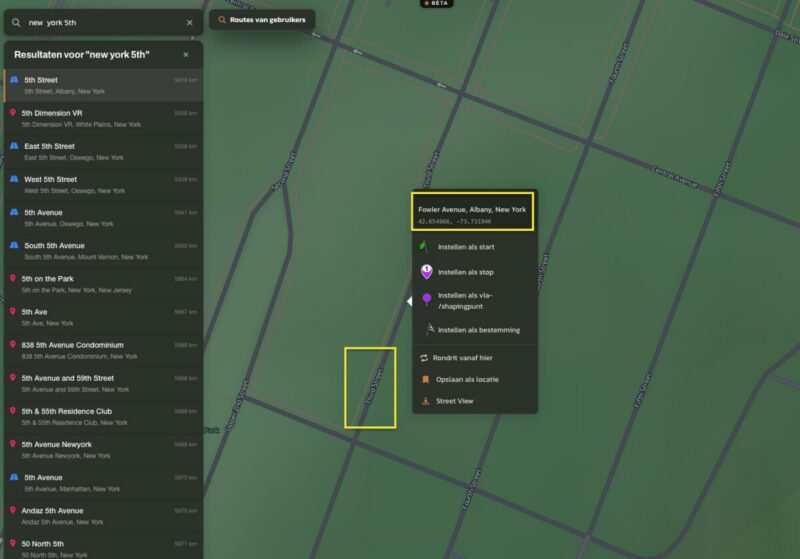
Using street view sometimes does not hit the correct street (right-click-mouse) ... but street view zooms in correctly.
Any ideas how this is happening?
Hi All,
Amazing the web-app Guido!!
Using street view sometimes does not hit the correct street (right-click-mouse) ... but street view zooms in correctly.
Any ideas how this is happening?
Quote from John on 20.11.2026, 14:00Just did my first ride from a route planned on the web app. No hiccups really at all, it's remarkably well polished for beta software.
The only nitpick is that you have to be careful where you place a stop or via point. It's very precise and maybe a bit too precise. It doesn't 'cling' to the existing roads. I noticed initially that my route seemed extremely long; and I realized that a bunch of my points were in driveways, side streets, etc. and the route had me exiting, doubling back, turning around, then re-joining the route.
The solution for the user is simple; make sure you zoom in and precisely select your points. Divided highways especially because it's easy to accidentally place a shaping point on the oncoming side of a divided highway; and the app will happily route you off, back the other way, and then back again the way you wanted to go.
I don't even think that's anything that can be 'fixed' or changed. Just something, as a user, to be careful and aware of. I like the scenic is powerful, obeys the routes I use, and doesn't try to intervene. A side effect of that, I think, is that it does EXACTLY what I tell it; instead of other tools that might snap a via point to the road I probably meant.
Just did my first ride from a route planned on the web app. No hiccups really at all, it's remarkably well polished for beta software.
The only nitpick is that you have to be careful where you place a stop or via point. It's very precise and maybe a bit too precise. It doesn't 'cling' to the existing roads. I noticed initially that my route seemed extremely long; and I realized that a bunch of my points were in driveways, side streets, etc. and the route had me exiting, doubling back, turning around, then re-joining the route.
The solution for the user is simple; make sure you zoom in and precisely select your points. Divided highways especially because it's easy to accidentally place a shaping point on the oncoming side of a divided highway; and the app will happily route you off, back the other way, and then back again the way you wanted to go.
I don't even think that's anything that can be 'fixed' or changed. Just something, as a user, to be careful and aware of. I like the scenic is powerful, obeys the routes I use, and doesn't try to intervene. A side effect of that, I think, is that it does EXACTLY what I tell it; instead of other tools that might snap a via point to the road I probably meant.


