
Add locations while navigating a route

Quote from Binwaa on 24.03.2022, 22:38Dear Guido,
while I’m riding a route, I happens that I discover a nice location (worthwhile to revisit or to advise to friends).
I therefore would like to save this place as a location. Could it be possible to assign the ‘add location’ from Scenic as a button on the navigation window (instead of shortcut for example).
I would prepare a folder on forehand so I could save all locations in the prepared folder.
Or if I could create a new folder or select an existing locations folder, it would even be better.
many thanks, and all my compliments for the superb work
Binwaa
Dear Guido,
while I’m riding a route, I happens that I discover a nice location (worthwhile to revisit or to advise to friends).
I therefore would like to save this place as a location. Could it be possible to assign the ‘add location’ from Scenic as a button on the navigation window (instead of shortcut for example).
I would prepare a folder on forehand so I could save all locations in the prepared folder.
Or if I could create a new folder or select an existing locations folder, it would even be better.
many thanks, and all my compliments for the superb work
Binwaa

Quote from Guido on 24.03.2022, 22:46Hi Binwaa,
You are not the first asking this. It is on the list to add in the future.
You can do this already actually without your ride being interrupted, but it takes quite some taps (you need to stop) and a bit of a workaround. You tap the ETA bar, then pause button, and then choose ‘to main screen’. Then you can access the entire app (also to save a location) and resume the ride again when finished.
Hi Binwaa,
You are not the first asking this. It is on the list to add in the future.
You can do this already actually without your ride being interrupted, but it takes quite some taps (you need to stop) and a bit of a workaround. You tap the ETA bar, then pause button, and then choose ‘to main screen’. Then you can access the entire app (also to save a location) and resume the ride again when finished.
Quote from Binwaa on 25.03.2022, 02:00Super, workaround does the job.
But I presume version 3.x will have a direct method.
On April 27th I start a 7500 km tour in Southern Thailand. Steered by Scenic naturally. You can follow me on the Facebook group ‘Thailand 2022 Clockwise’. everybody can join the group. Also within the group, we are talking about Scenic to further propagate the app.
Super, workaround does the job.
But I presume version 3.x will have a direct method.
On April 27th I start a 7500 km tour in Southern Thailand. Steered by Scenic naturally. You can follow me on the Facebook group ‘Thailand 2022 Clockwise’. everybody can join the group. Also within the group, we are talking about Scenic to further propagate the app.

Quote from Birger_s on 03.07.2022, 00:45
As a workaround I use iOS- Shortcuts.
You can direct access 2 Shortcuts from Scenic direct. Get the current position and send this to youre calender, mail or as a entry to a file.Or use a Siri voice command to get the POI and store in a file Shortcuts POI https://www.icloud.com/shortcuts/8e98b7255c14413a906dd238f51bbdc1
As a workaround I use iOS- Shortcuts.
You can direct access 2 Shortcuts from Scenic direct. Get the current position and send this to youre calender, mail or as a entry to a file.
Or use a Siri voice command to get the POI and store in a file Shortcuts POI https://www.icloud.com/shortcuts/8e98b7255c14413a906dd238f51bbdc1

Quote from theigi on 04.07.2022, 06:14Quote from Birger_s on 03.07.2022, 00:45
Könntest du bitte den Kurzbefehl auf deinem Screenshot teilen, der Aufbau ist nicht schlecht, evtl kann man ja noch dran „schrauben“ dafür müsste man aber wissen wie der aufgebaut ist.
Quote from Birger_s on 03.07.2022, 00:45
Könntest du bitte den Kurzbefehl auf deinem Screenshot teilen, der Aufbau ist nicht schlecht, evtl kann man ja noch dran „schrauben“ dafür müsste man aber wissen wie der aufgebaut ist.
Quote from Birger_s on 04.07.2022, 17:14The Basic Shortcut
https://www.icloud.com/shortcuts/c463c79f820c428ba55b44fc163b4bcb
Some of the Emoji shows a status, e g
🔋 = battery loading 🪫 = battery not connected to a power source
🎧 = Headphone via Bluetooth 🔊 = iPhone Speaker
If you hit the POI Section, a calendar and a file entry was created
The weather and sunset/sunrise section returns to the homescreen
Some Infos need the Power Tools extension for shortcuts.
Have fun!
The Basic Shortcut
https://www.icloud.com/shortcuts/c463c79f820c428ba55b44fc163b4bcb
Some of the Emoji shows a status, e g
🔋 = battery loading 🪫 = battery not connected to a power source
🎧 = Headphone via Bluetooth 🔊 = iPhone Speaker
If you hit the POI Section, a calendar and a file entry was created
The weather and sunset/sunrise section returns to the homescreen
Some Infos need the Power Tools extension for shortcuts.
Have fun!
Quote from theigi on 05.07.2022, 04:11Quote from Birger_s on 04.07.2022, 17:14The Basic Shortcut
https://www.icloud.com/shortcuts/c463c79f820c428ba55b44fc163b4bcb
Some of the Emoji shows a status, e g
= battery loading
= battery not connected to a power source
= Headphone via Bluetooth
= iPhone Speaker
If you hit the POI Section, a calendar and a file entry was created
The weather and sunset/sunrise section returns to the homescreen
Some Infos need the Power Tools extension for shortcuts.
Have fun!
Vielen Dank
es fehlt aber zu deinem Kurzbefehl der integrierte Kurzbefehl Blitzer, denn ohne den speichert es keine poi
es ist auch noch eine weitere App nötig, die ich aber schon besitze (toolbox for shortcuts) Achtung evtl inapp nötig
falls noch weitere sich daran testen wollen.
Standort bzw Home Adresse anpassen
“Focus“ erstellen und neu auswählen
evtl andere Musik Quellen anpassen/ersetzen
mal schauen was man dran noch schrauben könnte, ist auf alle Fälle schon mal sehr interessant sich mit den „kurzbefehlen“ auseinanderzusetzen
Quote from Birger_s on 04.07.2022, 17:14The Basic Shortcut
https://www.icloud.com/shortcuts/c463c79f820c428ba55b44fc163b4bcb
Some of the Emoji shows a status, e g
If you hit the POI Section, a calendar and a file entry was created
The weather and sunset/sunrise section returns to the homescreen
Some Infos need the Power Tools extension for shortcuts.
Have fun!
Vielen Dank
es fehlt aber zu deinem Kurzbefehl der integrierte Kurzbefehl Blitzer, denn ohne den speichert es keine poi
es ist auch noch eine weitere App nötig, die ich aber schon besitze (toolbox for shortcuts) Achtung evtl inapp nötig
falls noch weitere sich daran testen wollen.
Standort bzw Home Adresse anpassen
“Focus“ erstellen und neu auswählen
evtl andere Musik Quellen anpassen/ersetzen
mal schauen was man dran noch schrauben könnte, ist auf alle Fälle schon mal sehr interessant sich mit den „kurzbefehlen“ auseinanderzusetzen
Quote from Birger_s on 05.07.2022, 10:58Der MenüEintrag „Blitzer“ ist Privat.
Den POI speichert er, wenn Du auf den Menüeintrag 🙋🏻♂️ POI mit der Adresse tippst. Dann erstellt er einen Kalendereintrag und ergänzt eine Datei.
Das der Rest individuell Angepasst werden kann/muss ist klar.
Der MenüEintrag „Blitzer“ ist Privat.
Den POI speichert er, wenn Du auf den Menüeintrag 🙋🏻♂️ POI mit der Adresse tippst. Dann erstellt er einen Kalendereintrag und ergänzt eine Datei.
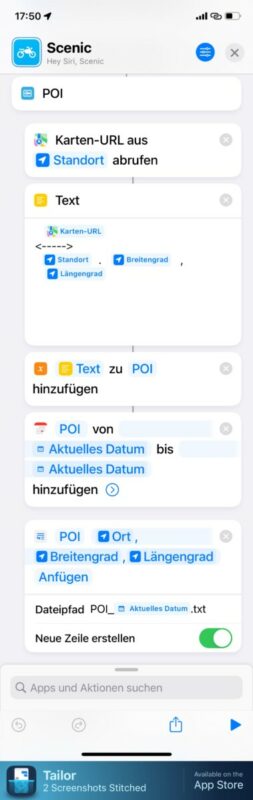
Das der Rest individuell Angepasst werden kann/muss ist klar.
Quote from theigi on 05.07.2022, 14:22Hmm, funktioniert nicht der poi Eintrag in den Kalender bei mir egal ob iPad oder phone
da scheint der Fehler/Haken zu sitzen, denn die Option poi möchte den Kurzbefehl „Blitzer“ ausführen
muss mich da mal reinfuchsen
danke
Hmm, funktioniert nicht der poi Eintrag in den Kalender bei mir egal ob iPad oder phone
da scheint der Fehler/Haken zu sitzen, denn die Option poi möchte den Kurzbefehl „Blitzer“ ausführen
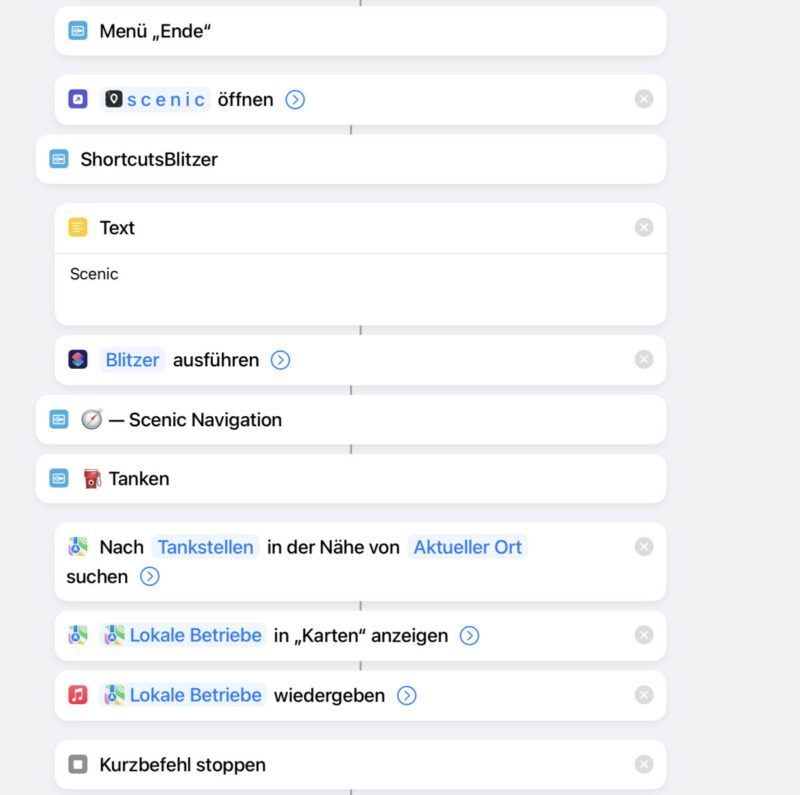
muss mich da mal reinfuchsen
danke
Quote from theigi on 05.07.2022, 14:26Die Fehlermeldung darauf ist Kurzbefehl nicht gefunden, stelle sicher, das ein gültiger Kurzbefehl in der Aktion /Kurzbefehl ausführen“ gewählt ist.
Die Fehlermeldung darauf ist Kurzbefehl nicht gefunden, stelle sicher, das ein gültiger Kurzbefehl in der Aktion /Kurzbefehl ausführen“ gewählt ist.
Quote from theigi on 05.07.2022, 16:40Kalendereinträge gehen, man muss „poi“ neu auswählen in den Einstellungen des kb und Kalender neu anklicken.
nur dein shortcut Blitzer fehlt
Musik und Anrufe hab ich rausgenommen und nur durch alle Musik in zufälliger Reihenfolge ersetzt
Kalendereinträge gehen, man muss „poi“ neu auswählen in den Einstellungen des kb und Kalender neu anklicken.
nur dein shortcut Blitzer fehlt
Musik und Anrufe hab ich rausgenommen und nur durch alle Musik in zufälliger Reihenfolge ersetzt

Quote from Gonzalex on 30.09.2022, 06:24Not tried .... just occurred to me as i'm reading all this. So maybe a neat way would be to assign a shortcut to Scenic which does exactly that. I know there is a capability to add shortcuts in Scenic which calls out to the actual Shortcuts app. It would be a scalable way of doing this I guess ... as you really just need to set the Shortcuts "script" correctly.
Not tried .... just occurred to me as i'm reading all this. So maybe a neat way would be to assign a shortcut to Scenic which does exactly that. I know there is a capability to add shortcuts in Scenic which calls out to the actual Shortcuts app. It would be a scalable way of doing this I guess ... as you really just need to set the Shortcuts "script" correctly.


