
Actual time

Quote from Bolletje 1100 on 06.10.2024, 14:42Why can I not see the actual time any more in scenic 4?
I cannot find it in any menu to get this back again.
Why can I not see the actual time any more in scenic 4?
I cannot find it in any menu to get this back again.

Quote from Guido on 06.10.2024, 14:47Decided to remove it as it wasn’t used much and onlybreally sense if the iOS status bar (has time) is not showing. (Landscape mode iPhone). Might bring it back later.
Decided to remove it as it wasn’t used much and onlybreally sense if the iOS status bar (has time) is not showing. (Landscape mode iPhone). Might bring it back later.
Quote from clroux on 06.11.2024, 04:52Hello Guido,
If possible please add the time back. Using phone mostly in landscape therefore cannot see current time. I’m using this app during the week mostly rushing from one meeting to another ( across town) and will help if I can see the time to know if I need to speed up or phone to let my clients know that I’m going to be a bit late (lol).
Hello Guido,
If possible please add the time back. Using phone mostly in landscape therefore cannot see current time. I’m using this app during the week mostly rushing from one meeting to another ( across town) and will help if I can see the time to know if I need to speed up or phone to let my clients know that I’m going to be a bit late (lol).
Quote from Guido on 06.11.2024, 13:30OK. OK. 🙂.
OK. OK. 🙂.
Quote from clroux on 07.11.2024, 08:11Thank you 🙏🏻 Guido
I know that you have a lot on your fork and know you have other priorities that you are working on. As long as this is added to the long list, then we will be very happy 😊.
Just want to say thank you from my side as well for this great app and all the time and effort you putting in to make it one of the best on the market.
Thank you 🙏🏻 Guido
I know that you have a lot on your fork and know you have other priorities that you are working on. As long as this is added to the long list, then we will be very happy 😊.
Just want to say thank you from my side as well for this great app and all the time and effort you putting in to make it one of the best on the market.

Quote from thomas_1802 on 12.08.2025, 13:56Dear All,
the time was coming back in landscape, but I have the problem, that the time is mostly frozen and not the actual time. If I move to standard alignment, the time will be updated. But after moving back to landscape, it was frozen.
@guidomm please help and fix this error.
Thanks a lot for this app ... Thomas
Dear All,
the time was coming back in landscape, but I have the problem, that the time is mostly frozen and not the actual time. If I move to standard alignment, the time will be updated. But after moving back to landscape, it was frozen.
@guidomm please help and fix this error.
Thanks a lot for this app ... Thomas
Quote from thomas_1802 on 02.05.2026, 01:23Dear @guidomm,
this problem with the frozen time und also battery charge level is still available in landscape on my iphone 16Pro. Can you please help and fix this with the next update?
All the best … Thomas
Dear @guidomm,
this problem with the frozen time und also battery charge level is still available in landscape on my iphone 16Pro. Can you please help and fix this with the next update?
All the best … Thomas
Quote from Guido on 02.05.2026, 11:36Sorry @thomas_1802. Must have missed this one. Will try and fix for the upcoming update.
Sorry @thomas_1802. Must have missed this one. Will try and fix for the upcoming update.
Quote from Guido on 02.05.2026, 12:59Hi @thomas_1802,
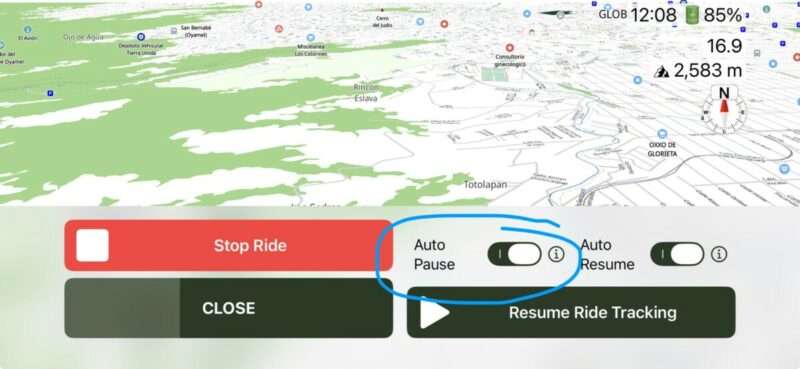
While going through the code I found that the time will only change if you have auto-pause enabled. It's enabled by default, but perhaps you turned it off (Tap the record/pause button during a navigation session and make sure that switch is enabled).
In any case I will fix this for the upcoming update so that it also works if auto-pause is disabled.
Another note... the battery level in landscape mode is reported in 5% increments on some devices / some iOS versions. So, it will jump from, for example 80% to 75%. It won't show 79, 79, 77 and 76. This is an undocumented iOS programming limitation and out of my control.
Best regards,
Guido
Hi @thomas_1802,
While going through the code I found that the time will only change if you have auto-pause enabled. It's enabled by default, but perhaps you turned it off (Tap the record/pause button during a navigation session and make sure that switch is enabled).
In any case I will fix this for the upcoming update so that it also works if auto-pause is disabled.
Another note... the battery level in landscape mode is reported in 5% increments on some devices / some iOS versions. So, it will jump from, for example 80% to 75%. It won't show 79, 79, 77 and 76. This is an undocumented iOS programming limitation and out of my control.
Best regards,
Guido
Quote from thomas_1802 on 02.05.2026, 13:51Hi Guido,
many thanks for your hints and that you have found the error. It‘s right, I have disabled auto-pause and will use this workaround while waiting for the next update. Great to hear that it will be fixed with the next update.
All the best … Thomas
Hi Guido,
many thanks for your hints and that you have found the error. It‘s right, I have disabled auto-pause and will use this workaround while waiting for the next update. Great to hear that it will be fixed with the next update.
All the best … Thomas
Quote from thomas_1802 on 04.05.2026, 01:01Hi Guido,
just saw the update of the App in the Apple Store. After updating it works fine - many thanks for the quick solution and you support is amazing.
All the best … Thomas
Hi Guido,
just saw the update of the App in the Apple Store. After updating it works fine - many thanks for the quick solution and you support is amazing.
All the best … Thomas


