
About tracks on Android

Quote from Asphalt on 19.06.2026, 17:27Hi, I purchased a one‑year Premium subscription and I’m planning a several‑thousand‑kilometre trip for July. I intend to use the Android app. I have a ready-made Trans Euro Trail route that follows small roads. I imported it into Scenic as a Track. If I convert it to a Route, I seem to lose the small roads.
1. When I select Overlays > My Routes > the folder that contains my Track routes, the Track routes do not appear in the Plan screen on either the Android or iPhone app. The folder that contains Route-type routes does appear. Is there any way to make Track routes visible there?
2. When I select My Routes > a Track route > Navigate in the Android app, the route appears correctly on the map. But when I press Ride, I get “Follow Track”, yet the Track itself does not appear on the screen. On the iPhone app it works normally, and I can follow the Track. Is this feature still under development on the Android version?
Hi, I purchased a one‑year Premium subscription and I’m planning a several‑thousand‑kilometre trip for July. I intend to use the Android app. I have a ready-made Trans Euro Trail route that follows small roads. I imported it into Scenic as a Track. If I convert it to a Route, I seem to lose the small roads.
1. When I select Overlays > My Routes > the folder that contains my Track routes, the Track routes do not appear in the Plan screen on either the Android or iPhone app. The folder that contains Route-type routes does appear. Is there any way to make Track routes visible there?
2. When I select My Routes > a Track route > Navigate in the Android app, the route appears correctly on the map. But when I press Ride, I get “Follow Track”, yet the Track itself does not appear on the screen. On the iPhone app it works normally, and I can follow the Track. Is this feature still under development on the Android version?

Quote from Guido on 19.06.2026, 18:55I can not reproduce this. It works for me.
1) I see tracks in an enabled route folder on the map. Both on iPhone and on Android (Android might require an app close and reopen sometimes)
2) I see the track on the map after tapping the ride button. Also both on Android and iOS.
I can not reproduce this. It works for me.
1) I see tracks in an enabled route folder on the map. Both on iPhone and on Android (Android might require an app close and reopen sometimes)
2) I see the track on the map after tapping the ride button. Also both on Android and iOS.

Quote from DRTBYK on 19.06.2026, 19:10Most of my Tracks show and Follow-the-line OK. But, I have a Track that when I click on Ride in Android (works fine in iOS), it seems to mark all track-points and then crashes Scenic-Android every time. I have never seen Scenic mark every Track Point like this. This track GPX opens and navigates in all other Nav Apps I have.
Most of my Tracks show and Follow-the-line OK. But, I have a Track that when I click on Ride in Android (works fine in iOS), it seems to mark all track-points and then crashes Scenic-Android every time. I have never seen Scenic mark every Track Point like this. This track GPX opens and navigates in all other Nav Apps I have.
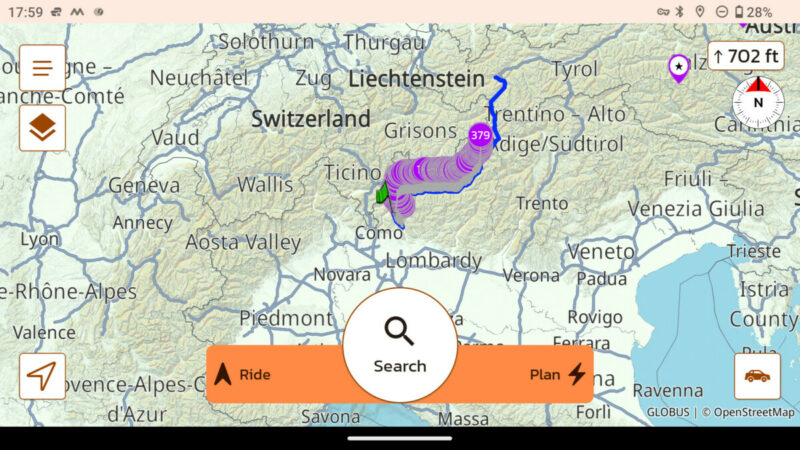
Quote from Guido on 19.06.2026, 19:15Yes... it showing the marker for every coordinate in the track is a bug in the Android version. This is however a separate issue from what @asphalt is mentioning I believe.
I tried with a shorter track so it didn't crash for me. The markers show in the main screen. If it loads (and doesn't crash), after tapping the ride button, it doesn't show the markers except for the start and end marker, and the track line obviously.
Yes... it showing the marker for every coordinate in the track is a bug in the Android version. This is however a separate issue from what @asphalt is mentioning I believe.
I tried with a shorter track so it didn't crash for me. The markers show in the main screen. If it loads (and doesn't crash), after tapping the ride button, it doesn't show the markers except for the start and end marker, and the track line obviously.
Quote from Asphalt on 20.06.2026, 03:17Thank you for looking into this issue. My phone is a Samsung A55 with 8 GB RAM, 256 GB storage, running One UI 8.5. On Android after your advice I have used “Force stop” and also reinstalled the app from the Play Store.
1. iOS and Android: The “Track” routes I previously (weeks ago) imported seem to be corrupted in some way. They do not appear even if I move them from one “Track” folder to another. Only a straight line between the start and end point is shown (see screenshot).
If I re‑import the KMZ file on either the iPhone or Android, or on one device and then sync via the cloud, the route appears normally in iPhone and Android. (Import > “GPX Content: Tracks” > “Save blue line as track”, “Track”.)
2. When I import a Track directly on Android, the route is drawn quickly and correctly. When I import the Track on the iPhone and sync it to Android, the route points are numbered on the map as @DRTBYK mentioned. After that, sometimes the Android app becomes unresponsive and sometimes navigation works. The route contains 3,895 track points. So the solution is to import the route on Android if you plan to navigate with Android. This is okay for me. I originally imported Tracks in iPhone and synced them to Android.
3. In a route synced from the iPhone to Android, the Track may occasionally appear normally when pressing Ride, but after zooming the map, and when it returns to current location after few seconds, the route disappears.
4. iOS: When pressing the circular arrow in the Overlays section, previous selections are preserved. In the Android app, previous selections disappear when doing the same.
Thank you for looking into this issue. My phone is a Samsung A55 with 8 GB RAM, 256 GB storage, running One UI 8.5. On Android after your advice I have used “Force stop” and also reinstalled the app from the Play Store.
1. iOS and Android: The “Track” routes I previously (weeks ago) imported seem to be corrupted in some way. They do not appear even if I move them from one “Track” folder to another. Only a straight line between the start and end point is shown (see screenshot).
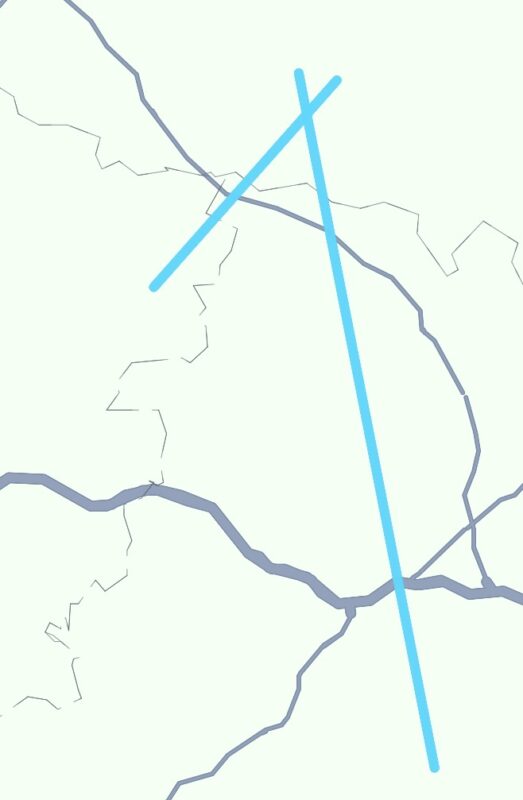
If I re‑import the KMZ file on either the iPhone or Android, or on one device and then sync via the cloud, the route appears normally in iPhone and Android. (Import > “GPX Content: Tracks” > “Save blue line as track”, “Track”.)
2. When I import a Track directly on Android, the route is drawn quickly and correctly. When I import the Track on the iPhone and sync it to Android, the route points are numbered on the map as @DRTBYK mentioned. After that, sometimes the Android app becomes unresponsive and sometimes navigation works. The route contains 3,895 track points. So the solution is to import the route on Android if you plan to navigate with Android. This is okay for me. I originally imported Tracks in iPhone and synced them to Android.
3. In a route synced from the iPhone to Android, the Track may occasionally appear normally when pressing Ride, but after zooming the map, and when it returns to current location after few seconds, the route disappears.
4. iOS: When pressing the circular arrow in the Overlays section, previous selections are preserved. In the Android app, previous selections disappear when doing the same.
Quote from Guido on 23.06.2026, 13:35I was able to reproduce all of this. Will try to get this fixed asap.
Thanks for the details. Very helpful!
I was able to reproduce all of this. Will try to get this fixed asap.
Thanks for the details. Very helpful!


