
Safety Cameras
Safety Cameras in Scenic
Scenic can display Safety Cameras on the map and warn you when you approach one while riding. This feature is intended to help you stay aware while navigating. Scenic does not determine whether using this feature is legal in any specific country or region.
Safety Camera Settings in Scenic
As of Scenic iOS version 4.29, Scenic provides per-country, user-controlled options related to Safety Cameras, available through Settings > Navigation & Tracking > Safety Cameras:
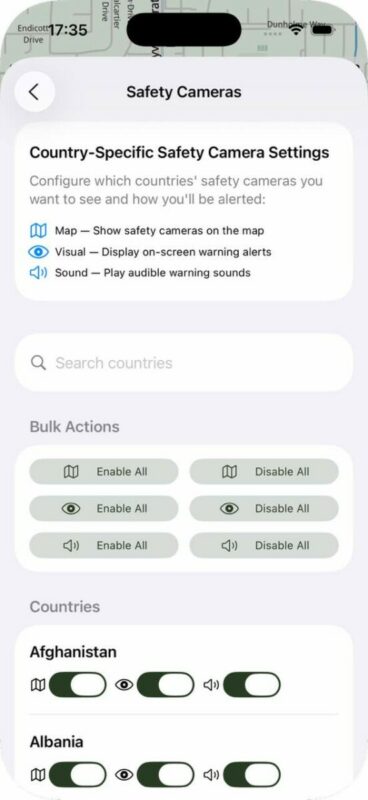
Next to this, Safety Camera support can be hidden, disabled or completely removed. You can find these settings in the Debug section under Settings, accessible by long pressing the version number at the bottom of settings.
Note: Safety cameras are displayed on the map only while navigating, not during route planning. Cameras appear within a 5 km radius of your current location. As you ride, additional cameras will become visible when you enter their 5 km range.
What types of cameras does Scenic show?
Scenic only shows fixed safety cameras. These are cameras installed at permanent locations. Depending on the region, this includes fixed safety cameras, fixed red light cameras, and average speed check zones (section control between two fixed points). These cameras are displayed directly on the map and Scenic provides a visual and audio warning as you approach one. Mobile, temporary, or police-operated cameras are not shown in Scenic.
How warnings work
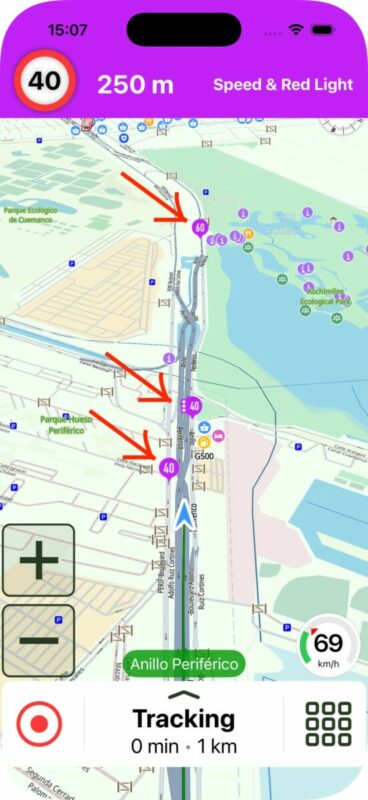
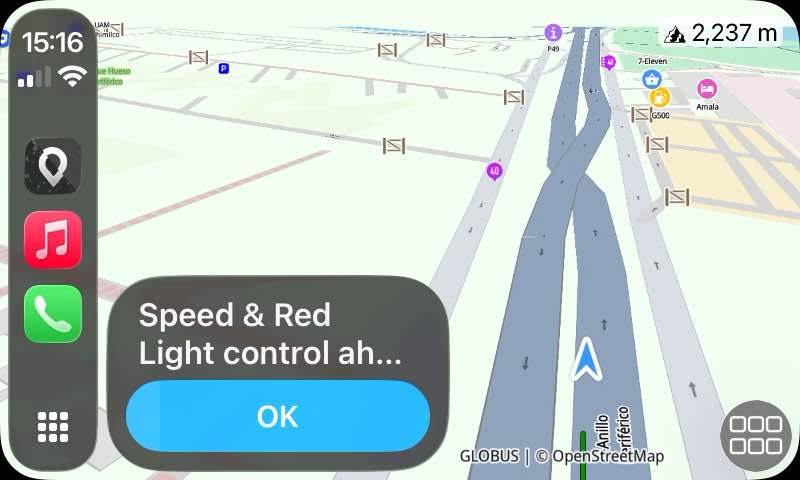
Fixed camera locations can be shown on the map. When approaching a camera or control zone, a visual warning can be displayed, and an audio warning consisting of three beeps can be played. For average speed check zones, Scenic indicates the start and end of the zone where applicable. The exact behavior may vary depending on platform (iPhone or CarPlay) and region.
Average Speed Sections
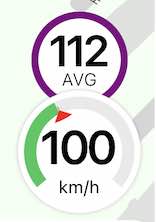
Scenic also provides warnings for average speed enforcement sections. These sections typically have a camera at the start and another at the end, but some sections also include additional cameras in between. Scenic will warn you for all of these cameras. While you are riding within an average speed section, Scenic also displays your current average speed above the speedometer.
False warnings
Scenic determines if you are going to pass a camera based on your heading and the location of the camera. If offline maps are installed for the region it will also cross check the class of road you are on, with the class of road the camera is on. If these are not the same, Scenic won’t warn you as it’s likely a camera on a parallel road. See above screenshots for example. Scenic won’t warn you for the first two cameras, because they are on a parallel road with a different road class. This only works if you have the offline map installed. If you don’t have the offline map installed, Scenic can’t determine the road class you are on, and will warn you for these cameras too.
Camera data source
Camera information in Scenic is powered by SCDB.info, a community-maintained safety camera database. Because this data is community-driven, a camera may be missing, outdated, or incorrectly positioned. If you notice a wrong or missing camera, you can report it directly to SCDB using the following link: https://www.scdb.info/en/report/. Reporting issues there helps improve the data for Scenic and other applications that use SCDB.
Legal responsibility
The availability and legality of safety camera warnings vary by country and region. It is entirely your responsibility to understand and follow the local laws in the areas where you ride. Scenic does not provide legal advice and does not determine whether using this feature is allowed or compliant in any specific jurisdiction. Some countries forbid the use of safety camera warning services altogether, while others restrict the usage of such services.
Example: France
In France, showing the exact location of safety cameras is not permitted by law. To reflect this, Scenic does not show exact camera positions there and instead displays Danger Zones, indicating an area where a safety check may be present.
Example: Switzerland
In Switzerland, it is not allowed to use a device or app that warns about safety cameras.
Final note
Safety Cameras in Scenic are provided as an optional navigation feature. They are not intended to encourage speeding or rule-breaking. Always ride responsibly and comply with the laws and regulations of the jurisdictions you travel through.


