
Zooming on Mac

Quote from Ernst on 02.08.2022, 01:40Hi Guido,
I'm using a brand new M2-MacBook Air, which gives me the opportunity to run Scenic on the notebook. This works nearly well, but shows one big issue with zooming.
There are no zoom-buttons, so I have to use the zoom gesture with two fingers. Zoom IN always works as expected, zoom OUT is extremely slow. Zooming out feels complete unconnected to the zoom gesture - you have to repeat the gesture over and over. But: Zooming in and out in the same gesture, without lifting the fingers, works as expected. In this case, the zooming map feels connected to the zooming fingers.
It seems, there is an issue loading the map data when zooming out. This appears at every map display of the app. But in the planer, there is a button to show the complete route. This button works seamlessly like expected. It zooms out like a charm. But if I try this with my fingers, it is unusable slow.
BTW: I have Premium forever and use loaded offline-maps.
BTW2: I love Scenic 🙂Cheers,
Ernst
Hi Guido,
I'm using a brand new M2-MacBook Air, which gives me the opportunity to run Scenic on the notebook. This works nearly well, but shows one big issue with zooming.
There are no zoom-buttons, so I have to use the zoom gesture with two fingers. Zoom IN always works as expected, zoom OUT is extremely slow. Zooming out feels complete unconnected to the zoom gesture - you have to repeat the gesture over and over. But: Zooming in and out in the same gesture, without lifting the fingers, works as expected. In this case, the zooming map feels connected to the zooming fingers.
It seems, there is an issue loading the map data when zooming out. This appears at every map display of the app. But in the planer, there is a button to show the complete route. This button works seamlessly like expected. It zooms out like a charm. But if I try this with my fingers, it is unusable slow.
BTW: I have Premium forever and use loaded offline-maps.
BTW2: I love Scenic 🙂
Cheers,
Ernst

Quote from Guido on 02.08.2022, 09:13I can confirm this is an issue with pinch zooming out. I will look into it.
Meanwhile you can zoom holding the command button and then swiping up/down with two fingers. That seems to work like it should.
I can confirm this is an issue with pinch zooming out. I will look into it.
Meanwhile you can zoom holding the command button and then swiping up/down with two fingers. That seems to work like it should.

Quote from Rockfisher on 06.01.2024, 03:56Hello Guido, I love scenic and enjoy planning on my Mac mini. How can I zoom out the map again using the mouse or keyboard?
brgds Bernhard
Hello Guido, I love scenic and enjoy planning on my Mac mini. How can I zoom out the map again using the mouse or keyboard?
brgds Bernhard

Quote from Vespone Argovia on 06.01.2024, 06:01Hy Guido
Unfortunately, on my Macbook Air (M2) - version 3.19 (5), the Command key and then two-finger swipe up/down does not work.
Will this be fixed in version 3.5?
Thanks a lot.Robert
Hy Guido
Unfortunately, on my Macbook Air (M2) - version 3.19 (5), the Command key and then two-finger swipe up/down does not work.
Will this be fixed in version 3.5?
Thanks a lot.
Robert
Quote from Guido on 06.01.2024, 07:20I’ll double check this for version 3.5
I’ll double check this for version 3.5
Quote from Rockfisher on 14.01.2024, 12:27Hi Guido,
I uninstalled the beta and reinstalled 3.19. There must also have been an update. have that the zoom has removed. It doesn't work anymore in 3.19 either...
brgds
Bernhard
Hi Guido,
I uninstalled the beta and reinstalled 3.19. There must also have been an update. have that the zoom has removed. It doesn't work anymore in 3.19 either...
brgds
Bernhard
Quote from Guido on 15.01.2024, 09:28In the latest beta the zoom on Mac (including pinch zoom with trackpad) should work. Does it not work for you Bernbard?
There was no update for 3.19. My guess is that something changed in one of the latest macOS releases that made it stop working.
In the latest beta the zoom on Mac (including pinch zoom with trackpad) should work. Does it not work for you Bernbard?
There was no update for 3.19. My guess is that something changed in one of the latest macOS releases that made it stop working.
Quote from Rockfisher on 20.01.2024, 07:32not yet. I can't zoom in and out with the mouse scroll wheel. I also noticed that I can't scroll the forum using the scroll wheel in the application...I can browse directly in the browser (Safari) using the mouse wheel.
not yet.
I can't zoom in and out with the mouse scroll wheel.
I also noticed that I can't scroll the forum using the scroll wheel in the application...
I can browse directly in the browser (Safari) using the mouse wheel.
Quote from Guido on 22.01.2024, 09:18Hi Bernhard,
I will release a new beta version in the next 2 days. This will have the zoom-with-mouse-scrollwheel on Mac fixed.
Best regards,
Guido
Hi Bernhard,
I will release a new beta version in the next 2 days. This will have the zoom-with-mouse-scrollwheel on Mac fixed.
Best regards,
Guido
Quote from Rockfisher on 27.01.2024, 03:41Hello Guido,
unfortunately it still doesn't work. Is it not changed yet or am I doing something wrong?
Wishing you a nice weekend.
Best regards, Bernhard
Hello Guido,
unfortunately it still doesn't work. Is it not changed yet or am I doing something wrong?
Wishing you a nice weekend.
Best regards, Bernhard
Quote from Guido on 27.01.2024, 10:04Hi Bernhard,
It's working for me here. Scrolling with the mouse scrollwheel moves the map up and down. When I hold the <command>-key and scroll it zooms in and out.
You tried this with the latest beta right? I always use a trackpad, and only tried with a bluetooth (Logitech) mouse. Perhaps that's the issue. What mouse are you using? Apple Magic Mouse? Perhaps that acts different. I'd need to get one to see what's going on.
Cheers,
Guido
Hi Bernhard,
It's working for me here. Scrolling with the mouse scrollwheel moves the map up and down. When I hold the <command>-key and scroll it zooms in and out.
You tried this with the latest beta right? I always use a trackpad, and only tried with a bluetooth (Logitech) mouse. Perhaps that's the issue. What mouse are you using? Apple Magic Mouse? Perhaps that acts different. I'd need to get one to see what's going on.
Cheers,
Guido
Quote from Rockfisher on 28.01.2024, 02:52Thanks for the quick reply.
Yes, very strange.
I have a Mac mini M1 with the Logitech MX Anywhere 3. I also connected a (MS) cable mouse and it doesn't work there either. It doesn't move and doesn't zoom while holding down the command key.The scroll wheel works without any problems in Google Maps or Apple maps.
I also tried installing it on my Macbook Pro. Does not work 😉 (no install)
I would be interested to know if anyone else here in the forum also has this effect. Then you don't need to buy a new mouse.
Thanks for the quick reply.
Yes, very strange.
I have a Mac mini M1 with the Logitech MX Anywhere 3. I also connected a (MS) cable mouse and it doesn't work there either. It doesn't move and doesn't zoom while holding down the command key.
The scroll wheel works without any problems in Google Maps or Apple maps.
I also tried installing it on my Macbook Pro. Does not work 😉 (no install)
I would be interested to know if anyone else here in the forum also has this effect. Then you don't need to buy a new mouse.
Quote from Guido on 28.01.2024, 03:19Can you confirm the Scenic version you have on your Macs? You can see version number at the bottom of settings.
On your MacBook Pro, does pinch zooming with the trackpad work?
Can you confirm the Scenic version you have on your Macs? You can see version number at the bottom of settings.
On your MacBook Pro, does pinch zooming with the trackpad work?
Quote from Rockfisher on 28.01.2024, 03:45I have the 3.50(56) - beta
I couldn't install Scenic on the Mac Book pro because it wasn't compatible.
I have the 3.50(56) - beta
I couldn't install Scenic on the Mac Book pro because it wasn't compatible.

Quote from Guido on 29.01.2024, 10:15I just tried with an old cabled USB mouse I had. It's working too.
I would find it hard to believe that your Logitech MX Anywhere 3 mouse would work differently from my Logitech M336 mouse, so for now, I'm going with the fact that something else might be wrong.
I found this article on Google: https://www.laptopmag.com/articles/logitech-scroll-wheel-not-working-macos-mojave
Could you have a look at that? I know that scrolling works in other applications for you, but who knows. Worth a try.
I just tried with an old cabled USB mouse I had. It's working too.
I would find it hard to believe that your Logitech MX Anywhere 3 mouse would work differently from my Logitech M336 mouse, so for now, I'm going with the fact that something else might be wrong.
I found this article on Google: https://www.laptopmag.com/articles/logitech-scroll-wheel-not-working-macos-mojave
Could you have a look at that? I know that scrolling works in other applications for you, but who knows. Worth a try.
Quote from Rockfisher on 29.01.2024, 11:15OMG...
I tried everything and changed everything. It did not work.
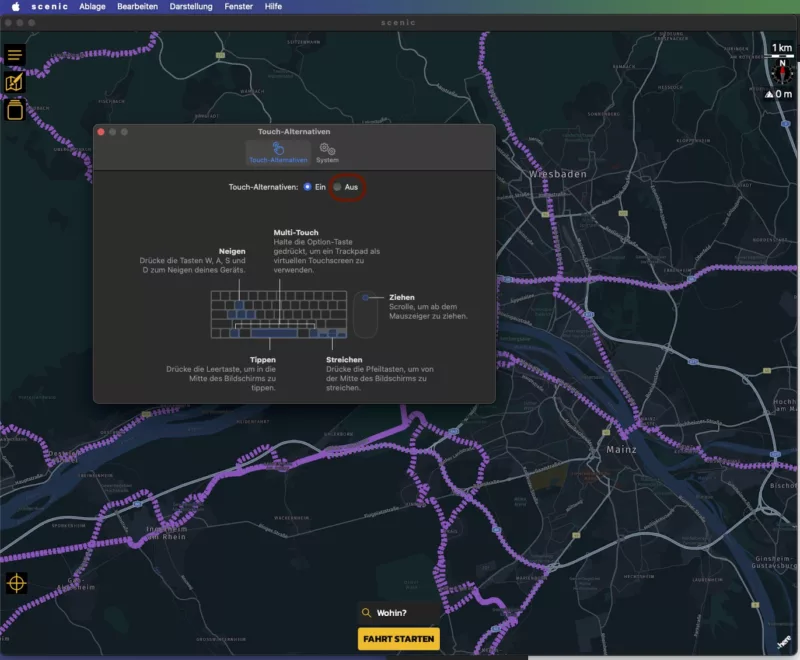
Now that you're writing this to me, I go to the Settings, Touch Alternatives in the drop-down menu and turned them off. And hurrah it works. But I don't remember ever changing anything. OK...
I'm happy!!! Thanks alot.
OMG...
I tried everything and changed everything. It did not work.
Now that you're writing this to me, I go to the Settings, Touch Alternatives in the drop-down menu and turned them off. And hurrah it works. But I don't remember ever changing anything. OK...
I'm happy!!! Thanks alot.
Quote from Guido on 29.01.2024, 11:19Phew... I'm happy too 🙂
Phew... I'm happy too 🙂
Quote from Ernst on 12.02.2024, 16:22Hello Guido!
I also use Scenic on a MacBook. With the old version I could zoom with two fingers (like in Google-Maps), which was very handy. With the new version I have to press the command key - and zooming takes place the wrong way around (swipe-up => zoom-in, swipe-down => zoom-out).
It would be great if you could offer the old behavior again. At least as an option.
Greetings
Ernst
Hello Guido!
I also use Scenic on a MacBook. With the old version I could zoom with two fingers (like in Google-Maps), which was very handy. With the new version I have to press the command key - and zooming takes place the wrong way around (swipe-up => zoom-in, swipe-down => zoom-out).
It would be great if you could offer the old behavior again. At least as an option.
Greetings
Ernst
Quote from Guido on 12.02.2024, 19:16Pinch zoom on trackpad with two fingers should also work. Or is that not what you mean?
Pinch zoom on trackpad with two fingers should also work. Or is that not what you mean?
Quote from Ernst on 13.02.2024, 13:31It's not.
Pinch zoom works as expected, but is inconvenient. What I want back is zoom via scroll gesture:
- two fingers together parallel upwards: zoom out
- two fingers together parallel downwards: zoom in
It's not.
Pinch zoom works as expected, but is inconvenient. What I want back is zoom via scroll gesture:
- two fingers together parallel upwards: zoom out
- two fingers together parallel downwards: zoom in
Quote from Guido on 13.02.2024, 14:03Hi Ernst,
I like to keep the two-finger pan because that's also how panning works in the Apple Maps Mac App, and it is more in line with normal scroll behavior in other apps (scrolling moves the view up/down (and sometimes left/right)).
I will do following for next update to improve things:
- Switch the behaviour like you suggested so that it zooms out with scroll upwards and zoom in with scroll downwards.
- <command>-scroll with two fingers stays
- I'll make the pinch zoom faster, because now it sometimes takes multiple pinches to change the zoom
Maybe later, I'll add a setting to enable a two-finger (without command) pan (and sacrifice a two-finger pan), but that's a bit more work.
Hi Ernst,
I like to keep the two-finger pan because that's also how panning works in the Apple Maps Mac App, and it is more in line with normal scroll behavior in other apps (scrolling moves the view up/down (and sometimes left/right)).
I will do following for next update to improve things:
- Switch the behaviour like you suggested so that it zooms out with scroll upwards and zoom in with scroll downwards.
- <command>-scroll with two fingers stays
- I'll make the pinch zoom faster, because now it sometimes takes multiple pinches to change the zoom
Maybe later, I'll add a setting to enable a two-finger (without command) pan (and sacrifice a two-finger pan), but that's a bit more work.
Quote from Ernst on 13.02.2024, 15:41Thank you for your proposition.
Allow me two more comments:
A normal Mac app can differentiate between scrolling and zooming. I.e. Pinch zoom and two-finger scrolling are not mutually exclusive. But I have no idea if this also applies to iOS apps that run on the Mac.Zoom buttons would also be helpful.
Thank you for your proposition.
Allow me two more comments:
A normal Mac app can differentiate between scrolling and zooming. I.e. Pinch zoom and two-finger scrolling are not mutually exclusive. But I have no idea if this also applies to iOS apps that run on the Mac.
Zoom buttons would also be helpful.
Quote from Deleted user on 15.03.2024, 11:15I too am having an issue zooming on a desktop Mac. I have an M1 Mac Mini with a Logitech M720 mouse. I can zoom in by double clicking, but no way to zoom out. The scroll wheel does nothing. I do have "Touch Alternatives" turned on in settings, but it still does not work. I've tried a generic mouse I had laying around, and it doesn't work either. Any ideas?
Thanks!
I too am having an issue zooming on a desktop Mac. I have an M1 Mac Mini with a Logitech M720 mouse. I can zoom in by double clicking, but no way to zoom out. The scroll wheel does nothing. I do have "Touch Alternatives" turned on in settings, but it still does not work. I've tried a generic mouse I had laying around, and it doesn't work either. Any ideas?
Thanks!
Quote from Guido on 15.03.2024, 11:59Hold command key while scrolling
Hold command key while scrolling
Quote from Deleted user on 15.03.2024, 12:21Nope, tried that. No joy.
Nope, tried that. No joy.
Quote from Guido on 15.03.2024, 12:51Weird. Ok:
- Make sure you have the latest version of Scenic (3.55 was just released an hour ago). https://apps.apple.com/app/id1089668246
Try with touch alternatives ON and OFF
Weird. Ok:
- Make sure you have the latest version of Scenic (3.55 was just released an hour ago). https://apps.apple.com/app/id1089668246
Try with touch alternatives ON and OFF
Quote from tenders on 27.01.2025, 14:00This has been bugging me for months - but I just stumbled across this for the first time. To reiterate: zooming works great on a non-touchpad-Mac, like a Mini with a mouse with a scroll wheel, after you turn OFF "Touch Alternatives." WHEEEEEE!
This has been bugging me for months - but I just stumbled across this for the first time. To reiterate: zooming works great on a non-touchpad-Mac, like a Mini with a mouse with a scroll wheel, after you turn OFF "Touch Alternatives." WHEEEEEE!

Quote from Zoomer on 31.01.2025, 19:45Wait; I have a 2024 MBA M3. Can I use the Scenic App on this laptop? Sorry for being slow and way behind the times.
But this would be great! Though I'm definitely anxious for a web-based route planner.
Wait; I have a 2024 MBA M3. Can I use the Scenic App on this laptop? Sorry for being slow and way behind the times.
But this would be great! Though I'm definitely anxious for a web-based route planner.
Quote from Guido on 31.01.2025, 20:07Yes. You can. Go to the App Store on your Mac and make sure to show iPad apps too.
And thanks for your comments on the other threads 🙂 Highly appreciated.
Yes. You can. Go to the App Store on your Mac and make sure to show iPad apps too.
And thanks for your comments on the other threads 🙂 Highly appreciated.
Quote from Zoomer on 02.02.2025, 19:07Whoo Hoooo! It works! Totally excellent!
BTW, the pinch to zoom function works perfectly and comfortably for me.
And thanks for noticing my other posts. I really like this app, and I'm amazed at what you have done in four months. Huge thanks,
Damon
Whoo Hoooo! It works! Totally excellent!
BTW, the pinch to zoom function works perfectly and comfortably for me.
And thanks for noticing my other posts. I really like this app, and I'm amazed at what you have done in four months. Huge thanks,
Damon

Quote from Td5 on 22.02.2025, 13:36Hi Guido,
This is strange, my MBP M4 with Sequoia 15.3.1 and Scenic 4.13 the zoon in work only if i double click the Mac mouse and zoom out if I press option and double click mouse.
Interesting that so many variations?
Brgds,
Juha
Hi Guido,
This is strange, my MBP M4 with Sequoia 15.3.1 and Scenic 4.13 the zoon in work only if i double click the Mac mouse and zoom out if I press option and double click mouse.
Interesting that so many variations?
Brgds,
Juha

Quote from Stresspuppy on 22.02.2025, 17:39I'm having some odd behavior on my MBP M4. When I first start the app, I can use CMD + two finger movement on the trackpad to zoom in and out (which I find faster than pinch/zoom). This also works when I go directly into Plan mode. BUT, something happens when you go to routes and this functionality goes away.
- Open Scenic
- Cmd + two finger movement on trackpad zooms in and out
- Click on Plan
- Cmd + two finger movement on trackpad zooms in and out
- Close Plan, back to main screen
- Cmd + two finger movement on trackpad zooms in and out
- Go to "My Routes", don't open anything, close and go back to main screen
- Cmd + two finger movement on trackpad zooms in and out
- Go back to "My Routes", select a route, close the route (X in upper right), close "My Routes", back to main screen
- Cmd + two finger movement on trackpad DOES NOT zoom in and out, just moves map around (as it does with the two finger movement by itself)
From this point on, anything you do that functionality no longer works. Close the app and reopen, it's back to working. It's almost like something is disabling the CMD key when you go into My Routes and never re-enables it.
Obviously this is not a major thing, but a functionality I really like and makes things easier. Here's hoping it's an easy thing to find/fix.
I'm having some odd behavior on my MBP M4. When I first start the app, I can use CMD + two finger movement on the trackpad to zoom in and out (which I find faster than pinch/zoom). This also works when I go directly into Plan mode. BUT, something happens when you go to routes and this functionality goes away.
- Open Scenic
- Cmd + two finger movement on trackpad zooms in and out
- Click on Plan
- Cmd + two finger movement on trackpad zooms in and out
- Close Plan, back to main screen
- Cmd + two finger movement on trackpad zooms in and out
- Go to "My Routes", don't open anything, close and go back to main screen
- Cmd + two finger movement on trackpad zooms in and out
- Go back to "My Routes", select a route, close the route (X in upper right), close "My Routes", back to main screen
- Cmd + two finger movement on trackpad DOES NOT zoom in and out, just moves map around (as it does with the two finger movement by itself)
From this point on, anything you do that functionality no longer works. Close the app and reopen, it's back to working. It's almost like something is disabling the CMD key when you go into My Routes and never re-enables it.
Obviously this is not a major thing, but a functionality I really like and makes things easier. Here's hoping it's an easy thing to find/fix.


