Forum breadcrumbs - You are here:Scenic ForumScenic Feature RequestsZoom on mac
Please or Register to create posts and topics.

Zoom on mac

Can’t figure out a zoom for map during Power Planner.  Need to zoom in on map to set via and stops.  Non touch screen.

if you have a touchpad you can pinch zoom on touch pad. If you dont have a touch pad / alternatively hold down the option key and use one finger on your magic mouse moving up and down. This will "pinch zoom" as your MacBook with trackpad does.

If you're enjoying Scenic and are happy with the support, please leave a nice rating in the App Store. It would mean a lot to me ❤️

I miss the function very much, it does not work for me; Mac Mini M1 with Magic Mouse 2.

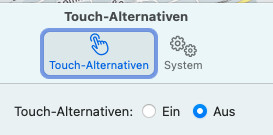
Touch alternative is enabled.

When I hold down the alt/option key and move my finger on the mouse up/down nothing happens.
Without Alt key I can only move the map.

had more feedback and will be adding some changes specifically for M1 users with a mouse. Will probably be after new year

If you're enjoying Scenic and are happy with the support, please leave a nice rating in the App Store. It would mean a lot to me ❤️

Hi,

I‘m also unable to zoom the map on a MacMini with a normal mouse with scroll wheel. Ive tried all key combinations, no success.

If it is not possible to implement it for a mouse, maybe optional some buttons (+, -) are feasible (similar like this Photobutton)?

It is possible to implement zooming through mouse scroll wheel. This will be added in the next update... coming in about 2 to 3 weeks.

uwolf has reacted to this post.
uwolf
If you're enjoying Scenic and are happy with the support, please leave a nice rating in the App Store. It would mean a lot to me ❤️

FYI Not sure it is related:

I can zoom in on the MBP M1 Max using the trackpad, but zooming out is very painful. Zooming in feels natural and easy, zooming out is like it’s stuck and as if there is a rubber band holding it back.
When zooming I now hit the route overview button to get out and pretty much only zoom in.

That’s not related. For zoom with trackpad to run smooth you need to turn on ‘touch alternatives’ (in Scenic menu > preferences). Then hold iotion key to zoom with trackpad.

Oom with scroll wheel of mouse will be implemented in next update.

If you're enjoying Scenic and are happy with the support, please leave a nice rating in the App Store. It would mean a lot to me ❤️

Hi,

I‘ve just updated Scenic on my Mac.
Unfortunately I didn’t figure out how to zoom with the wheel of my mouse.

Maybe I misses something, would you like to give me a hint?

Thanks,
Uwe

Look in the settings, touch must be disabled.

Scrolling functions without pressing another key.

It works fine, thank you!

GuidoOnTour has reacted to this post.
GuidoOnTour