
WunderLINQ custom keyboard iOS

Quote from Ricardo on 11.07.2023, 10:05Hi,
first of, great work with integrating Scenic with WunderLINQ. I love it.
recently, I started experimenting with using a “full keyboard access” to be able to control more my phone (e.g. I may use different navigations, Cardo app, etc).
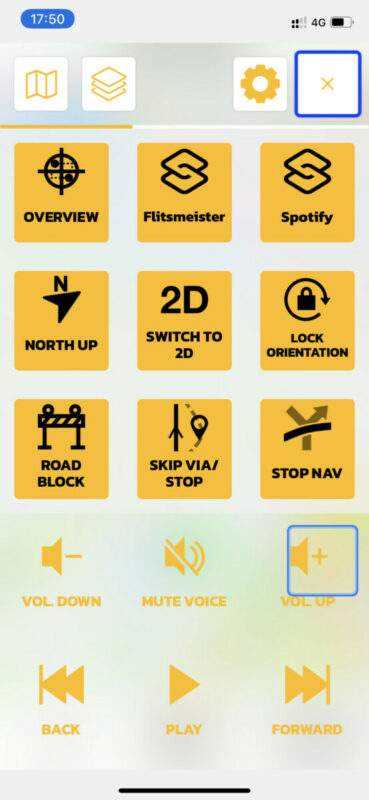
it works great for me… except once I got to scenic. In scenic, I can’t seem to be able to navigate the navigation menu with the basic keyboard. I can navigate many other things on Scenic, but not the big Nav menu.
it seems that the keyboard is still interacting in the Map view. Is there a way to make a keyboard also work on the Nav menu?
This seems to be an Accessibility limitation.
thanks!

Hi,
first of, great work with integrating Scenic with WunderLINQ. I love it.
recently, I started experimenting with using a “full keyboard access” to be able to control more my phone (e.g. I may use different navigations, Cardo app, etc).
it works great for me… except once I got to scenic. In scenic, I can’t seem to be able to navigate the navigation menu with the basic keyboard. I can navigate many other things on Scenic, but not the big Nav menu.
it seems that the keyboard is still interacting in the Map view. Is there a way to make a keyboard also work on the Nav menu?
This seems to be an Accessibility limitation.
thanks!

Quote from Guido on 11.07.2023, 11:03Hi Ricardo,
I've not seen this behaviour before. Strange. I think you might need the Scenic beta version. Have a look here: https://scenic.app/forum/topic/bluetooth-remote-keymap-to-function/#postid-5095 Send me an email through the 'email me' button at bottom of the help page if you would like to try the beta.
Cheers,
Guido
Hi Ricardo,
I've not seen this behaviour before. Strange. I think you might need the Scenic beta version. Have a look here: https://scenic.app/forum/topic/bluetooth-remote-keymap-to-function/#postid-5095 Send me an email through the 'email me' button at bottom of the help page if you would like to try the beta.
Cheers,
Guido
Quote from Ricardo on 12.07.2023, 08:22Maybe I could try. Let me explore a bit further first and I’ll get back to you. Would it be easy to install the beta on my iPhone?
Maybe I could try. Let me explore a bit further first and I’ll get back to you. Would it be easy to install the beta on my iPhone?
Quote from Guido on 12.07.2023, 09:47Beta's are installed through TestFlight. That's an app from Apple to distribute beta versions.
Please note: You can't have the beta and the App Store version on the same phone at the same time. The beta overwrites the normal App Store version. You can always delete the beta and download the App Store version from the App Store again. Your data syncs with the same database so your account data should be safe.Also note: the current beta version has quite some bugs around detour behaviour, skipping via points and navigation in general. As I release new beta versions these will be resolved one by one.
Beta's are installed through TestFlight. That's an app from Apple to distribute beta versions.
Quote from Ricardo on 04.08.2023, 03:58Hi @guidomm
I downloaded TestFlight again on my phone. I sent you an email (found the button in your help center)
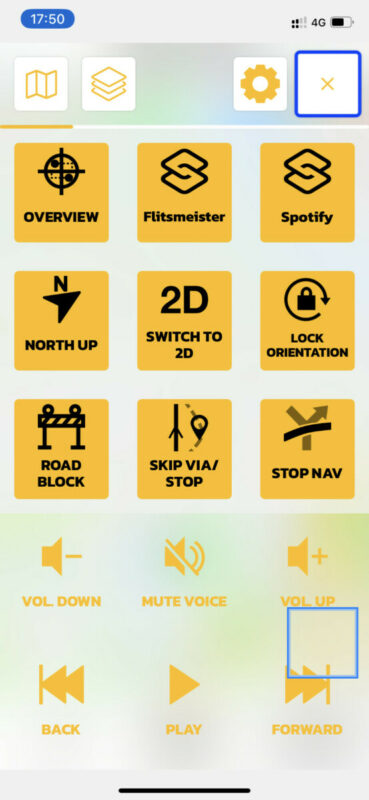
Also, I stumbled upon the same issue in another situation. It looks like the keyboard does not take over floating windows.
Hi @guidomm
I downloaded TestFlight again on my phone. I sent you an email (found the button in your help center)
Also, I stumbled upon the same issue in another situation. It looks like the keyboard does not take over floating windows.

Quote from Guido on 04.08.2023, 05:59Hi Ricardo,
Choose ‘help’ in the top bar (on mobile you need to open the menu through the ‘three lines’ button at the top right of this page. Then scroll down. There will be the ‘email me’ button.
However, I think I might have misunderstood your question. I now realize you are trying to use Scenic with a keyboard through the accessibility settings. Scenic does not support that. Scenic supports a number of specific handlebar controllers that emulate a keyboard, it only ‘listens’ to devices and key presses as I mentioned in the link I gave you above.
The accessibility setting works quite different and is not supported by Scenic.
Hi Ricardo,
Choose ‘help’ in the top bar (on mobile you need to open the menu through the ‘three lines’ button at the top right of this page. Then scroll down. There will be the ‘email me’ button.
However, I think I might have misunderstood your question. I now realize you are trying to use Scenic with a keyboard through the accessibility settings. Scenic does not support that. Scenic supports a number of specific handlebar controllers that emulate a keyboard, it only ‘listens’ to devices and key presses as I mentioned in the link I gave you above.
The accessibility setting works quite different and is not supported by Scenic.
Quote from Ricardo on 04.08.2023, 11:34Correct @guidomm, I am using the Wonderwheel and WunderLINQ app as a basic keyboard with directional arrows and the other enter-back controls.
Pity. The most important part of the app when I’m driving I can’t control with a keyboard emulated via accessibility advanced keyboard.
thanks in any case. I think I’ll skip the beta then.
Correct @guidomm, I am using the Wonderwheel and WunderLINQ app as a basic keyboard with directional arrows and the other enter-back controls.
Pity. The most important part of the app when I’m driving I can’t control with a keyboard emulated via accessibility advanced keyboard.
thanks in any case. I think I’ll skip the beta then.


