
WunderLINQ

Quote from GB on 05.10.2024, 02:17sorry if this has been addressed before, I did search but couldn’t find anything. It’s looking like I can’t use the WunderLINQ at the moment, that is the main reason I use scenic, when will that feature be back?
sorry if this has been addressed before, I did search but couldn’t find anything. It’s looking like I can’t use the WunderLINQ at the moment, that is the main reason I use scenic, when will that feature be back?

Quote from Guido on 05.10.2024, 05:34WunderLINQ should work. Tested myself (not with the WunderLINQ but the MotiveMonkey), and have confirmation of another WunderLINQ user that it works.
Try toggling the “I have a remote” switch off and on, in settings > handlebar controller
In the Scenic main/start screen you can only select the “Ride” button (should have border around it when WunderLINQ connects). You can’t move to other buttons. So… if you press and hold to the right it should go to “navigation” mode. In navigation mode you can select the navigation menu and move around. The shortcuts should work in both screens.
WunderLINQ should work. Tested myself (not with the WunderLINQ but the MotiveMonkey), and have confirmation of another WunderLINQ user that it works.
Try toggling the “I have a remote” switch off and on, in settings > handlebar controller
In the Scenic main/start screen you can only select the “Ride” button (should have border around it when WunderLINQ connects). You can’t move to other buttons. So… if you press and hold to the right it should go to “navigation” mode. In navigation mode you can select the navigation menu and move around. The shortcuts should work in both screens.
Quote from GB on 05.10.2024, 06:35It works if I open it separately but if I select navigation from the WunderLINQ app I get this message.
It works if I open it separately but if I select navigation from the WunderLINQ app I get this message.
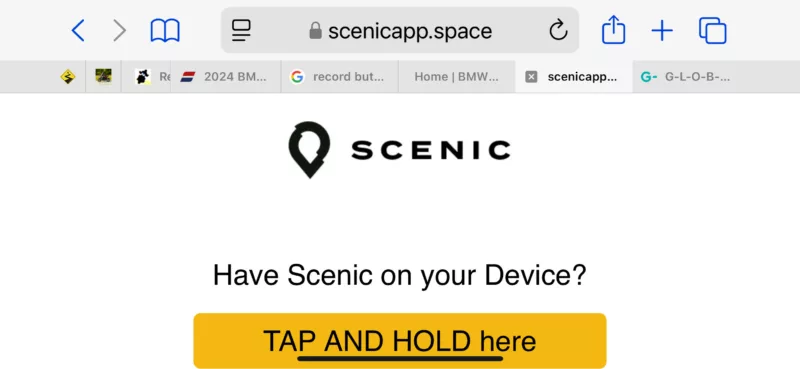
Quote from Guido on 05.10.2024, 06:58Follow the steps. Then iOS should know that you allow this, and Scenic should open without this message.
Follow the steps. Then iOS should know that you allow this, and Scenic should open without this message.
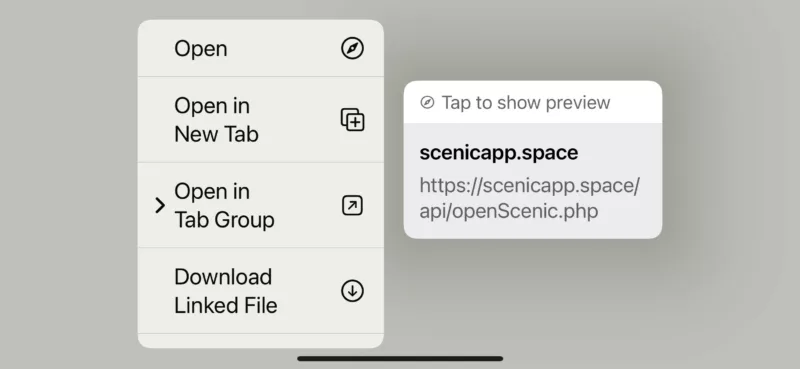
Quote from Guido on 05.10.2024, 07:15Hmm. That’s a bug I think. It should offer you to open Scenic. I’ll look into it.
Hmm. That’s a bug I think. It should offer you to open Scenic. I’ll look into it.

Quote from Roffel on 07.10.2024, 11:25Quote from Guido on 05.10.2024, 07:15Hmm. That’s a bug I think. It should offer you to open Scenic. I’ll look into it.
Hi Guido I've the same issue with starting Scenic from the Wunderlinq device (since version 4, version 3 was working fine)
same screens as shown in #5 from GB
Thanks for the big efforts you already realized, hope this issue can be solved on a short notice.
Quote from Guido on 05.10.2024, 07:15Hmm. That’s a bug I think. It should offer you to open Scenic. I’ll look into it.
Hi Guido I've the same issue with starting Scenic from the Wunderlinq device (since version 4, version 3 was working fine)
same screens as shown in #5 from GB
Thanks for the big efforts you already realized, hope this issue can be solved on a short notice.
Quote from Guido on 07.10.2024, 11:34will be solved in v4.01 (release by end of this week)
will be solved in v4.01 (release by end of this week)
Quote from mortalzen on 16.11.2025, 18:21I am having problems with integration as well. I have handle bar control set in Scenic. I have Scenic set as my navigation in WunderLINQ. When I am in Scenic and long left press my wonder wheel, then WunderLINQ opens. However, when I try to use navatigation from WunderLINQ it gives my the webpage to tap and hold for scenic. It does go back to scenic. When i shift over to AppleMaps as the option, the integration works. But i really prefer to use Scenic! 🙂
I am having problems with integration as well. I have handle bar control set in Scenic. I have Scenic set as my navigation in WunderLINQ. When I am in Scenic and long left press my wonder wheel, then WunderLINQ opens. However, when I try to use navatigation from WunderLINQ it gives my the webpage to tap and hold for scenic. It does go back to scenic. When i shift over to AppleMaps as the option, the integration works. But i really prefer to use Scenic! 🙂

Quote from Guido on 16.11.2025, 19:21I moved Scenic to a new developer account which caused this. I made some changes, but it can take upto a week for them to take effect (has to do with caching on Apple servers). You can speed up this process by removing Scenic from your device and reinstalling through the App Store. This has the disadvantage that you'll need to re-download your offline maps, and reconfigure your settings the way they like.
So… either:
1) Wait a week or so. It will start working eventually, or
2) Remove Scenic from your device and reinstall through the App Store.Best regards,
Guido
I moved Scenic to a new developer account which caused this. I made some changes, but it can take upto a week for them to take effect (has to do with caching on Apple servers). You can speed up this process by removing Scenic from your device and reinstalling through the App Store. This has the disadvantage that you'll need to re-download your offline maps, and reconfigure your settings the way they like.
So… either:
1) Wait a week or so. It will start working eventually, or
2) Remove Scenic from your device and reinstall through the App Store.
Best regards,
Guido


