
"Wrong" vehicle (arrow) position during navigation

Quote from TheDriver79 on 07.05.2024, 03:47Since the new version of Scenic I am experiencing some really annoying issue with the position of my car during navigation.
The problem is, on the map the vehicle/arrow (in my case my car) is displayed far more behind compared to the real location I am driving. That results in strange feelings when looking at the road, already passing the moment when I have to do the turn but trying to find the road I have to go which seems to be at least 50 meters away based on what I see on the map.
Furthermore this makes it hard to find the correct direction/road in case of two turns very close one after another.That worked better in the earlier versions of Scenic and is something that I find really annoying in the new version. I had already the clue that it could be because I am driving in a car and the GPS signal isn't clear enough, however even when I am driving with open roof (convertible) it does not get better.
What could be the reason for that and how it might be possible to reduce that behavior?
Since the new version of Scenic I am experiencing some really annoying issue with the position of my car during navigation.
The problem is, on the map the vehicle/arrow (in my case my car) is displayed far more behind compared to the real location I am driving. That results in strange feelings when looking at the road, already passing the moment when I have to do the turn but trying to find the road I have to go which seems to be at least 50 meters away based on what I see on the map.
Furthermore this makes it hard to find the correct direction/road in case of two turns very close one after another.
That worked better in the earlier versions of Scenic and is something that I find really annoying in the new version. I had already the clue that it could be because I am driving in a car and the GPS signal isn't clear enough, however even when I am driving with open roof (convertible) it does not get better.
What could be the reason for that and how it might be possible to reduce that behavior?

Quote from Guido on 07.05.2024, 11:10@thedriver79. Could you try enabling "Extrapolate Position" in Settings > Finetuning? This advances the position of the indicator a bit more, based on your route and driving direction.
@thedriver79. Could you try enabling "Extrapolate Position" in Settings > Finetuning? This advances the position of the indicator a bit more, based on your route and driving direction.
Quote from TheDriver79 on 08.05.2024, 01:05Thank you Guido. I will give it a try and report about my experience.
Thank you Guido. I will give it a try and report about my experience.

Quote from Kev450 on 28.06.2024, 20:10I am experiencing the same problem, I did enable the extrapolate position hoping it would solve the issue but it unfortunately does not. Waze and google map work fine, only Scenic is putting me ahead of the GPS so in navigation I end up missing turns, I can see myself crossing a street while the app displays like I haven’t crossed yet..
I am experiencing the same problem, I did enable the extrapolate position hoping it would solve the issue but it unfortunately does not. Waze and google map work fine, only Scenic is putting me ahead of the GPS so in navigation I end up missing turns, I can see myself crossing a street while the app displays like I haven’t crossed yet..
Quote from TheDriver79 on 29.06.2024, 01:38I have to add another experience with the same issue during a 5-days roadtrip last week.
We spent about 1400km using Scenic navigation by navigating planned routes.
Every day I had the „position on map behind real on-street position“ that caused multiple times unexpected early appearing turns.
Of course I enabled the extrapolate option but didn‘t have better position rendering in Scenic. Sometimes I even had the feeling it got worse.
For 3 days we drove with open roof so GPS signal should habe been fine.
I have to add another experience with the same issue during a 5-days roadtrip last week.
We spent about 1400km using Scenic navigation by navigating planned routes.
Every day I had the „position on map behind real on-street position“ that caused multiple times unexpected early appearing turns.
Of course I enabled the extrapolate option but didn‘t have better position rendering in Scenic. Sometimes I even had the feeling it got worse.
For 3 days we drove with open roof so GPS signal should habe been fine.

Quote from Drive4fun on 09.07.2024, 14:25I have this phenomenon when I am in a traffic jam on the motorway and am driving very slowly. Sometimes the Scenic direction icon jumps into oncoming traffic and visually "drives" 20 meters away. (Fine adjustment / logging = locked) The route is then usually recalculated.
Dieses Phänomen habe ich wenn ich mich im einem Stau auf der Autobahn befinde und nur sehr langsam fahre. Zeitweise springt dann das Scenic Fahrtrichtungsicon in den Gegenverkehr und "fährt" optisch 20 meter weit weg. (Feineinstellung / Protokollieren = eingerastet) Meißtens wird dann auch die Route neu berechnet.
I have this phenomenon when I am in a traffic jam on the motorway and am driving very slowly. Sometimes the Scenic direction icon jumps into oncoming traffic and visually "drives" 20 meters away. (Fine adjustment / logging = locked) The route is then usually recalculated.
Dieses Phänomen habe ich wenn ich mich im einem Stau auf der Autobahn befinde und nur sehr langsam fahre. Zeitweise springt dann das Scenic Fahrtrichtungsicon in den Gegenverkehr und "fährt" optisch 20 meter weit weg. (Feineinstellung / Protokollieren = eingerastet) Meißtens wird dann auch die Route neu berechnet.
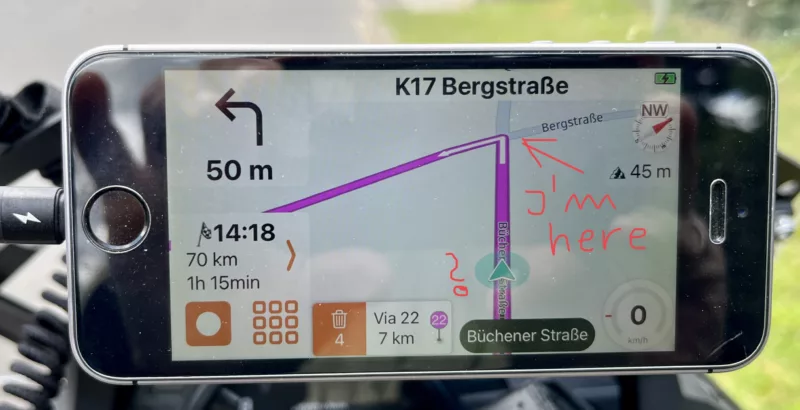
Quote from TheDriver79 on 15.07.2024, 00:03Thank you for providing the shot of the situation. It's exactly as I experience it since Scenic v3.5 and newer.
Thank you for providing the shot of the situation. It's exactly as I experience it since Scenic v3.5 and newer.
Quote from Guido on 15.07.2024, 09:25Thanks for the additional information and screenshots, everyone. I'll take a look at this for the upcoming update.
Thanks for the additional information and screenshots, everyone. I'll take a look at this for the upcoming update.
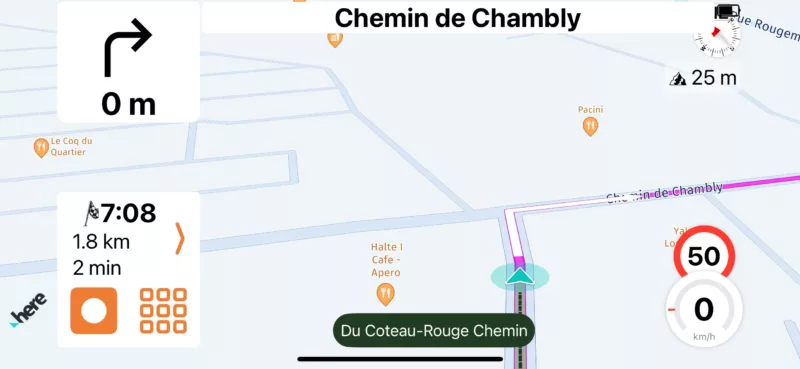
Quote from Kev450 on 15.07.2024, 09:34here’s a screenshot from me, i was at the corner waiting at the traffic light with no vehicles in front of me, its not a one time thing.. so far I’ve deleted offline maps, logged out, deleted the app and reinstalled, turned on extrapolate position but all these troubleshooting steps didn’t change anything, problem still occurs.
here’s a screenshot from me, i was at the corner waiting at the traffic light with no vehicles in front of me, its not a one time thing.. so far I’ve deleted offline maps, logged out, deleted the app and reinstalled, turned on extrapolate position but all these troubleshooting steps didn’t change anything, problem still occurs.
Quote from Avdbergh on 11.08.2024, 02:27Hi Guys,
I also having this problem with 50mtr off I hope there is a fix soon, I don’t want to change to another app I love this one but sometimes it’s very frustrating when I miss a turn. Especially when they are close to each other.
@guidomm any news on this?
Hi Guys,
I also having this problem with 50mtr off I hope there is a fix soon, I don’t want to change to another app I love this one but sometimes it’s very frustrating when I miss a turn. Especially when they are close to each other.
@guidomm any news on this?
Quote from Guido on 11.08.2024, 08:17Improvement is coming. This is a more fundamental change and will be handled in the big update. Stay tuned and follow the Scenic social channels and/or subscribe to the newsletter (see buttons in the footer) to receive news about it.
Improvement is coming. This is a more fundamental change and will be handled in the big update. Stay tuned and follow the Scenic social channels and/or subscribe to the newsletter (see buttons in the footer) to receive news about it.


