
When adding the End to a route, it make a new shortcut route at the end?
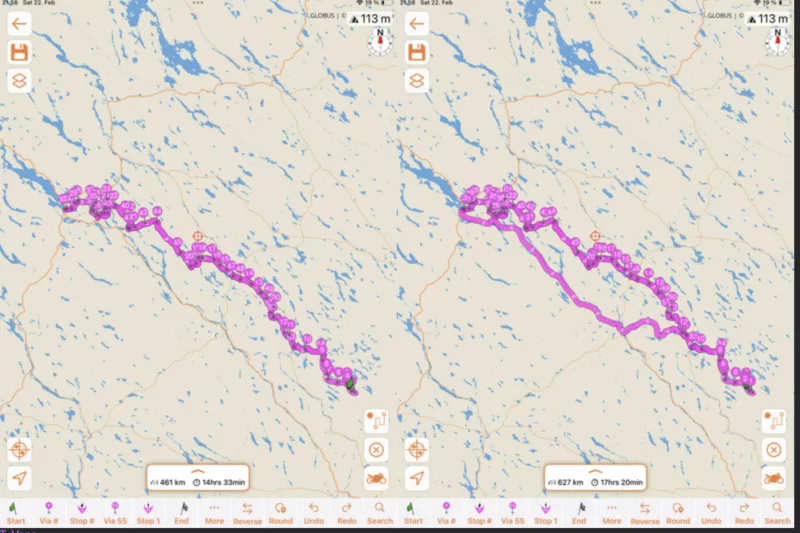
Quote from Td5 on 22.02.2025, 14:11I'm planning a route from a TET route, by following the route and adding Via points on the route so that the route go where I want. I can't use the original route as it ride in other direction. When I revers the rout it make all kind of loops and additions, so I make a new route. I had to insert a lot of Via's, other wise it made "shortcuts".
But when I add the End to the route, it make a new shortcut at the route? Left is the route I made and when I add the End it make a new route?
Is there a setting to force Scenic to take the route that is made?
Brgds,
Vane
I'm planning a route from a TET route, by following the route and adding Via points on the route so that the route go where I want. I can't use the original route as it ride in other direction. When I revers the rout it make all kind of loops and additions, so I make a new route. I had to insert a lot of Via's, other wise it made "shortcuts".
But when I add the End to the route, it make a new shortcut at the route? Left is the route I made and when I add the End it make a new route?
Is there a setting to force Scenic to take the route that is made?
Brgds,
Vane

Quote from Guido on 23.02.2025, 08:06Hi Vane,
This is indeed very strange. Also notice the difference in distance between the two. It seems like to get from the last via point to the finish it sends you in a big loop.
What I recommend for this kind of routes (where you take exactly the same way to go and back) is to make two separate routes.
Scenic can get confused if the route overlaps itself this much. Especially if you make a detour, Scenic needs to guess if you are on the way back or on the way out. Better to prevent that.
Hi Vane,
This is indeed very strange. Also notice the difference in distance between the two. It seems like to get from the last via point to the finish it sends you in a big loop.
What I recommend for this kind of routes (where you take exactly the same way to go and back) is to make two separate routes.
Scenic can get confused if the route overlaps itself this much. Especially if you make a detour, Scenic needs to guess if you are on the way back or on the way out. Better to prevent that.
Quote from Td5 on 23.02.2025, 13:21Perhaps I told this unclear, what I try to do is to make a route on small roads, copying a TET Sweden track and for some reason when I put the marker on the road and either make a stop or a via, it in some case extend the track and make an u-turn in the end or it make a lengthy detour. The total length of this track is less that 300km.
I don't understand "overlap", met track is following small roads but are continuing, not making any loops.
There is a road where I put stops and visa, it's a small road and I zoomed to show the detour Scenic created.
What am I doing wrong here?
Brgds,
Vane

Perhaps I told this unclear, what I try to do is to make a route on small roads, copying a TET Sweden track and for some reason when I put the marker on the road and either make a stop or a via, it in some case extend the track and make an u-turn in the end or it make a lengthy detour. The total length of this track is less that 300km.
I don't understand "overlap", met track is following small roads but are continuing, not making any loops.
There is a road where I put stops and visa, it's a small road and I zoomed to show the detour Scenic created.
What am I doing wrong here?
Brgds,
Vane

Quote from Guido on 23.02.2025, 15:01Check that your routing mode is not set to curvy (because this adds via points to make the route go curvy… you don’t need that since your trying to recreate the TET route).
Also make sure your via points are in order (Scenic will calculate the route to go from via 1 to via 2, etc.)
Im saying this because it looks like stop 5 and stop 1 should be reversed.
Also, I recommend to place start and finish first. Then start adding via points and stops using the via # and stop # buttons. (Long press these buttons to manually choose between which markers to place it.
Check that your routing mode is not set to curvy (because this adds via points to make the route go curvy… you don’t need that since your trying to recreate the TET route).
Also make sure your via points are in order (Scenic will calculate the route to go from via 1 to via 2, etc.)
Im saying this because it looks like stop 5 and stop 1 should be reversed.
Also, I recommend to place start and finish first. Then start adding via points and stops using the via # and stop # buttons. (Long press these buttons to manually choose between which markers to place it.
Quote from Guido on 23.02.2025, 15:20I can not see on the picture but maybe there is no known road between 48 (stop 2) and 49. If there is no known road or it is a road you are not allowed to go on, Scenic can’t route you over it. I noticed you already tried bicycle routing. Is it on mountain bike with highest value for bad surfaces and hills?
I can not see on the picture but maybe there is no known road between 48 (stop 2) and 49. If there is no known road or it is a road you are not allowed to go on, Scenic can’t route you over it. I noticed you already tried bicycle routing. Is it on mountain bike with highest value for bad surfaces and hills?
Quote from Td5 on 24.02.2025, 03:02Hi,
Changed the route to Standard and it helped somewhat, I have to add either Via to Stop to get the routing to be OK, it really want to make U-turns and turn back or make strange loops back. I'm not trying to route to dead ends.
I am following the small roads that are visible on downloaded Scenic provided map. What should I send to you so you can repeat this at your end and hopefully fix it?
I was now making a route on Lofooten islands and there also it wanted to make U-turns, I can't add Start and End in the beginning as I want to ride on the side roads. If I add also the End, I can't really decide where to ride.
I'm using MBP M4 with Sequoia 15.3.1 and Scenic version is 4.13.
Hi,
Changed the route to Standard and it helped somewhat, I have to add either Via to Stop to get the routing to be OK, it really want to make U-turns and turn back or make strange loops back. I'm not trying to route to dead ends.
I am following the small roads that are visible on downloaded Scenic provided map. What should I send to you so you can repeat this at your end and hopefully fix it?
I was now making a route on Lofooten islands and there also it wanted to make U-turns, I can't add Start and End in the beginning as I want to ride on the side roads. If I add also the End, I can't really decide where to ride.
I'm using MBP M4 with Sequoia 15.3.1 and Scenic version is 4.13.
Quote from Guido on 24.02.2025, 08:09Try mountain bike routing, or try motorcycle short routing. With standard routing it will prefer faster routes, and typically the dirt roads in TET-like routes are marked as very slow, so it’s faster to go around them.
I can't add Start and End in the beginning as I want to ride on the side roads. If I add also the End, I can't really decide where to ride.
I don’t understand. Why not? Do you not know where you will start and end for that day?
Try mountain bike routing, or try motorcycle short routing. With standard routing it will prefer faster routes, and typically the dirt roads in TET-like routes are marked as very slow, so it’s faster to go around them.
I can't add Start and End in the beginning as I want to ride on the side roads. If I add also the End, I can't really decide where to ride.
I don’t understand. Why not? Do you not know where you will start and end for that day?
Quote from Td5 on 25.02.2025, 04:26Usually I know where I'm heading, so starting by marking Start and End seem to solve this problem, I then just add vias or stops on the actual route wanted.
But quite interesting "feature", I was making a route at Lofoten island and it wanted desperately to make U-turns, but marking the End solved this.
Thanks.
Usually I know where I'm heading, so starting by marking Start and End seem to solve this problem, I then just add vias or stops on the actual route wanted.
But quite interesting "feature", I was making a route at Lofoten island and it wanted desperately to make U-turns, but marking the End solved this.
Thanks.
Quote from Td5 on 10.03.2025, 08:24I’m puzzled and don’t know what to do. Planning a route in Norway, all these places was also found using Scenic search.
- Starting at Gol, Pers Hotel.
- Heading to Aurlandsvangen via road #7, then to road #50.
- Via Nyheim on road #5627 to Aurlandsvangen
- From A on road #5627 to Laerdalsoyri
- From L on road #5 to ferry port and continue road #5
- In Sogndal turn to road #13 to Leikanger
- From L to Vangsnes
- From V to Voss
- From V to Ulvik
Also noted that the arrow that I believe is the direction, change direction
This program has it’s own mind and reroute what ever it want. I tried with MBP M4, with iPad and nothing works. Tried to use mountain bike, moto and car.
My routing might not be the best one, but I wan’t to decide where i go and where not
Seriously thinking that is the only solution to ditch Scenic. I didn’t have any such problems with the previous versions, or am I doing something wrong?
I’m puzzled and don’t know what to do. Planning a route in Norway, all these places was also found using Scenic search.
- Starting at Gol, Pers Hotel.
- Heading to Aurlandsvangen via road #7, then to road #50.
- Via Nyheim on road #5627 to Aurlandsvangen
- From A on road #5627 to Laerdalsoyri
- From L on road #5 to ferry port and continue road #5
- In Sogndal turn to road #13 to Leikanger
- From L to Vangsnes
- From V to Voss
- From V to Ulvik
Also noted that the arrow that I believe is the direction, change direction
This program has it’s own mind and reroute what ever it want. I tried with MBP M4, with iPad and nothing works. Tried to use mountain bike, moto and car.
My routing might not be the best one, but I wan’t to decide where i go and where not
Seriously thinking that is the only solution to ditch Scenic. I didn’t have any such problems with the previous versions, or am I doing something wrong?
Quote from Guido on 10.03.2025, 17:04
Do you still have the route saved? If so, could you share the link to the route with me? (select route from the route list > 3 dots button top right > share link).
Do you still have the route saved? If so, could you share the link to the route with me? (select route from the route list > 3 dots button top right > share link).


