
Web Power Planner

Quote from Polar Bear on 07.01.2024, 09:47The phone app and features in it are incredible, but I would love to be able to import gpx files into a working Power Planner on the website, then sync that route to the phone app. Sometimes you just need more space and a bigger screen!
The phone app and features in it are incredible, but I would love to be able to import gpx files into a working Power Planner on the website, then sync that route to the phone app. Sometimes you just need more space and a bigger screen!

Quote from Guido on 07.01.2024, 10:04Yep this is on the list to add in 2024.
Yep this is on the list to add in 2024.
Quote from Polar Bear on 07.01.2024, 11:21Awesome. Thank you Sir. Keep up the good work!
Awesome. Thank you Sir. Keep up the good work!
Quote from Benny-Ointenmcklub on 16.01.2024, 05:07Hello
Yes to be able to plan and make the route ready on a big screen, laptop etc would really be awesome.
Awesome app!!! Ive used it for 226 rides and 14500km so far.
Keep up the good work!!!
Benny
Hello
Yes to be able to plan and make the route ready on a big screen, laptop etc would really be awesome.
Awesome app!!! Ive used it for 226 rides and 14500km so far.
Keep up the good work!!!
Benny

Quote from Aussiefly on 20.01.2024, 04:43Great idea @polar-bear
I was hoping for the same feature.
Great idea @polar-bear
I was hoping for the same feature.

Quote from nick123123 on 23.01.2024, 16:06I’ve been able to side load the app onto a MacBook . It renders as a slightly larger version of the app but doesn’t always behave as you would expect - a bit random. Anyway , a web version of the planner would be a game changer . Planning a big trip on a small phone is challenging and will put many people off. Just to fiddly . Even now I’m considering jumping ship to another product for this very reason which is a big shame .
keep up the good work and look forward to a web planner this year .
I’ve been able to side load the app onto a MacBook . It renders as a slightly larger version of the app but doesn’t always behave as you would expect - a bit random. Anyway , a web version of the planner would be a game changer . Planning a big trip on a small phone is challenging and will put many people off. Just to fiddly . Even now I’m considering jumping ship to another product for this very reason which is a big shame .
keep up the good work and look forward to a web planner this year .

Quote from massi on 24.01.2024, 02:47To be honest, I never missed a scenic web planning tool. The power planner is one of the best planning tools I've ever used, it does work very well on my phone and if I need more space I plan on my iPad or the Macbook Air. Sometimes I also plan my routes and tours with Garmin Basecamp and import them to Scenic.
There are so many ways to plan routes for Scenic, that in my opinion the priority should not be on this feature, but I can understand, that people that are not deep in the Apple world, would like to have a web planning tool.
To be honest, I never missed a scenic web planning tool. The power planner is one of the best planning tools I've ever used, it does work very well on my phone and if I need more space I plan on my iPad or the Macbook Air. Sometimes I also plan my routes and tours with Garmin Basecamp and import them to Scenic.
There are so many ways to plan routes for Scenic, that in my opinion the priority should not be on this feature, but I can understand, that people that are not deep in the Apple world, would like to have a web planning tool.

Quote from Sampleman on 03.02.2024, 02:14I chose Scenic as my favorite navigation app because it is able to use GPX routes which I created with the web based planning tool Kurviger.de
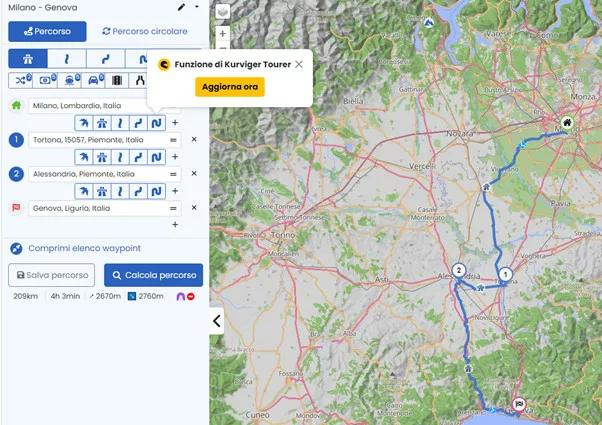
Kurviger allows you to create detailed routes. You even are able to choose different route characteristics for different parts of the route, so maybe "more straight" for covering a distance to get where you want to get and then "curvy" to enjoy the area around your destination.
Once you are done planning your trip with Kurviger.de., you can export it to the Scenic cloud service. This is pretty easy, just klick on "create a link for the route" and Kurviger.de offers you a preconfigured export to Scenic. Once the route is in the Scenic cloud, open the Scenic app on your phone and choose "import". Your new route will appear on the import queue list. Then you can import it, and then it is stored on your device. After you have imported the route, no internet connection is necessary anymore.
Kurviger.de requires a subscription. In order to use all features, you need the Tourer subscription for 15 Euro per year. A free version with basic features and a maximum length of 300 km is also available.
I chose Scenic as my favorite navigation app because it is able to use GPX routes which I created with the web based planning tool Kurviger.de
Kurviger allows you to create detailed routes. You even are able to choose different route characteristics for different parts of the route, so maybe "more straight" for covering a distance to get where you want to get and then "curvy" to enjoy the area around your destination.
Once you are done planning your trip with Kurviger.de., you can export it to the Scenic cloud service. This is pretty easy, just klick on "create a link for the route" and Kurviger.de offers you a preconfigured export to Scenic. Once the route is in the Scenic cloud, open the Scenic app on your phone and choose "import". Your new route will appear on the import queue list. Then you can import it, and then it is stored on your device. After you have imported the route, no internet connection is necessary anymore.
Kurviger.de requires a subscription. In order to use all features, you need the Tourer subscription for 15 Euro per year. A free version with basic features and a maximum length of 300 km is also available.

Quote from I-Chewbacca-I on 04.02.2024, 02:27Quote from Sampleman on 03.02.2024, 02:14Kurviger.de requires a subscription. In order to use all features, you need the Tourer subscription for 15 Euro per year. A free version with basic features and a maximum length of 300 km is also available.
I told Guido: let’s make it easier. Buy Kruviger and merge functionalities & users….
Quote from Sampleman on 03.02.2024, 02:14Kurviger.de requires a subscription. In order to use all features, you need the Tourer subscription for 15 Euro per year. A free version with basic features and a maximum length of 300 km is also available.
I told Guido: let’s make it easier. Buy Kruviger and merge functionalities & users….

Quote from BiKenG on 04.02.2024, 03:35Quote from massi on 24.01.2024, 02:47To be honest, I never missed a scenic web planning tool. The power planner is one of the best planning tools I've ever used, it does work very well on my phone and if I need more space I plan on my iPad or the Macbook Air. Sometimes I also plan my routes and tours with Garmin Basecamp and import them to Scenic.
There are so many ways to plan routes for Scenic, that in my opinion the priority should not be on this feature, but I can understand, that people that are not deep in the Apple world, would like to have a web planning tool.
Completely disagree with the above. Trying to plan a large route on the silly small screen of a phone is a nightmare. Absolutely we need to be able to plan routes on a large screen and although it is now possible using Google, better integration of this functionality within the Scenic realm would be very welcome.
Quote from massi on 24.01.2024, 02:47To be honest, I never missed a scenic web planning tool. The power planner is one of the best planning tools I've ever used, it does work very well on my phone and if I need more space I plan on my iPad or the Macbook Air. Sometimes I also plan my routes and tours with Garmin Basecamp and import them to Scenic.
There are so many ways to plan routes for Scenic, that in my opinion the priority should not be on this feature, but I can understand, that people that are not deep in the Apple world, would like to have a web planning tool.
Completely disagree with the above. Trying to plan a large route on the silly small screen of a phone is a nightmare. Absolutely we need to be able to plan routes on a large screen and although it is now possible using Google, better integration of this functionality within the Scenic realm would be very welcome.
Quote from nick123123 on 04.02.2024, 17:04taken a look at the Kurviger site - all in German can’t find an option for English . Total switch off. ☹️
taken a look at the Kurviger site - all in German can’t find an option for English . Total switch off. ☹️
Quote from Guido on 04.02.2024, 17:09Top right (or behind the profile pic if you are on mobile), you’ll find the German flag 🇩🇪 If you tap that, you’ll get other languages. Here’s direct link toe english site: https://kurviger.de/en
Top right (or behind the profile pic if you are on mobile), you’ll find the German flag 🇩🇪 If you tap that, you’ll get other languages. Here’s direct link toe english site: https://kurviger.de/en
Quote from I-Chewbacca-I on 05.02.2024, 02:14Quote from Guido on 04.02.2024, 17:09[...]
I do not understand if it is a question of patented SW or whatever, but I do not understand why I should pay 14,99 eur/year Kruviger only to manage the type of route between two waypoints and then 45,95 eur/year to Scenic.
I 100% prefer to pay 60 eur/year to you Guido....
Quote from Guido on 04.02.2024, 17:09[...]
I do not understand if it is a question of patented SW or whatever, but I do not understand why I should pay 14,99 eur/year Kruviger only to manage the type of route between two waypoints and then 45,95 eur/year to Scenic.
I 100% prefer to pay 60 eur/year to you Guido....
Quote from Deleted user on 05.02.2024, 05:59I use iPad to create/edit the routes. Routes are synchronized with the iPhone. Works fine !!!
Congrats Guido
Beautiful piece of software !
Jo
I use iPad to create/edit the routes. Routes are synchronized with the iPhone. Works fine !!!
Congrats Guido
Beautiful piece of software !
Jo
Quote from massi on 06.02.2024, 03:13
Trying to plan a large route on the silly small screen of a phone is a nightmare.
I planned routes with hundreds of kilometers on my iPhone 11 pro max, no problems so far. It's a bit more fiddling, than on a big screen, but I wouldn't say that it is a nightmare.
Trying to plan a large route on the silly small screen of a phone is a nightmare.
I planned routes with hundreds of kilometers on my iPhone 11 pro max, no problems so far. It's a bit more fiddling, than on a big screen, but I wouldn't say that it is a nightmare.
Quote from nick123123 on 06.02.2024, 04:48I would class it at difficult or slow !
A nightmare - chased down the street by a man waving an axe 🪓 😝
personally I find phone screens too small, and sadly don’t have the funds for an iPad or similar. Hence I rarely use the planning feature which is sad.
I would class it at difficult or slow !
A nightmare - chased down the street by a man waving an axe 🪓 😝
personally I find phone screens too small, and sadly don’t have the funds for an iPad or similar. Hence I rarely use the planning feature which is sad.

Quote from mattsz on 06.02.2024, 18:43You guys are hilarious!
"Planning on a small screen is terrible!"
"No, it isn't!"
"Yes, it is!"
"No, it isn't!"
"Yes, it is!"
😁
You guys are hilarious!
"Planning on a small screen is terrible!"
"No, it isn't!"
"Yes, it is!"
"No, it isn't!"
"Yes, it is!"
😁

Quote from TheDriver79 on 08.02.2024, 09:51Quote from mattsz on 06.02.2024, 18:43You guys are hilarious!
"Planning on a small screen is terrible!"
"No, it isn't!"
"Yes, it is!"
"No, it isn't!"
"Yes, it is!"
That‘s what any developer struggles with. 🥸
I‘ve planned a lot of trips using Scenic and I love it - thank you @guidomm !
So far the most trips got created using my iPad, however sometimes even my iPhone does the job, e.g. while on the road and plans change.Yes, I think a desktop/browser editor for Scenic makes sense and would be a nice to have feature. But, getting the most wanted features for the App implemented and working has a much higher priority for me.

Quote from mattsz on 06.02.2024, 18:43You guys are hilarious!
"Planning on a small screen is terrible!"
"No, it isn't!"
"Yes, it is!"
"No, it isn't!"
"Yes, it is!"
That‘s what any developer struggles with. 🥸
I‘ve planned a lot of trips using Scenic and I love it - thank you @guidomm !
So far the most trips got created using my iPad, however sometimes even my iPhone does the job, e.g. while on the road and plans change.
Yes, I think a desktop/browser editor for Scenic makes sense and would be a nice to have feature. But, getting the most wanted features for the App implemented and working has a much higher priority for me.

Quote from GHJ on 21.02.2024, 08:34Maybe another suggestion Guido,
You recommend a combination of Kurviger and Scenic for time being. Kurviger offers more options than the power planner and works on the large screen. Kurviger charges €14.99 per year. You may be able to arrange a discount code with Kurviger for Scenic subscribers. This seems like a nice addition to the "special offers" in the Scenic app.
Maybe another suggestion Guido,
You recommend a combination of Kurviger and Scenic for time being. Kurviger offers more options than the power planner and works on the large screen. Kurviger charges €14.99 per year. You may be able to arrange a discount code with Kurviger for Scenic subscribers. This seems like a nice addition to the "special offers" in the Scenic app.
Quote from Guido on 21.02.2024, 08:59Good idea. I'll check with Kurviger if they are willing to do that.
Good idea. I'll check with Kurviger if they are willing to do that.

Quote from BlasterMaster on 23.09.2024, 13:10Will the Power Planner for Scenic 4 be available for the PC so I can plan more comfortably? Thanks.
Will the Power Planner for Scenic 4 be available for the PC so I can plan more comfortably? Thanks.
Quote from BlasterMaster on 01.10.2024, 09:40Quote from massi on 06.02.2024, 03:13
Trying to plan a large route on the silly small screen of a phone is a nightmare.
I planned routes with hundreds of kilometers on my iPhone 11 pro max, no problems so far. It's a bit more fiddling, than on a big screen, but I wouldn't say that it is a nightmare.
I would also call it a nightmare. My IPhone screen is way too small to plan a ride for me. I want to plan on my 42" monitor. Not straining my eyes on a 6.5" screen.
Quote from massi on 06.02.2024, 03:13
Trying to plan a large route on the silly small screen of a phone is a nightmare.
I planned routes with hundreds of kilometers on my iPhone 11 pro max, no problems so far. It's a bit more fiddling, than on a big screen, but I wouldn't say that it is a nightmare.
I would also call it a nightmare. My IPhone screen is way too small to plan a ride for me. I want to plan on my 42" monitor. Not straining my eyes on a 6.5" screen.
Quote from jimbojsb on 01.10.2024, 09:59I do all planning in Google My Maps, which is free and lets me quickly and easily plan routes has all the power of Google's database built in. Once ready it's just a couple of clicks to import them into Scenic and then I just do a very quick check of the route to make sure it's routed the same. In 3.5 I think maybe twice ever did I see a deviation that just required an extra via. In 4.0 so far I have seen 2 routes with very "Acute angle" intersections where the via that comes from google is too close to the intersection and needs to be moved a bit to avoid Scenic suggesting you go up the road a couple of hundred yards and u-turn and come back. Either way, My Maps is my go-to for planning on a laptop / desktop computer.
I do all planning in Google My Maps, which is free and lets me quickly and easily plan routes has all the power of Google's database built in. Once ready it's just a couple of clicks to import them into Scenic and then I just do a very quick check of the route to make sure it's routed the same. In 3.5 I think maybe twice ever did I see a deviation that just required an extra via. In 4.0 so far I have seen 2 routes with very "Acute angle" intersections where the via that comes from google is too close to the intersection and needs to be moved a bit to avoid Scenic suggesting you go up the road a couple of hundred yards and u-turn and come back. Either way, My Maps is my go-to for planning on a laptop / desktop computer.
Quote from BlasterMaster on 06.10.2024, 06:52Quote from jimbojsb on 01.10.2024, 09:59I do all planning in Google My Maps, which is free and lets me quickly and easily plan routes has all the power of Google's database built in. Once ready it's just a couple of clicks to import them into Scenic and then I just do a very quick check of the route to make sure it's routed the same. In 3.5 I think maybe twice ever did I see a deviation that just required an extra via. In 4.0 so far I have seen 2 routes with very "Acute angle" intersections where the via that comes from google is too close to the intersection and needs to be moved a bit to avoid Scenic suggesting you go up the road a couple of hundred yards and u-turn and come back. Either way, My Maps is my go-to for planning on a laptop / desktop computer.
I wasn't aware of this variation of Google Maps. Thanks. I played with it a bit. I added 2 destinations. How do I get it to route them?
Quote from jimbojsb on 01.10.2024, 09:59I do all planning in Google My Maps, which is free and lets me quickly and easily plan routes has all the power of Google's database built in. Once ready it's just a couple of clicks to import them into Scenic and then I just do a very quick check of the route to make sure it's routed the same. In 3.5 I think maybe twice ever did I see a deviation that just required an extra via. In 4.0 so far I have seen 2 routes with very "Acute angle" intersections where the via that comes from google is too close to the intersection and needs to be moved a bit to avoid Scenic suggesting you go up the road a couple of hundred yards and u-turn and come back. Either way, My Maps is my go-to for planning on a laptop / desktop computer.
I wasn't aware of this variation of Google Maps. Thanks. I played with it a bit. I added 2 destinations. How do I get it to route them?
Quote from jimbojsb on 06.10.2024, 07:22Add a driving directions layer, there is a button for it. Then you just drag the route to your preferences. To import to Scenic just use the Scenic web app and give it the map url.
Add a driving directions layer, there is a button for it. Then you just drag the route to your preferences. To import to Scenic just use the Scenic web app and give it the map url.
Quote from BlasterMaster on 06.10.2024, 09:23I created the 2 layers. One for my home, the other my destination. How to create the route?
I created the 2 layers. One for my home, the other my destination. How to create the route?
Quote from Guido on 06.10.2024, 09:53There is Google My Maps and Google Maps. Scenic can import both, but works a bit different.
In both cases it's not necessary to export to GPX. You can use the webapp to paste the link. Here is a help article... it still displays old Scenic, but the process is the same: https://scenic.app/help/import-from-google-maps/
There is Google My Maps and Google Maps. Scenic can import both, but works a bit different.
In both cases it's not necessary to export to GPX. You can use the webapp to paste the link. Here is a help article... it still displays old Scenic, but the process is the same: https://scenic.app/help/import-from-google-maps/
Quote from mattsz on 06.10.2024, 12:03Quote from jimbojsb on 06.10.2024, 11:41If it does I’ve never encountered the limit.
On my computer, Google Maps only allows 12 custom points on a route between two locations...
Quote from jimbojsb on 06.10.2024, 11:41If it does I’ve never encountered the limit.
On my computer, Google Maps only allows 12 custom points on a route between two locations...


