
Waypoint Names method and Share Route from Route Screen

Quote from Old Man Emu on 08.11.2024, 16:49Guido, nice work, keep on keeping on.
Two minor things,
1) Can we have a “Share Route” button on the Route screen? After planning and saving the Route screen is displayed and in the lower centre Ride and Plan are displayed. Perhaps a “Share” option between them under the word “Search”
2) Naming Waypoints
I know a long tap (smart device) will create a Stop with the Address. Sometimes the addresses are very long and I edit them for example from “1457-1469 Abercrombie Rd” to “Hampton Hotel”.
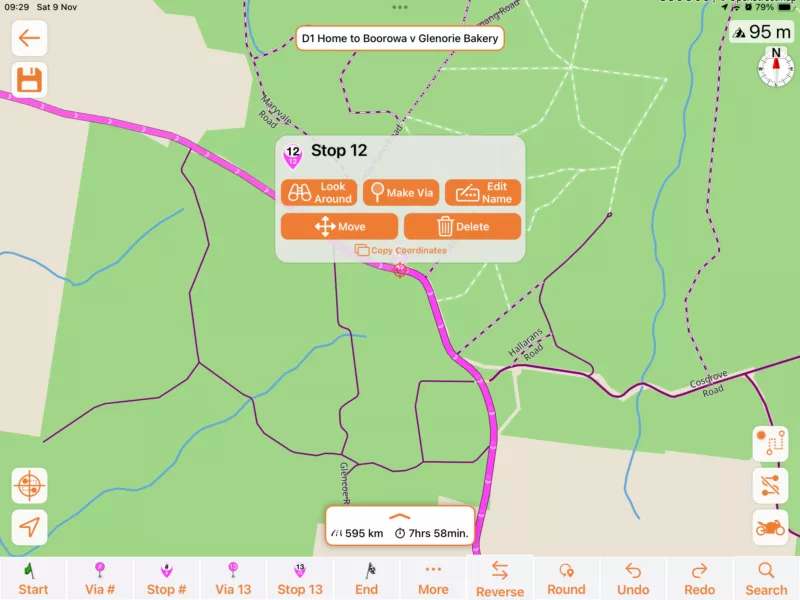
But generally in power planner I will hit the Stop# which creates a new stop. Then I will tap the Stop marker and it will pop a box of choices. I select “Edit Name” and put in the name.
Could we have the input for Edit Name pop after the “Stop #” tap?
So “Stop#” or Stop (number)” inserts a new Stop and pops the name input function ready to accept a name.
Guido, nice work, keep on keeping on.
Two minor things,
1) Can we have a “Share Route” button on the Route screen? After planning and saving the Route screen is displayed and in the lower centre Ride and Plan are displayed. Perhaps a “Share” option between them under the word “Search”
2) Naming Waypoints
I know a long tap (smart device) will create a Stop with the Address. Sometimes the addresses are very long and I edit them for example from “1457-1469 Abercrombie Rd” to “Hampton Hotel”.
But generally in power planner I will hit the Stop# which creates a new stop. Then I will tap the Stop marker and it will pop a box of choices. I select “Edit Name” and put in the name.
Could we have the input for Edit Name pop after the “Stop #” tap?
So “Stop#” or Stop (number)” inserts a new Stop and pops the name input function ready to accept a name.

Quote from Guido on 09.11.2024, 10:35Thanks for the suggestions.
1) (share route), this feature isn’t used as much to warrant a place directly in the Home Screen. You can already share the route by selecting the route from your route list and then tapping the 3-dots button top right. Takes a few more taps, but for a less used feature for most I think that’s acceptable.
2) That’s a good suggestion. I’ll add it to the list. Will take a while before I get around to that, though.
Thanks for the suggestions.
1) (share route), this feature isn’t used as much to warrant a place directly in the Home Screen. You can already share the route by selecting the route from your route list and then tapping the 3-dots button top right. Takes a few more taps, but for a less used feature for most I think that’s acceptable.
2) That’s a good suggestion. I’ll add it to the list. Will take a while before I get around to that, though.


