
V4.1 Visibility of route numbers and names on the designated route

Quote from martisha on 11.10.2024, 01:05Hi Guido,
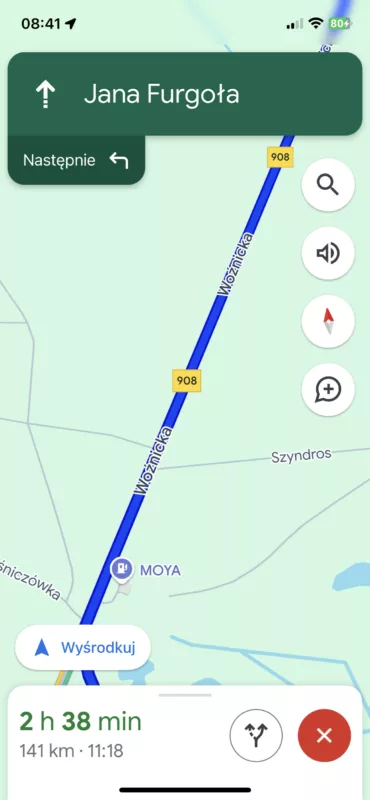
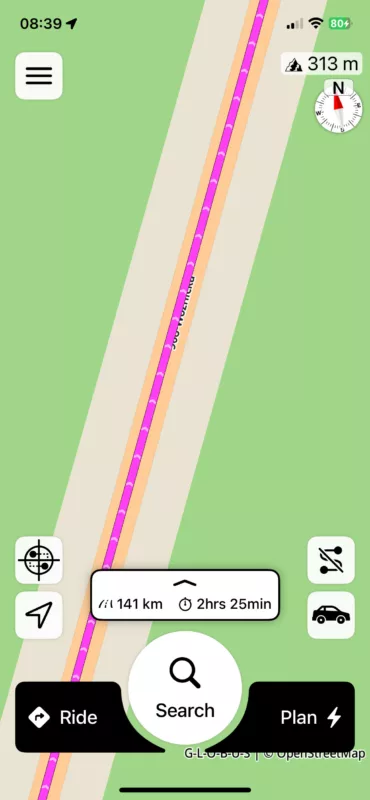
1. When you set a route in the new 4.1, unfortunately the color makes the route number and name invisible. They are under the color instead of on top. I'm leaving a sample photo from Google. When I set a route here, the number and name are visible on top. However, in Scenic 4.1, it is under the color and is not visible. Can this be changed?Great job with the update 🙂 It's getting more and more beautiful 🙂
2. And another thing.. is it possible to set the map colors? Currently, my choice is a dark menu and a light map, but the map is light only during navigation. When I want to create a route in this setting, unfortunately I have to use the dark mode, which is less legible for me and only after starting it changes to light.
Can this be changed? ..so that the light map selection also allows the light color for creating a route. Changing the settings every time to have light mode doesn't make sense.
In scenic 3 it was perfect, either the map was always light or dark and the menu also had a light or dark selection. It was perfect.
Hi Guido,
1. When you set a route in the new 4.1, unfortunately the color makes the route number and name invisible. They are under the color instead of on top. I'm leaving a sample photo from Google. When I set a route here, the number and name are visible on top. However, in Scenic 4.1, it is under the color and is not visible. Can this be changed?
Great job with the update 🙂 It's getting more and more beautiful 🙂
2. And another thing.. is it possible to set the map colors? Currently, my choice is a dark menu and a light map, but the map is light only during navigation. When I want to create a route in this setting, unfortunately I have to use the dark mode, which is less legible for me and only after starting it changes to light.
Can this be changed? ..so that the light map selection also allows the light color for creating a route. Changing the settings every time to have light mode doesn't make sense.
In scenic 3 it was perfect, either the map was always light or dark and the menu also had a light or dark selection. It was perfect.

Quote from Guido on 11.10.2024, 06:01In aware of this and working with the map provider on a solution
In aware of this and working with the map provider on a solution

Quote from Kev450 on 11.10.2024, 20:57Great job fixing the road numbers, it’s a lot easier to plan but I also noticed the same problem here, planned route needs some transparency or the road numbers/names layer needs to be above the planned route.
Great job fixing the road numbers, it’s a lot easier to plan but I also noticed the same problem here, planned route needs some transparency or the road numbers/names layer needs to be above the planned route.


