
v4.05 Bug Report from Weekend Trip, and 2 requests

Quote from greg2112 on 18.11.2024, 13:28Bug 1:
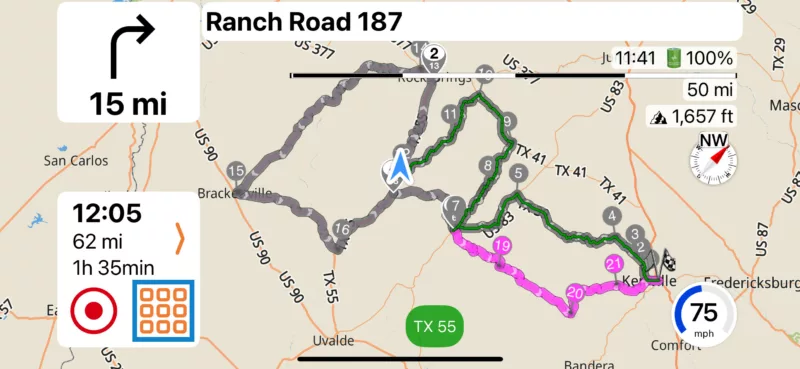
Did a weekend trip from DFW, TX down to TX Hill Country and on our 360 mile round trip Saturday, went off the route less than a mile to hit a gas station, and when we came back to the route, it had marked the remainder of the ride as ridden and the path was grey. Voice directions, Via updates, and next turn indicator just stopped. I am attaching a copy of the route and a screenshot. I went beyond Stop #1 and then returned. Everything from Stop #1 (Via 6) to Via 18 was marked as ridden.
https://scenicapp.space/route/mcoROkOP
Bug 2:
The GPS voice directions intermittently speed up super fast and cut in and out. When this happens, it also happens to whatever music is playing via Apple Music. Everything is fine until a voice direction comes over the speaker and then everything is a mess for awhile. I often have to kill Apple Music and reopen it. If I close Scenic, and just run Apple Music, it never happens, so I believe the two to be related and likely caused by Scenic since the behavior starts with a voice direction or announcement.
Feature Request 1:
Can you PLEASE remove all the labels on the map for "Soil Conservation Service Reservoirs". I believe these to pointless for any of us and it is a tremendous amount of unnecessary noise on the map, and would be helpful for planning.
Feature Request 2:
Can you somehow put a legend on the power planning map that shows what the various road colors mean? It would be very helpful for planning routes. I plan very specific routes to force the path to specific roads using Via points. I like to use State Hwys and TX FM Roads, primarily, though I use US Hwys and TX RM Roads also. I absolutely avoid dirt/unpaved roads, and situationally avoid County Roads and Interstate Freeways. It would be great to know the color coding and have the legend handy.
Bug 1:
Did a weekend trip from DFW, TX down to TX Hill Country and on our 360 mile round trip Saturday, went off the route less than a mile to hit a gas station, and when we came back to the route, it had marked the remainder of the ride as ridden and the path was grey. Voice directions, Via updates, and next turn indicator just stopped. I am attaching a copy of the route and a screenshot. I went beyond Stop #1 and then returned. Everything from Stop #1 (Via 6) to Via 18 was marked as ridden.
https://scenicapp.space/route/mcoROkOP
Bug 2:
The GPS voice directions intermittently speed up super fast and cut in and out. When this happens, it also happens to whatever music is playing via Apple Music. Everything is fine until a voice direction comes over the speaker and then everything is a mess for awhile. I often have to kill Apple Music and reopen it. If I close Scenic, and just run Apple Music, it never happens, so I believe the two to be related and likely caused by Scenic since the behavior starts with a voice direction or announcement.
Feature Request 1:
Can you PLEASE remove all the labels on the map for "Soil Conservation Service Reservoirs". I believe these to pointless for any of us and it is a tremendous amount of unnecessary noise on the map, and would be helpful for planning.
Feature Request 2:
Can you somehow put a legend on the power planning map that shows what the various road colors mean? It would be very helpful for planning routes. I plan very specific routes to force the path to specific roads using Via points. I like to use State Hwys and TX FM Roads, primarily, though I use US Hwys and TX RM Roads also. I absolutely avoid dirt/unpaved roads, and situationally avoid County Roads and Interstate Freeways. It would be great to know the color coding and have the legend handy.

Quote from Stresspuppy on 19.11.2024, 07:30Quote from greg2112 on 18.11.2024, 13:28Bug 1:
Did a weekend trip from DFW, TX down to TX Hill Country and on our 360 mile round trip Saturday, went off the route less than a mile to hit a gas station, and when we came back to the route, it had marked the remainder of the ride as ridden and the path was grey. Voice directions, Via updates, and next turn indicator just stopped. I am attaching a copy of the route and a screenshot. I went beyond Stop #1 and then returned. Everything from Stop #1 (Via 6) to Via 18 was marked as ridden
I have seen this behavior as well but don't have any specifics or screenshots to share. Not 100% sure of the circumstance but it does sound exactly like what greg2112 mentions. I was able to follow the route, but no turn-by-turn and I just had the grey line that I had to manually follow.
Quote from greg2112 on 18.11.2024, 13:28Bug 1:
Did a weekend trip from DFW, TX down to TX Hill Country and on our 360 mile round trip Saturday, went off the route less than a mile to hit a gas station, and when we came back to the route, it had marked the remainder of the ride as ridden and the path was grey. Voice directions, Via updates, and next turn indicator just stopped. I am attaching a copy of the route and a screenshot. I went beyond Stop #1 and then returned. Everything from Stop #1 (Via 6) to Via 18 was marked as ridden
I have seen this behavior as well but don't have any specifics or screenshots to share. Not 100% sure of the circumstance but it does sound exactly like what greg2112 mentions. I was able to follow the route, but no turn-by-turn and I just had the grey line that I had to manually follow.

Quote from Guido on 19.11.2024, 10:47Thanks @greg2112 and @stresspuppy,
Bug 1: I'll have a look. What is your detour behaviour setting?
Bug 2: Could you try changing the voice prompt mode? If it's ON, turn it OFF. If it's OFF, turn it ON.
Settings > Sound & Voice Instructions > Navigation Voice & Sounds > Voice Prompt ModeFR1: I can give it a try. Remove only the names, or also the blue areas?
FR2: Dirt roads are purple, or purple with some other colors. A full legend will return when the map customizer is added back. Still, it will not be referring to names like "State highways", "Interstates" etc. as these names are country specific. The map is global and uses names/categories that are not country specificic, like 'motorway', 'primary', 'secondary'. Here's more info if you like: https://wiki.openstreetmap.org/wiki/Key:highway
Cheers,
Guido
Thanks @greg2112 and @stresspuppy,
Bug 1: I'll have a look. What is your detour behaviour setting?
Bug 2: Could you try changing the voice prompt mode? If it's ON, turn it OFF. If it's OFF, turn it ON.
Settings > Sound & Voice Instructions > Navigation Voice & Sounds > Voice Prompt Mode
FR1: I can give it a try. Remove only the names, or also the blue areas?
FR2: Dirt roads are purple, or purple with some other colors. A full legend will return when the map customizer is added back. Still, it will not be referring to names like "State highways", "Interstates" etc. as these names are country specific. The map is global and uses names/categories that are not country specificic, like 'motorway', 'primary', 'secondary'. Here's more info if you like: https://wiki.openstreetmap.org/wiki/Key:highway
Cheers,
Guido
Quote from greg2112 on 19.11.2024, 12:07Quote from Guido on 19.11.2024, 10:47Thanks @greg2112 and @stresspuppy,
Bug 1: I'll have a look. What is your detour behaviour setting?
**My detour behavior is "Don't Recalculate". I find it to be the least annoying if I go off track. I'm not set on it, but the countless "recalculating" and trying to take me back to where I went off the route when 99% of the time, it was intentional, drives me nuts.
Bug 2: Could you try changing the voice prompt mode? If it's ON, turn it OFF. If it's OFF, turn it ON.
Settings > Sound & Voice Instructions > Navigation Voice & Sounds > Voice Prompt Mode**I will try this. Thanks for the suggestion
FR1: I can give it a try. Remove only the names, or also the blue areas?
**Just the names would be a tremendous improvement. It's so much visual noise that has no value to the community.
FR2: Dirt roads are purple, or purple with some other colors. A full legend will return when the map customizer is added back. Still, it will not be referring to names like "State highways", "Interstates" etc. as these names are country specific. The map is global and uses names/categories that are not country specificic, like 'motorway', 'primary', 'secondary'. Here's more info if you like: https://wiki.openstreetmap.org/wiki/Key:highway
**I have reviewed that previously and it is a lengthy legend. I guess I was just hoping there was a way to simply it and make it readily available on the planning screen.
**Thank you for responding and your consideration. If you ever need designated testers, I would be willing to participate. I ride about 300 to 500 miles a week on average, with at least one day being a planned, all day route.
Cheers,
Guido
Quote from Guido on 19.11.2024, 10:47Thanks @greg2112 and @stresspuppy,
Bug 1: I'll have a look. What is your detour behaviour setting?
**My detour behavior is "Don't Recalculate". I find it to be the least annoying if I go off track. I'm not set on it, but the countless "recalculating" and trying to take me back to where I went off the route when 99% of the time, it was intentional, drives me nuts.
Bug 2: Could you try changing the voice prompt mode? If it's ON, turn it OFF. If it's OFF, turn it ON.
Settings > Sound & Voice Instructions > Navigation Voice & Sounds > Voice Prompt Mode**I will try this. Thanks for the suggestion
FR1: I can give it a try. Remove only the names, or also the blue areas?
**Just the names would be a tremendous improvement. It's so much visual noise that has no value to the community.
FR2: Dirt roads are purple, or purple with some other colors. A full legend will return when the map customizer is added back. Still, it will not be referring to names like "State highways", "Interstates" etc. as these names are country specific. The map is global and uses names/categories that are not country specificic, like 'motorway', 'primary', 'secondary'. Here's more info if you like: https://wiki.openstreetmap.org/wiki/Key:highway
**I have reviewed that previously and it is a lengthy legend. I guess I was just hoping there was a way to simply it and make it readily available on the planning screen.
**Thank you for responding and your consideration. If you ever need designated testers, I would be willing to participate. I ride about 300 to 500 miles a week on average, with at least one day being a planned, all day route.
Cheers,
Guido
Quote from Stresspuppy on 19.11.2024, 13:51Mine is "Guide me to the first unreached via point", which must be the default because I don't remember changing it. But I agree, with this setting, I do get lots of recalulating prompts if going off track.
Mine is "Guide me to the first unreached via point", which must be the default because I don't remember changing it. But I agree, with this setting, I do get lots of recalulating prompts if going off track.
Quote from Guido on 19.11.2024, 14:55OK. Thank you guys. I'll have a look.
Regarding the recalculations... I understand it can be a bit annoying to get many recalculations to guide you back. But, looking at it from another perspective, this is one of the points distinguishing Scenic from main stream navigation apps (who can drastically change your route if you deviate). I would even argue it's one of the key reasons for using an app like Scenic. Scenic assumes you carefully planned the route you want to follow, and, with the setting on 'Guide me to the first unreached via point' (which indeed is the default), also assumes you want to follow that carefully planned route as much as possible. And so, it will send you back if you missed a via point, relentlessly, until you actually reach it. Or, until you manually skip it.
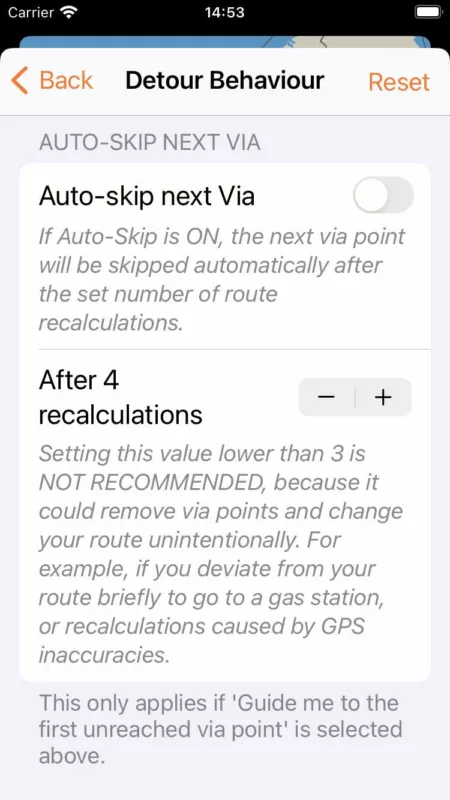
Having said that... in the next version I am bringing back the 'auto-skip next via' function. With that feature you can set the number of times you want Scenic to recalculate before it will automatically skip the next via point. With this enabled, you'll only get a few notifications. After which it will assume you don't want to go to the next via, and will send you to the next one.
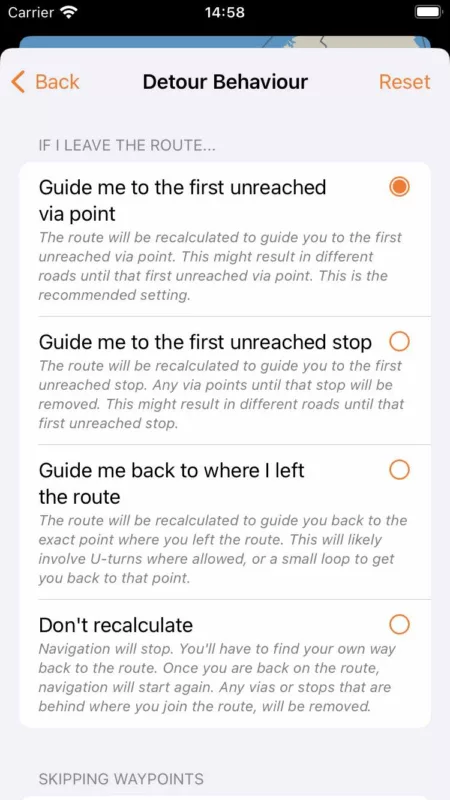
And, of course there are also the other two detour behaviour settings. If one would want Scenic to behave more like a mainstream navigation app, then the 2nd setting is probably better.
OK. Thank you guys. I'll have a look.
Regarding the recalculations... I understand it can be a bit annoying to get many recalculations to guide you back. But, looking at it from another perspective, this is one of the points distinguishing Scenic from main stream navigation apps (who can drastically change your route if you deviate). I would even argue it's one of the key reasons for using an app like Scenic. Scenic assumes you carefully planned the route you want to follow, and, with the setting on 'Guide me to the first unreached via point' (which indeed is the default), also assumes you want to follow that carefully planned route as much as possible. And so, it will send you back if you missed a via point, relentlessly, until you actually reach it. Or, until you manually skip it.
Having said that... in the next version I am bringing back the 'auto-skip next via' function. With that feature you can set the number of times you want Scenic to recalculate before it will automatically skip the next via point. With this enabled, you'll only get a few notifications. After which it will assume you don't want to go to the next via, and will send you to the next one.
And, of course there are also the other two detour behaviour settings. If one would want Scenic to behave more like a mainstream navigation app, then the 2nd setting is probably better.
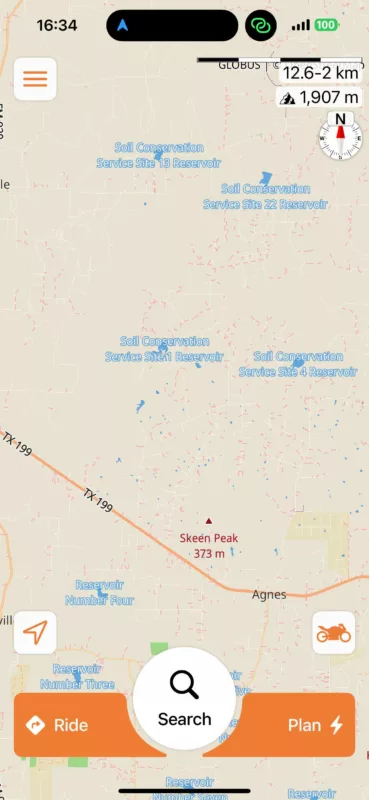
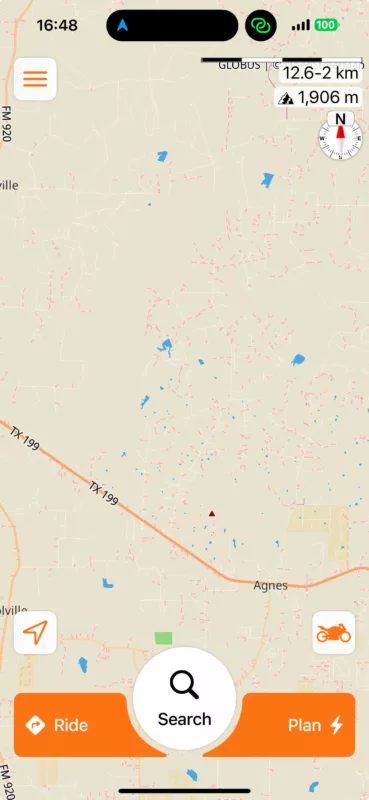
Quote from Guido on 19.11.2024, 16:49Reservoir names (and mountain peak names and elevations):
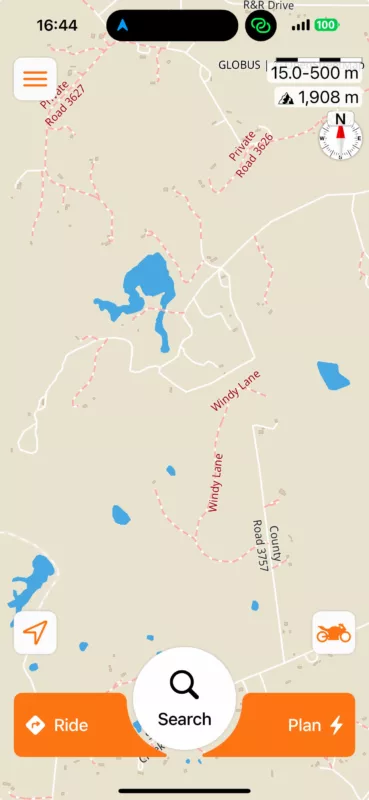
In the next version, the reservoir names will appear only at a much closer zoom level. This way the names can still be seen (and potentially used as reference point while planning), but won't give too much clutter.
Before:
After:
Reservoir names (and mountain peak names and elevations):
In the next version, the reservoir names will appear only at a much closer zoom level. This way the names can still be seen (and potentially used as reference point while planning), but won't give too much clutter.
Before:
After:
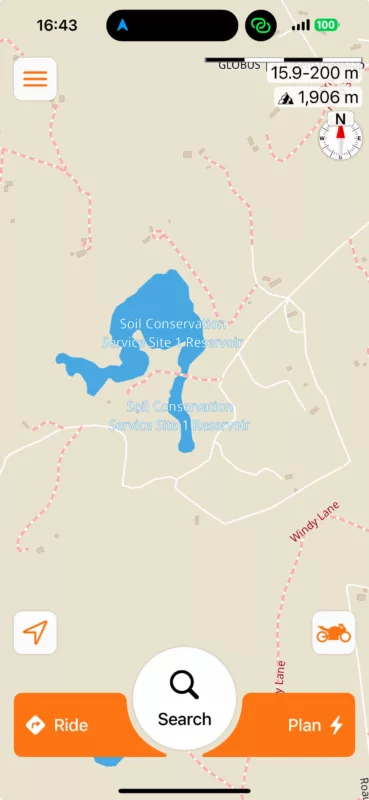
Quote from Guido on 19.11.2024, 17:05If you ever need designated testers, I would be willing to participate. I ride about 300 to 500 miles a week on average, with at least one day being a planned, all day route.
I can always use new and "fresh" beta testers. If you send me an email, mentioning your Apple ID email, I can add you as a beta tester. You can use the email button at the bottom of the help page to send me a direct email.
Thanks and cheers,
Guido
If you ever need designated testers, I would be willing to participate. I ride about 300 to 500 miles a week on average, with at least one day being a planned, all day route.
I can always use new and "fresh" beta testers. If you send me an email, mentioning your Apple ID email, I can add you as a beta tester. You can use the email button at the bottom of the help page to send me a direct email.
Thanks and cheers,
Guido
Quote from Guido on 19.11.2024, 17:20I went beyond Stop #1 and then returned. Everything from Stop #1 (Via 6) to Via 18 was marked as ridden.
After looking closer at the route, and knowing your detour behaviour setting is set to "don't recalculate", I believe this is the expected behaviour. Also assuming that the circled gas station is the one you went to:
When you passed stop 1, you were not on the route anymore. From that moment onwards, Scenic starts "scanning" to check when and where you are back on the route again (so it can restart navigation from that point onward). It looks like this is exactly what happened. You passed stop 1, but then got close to the route between via 18 and via 19, so Scenic assumed you re-joined the route there, and started navigating you to the next via point.
In the broader scheme of things, this is one of the most difficult part of navigation complicated routes. I.e. routes that (nearly) overlap themselves. There is no way for Scenic to know if you intentionally means to skip that loop, or if you did it by accident.
What I recommend in this case, is to place stop 1 exactly at the gas station. This way, you won't go off route and Scenic won't have to start "scanning" if you are back on route again.
I went beyond Stop #1 and then returned. Everything from Stop #1 (Via 6) to Via 18 was marked as ridden.
After looking closer at the route, and knowing your detour behaviour setting is set to "don't recalculate", I believe this is the expected behaviour. Also assuming that the circled gas station is the one you went to:
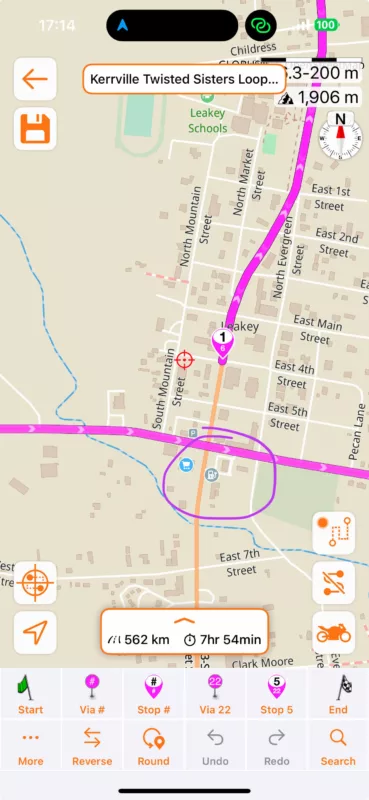
When you passed stop 1, you were not on the route anymore. From that moment onwards, Scenic starts "scanning" to check when and where you are back on the route again (so it can restart navigation from that point onward). It looks like this is exactly what happened. You passed stop 1, but then got close to the route between via 18 and via 19, so Scenic assumed you re-joined the route there, and started navigating you to the next via point.
In the broader scheme of things, this is one of the most difficult part of navigation complicated routes. I.e. routes that (nearly) overlap themselves. There is no way for Scenic to know if you intentionally means to skip that loop, or if you did it by accident.
What I recommend in this case, is to place stop 1 exactly at the gas station. This way, you won't go off route and Scenic won't have to start "scanning" if you are back on route again.
Quote from greg2112 on 22.11.2024, 12:07Guido,
Understood on all points. Thanks for the in depth and quick response.
Also, thank you SO MUCH for modifying the labels on the Soil Conservation Site/Reservoirs. It is so much easier to see all the potentially interesting roads without all that noise on the screen covering them up.
Much appreciated!
Greg
Guido,
Understood on all points. Thanks for the in depth and quick response.
Also, thank you SO MUCH for modifying the labels on the Soil Conservation Site/Reservoirs. It is so much easier to see all the potentially interesting roads without all that noise on the screen covering them up.
Much appreciated!
Greg


