
V4.02 Skip Waypoint

Quote from Bob on 13.10.2024, 15:19Guido,
I may be missing something, but using v4.02 today, I can't get the "skip" button to show up? It's selected "on" in the settings, but doesn't show when navigating, or show up on the navigation menu like it did?
I searched and didn't see this noted yet, sorry if it's a duplicate.
Also in v4.02, the app crashed 3 times in 45 minutes, but you could restart the app and pick up from where it crashed. When I stopped using the CarPlay "stub" to show the map in CarPlay, just stuck to the phone app alone, it stopped crashing. I'm probably using an unsupported function here, CarPlay isn't released yet. But perhaps some value in the observation.
I've previously read, but don't remember all the CarPlay app restrictions on screen functionality. But...if it's possible to use the phone display and the CarPlay display at the same time, like it's doing now, all I need on the CarPlay display is seperate control of map zoom in/out there, ideally one that I can get the handle bar controls to control. There is an up/down/center click lever (Indian Motorcycle) that works in Google Maps to scroll to and and then press buttons. I'd just use the actual phone for all other Scenic application control.
Even if the phone zoom level has to be the same as CarPlay, just the mirror function by itself a great addition, if allowed by Apple.
Thanks!
This won't work for those folks who hide the phone in a pocket or saddlebag.
Guido,
I may be missing something, but using v4.02 today, I can't get the "skip" button to show up? It's selected "on" in the settings, but doesn't show when navigating, or show up on the navigation menu like it did?
I searched and didn't see this noted yet, sorry if it's a duplicate.
Also in v4.02, the app crashed 3 times in 45 minutes, but you could restart the app and pick up from where it crashed. When I stopped using the CarPlay "stub" to show the map in CarPlay, just stuck to the phone app alone, it stopped crashing. I'm probably using an unsupported function here, CarPlay isn't released yet. But perhaps some value in the observation.
I've previously read, but don't remember all the CarPlay app restrictions on screen functionality. But...if it's possible to use the phone display and the CarPlay display at the same time, like it's doing now, all I need on the CarPlay display is seperate control of map zoom in/out there, ideally one that I can get the handle bar controls to control. There is an up/down/center click lever (Indian Motorcycle) that works in Google Maps to scroll to and and then press buttons. I'd just use the actual phone for all other Scenic application control.
Even if the phone zoom level has to be the same as CarPlay, just the mirror function by itself a great addition, if allowed by Apple.
Thanks!
This won't work for those folks who hide the phone in a pocket or saddlebag.

Quote from Guido on 14.10.2024, 08:51Hi Bob,
That's strange. Haven't had that feedback before about the missing "skip waypoint" button. What is your setting for detour behaviour? Were you getting navigation instructions?
As you mentioned CarPlay still needs to be completed, and it will be possiblet o control zoom if the iPhone screen stays on (similar to how it was with Scenic 3).
Cheers,
Guido
Hi Bob,
That's strange. Haven't had that feedback before about the missing "skip waypoint" button. What is your setting for detour behaviour? Were you getting navigation instructions?
As you mentioned CarPlay still needs to be completed, and it will be possiblet o control zoom if the iPhone screen stays on (similar to how it was with Scenic 3).
Cheers,
Guido
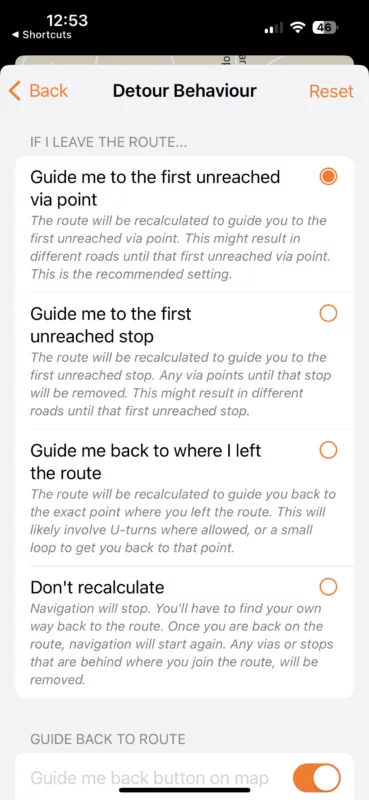
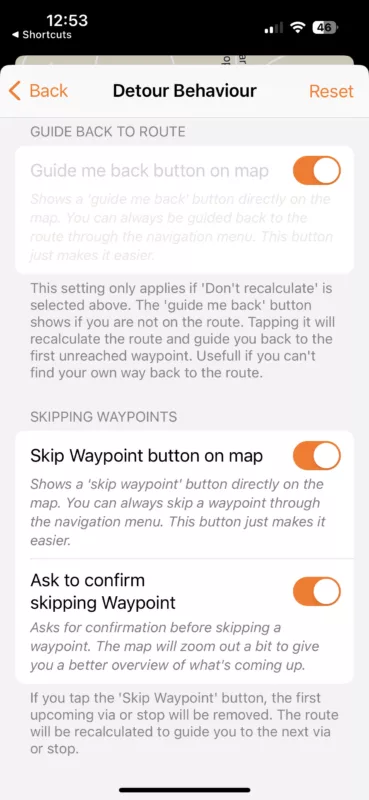
Quote from Bob on 14.10.2024, 11:09The detour behavior settings I use is shown below. In V3, I believe it made all waypoints mandatory, so if you skipped or missed one, it would forever try to take you back to that location. If I decided I wanted to skip, I used the manual skip button to cycle to the next one. There may be better options, but that's how I got used to using Scenic.
Yes, I was in "Navigation mode", with the distance to the next turn on the top of the screen. I don't use audio, so not sure what was there.
On CarPlay V3, the phone had a "logo" screen anytime the car play one was displayed. In V4, it shows in both places?
The detour behavior settings I use is shown below. In V3, I believe it made all waypoints mandatory, so if you skipped or missed one, it would forever try to take you back to that location. If I decided I wanted to skip, I used the manual skip button to cycle to the next one. There may be better options, but that's how I got used to using Scenic.
Yes, I was in "Navigation mode", with the distance to the next turn on the top of the screen. I don't use audio, so not sure what was there.
On CarPlay V3, the phone had a "logo" screen anytime the car play one was displayed. In V4, it shows in both places?
Quote from Guido on 14.10.2024, 11:17Ok. Thank Bob. I’ll investigate.
Ok. Thank Bob. I’ll investigate.


