
v3.5 - Some tests

Quote from Rallebiker on 02.02.2024, 07:52Hi,
I tried v.3.5 the last days-here my impressions:
- Route calculation/recalculation very fast
- Auto zoom very rough and not really helpful because the zooming is very low.
- (sorry, have a look on the Magic Earth screen - soft zoom and automaticly from 3D to 2D and back.)
- I activated the "Speedcameras", accepted on my on risk... but I see no speedcameras-no warning nothing.
- Also the traffic situation - not included the route calculation. TomTom shows me a big traffic jam and Scenic navigated me straight in 🙁
Best
Rallebiker
Hi,
I tried v.3.5 the last days-here my impressions:
- Route calculation/recalculation very fast
- Auto zoom very rough and not really helpful because the zooming is very low.
- (sorry, have a look on the Magic Earth screen - soft zoom and automaticly from 3D to 2D and back.)
- I activated the "Speedcameras", accepted on my on risk... but I see no speedcameras-no warning nothing.
- Also the traffic situation - not included the route calculation. TomTom shows me a big traffic jam and Scenic navigated me straight in 🙁
Best
Rallebiker

Quote from Guido on 02.02.2024, 08:49Thanks for your feedack @rallebiker. See my commenst below:
Route calculation/recalculation very fast
👍
Auto zoom very rough and not really helpful because the zooming is very low.
There are now two auto-zoom settings. Turn based and speed based. You can switch between them by tapping the zoom button in the navigation menu. Perhaps the other options works better for you?
I activated the "Speedcameras", accepted on my on risk... but I see no speedcameras-no warning nothing.
What country do you live?
Also the traffic situation - not included the route calculation. TomTom shows me a big traffic jam and Scenic navigated me straight in
Traffic is not yet taken into account in the route calculation and recalculation. It only shows on the map. Considering traffic in route (re-) calculation will be added later.
Thanks for your feedack @rallebiker. See my commenst below:
Route calculation/recalculation very fast
👍
Auto zoom very rough and not really helpful because the zooming is very low.
There are now two auto-zoom settings. Turn based and speed based. You can switch between them by tapping the zoom button in the navigation menu. Perhaps the other options works better for you?
I activated the "Speedcameras", accepted on my on risk... but I see no speedcameras-no warning nothing.
What country do you live?
Also the traffic situation - not included the route calculation. TomTom shows me a big traffic jam and Scenic navigated me straight in
Traffic is not yet taken into account in the route calculation and recalculation. It only shows on the map. Considering traffic in route (re-) calculation will be added later.
Quote from Rallebiker on 02.02.2024, 14:27I live in Germany.
Why should I accept the risk if nothing happens?
In my other navigation apps I have no problems, why does SCENIC make so problems?
Regards
Rallebiker
I live in Germany.
Why should I accept the risk if nothing happens?
In my other navigation apps I have no problems, why does SCENIC make so problems?
Regards
Rallebiker
Quote from Guido on 02.02.2024, 14:33I understand your comment.
You have to accept because Scenic does not know where and what countries you are going to ride.
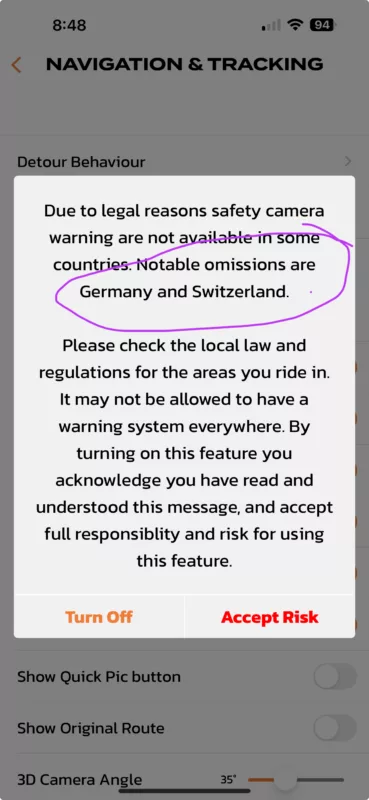
Why is Germany and Switzerland not supported at the moment? Good question! I truly wish we could support Germany and Switzerland, too, but we can not at the moment. Not because we do not want to, but because Scenic's map provider, HERE Maps, does not offer speed camera data in these countries. They say it's because of legal reasons.
I am already looking into 3rd party speed camera data providers so that Scenic can include Germany and Switzerland. But this is going to take some time.
I understand your comment.
You have to accept because Scenic does not know where and what countries you are going to ride.
Why is Germany and Switzerland not supported at the moment? Good question! I truly wish we could support Germany and Switzerland, too, but we can not at the moment. Not because we do not want to, but because Scenic's map provider, HERE Maps, does not offer speed camera data in these countries. They say it's because of legal reasons.
I am already looking into 3rd party speed camera data providers so that Scenic can include Germany and Switzerland. But this is going to take some time.
Quote from Rallebiker on 02.02.2024, 15:00Ok we will see.
I don't why Germany und Switzerland make so much trouble.
For me is more important to include the traffic situation in the calculations.
Regards
Rallebiker
Ok we will see.
I don't why Germany und Switzerland make so much trouble.
For me is more important to include the traffic situation in the calculations.
Regards
Rallebiker

Quote from GHJ on 03.02.2024, 07:04I've been looking forward to the big release for a long time. My first experience is an improvement over the very familiar 3.19. Thanks Guido.
3.51 seems nice and solid. Maybe a few wrinkles, but the product will only get better in the coming months.My impressions:
- When driving a route I saw the new Skip Via button. This one works great. Big improvement.
- Camera notifications
- Notification comes very early
- Fixed cameras only
- No mobile speed cameras
Tip: As an alternative, I use the Flitsmeister app in the background. This works with live information, including mobile cameras and also in Germany, Switzerland and Austria.- Settings:
While navigating I went to settings. It stuck so I quit and restarted the app. This has also been reported by others.- Route planning:
The Powerplanner is a very friendly planner.
What I am still missing is the option to choose different routing settings for parts of the route, such as highway/no highway. Is here already a topic for?
I've been looking forward to the big release for a long time. My first experience is an improvement over the very familiar 3.19. Thanks Guido.
3.51 seems nice and solid. Maybe a few wrinkles, but the product will only get better in the coming months.
My impressions:
- When driving a route I saw the new Skip Via button. This one works great. Big improvement.
- Camera notifications
- Notification comes very early
- Fixed cameras only
- No mobile speed cameras
Tip: As an alternative, I use the Flitsmeister app in the background. This works with live information, including mobile cameras and also in Germany, Switzerland and Austria. - Settings:
While navigating I went to settings. It stuck so I quit and restarted the app. This has also been reported by others. - Route planning:
The Powerplanner is a very friendly planner.
What I am still missing is the option to choose different routing settings for parts of the route, such as highway/no highway. Is here already a topic for?
Quote from Guido on 03.02.2024, 08:04- Notification comes very early
Agreed. Already submitted a support ticket to HERE maps about that.
- Fixed cameras only
Those are the only ones that HERE maps offers. I'm looking into other providers (especially to get cam warnings for Germany and Switzerland), but if that provider also offers mobile cams, I might add them. Don't get your hopes up, though 🙂.
While navigating I went to settings. It stuck so I quit and restarted the app. This has also been reported by others.
Yes. Had more reports about this. Will release an update next week with this and other "teething problems" fixed.
What I am still missing is the option to choose different routing settings for parts of the route
The HERE routing algorithm doesn't support multiple routing modes per route yet. Once they add it, I will add this to Scenic. Meanwhile, you could plan with Kurviger and import into Scenic. Have a look at this forum post: https://scenic.app/forum/topic/web-power-planner/#postid-6484
- Notification comes very early
Agreed. Already submitted a support ticket to HERE maps about that.
- Fixed cameras only
Those are the only ones that HERE maps offers. I'm looking into other providers (especially to get cam warnings for Germany and Switzerland), but if that provider also offers mobile cams, I might add them. Don't get your hopes up, though 🙂.
While navigating I went to settings. It stuck so I quit and restarted the app. This has also been reported by others.
Yes. Had more reports about this. Will release an update next week with this and other "teething problems" fixed.
What I am still missing is the option to choose different routing settings for parts of the route
The HERE routing algorithm doesn't support multiple routing modes per route yet. Once they add it, I will add this to Scenic. Meanwhile, you could plan with Kurviger and import into Scenic. Have a look at this forum post: https://scenic.app/forum/topic/web-power-planner/#postid-6484
Quote from Deleted user on 04.02.2024, 03:05Quote from Rallebiker on 02.02.2024, 07:52
- I activated the "Speedcameras", accepted on my on risk... but I see no speedcameras-no warning nothing.
Did you activate the layer for the speed camera's?
Quote from Rallebiker on 02.02.2024, 07:52
- I activated the "Speedcameras", accepted on my on risk... but I see no speedcameras-no warning nothing.
Did you activate the layer for the speed camera's?
Quote from Rallebiker on 04.02.2024, 04:57Quote from Boffert56 on 04.02.2024, 03:05Quote from Rallebiker on 02.02.2024, 07:52
- I activated the "Speedcameras", accepted on my on risk... but I see no speedcameras-no warning nothing.
Did you activate the layer for the speed camera's?
Which layer?
Quote from Boffert56 on 04.02.2024, 03:05Quote from Rallebiker on 02.02.2024, 07:52
- I activated the "Speedcameras", accepted on my on risk... but I see no speedcameras-no warning nothing.
Did you activate the layer for the speed camera's?
Which layer?
Quote from Deleted user on 04.02.2024, 05:57On the map page, there are 3 pictograms on the upper-left side.
The 3rd one down is the "layers" pictogram.
Click on that and a "layers" menu pops up, where you can activate or de-activate different layers, including the "speedcamera" one.
On the map page, there are 3 pictograms on the upper-left side.
The 3rd one down is the "layers" pictogram.
Click on that and a "layers" menu pops up, where you can activate or de-activate different layers, including the "speedcamera" one.
Quote from Rallebiker on 04.02.2024, 14:54Okay, I have found the "layer"
and activated it.
I'll test this week to see if anything is displayed.
I find the statement from HERE unusual,
because Garmin also gets its maps from HERE
and they get the speed cameras for Germany without any problems.
Okay, I have found the "layer"
and activated it.
I'll test this week to see if anything is displayed.
I find the statement from HERE unusual,
because Garmin also gets its maps from HERE
and they get the speed cameras for Germany without any problems.
Quote from Rallebiker on 06.02.2024, 14:10I have now tested it with the new settings (layers etc) - no speed camera is displayed.
Ok, if that's the way it is for now.
What is surprising is that the zoom and 3D settings have reset themselves!
At first I could hardly recognise 3D, I had increased this to 50% in the settings and then suddenly it was only 2D!
I tried the zoom settings again:
Route-based basically nothing happens, hardly any zoom function.
Speed-based is zoomed in a little, but only very little and then, as already written, quite jerky.
Manual is the best way to drive.
I have now tested it with the new settings (layers etc) - no speed camera is displayed.
Ok, if that's the way it is for now.
What is surprising is that the zoom and 3D settings have reset themselves!
At first I could hardly recognise 3D, I had increased this to 50% in the settings and then suddenly it was only 2D!
I tried the zoom settings again:
Route-based basically nothing happens, hardly any zoom function.
Speed-based is zoomed in a little, but only very little and then, as already written, quite jerky.
Manual is the best way to drive.


