
Using POI-Groups in PowerPlaner

Quote from SuperGraupe on 29.05.2023, 03:31Hi, may this is a request or I could not find the function.
I imported mountain passes from passknacker.com into a POI-Group.
Works fine. I could see them on the map.When I open the Power-Planer, it is only possible to search or select my favorite POI.
Imported passes as a POI-Group are not search or selectable.
It would be nice to put them in an easy way as a waypoint or stop in a route.
Hi, may this is a request or I could not find the function.
I imported mountain passes from passknacker.com into a POI-Group.
Works fine. I could see them on the map.
When I open the Power-Planer, it is only possible to search or select my favorite POI.
Imported passes as a POI-Group are not search or selectable.
It would be nice to put them in an easy way as a waypoint or stop in a route.
Quote from SuperGraupe on 29.05.2023, 04:23I find a workaround.
Import as POI (not as group)
Now they are search and selectable.Minus:
All marks are equal.
In groups you could set up the color and a picture for this kind of POI.
In normal POI that doesn't work.
Now I could not decide between Mountain, Ferry or anything else.May it is possible to add this customisation.
I find a workaround.
Import as POI (not as group)
Now they are search and selectable.
Minus:
All marks are equal.
In groups you could set up the color and a picture for this kind of POI.
In normal POI that doesn't work.
Now I could not decide between Mountain, Ferry or anything else.
May it is possible to add this customisation.

Quote from Guido on 29.05.2023, 05:39It’s true you can not search for single POIs in a group, but there is a way to add POIs from a group to your route:
1) Add your POI group
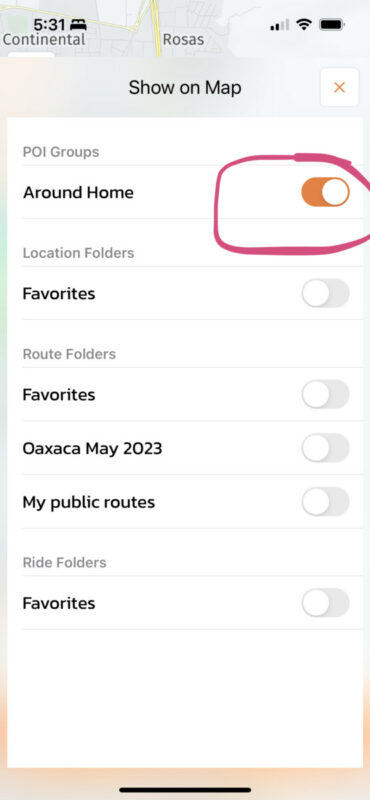
2) Make it visible on the ‘show on map’ panel (3rd button from top left):
3) Now the POIS appear as markers on the map, and you can tap/select this markers.
Example in the ‘map’ screen, tap the marker and choose ‘select’ to add it as a stop or destination:
Example in the Power Planner, selec the marker, the map will center on that location, and now you can drop a start, destination, via point or stop there.
Hope this helps/explains. If not, or if you have other questions, please let me know. Happy to help.
Best regards and ride safe,
Guido
It’s true you can not search for single POIs in a group, but there is a way to add POIs from a group to your route:
1) Add your POI group
2) Make it visible on the ‘show on map’ panel (3rd button from top left):
3) Now the POIS appear as markers on the map, and you can tap/select this markers.
Example in the ‘map’ screen, tap the marker and choose ‘select’ to add it as a stop or destination:
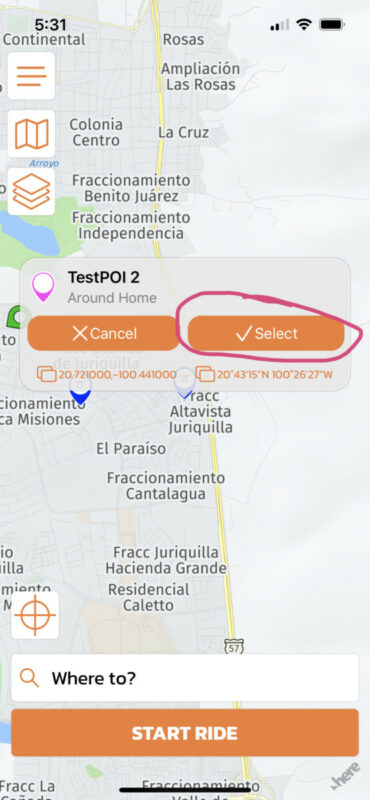
Example in the Power Planner, selec the marker, the map will center on that location, and now you can drop a start, destination, via point or stop there.
Hope this helps/explains. If not, or if you have other questions, please let me know. Happy to help.
Best regards and ride safe,
Guido
Quote from SuperGraupe on 29.05.2023, 08:26Thanks for your reply.
In my optinion this works only direct on the mainscreen not in the Power-Planer.
But I have currently a way to manage it.Is it possible to take this request (selectable POI in Group) to the development list?
Would be nice.Thanks.
Thanks for your reply.
In my optinion this works only direct on the mainscreen not in the Power-Planer.
But I have currently a way to manage it.
Is it possible to take this request (selectable POI in Group) to the development list?
Would be nice.
Thanks.
Quote from Guido on 29.05.2023, 08:39It works in Power Planner. You won't see a 'select' button in the callout bubble, but the map will center on the marker you selected... and when you drop a stop there, the stop will take the name from the POI. So, in essence the POI becomes a stop in your route.
It works in Power Planner. You won't see a 'select' button in the callout bubble, but the map will center on the marker you selected... and when you drop a stop there, the stop will take the name from the POI. So, in essence the POI becomes a stop in your route.
Quote from SuperGraupe on 29.05.2023, 09:23Just tested it.
Works, great!
Hidden features are the best :-).
Thanks,
Michael
Just tested it.
Works, great!
Hidden features are the best :-).
Thanks,
Michael


