
user since 2018 experience. Route Warps, Background Recalculations et al.

Quote from cgriell on 24.10.2024, 08:27I am an early Scenic adopter, I started back in 2018, and I am a fan of it. I have logged 2,421 hours using it, 492 rides and 78,520 Km. Said this, I tested V4.0 on October 1st and immediately I went back to V3.66. At the same time I was using V4.0 in another iPhone junt to decide when to switch. Alas, Scenic decided for me, and I am now in V4.3 in both phones.
I'll explain my today's experience, without comments, hope this help
Planning the route:
i.) Route warp I had several cases of "Route Warp". It has been reported elsewhere in this forum, so I leave it here to document that it also happened to me. In a 300 Km of planned route it happened once (the image is of another instance of same issue)
ii.) Bypassed Waypoint (I have documented it on a post on Facebook on October 1st) the planner ignored in two different occasions the waypoint I fixed when creating the route. Generated route bypassed the waypoint I fixed, then several kilometers ahead of it, it did a U-Turn to bring me back to it. I must say that this was a country road, with one lane per direction, not a 2 + 2 Highway. I assumed this happened only in V4.0, but it still happens in V4.3.
iii.) Background rerouting. This issue existed in Scenic V1, 2 and 3, and still is in V4. I set up waypoints, the planner chooses the route, I am happy with it, I continue my planning and, when recalculating the route to add the new waypoints, Scenic changes the route may be 100 km before the waypoint I just added. I was used to live with, not happy with it, but let it be
Navigating the route
i.) Skipped waypoints are cast in iron. If for any reason a waypoint is skipped, the navigator retraces the route to go to this waypoint. A pop up appears asking if we want to skip it. To click on the option means to stop (a dangerous option), take out a glove, click on the pop-up telling the navigator that we want to skip the waypoint. Not to click means becaming lost because we do not know if we follow the original route (next waypoint) or the rerouted one (first skipped waypoint).
ii.) Route Warps. In 100 km I had may be 6 or 7 cases of route warps that (and this is interesting), did not appear on the original route. It seems that the recalculation has gone nuts, and this means that they map provider uses to different route planning engines, one off-line, and one on-line... and this is bad.
iii.) Parallel route creation. This is strange... in two occasions I saw the navigator create a new route (like in the Route Warp case) but instead of bringing me to a certain point and back (like the image I uploaded), it continued trough a route parallel to the original route, and then joining it again, kilometers ahead. In my screen I saw two routes, advancing on the same direction, the one that I followed, and another one at my right, on the other side of the river. (It seems to me a special case of route warp, so probably, solved ii.) this one will be solved too.
iv.) Wrong ETA. Due to all the above, estimated arrival times as well as distances to waypoints cannot be trusted. And they oscillate wildly
iv) Wrong route length calculation. It happened once, and I ignore the circumstances. The fact is that I created a route that started 120 Km from home (I put the green flag 120 Km away from the point I actually started the navigation). Then I departed home, and the route lenght became the actual route + the 120 Km approach. I know that this happened, but I do not know under what circumstances
v.) Cluttered Map. I ignore if there are options to select the level of detail of the map, but when "Navigation Mode" the less artifacts shown, the better.
I am an early Scenic adopter, I started back in 2018, and I am a fan of it. I have logged 2,421 hours using it, 492 rides and 78,520 Km. Said this, I tested V4.0 on October 1st and immediately I went back to V3.66. At the same time I was using V4.0 in another iPhone junt to decide when to switch. Alas, Scenic decided for me, and I am now in V4.3 in both phones.
I'll explain my today's experience, without comments, hope this help
Planning the route:
i.) Route warp I had several cases of "Route Warp". It has been reported elsewhere in this forum, so I leave it here to document that it also happened to me. In a 300 Km of planned route it happened once (the image is of another instance of same issue)
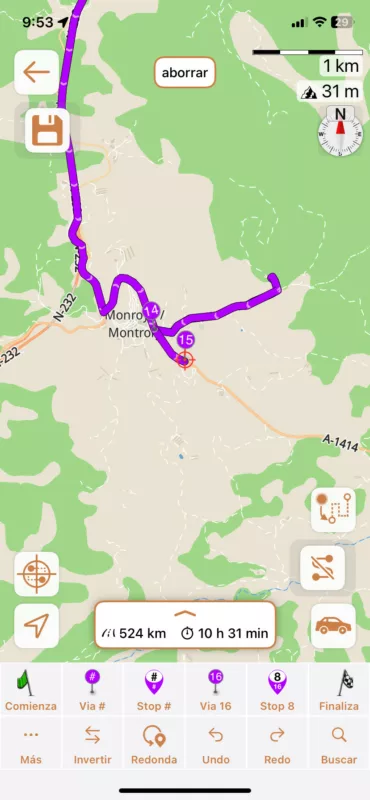
ii.) Bypassed Waypoint (I have documented it on a post on Facebook on October 1st) the planner ignored in two different occasions the waypoint I fixed when creating the route. Generated route bypassed the waypoint I fixed, then several kilometers ahead of it, it did a U-Turn to bring me back to it. I must say that this was a country road, with one lane per direction, not a 2 + 2 Highway. I assumed this happened only in V4.0, but it still happens in V4.3.
iii.) Background rerouting. This issue existed in Scenic V1, 2 and 3, and still is in V4. I set up waypoints, the planner chooses the route, I am happy with it, I continue my planning and, when recalculating the route to add the new waypoints, Scenic changes the route may be 100 km before the waypoint I just added. I was used to live with, not happy with it, but let it be
Navigating the route
i.) Skipped waypoints are cast in iron. If for any reason a waypoint is skipped, the navigator retraces the route to go to this waypoint. A pop up appears asking if we want to skip it. To click on the option means to stop (a dangerous option), take out a glove, click on the pop-up telling the navigator that we want to skip the waypoint. Not to click means becaming lost because we do not know if we follow the original route (next waypoint) or the rerouted one (first skipped waypoint).
ii.) Route Warps. In 100 km I had may be 6 or 7 cases of route warps that (and this is interesting), did not appear on the original route. It seems that the recalculation has gone nuts, and this means that they map provider uses to different route planning engines, one off-line, and one on-line... and this is bad.
iii.) Parallel route creation. This is strange... in two occasions I saw the navigator create a new route (like in the Route Warp case) but instead of bringing me to a certain point and back (like the image I uploaded), it continued trough a route parallel to the original route, and then joining it again, kilometers ahead. In my screen I saw two routes, advancing on the same direction, the one that I followed, and another one at my right, on the other side of the river. (It seems to me a special case of route warp, so probably, solved ii.) this one will be solved too.
iv.) Wrong ETA. Due to all the above, estimated arrival times as well as distances to waypoints cannot be trusted. And they oscillate wildly
iv) Wrong route length calculation. It happened once, and I ignore the circumstances. The fact is that I created a route that started 120 Km from home (I put the green flag 120 Km away from the point I actually started the navigation). Then I departed home, and the route lenght became the actual route + the 120 Km approach. I know that this happened, but I do not know under what circumstances
v.) Cluttered Map. I ignore if there are options to select the level of detail of the map, but when "Navigation Mode" the less artifacts shown, the better.

Quote from Guido on 24.10.2024, 12:07Hi Carlos,
Thanks for the detailed feedback. Below my replies/comments.
If you didn't know already, we were forced to release Scenic 4 a lot faster than we wanted, resulting in a buggy release and features that are still missing. Here's more info: https://scenic.app/scenic-4-faqs/Best regards,
GuidoPlanning:
i) Could this be due to placement of the via points? The side of the road does matter on some kind of roads, and if it's placed on the "other" side of the road, the route will send you around / updown to reach that side.ii) This is my number 1 priority now. It's the cause for many other bugs.
iii) I'm not sure I understand. Are you saying that the route is changing during planning, when you add new waypoints?
Navigation
i) By solving planning ii interacting witht he screen for this will become less necessary. You can see the next waypoint in the "skip waypoint" button at the bottom (above the bar where you see time / distance to destination
ii) This is a result of i. See here: https://scenic.app/forum/topic/detours-into-private-properties-during-ride-and-strange-generated-route/#postid-10049 (my first comment on the first issue)
iii) Without knowing the details, indeed this sounds like a special case of road warp
iv) Maybe I'm understanding wrong, but, if you have a route that starts 120km from where you are, and you include your current location in this route, then, the total length will indeed be the 120km + the route length. Have a look here: https://scenic.app/forum/topic/couple-of-defects-in-4-01/#postid-9809 (point nr 3 with the picture).
v) This is very personal. A lot of people like the details. Others don't. When the map customizer comes back, you will be able to customize again to your liking.
Hi Carlos,
Thanks for the detailed feedback. Below my replies/comments.
If you didn't know already, we were forced to release Scenic 4 a lot faster than we wanted, resulting in a buggy release and features that are still missing. Here's more info: https://scenic.app/scenic-4-faqs/
Best regards,
Guido
Planning:
i) Could this be due to placement of the via points? The side of the road does matter on some kind of roads, and if it's placed on the "other" side of the road, the route will send you around / updown to reach that side.
ii) This is my number 1 priority now. It's the cause for many other bugs.
iii) I'm not sure I understand. Are you saying that the route is changing during planning, when you add new waypoints?
Navigation
i) By solving planning ii interacting witht he screen for this will become less necessary. You can see the next waypoint in the "skip waypoint" button at the bottom (above the bar where you see time / distance to destination
ii) This is a result of i. See here: https://scenic.app/forum/topic/detours-into-private-properties-during-ride-and-strange-generated-route/#postid-10049 (my first comment on the first issue)
iii) Without knowing the details, indeed this sounds like a special case of road warp
iv) Maybe I'm understanding wrong, but, if you have a route that starts 120km from where you are, and you include your current location in this route, then, the total length will indeed be the 120km + the route length. Have a look here: https://scenic.app/forum/topic/couple-of-defects-in-4-01/#postid-9809 (point nr 3 with the picture).
v) This is very personal. A lot of people like the details. Others don't. When the map customizer comes back, you will be able to customize again to your liking.
Quote from cgriell on 24.10.2024, 14:43Hi, Guido, thanks for your answer. here are my answers
Planning
i.) placement of waypoints: The road in which I saw the "forgotten waypoint" effect is a two lane country road, 6 to 7 meters total width including both lanes.
iii.) yes, when planning the route it is like I've defined it. I save it and when I review it, some stretches of the route (of course, no waypoints on it) may have changed
Navigation
i.) Sorry to disagree, but Skipping waypoints is normal, for instance, in planning I use the "Search" Function to select the most important points of the route using the name of the city/town village that I know are on the route. I do not want to visit them, I want the road to go through. Scenic fixes the waypoint at the center of the village. When riding, I follow the road I am in, until I exit the village. V3.x directed me towards the waypoint at the center of the village during a while, but after a few kilometers this routing disappeared.
Hi, Guido, thanks for your answer. here are my answers
Planning
i.) placement of waypoints: The road in which I saw the "forgotten waypoint" effect is a two lane country road, 6 to 7 meters total width including both lanes.
iii.) yes, when planning the route it is like I've defined it. I save it and when I review it, some stretches of the route (of course, no waypoints on it) may have changed
Navigation
i.) Sorry to disagree, but Skipping waypoints is normal, for instance, in planning I use the "Search" Function to select the most important points of the route using the name of the city/town village that I know are on the route. I do not want to visit them, I want the road to go through. Scenic fixes the waypoint at the center of the village. When riding, I follow the road I am in, until I exit the village. V3.x directed me towards the waypoint at the center of the village during a while, but after a few kilometers this routing disappeared.
Quote from Guido on 24.10.2024, 15:25I'll take another look and i and iii planning.
For Nav i, Scenic 3 had an option to automatically skip the next waypoint after X recalculations. This is not available (yet) in Scenic 4. Scenic 4 does have another option that Scenic 3 did not have... skip all via points until the next stop. It's not the same, I realize, but perhaps workable for you in the meantime.
I'll take another look and i and iii planning.
For Nav i, Scenic 3 had an option to automatically skip the next waypoint after X recalculations. This is not available (yet) in Scenic 4. Scenic 4 does have another option that Scenic 3 did not have... skip all via points until the next stop. It's not the same, I realize, but perhaps workable for you in the meantime.


