
Update nearly unusable on iOS and iPadOS

Quote from oldgeezer on 29.01.2024, 19:45Guido,
Sorry to be the bearer of bad news, but the update is massively slow for me on iOS (iPhone 14 Pro Max running iOS 17.3) as well as iPadOS (iPad Pro second generation running iPadOS 17.3). Both devices exhibit a 5-7 second delay transitioning from one screen to another.
Guido,
Sorry to be the bearer of bad news, but the update is massively slow for me on iOS (iPhone 14 Pro Max running iOS 17.3) as well as iPadOS (iPad Pro second generation running iPadOS 17.3). Both devices exhibit a 5-7 second delay transitioning from one screen to another.

Quote from Guido on 29.01.2024, 20:18Weird. None of the 100+ beta testers reported this. Could you try uninstalling and reinstalling through the App Store and logging in again? First try on one device first.
Weird. None of the 100+ beta testers reported this. Could you try uninstalling and reinstalling through the App Store and logging in again? First try on one device first.
Quote from itchysnooks on 29.01.2024, 20:54I also experienced a noticeable slowness when transitioning between screens - the most obvious was Home -> Power Planner -> Cancel. About a 2-3 second lag. The map view has no additional layers enabled.
If it helps, I tested this on two devices running 17.2.1 (11 pro max, iPad Pro). One was signed in with some offline maps installed before the upgrade. One was not logged in. Only the device with offline maps / user auth state showed the lag after upgrading. I am also a yearly subscriber, if that detail matters.
FWIW, a clean install from the App Store fixed the slowness though. I have 3 more test devices available if you need to confirm any theories (I’m a dev).
I also experienced a noticeable slowness when transitioning between screens - the most obvious was Home -> Power Planner -> Cancel. About a 2-3 second lag. The map view has no additional layers enabled.
If it helps, I tested this on two devices running 17.2.1 (11 pro max, iPad Pro). One was signed in with some offline maps installed before the upgrade. One was not logged in. Only the device with offline maps / user auth state showed the lag after upgrading. I am also a yearly subscriber, if that detail matters.
FWIW, a clean install from the App Store fixed the slowness though. I have 3 more test devices available if you need to confirm any theories (I’m a dev).
Quote from Guido on 29.01.2024, 21:02Thanks @itchysnooks & @oldgeezer. I’m going to look into this first thing tomorrow. Offline maps being installed before the update is first thing I’ll investigate. Will keep you posted here.
Thanks @itchysnooks & @oldgeezer. I’m going to look into this first thing tomorrow. Offline maps being installed before the update is first thing I’ll investigate. Will keep you posted here.
Quote from oldgeezer on 29.01.2024, 22:18I did have offline maps on both devices before installing the update. A clean install fixed the problem for me on my iPad. I tested both before and after reinstalling my usual complement of offline maps, and everything is working as well as it did before the update.
I did have offline maps on both devices before installing the update. A clean install fixed the problem for me on my iPad. I tested both before and after reinstalling my usual complement of offline maps, and everything is working as well as it did before the update.
Quote from PeteRT on 30.01.2024, 03:12On first upgrade I too experienced significant delays between screens and some button presses. Must admit I was not impressed. However found this thread and deleted app and did a clean install and all good now. Phew. Just for info I'm using iPhone 12 ios 17.2.1
On first upgrade I too experienced significant delays between screens and some button presses. Must admit I was not impressed. However found this thread and deleted app and did a clean install and all good now. Phew. Just for info I'm using iPhone 12 ios 17.2.1

Quote from Guido on 30.01.2024, 05:48A question to all of you. Did you get this tracking question when first starting the app?
What choice did you make in this screen? If you chose “allow”, where did it take you? To the iOS Settings app, or did it show you this standard alert:
This might seem unrelated, but I’m asking, because one of my guesses is that when it takes you to the iOS Settings app, Scenic is pushed to the background, and the deletion of the old offline maps, might be interrupted, leaving half deleted maps or possibly even corrupted files.
This would also explain why the beta testers did not report this because I added above screen long after they ran the update for the first time.
A question to all of you. Did you get this tracking question when first starting the app?
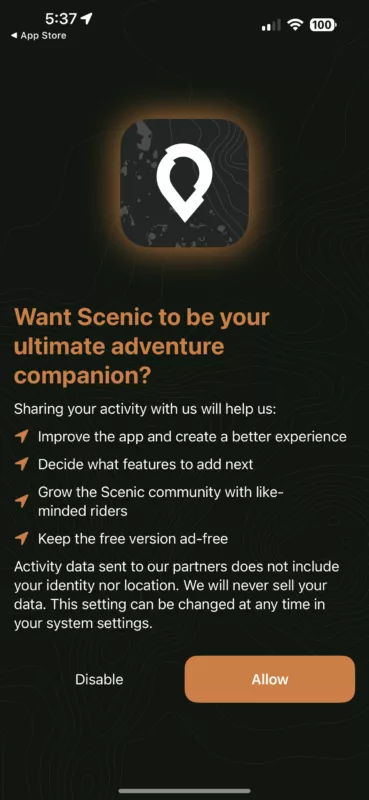
What choice did you make in this screen? If you chose “allow”, where did it take you? To the iOS Settings app, or did it show you this standard alert:
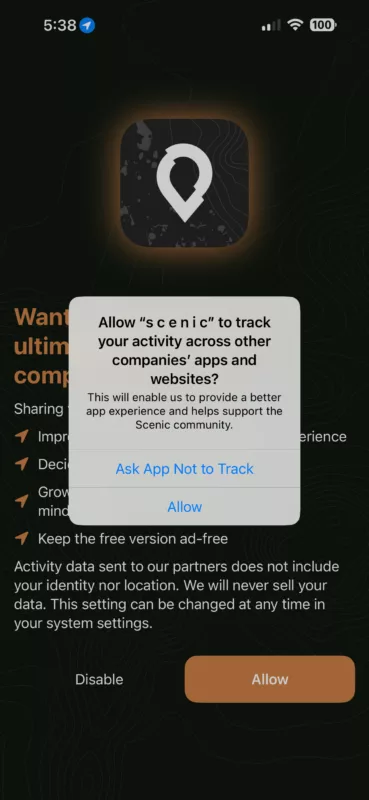
This might seem unrelated, but I’m asking, because one of my guesses is that when it takes you to the iOS Settings app, Scenic is pushed to the background, and the deletion of the old offline maps, might be interrupted, leaving half deleted maps or possibly even corrupted files.
This would also explain why the beta testers did not report this because I added above screen long after they ran the update for the first time.
Quote from PeteRT on 30.01.2024, 07:03Yes I got first screen and clicked on 'Allow' then got second screen and clicked on 'Ask App Not to Track'
App is looking good.
Yes I got first screen and clicked on 'Allow' then got second screen and clicked on 'Ask App Not to Track'
App is looking good.

Quote from Guido on 30.01.2024, 07:30It’s a phased roll-out. Not everyone gets the update at the same time. Only a small percentage have it. And I paused the roll-out after this message. I need to look into this first before I resume it.
It’s a phased roll-out. Not everyone gets the update at the same time. Only a small percentage have it. And I paused the roll-out after this message. I need to look into this first before I resume it.
Quote from itchysnooks on 30.01.2024, 09:50@Guido I clicked “Disable” on that screen (on the device with offline maps). However, I did background the app on the “what’s new” page for a different reason (I was taking a screenshot of the pricing changes). The only other things I’d note are:
- my maps were out of date. I immediately started customizing the map layers and custom style when the main UI was shown.
- I did have a custom map style already setup. I also have routes saved, completed and some POIs.
- I have two custom shortcuts, a non-default nav voice, and media playback set to control “All Media Apps”.
I’m not sure how it’s done now, but personally I’d “try” to perform the cleanup as part of an upgrade step which blocks the main UI until it’s done? And unblocks it on error/success. And if it’s supported use a different versioned cache path for the new Here SDK version (if no data is being carried over). That way, even if the delete operation fails, at least you’re working from a separate cache folder.
@Guido I clicked “Disable” on that screen (on the device with offline maps). However, I did background the app on the “what’s new” page for a different reason (I was taking a screenshot of the pricing changes). The only other things I’d note are:
- my maps were out of date. I immediately started customizing the map layers and custom style when the main UI was shown.
- I did have a custom map style already setup. I also have routes saved, completed and some POIs.
- I have two custom shortcuts, a non-default nav voice, and media playback set to control “All Media Apps”.
I’m not sure how it’s done now, but personally I’d “try” to perform the cleanup as part of an upgrade step which blocks the main UI until it’s done? And unblocks it on error/success. And if it’s supported use a different versioned cache path for the new Here SDK version (if no data is being carried over). That way, even if the delete operation fails, at least you’re working from a separate cache folder.
Quote from Guido on 30.01.2024, 09:55Thanks for your help guys. I actually found the issue. I was not cleaning the old cache at all. I thought I was (and I'm pretty sure I was in an older version of the beta), but it somehow "disappeared" (probably due to a version control issue I had a while back). I never discovered it during beta because, by that time, all beta users had already migrated. In any case, I added it back, and all should be good again. I'm uploading a new version for Apple approval today.
Thanks again everyone.
On to the next issue 🙂
Thanks for your help guys. I actually found the issue. I was not cleaning the old cache at all. I thought I was (and I'm pretty sure I was in an older version of the beta), but it somehow "disappeared" (probably due to a version control issue I had a while back). I never discovered it during beta because, by that time, all beta users had already migrated. In any case, I added it back, and all should be good again. I'm uploading a new version for Apple approval today.
Thanks again everyone.
On to the next issue 🙂

Quote from Old Man Emu on 30.01.2024, 18:40Nice ! I like the Dirt roads colour.
I have installed on iPad and iPhone ios 17.2 and downloaded new maps. Pity I bought some credits last week !!
It seems to me that the change Map Style might not be working as planned.
If I change to Hybrid Day and then want to change back to Day I have to "Select Temporarily" even though the default for Day is selected.
Not a big issue.
Good work Guido.
Nice ! I like the Dirt roads colour.
I have installed on iPad and iPhone ios 17.2 and downloaded new maps. Pity I bought some credits last week !!
It seems to me that the change Map Style might not be working as planned.
If I change to Hybrid Day and then want to change back to Day I have to "Select Temporarily" even though the default for Day is selected.
Not a big issue.
Good work Guido.
Quote from jknight611 on 30.01.2024, 19:24I did 2 ALLOWS, took it for a ride today, worked fine. I do like the dirt road indication. Can you ever see a “dirt” option on the curvy menu. I was a little concerned that my rides didn’t populate, but checked back a while later and all good. Thanks for the continued support on the app. Best of the bunch.
I did 2 ALLOWS, took it for a ride today, worked fine. I do like the dirt road indication. Can you ever see a “dirt” option on the curvy menu. I was a little concerned that my rides didn’t populate, but checked back a while later and all good. Thanks for the continued support on the app. Best of the bunch.
Quote from Guido on 30.01.2024, 19:45Can you ever see a “dirt” option on the curvy menu.
If it were up to me, it would already be there. But I'm dependent on the routing algorytms of HERE maps (and for Curvy, Kurviger). They do not have the option to "prefer" dirt roads yet. So, once they add this and make it available for 3rd party developers, I'll be the first to add it to Scenic.
Can you ever see a “dirt” option on the curvy menu.
If it were up to me, it would already be there. But I'm dependent on the routing algorytms of HERE maps (and for Curvy, Kurviger). They do not have the option to "prefer" dirt roads yet. So, once they add this and make it available for 3rd party developers, I'll be the first to add it to Scenic.
Quote from oldgeezer on 31.01.2024, 18:58I installed the 3.51 update with my offline maps in place, and there was no repeat of the sluggishness exhibited by 3.5.
Scratch one bug! 👍
I installed the 3.51 update with my offline maps in place, and there was no repeat of the sluggishness exhibited by 3.5.
Scratch one bug! 👍
Quote from Guido on 31.01.2024, 20:13Did you install it over 3.19, or over 3.50 ?
Did you install it over 3.19, or over 3.50 ?
Quote from Guido on 31.01.2024, 20:18OK. Thanks. Curious if lag is also gone for people installing over 3.19.
Only those who did not update to 3.50 can test this, as you can't get 3.19 anymore through the App Store.
OK. Thanks. Curious if lag is also gone for people installing over 3.19.
Only those who did not update to 3.50 can test this, as you can't get 3.19 anymore through the App Store.
Quote from itchysnooks on 01.02.2024, 12:36Quote from Guido on 31.01.2024, 20:18OK. Thanks. Curious if lag is also gone for people installing over 3.19.
Only those who did not update to 3.50 can test this, as you can't get 3.19 anymore through the App Store.Guido - I installed 3.51 over 3.19 on another iPhone with lots of offline maps - no lag. As an aside, I didn't get the screen with the Disable/Allow buttons this time.
Quote from Guido on 31.01.2024, 20:18OK. Thanks. Curious if lag is also gone for people installing over 3.19.
Only those who did not update to 3.50 can test this, as you can't get 3.19 anymore through the App Store.
Guido - I installed 3.51 over 3.19 on another iPhone with lots of offline maps - no lag. As an aside, I didn't get the screen with the Disable/Allow buttons this time.
Quote from Guido on 01.02.2024, 13:14I installed 3.51 over 3.19 on another iPhone with lots of offline maps - no lag. As an aside, I didn't get the screen with the Disable/Allow buttons this time.
That's good to hear. Thanks.
You only get the Disable/Allow buttons once, so that's also good 🙂.
I installed 3.51 over 3.19 on another iPhone with lots of offline maps - no lag. As an aside, I didn't get the screen with the Disable/Allow buttons this time.
That's good to hear. Thanks.
You only get the Disable/Allow buttons once, so that's also good 🙂.

Quote from GHJ on 02.02.2024, 12:29What an amazing difference. I upgraded earlier this week from 3.19 to 3.5 on iPhone, iPad and macbook. I experienced delays as described on the forum. Today you already have the solution in 3.51, with transparent clarification about cashing.
I just installed it and … the look and feel with the trust in my navigation partner is back. And yes, on the couch there is no speed limit. I can’t wait to try it on the road.
Chapeau Guido, thanks for all the good work.
What an amazing difference. I upgraded earlier this week from 3.19 to 3.5 on iPhone, iPad and macbook. I experienced delays as described on the forum. Today you already have the solution in 3.51, with transparent clarification about cashing.
I just installed it and … the look and feel with the trust in my navigation partner is back. And yes, on the couch there is no speed limit. I can’t wait to try it on the road.
Chapeau Guido, thanks for all the good work.


