
turn-off instruction

Quote from mfeske on 23.03.2022, 06:01Hello Guido,
Thank you for the great work and the new version. I've already gotten used to the new design and don't have to search for everything for so long, even if I don't have the selection wheel.
I wanted to ride a route yesterday. In the beginning everything was very promising. Only at one intersection did the turn-off instruction appear directly on the intersection, which was a bit late, but since I knew that the turn could be there, I managed to do it. In the last half, on the other hand, I sometimes missed the hints completely. The 108 kilometers became 128 kilometers.Can I send you the links to the route and the journey or does that not help at all?
greeting
Micha
Hello Guido,
Thank you for the great work and the new version. I've already gotten used to the new design and don't have to search for everything for so long, even if I don't have the selection wheel.
I wanted to ride a route yesterday. In the beginning everything was very promising. Only at one intersection did the turn-off instruction appear directly on the intersection, which was a bit late, but since I knew that the turn could be there, I managed to do it. In the last half, on the other hand, I sometimes missed the hints completely. The 108 kilometers became 128 kilometers.
Can I send you the links to the route and the journey or does that not help at all?
greeting
Micha

Quote from Guido on 23.03.2022, 06:17Hi Micha,
Im afraid I don’t fully understand. Do you mean the turn instructions were too late?
If yes, are you talking about the visual turn arrows top left of the screen and the distance to the turn? Or perhaps the audible spoken instructions? Or Perhaps something else?
Cheers,
Guido
Hi Micha,
Im afraid I don’t fully understand. Do you mean the turn instructions were too late?
If yes, are you talking about the visual turn arrows top left of the screen and the distance to the turn? Or perhaps the audible spoken instructions? Or Perhaps something else?
Cheers,
Guido
Quote from mfeske on 23.03.2022, 10:11Hallo Guido,
ich habe gestern nur Audio verwendet.
Einmal kam sie direkt auf der Kreuzung und in der zweiten Hälfte kam Sie gar nicht.
geplant:
https://scenicapp.space/viewRoute.php?rid=GRaoJVfQ
gefahren:
https://scenicapp.space/viewRide.php?rid=hsQsJxVU
Hallo Guido,
ich habe gestern nur Audio verwendet.
Einmal kam sie direkt auf der Kreuzung und in der zweiten Hälfte kam Sie gar nicht.
geplant:
https://scenicapp.space/viewRoute.php?rid=GRaoJVfQ
gefahren:
https://scenicapp.space/viewRide.php?rid=hsQsJxVU
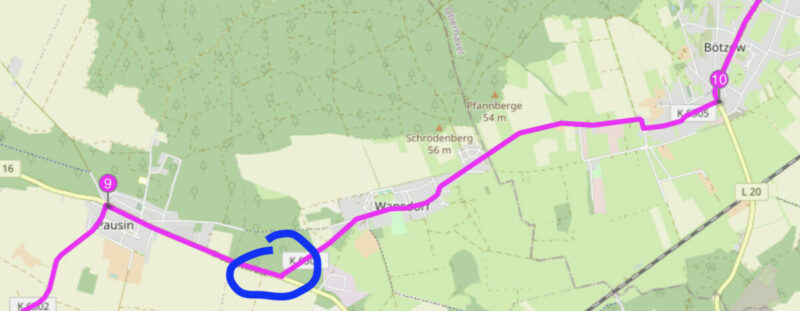
Quote from Guido on 23.03.2022, 11:23Hmmm.... that is a bit strange. One reason why this could happen is if a via point is placed exactly on or just before a junction. I recommend to place via points a good 50 or 100 meters after a junction. But, looking at your route it seems that in most cases you have done that., but not all maybe. E.g. 9 and 10 are placed almost on the junctions. Did you get an instruction on this one?
Hmmm.... that is a bit strange. One reason why this could happen is if a via point is placed exactly on or just before a junction. I recommend to place via points a good 50 or 100 meters after a junction. But, looking at your route it seems that in most cases you have done that., but not all maybe. E.g. 9 and 10 are placed almost on the junctions. Did you get an instruction on this one?

Quote from rocminc99al on 23.03.2022, 17:38I'm curious why it would matter where a via point is. I could be wrong, buy my understanding was that the via points are used to calculate the route. Once the route is calculated, they don't really matter.
I'm curious why it would matter where a via point is. I could be wrong, buy my understanding was that the via points are used to calculate the route. Once the route is calculated, they don't really matter.
Quote from Guido on 23.03.2022, 17:54I understand where you are coming from, but via points are also important when you deviate from the route. If you deviate from the route you are guided to the first unreached via point. (Exact behaviour depends on your Detour Behaviour settings, under Navigation & Tracking). That's why Scenic can't simply 'forget' about via points after a route calculation.
You are right though that essentially it shouldn't matter where via points are placed. However there is a quirk in the routing framework that Scenic uses that I need to work around: The framework generates guidances instructions for getting close to and reaching a stop or via. So, if a via/stop is just before (let's say 10 meters) before a junction and you are, let's say 100 meters before the junction, the next guidance instruction it not the turn itself, but it's "90 meters until you reach the via/stop". I block these instructions (for via points, not stops), but I don't get the next instruction before that via/stop instruction has come to pass. So, in this example I would get the actual turn instruction only 10 meters before the junction.
I have several workaround for this in place for this and honestly have not yet had many feedback about this, so it must be working quite well, otherwise I would have gotten more feedback. So, I'm not 100% sure it this is the issue for @mfeske. If this happens again with a route without via points and/or where via points are after junctions, I'd love to know about it.
I understand where you are coming from, but via points are also important when you deviate from the route. If you deviate from the route you are guided to the first unreached via point. (Exact behaviour depends on your Detour Behaviour settings, under Navigation & Tracking). That's why Scenic can't simply 'forget' about via points after a route calculation.
You are right though that essentially it shouldn't matter where via points are placed. However there is a quirk in the routing framework that Scenic uses that I need to work around: The framework generates guidances instructions for getting close to and reaching a stop or via. So, if a via/stop is just before (let's say 10 meters) before a junction and you are, let's say 100 meters before the junction, the next guidance instruction it not the turn itself, but it's "90 meters until you reach the via/stop". I block these instructions (for via points, not stops), but I don't get the next instruction before that via/stop instruction has come to pass. So, in this example I would get the actual turn instruction only 10 meters before the junction.
I have several workaround for this in place for this and honestly have not yet had many feedback about this, so it must be working quite well, otherwise I would have gotten more feedback. So, I'm not 100% sure it this is the issue for @mfeske. If this happens again with a route without via points and/or where via points are after junctions, I'd love to know about it.
Quote from mfeske on 24.03.2022, 02:44Hello Guido,
many thanks for your response. 9 and 10 were unproblematic. If I remember correctly, 4 was the turn where I only got the information at the crossing. At 6 I don't think I received any real notice that I should leave the main road, and from then on there was nothing more reasonable. As I said, I only had the audio output on and can therefore not narrow it down any further. So I should move 4 and 6?
The 7 was probably also the cause of the random walk if you look at the two routes.
Molding
Micha
Hello Guido,
many thanks for your response. 9 and 10 were unproblematic. If I remember correctly, 4 was the turn where I only got the information at the crossing. At 6 I don't think I received any real notice that I should leave the main road, and from then on there was nothing more reasonable. As I said, I only had the audio output on and can therefore not narrow it down any further. So I should move 4 and 6?
The 7 was probably also the cause of the random walk if you look at the two routes.
Molding
Micha
Quote from mfeske on 24.03.2022, 08:43Hello Guido, I moved the points and it now ran smoothly. The only deviation now was because of a blocking.
planned https://scenicapp.space/route/eGRaBote driven https://scenicapp.space/ride/WviENyPm
So note for me. Always set Via Points after the crossing.
greeting
Micha
Hello Guido, I moved the points and it now ran smoothly. The only deviation now was because of a blocking.
planned https://scenicapp.space/route/eGRaBote driven https://scenicapp.space/ride/WviENyPm
So note for me. Always set Via Points after the crossing.
greeting
Micha
Quote from Guido on 24.03.2022, 09:03Hi Micha,
thanks for letting me know. I’m happy to hear it was this known ‘quirk’.
best regards,
guido
Hi Micha,
thanks for letting me know. I’m happy to hear it was this known ‘quirk’.
best regards,
guido
Quote from rocminc99al on 24.03.2022, 20:15Thanks, Guido. So as a rule of thumb, via points should not be placed close to intersections. Should not be hard to follow this rule.
Thanks, Guido. So as a rule of thumb, via points should not be placed close to intersections. Should not be hard to follow this rule.
Quote from Guido on 24.03.2022, 20:31Correct. Specifically before the junction could cause issues. Directly after the junction not so much
If you think about it, it doesn’t make too much sense to put a via point before a junction really. The via points are intended for forcing the routing to take certain roads, so if you place a via just after the junction it will serve two purposes: it makes sure (1) you go over this junction, ánd (2) that you turn into the right road at this junction. A via point directly before a junction would only ensure number 1.
Correct. Specifically before the junction could cause issues. Directly after the junction not so much
If you think about it, it doesn’t make too much sense to put a via point before a junction really. The via points are intended for forcing the routing to take certain roads, so if you place a via just after the junction it will serve two purposes: it makes sure (1) you go over this junction, ánd (2) that you turn into the right road at this junction. A via point directly before a junction would only ensure number 1.


