
Turn-by-turn navigation “broken” v4.02

Quote from TigerOnTour on 20.10.2024, 11:09Hi, I’ve been on a day trip today and tested Scenic functionality after the first bug fix releases were released. Unfortunately I started before 4.03 was available, so I used 4.02 today.
A few things have been solved in the meantime (from 4.0 and 4.01). But I discovered a major problem today, which (as far as I can say) way not an issue in 4.0 or 4.01. It looks like turn-by-turn navigation is not working. Apart from a few times after “rerouting” - the turn-by-turn navigation was not working during my whole trip today.
I started using a planned route, when starting navigation I got the first message for navigation (visible on screen and by voice) but after a few minutes, the navigation patch on the screen reduced to a 1-line display and showed a “random” distance - this value kept fix (not changing while driving) and did not relate to any meaningful location - not the next turn nor the next waypoint. From time to time the value “changed” - but sometimes not for 10 or 20 minutes. When the navigation disappeared from the screen, the voice also went silent (not spoken navigation either).
There were values displayed in the destination frame (where the red recording sign is) - and they were also altering as set in the settings - but the displayed values were meaningless too.
The only thing working was
- following the planned route
- this was recognised by the system too - behind me the track changed to green
- the green patch which displayed the current road name and number was correctly displaying the current roadLet me know if you want to see screenshots or the route / tracks saved to investigate.
Thomas
Hi, I’ve been on a day trip today and tested Scenic functionality after the first bug fix releases were released. Unfortunately I started before 4.03 was available, so I used 4.02 today.
A few things have been solved in the meantime (from 4.0 and 4.01). But I discovered a major problem today, which (as far as I can say) way not an issue in 4.0 or 4.01. It looks like turn-by-turn navigation is not working. Apart from a few times after “rerouting” - the turn-by-turn navigation was not working during my whole trip today.
I started using a planned route, when starting navigation I got the first message for navigation (visible on screen and by voice) but after a few minutes, the navigation patch on the screen reduced to a 1-line display and showed a “random” distance - this value kept fix (not changing while driving) and did not relate to any meaningful location - not the next turn nor the next waypoint. From time to time the value “changed” - but sometimes not for 10 or 20 minutes. When the navigation disappeared from the screen, the voice also went silent (not spoken navigation either).
There were values displayed in the destination frame (where the red recording sign is) - and they were also altering as set in the settings - but the displayed values were meaningless too.
The only thing working was
- following the planned route
- this was recognised by the system too - behind me the track changed to green
- the green patch which displayed the current road name and number was correctly displaying the current road
Let me know if you want to see screenshots or the route / tracks saved to investigate.
Thomas

Quote from Guido on 20.10.2024, 17:47Hi Thomas,
I've had more reports and I'm looking into it. Will bring out a new version with fix asap.
Best regards,
Guido
Hi Thomas,
I've had more reports and I'm looking into it. Will bring out a new version with fix asap.
Best regards,
Guido

Quote from greg2112 on 20.10.2024, 18:41I had a similar experience yesterday while doing a 330 mile route that I constructed with Scenic. It seems that one of the underlying issues has to do with vias being reached, but not acknoledged. There were many, many times yesterday where the navigation and next turn distance stopped and I below it was trying to take me back to a waypoint (via) I had already passed. Once I skipped the waypoint, it would start to behave normally again.
One important thing to not that may or may not be understood yet is that there seems to be an issue with navigation when a section of road is traversed more than once in the same route. I had entire blocks of my route turn red (already ridden) when it had not been. The only thing I can figure is that the algorithm believes I’ve already ridden part of it, so I must have ridden all of it.
Guido, I have a lot of screenshots from this ride if that helps.
I had a similar experience yesterday while doing a 330 mile route that I constructed with Scenic. It seems that one of the underlying issues has to do with vias being reached, but not acknoledged. There were many, many times yesterday where the navigation and next turn distance stopped and I below it was trying to take me back to a waypoint (via) I had already passed. Once I skipped the waypoint, it would start to behave normally again.
One important thing to not that may or may not be understood yet is that there seems to be an issue with navigation when a section of road is traversed more than once in the same route. I had entire blocks of my route turn red (already ridden) when it had not been. The only thing I can figure is that the algorithm believes I’ve already ridden part of it, so I must have ridden all of it.
Guido, I have a lot of screenshots from this ride if that helps.
Quote from Guido on 20.10.2024, 18:46Hi Greg,
You are spot on. It has to do with not marking a via point as 'reached'. This is also the underlying cause for marking an overlapping stretch 'too soon'. I don't need the screenshots, but would you mind sharing your route with me and what option is your detour behaviour set to? (select route from your route list > 3 dots button top right > share link. If you prefer you can send it to me directly through the email button at the bottom of the help page.
Best regards,
Guido
Hi Greg,
You are spot on. It has to do with not marking a via point as 'reached'. This is also the underlying cause for marking an overlapping stretch 'too soon'. I don't need the screenshots, but would you mind sharing your route with me and what option is your detour behaviour set to? (select route from your route list > 3 dots button top right > share link. If you prefer you can send it to me directly through the email button at the bottom of the help page.
Best regards,
Guido
Quote from Guido on 20.10.2024, 18:50Just to check... was this with v4.03? (this contained the fix I was talking about). v4.03 was released to the app store around 34 hours ago (9:30 am US Central Time / UTS-6)
Just to check... was this with v4.03? (this contained the fix I was talking about). v4.03 was released to the app store around 34 hours ago (9:30 am US Central Time / UTS-6)
Quote from greg2112 on 20.10.2024, 19:03Guido,
I created the route on version 3 on the iPad, but updated it after opening it in v4.02. I was using v4.02 on the ride yesterday. I just downloaded the 4.03 update last night but have not had a chance to use it yet. Here is the link to my ride:
https://scenicapp.space/route/JEvYgSbZ
I am using
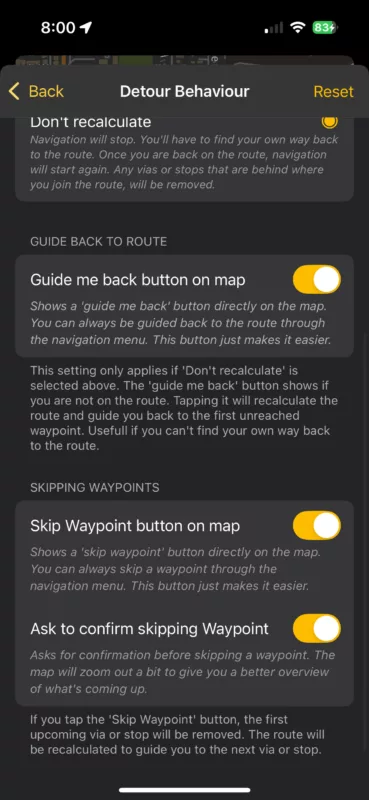
Guido,
I created the route on version 3 on the iPad, but updated it after opening it in v4.02. I was using v4.02 on the ride yesterday. I just downloaded the 4.03 update last night but have not had a chance to use it yet. Here is the link to my ride:
https://scenicapp.space/route/JEvYgSbZ
I am using 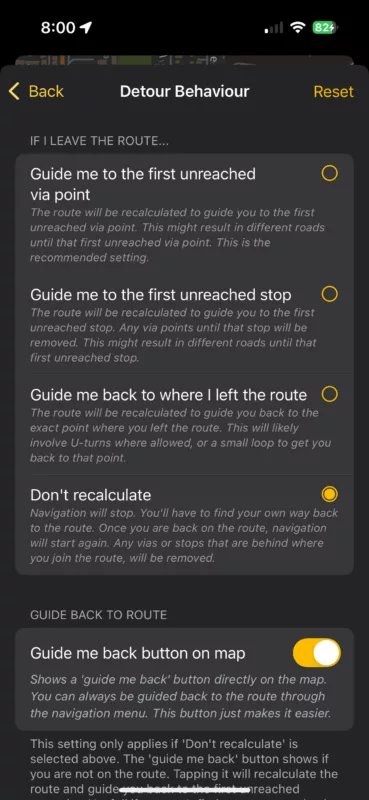
Quote from TigerOnTour on 20.10.2024, 22:35My detour behaviour was set the same way (don’t recalc) - with the same options below activated.
But I’m not sure that it matched the “points marked as already visited” behaviour - it was more like a complete stop of turn-by-turn functionality, shortly after starting navigation (within 5 minutes) - turn-by-turn was reactivated, when I added a new waypoint as next waypoint on the fly, but stopped working again quickly.
I also tried to split my route into smaller tracks - trying to just map pieces within the same map-region, downloading the newest map of the current region, avoid unpaved tracks, using only waypoints without vias, avoiding running the same piece of the road twice, trying portrait vs landscape - just to see if that would change the behaviour. Nothing of that changed the behaviour. Turn-by-turn started working after and then stopped within minutes.
My detour behaviour was set the same way (don’t recalc) - with the same options below activated.
But I’m not sure that it matched the “points marked as already visited” behaviour - it was more like a complete stop of turn-by-turn functionality, shortly after starting navigation (within 5 minutes) - turn-by-turn was reactivated, when I added a new waypoint as next waypoint on the fly, but stopped working again quickly.
I also tried to split my route into smaller tracks - trying to just map pieces within the same map-region, downloading the newest map of the current region, avoid unpaved tracks, using only waypoints without vias, avoiding running the same piece of the road twice, trying portrait vs landscape - just to see if that would change the behaviour. Nothing of that changed the behaviour. Turn-by-turn started working after and then stopped within minutes.
Quote from Guido on 21.10.2024, 09:01Could you go to the offline map list (side menu > offline maps > button top right) and check if there is an update available for the world map?
I think what's happening is that the world map is not the same version as the map regions, preventing the offline calculation from working. Not sure though... trying to gather data so that I can find the exact cause of this.Thank you
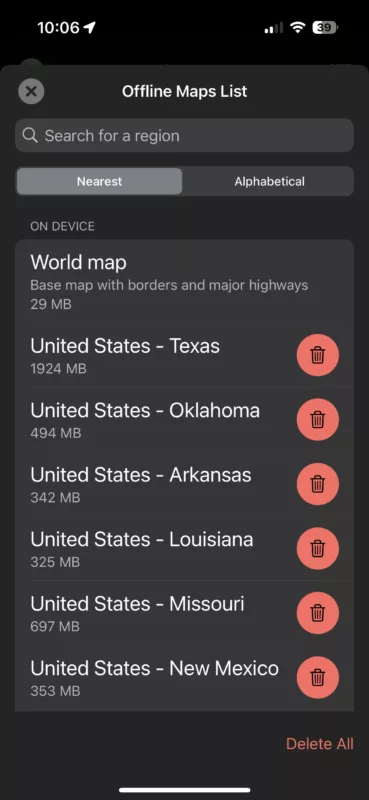
Could you go to the offline map list (side menu > offline maps > button top right) and check if there is an update available for the world map?
I think what's happening is that the world map is not the same version as the map regions, preventing the offline calculation from working. Not sure though... trying to gather data so that I can find the exact cause of this.
Thank you
Quote from Guido on 21.10.2024, 09:25OK. Thank you. I'll check with the map provider what's going on exactly.
OK. Thank you. I'll check with the map provider what's going on exactly.
Quote from TigerOnTour on 21.10.2024, 10:02I updated the offline maps yesterday during the trip (for the region where I was travelling: France - Rhone/Alpes) - it did not solve the issues or change the behaviour. After the update I created a copy of my route where I removed all parts outside of that region. The same issues happened with this route too.
Thomas
I updated the offline maps yesterday during the trip (for the region where I was travelling: France - Rhone/Alpes) - it did not solve the issues or change the behaviour. After the update I created a copy of my route where I removed all parts outside of that region. The same issues happened with this route too.
Thomas
Quote from TigerOnTour on 27.10.2024, 10:54Did a trip with 4.03 this weekend and could not reproduce the issues seen on 4.02 - Turn-by-turn navigation did work as expected. (planned route before the trip, checked for app and map updates before starting the trip this time)
4.03 navigation was stable yesterday and today, from my point of view even better than in v3 (apart from the missing 3D view). No issues while pausing and resuming the navigation (no crashes like in 4.02 anymore).
Did a trip with 4.03 this weekend and could not reproduce the issues seen on 4.02 - Turn-by-turn navigation did work as expected. (planned route before the trip, checked for app and map updates before starting the trip this time)
4.03 navigation was stable yesterday and today, from my point of view even better than in v3 (apart from the missing 3D view). No issues while pausing and resuming the navigation (no crashes like in 4.02 anymore).


