
Trial Version GPX import does not work in Web APP

Quote from DashR1300 on 29.12.2025, 12:45Not sure if this is by design, but when I import a GPX file it never prompts me to send to Scenic. I have tried multiple browsers (Chrome, Edge and Firefox). This was the main feature I wanted to try before deciding to purchase the app.
I am in the US and attempting to import a section of one of the South Eastern BDR rides.
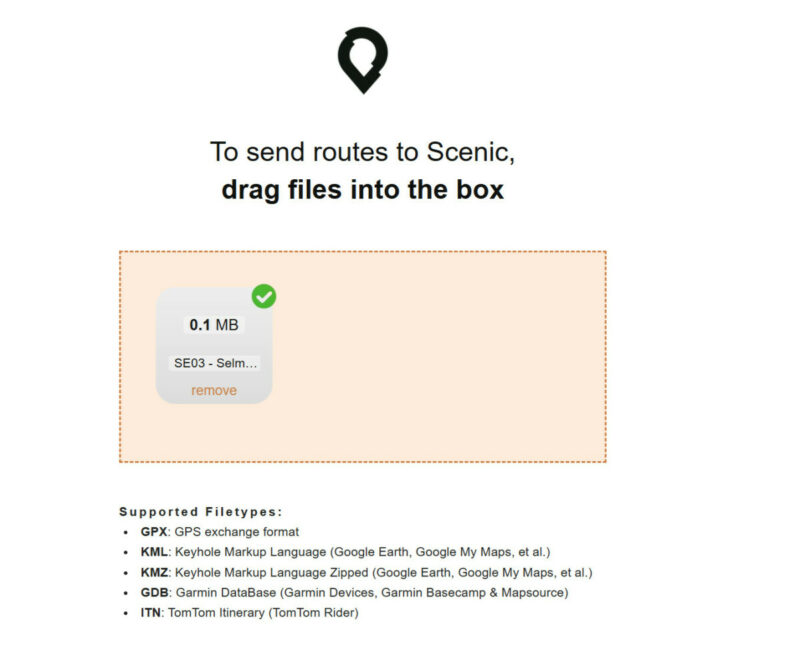
When I attempt to load a file this is all I get after an import.
GPX file is attached in a pdf file.[pdf-embedder url="https://scenic.app/wp-content/uploads/SE03-Selma-AL-to-Sylacauga-AL.pdf" title="SE03 - Selma AL to Sylacauga AL"]
Not sure if this is by design, but when I import a GPX file it never prompts me to send to Scenic. I have tried multiple browsers (Chrome, Edge and Firefox). This was the main feature I wanted to try before deciding to purchase the app.
I am in the US and attempting to import a section of one of the South Eastern BDR rides.
When I attempt to load a file this is all I get after an import.
GPX file is attached in a pdf file.[pdf-embedder url="https://scenic.app/wp-content/uploads/SE03-Selma-AL-to-Sylacauga-AL.pdf" title="SE03 - Selma AL to Sylacauga AL"]
Quote from DashR1300 on 29.12.2025, 12:55Disregard. It worked, but I did not understand that I completed the import from inside of Scenic and it would show up as an import cue.
Thanks,
Darren
Disregard. It worked, but I did not understand that I completed the import from inside of Scenic and it would show up as an import cue.
Thanks,
Darren


