
Traffic circle issue with Google Map import
Quote from rickwhitt on 03.06.2022, 08:37Hi, just starting out with this app and doing some initial tests close to home. Here's one that's vexxed me so far:
Test route from my house to a nearby town. In route, there is a traffic circle. Pretty typical of the ones around here, it has 4 "roads" attached. In the route I'm following, I enter and the 1st road is an incoming interstate off-ramp, next is the exit to go "straight", then 3rd is the exit to interstate on-ramp.
Plan route in google, copy url and import into scentic webapp and then in iPhone app. It looks perfect in review, route goes through the circle and out the other side to keep going straight. Now, when I start navigation, things go awry. First I noticed that the time estimate to destination is way off. Once I approach this traffic cirle I see why. It has me exiting on the 2nd exit, which in this case ends up being the interstate on ramp. I can see the planned track go that way, and seemingly must turn around at some point and come back as I ALSO see the track go out the correct exit of the traffic circle. Yikes!
To further investigate, I go back and do the Where To in the app itself to let it create the route itself (no import). Looks correct on review, and start navigation. Everything works as expected this way.
So, is there some known issue when using Google Map imports?
Hi, just starting out with this app and doing some initial tests close to home. Here's one that's vexxed me so far:
Test route from my house to a nearby town. In route, there is a traffic circle. Pretty typical of the ones around here, it has 4 "roads" attached. In the route I'm following, I enter and the 1st road is an incoming interstate off-ramp, next is the exit to go "straight", then 3rd is the exit to interstate on-ramp.
Plan route in google, copy url and import into scentic webapp and then in iPhone app. It looks perfect in review, route goes through the circle and out the other side to keep going straight. Now, when I start navigation, things go awry. First I noticed that the time estimate to destination is way off. Once I approach this traffic cirle I see why. It has me exiting on the 2nd exit, which in this case ends up being the interstate on ramp. I can see the planned track go that way, and seemingly must turn around at some point and come back as I ALSO see the track go out the correct exit of the traffic circle. Yikes!
To further investigate, I go back and do the Where To in the app itself to let it create the route itself (no import). Looks correct on review, and start navigation. Everything works as expected this way.
So, is there some known issue when using Google Map imports?

Quote from Guido on 03.06.2022, 08:40Can you share the link to the route you imported with me? (Select route from your list and then tap ‘share’ button).
If you prefer you can email it to me directly using the ‘email me’ button at the bottom of the help page. (rather than posting it publicly here).
Can you share the link to the route you imported with me? (Select route from your list and then tap ‘share’ button).
If you prefer you can email it to me directly using the ‘email me’ button at the bottom of the help page. (rather than posting it publicly here).
Quote from rickwhitt on 03.06.2022, 09:09Hi Guido, thanks for the prompt reply! I emailed it. Seems it routed onto the highway, turned around at the next exit, came all the way back and past to the next exit in the other direction, and then back up the highway back to the traffic circle. The long way! 🙂
Hi Guido, thanks for the prompt reply! I emailed it. Seems it routed onto the highway, turned around at the next exit, came all the way back and past to the next exit in the other direction, and then back up the highway back to the traffic circle. The long way! 🙂
Quote from Guido on 03.06.2022, 14:16Hi Rick,
Took a look at the route and I can reproduce what you experienced. This is not related to Google Maps import. It's because Scenic moves via points away from junctions before a navigation starts.
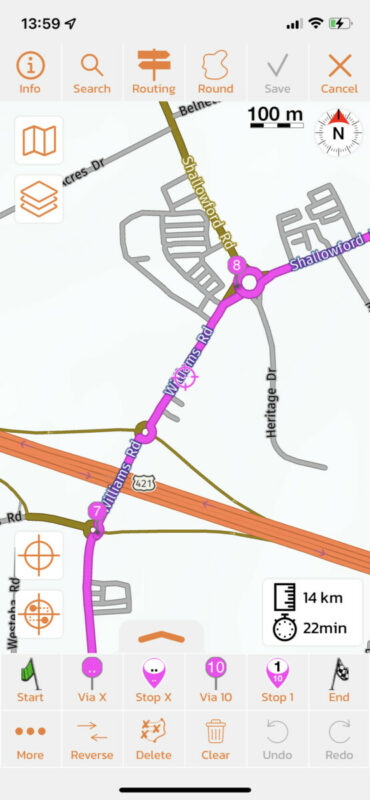
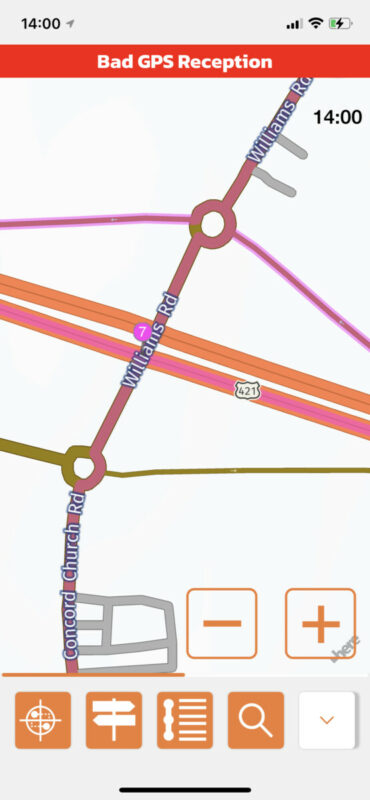
Why does Scenic move via's away from junctions you ask? Well, because via points directly on junctions can cause strange loops. If a via point is on a junction it's not sure on what road of that junction the via point is... and sometimes Scenic guesses wrong. So, to avoid this, Scenic moves via points that are very close or on junctions a little bit further down route.For this route this was quite unlucky, because the via point was moved away from the traffic circle, but by pure coincidence / bad luck, it ended up on the highway... and that's why Scenic was sending you back and forth, so you could reach that via point on the highway.Here's how the via point 7 was placed during import:And here's where via point 7 was moved to for navigation purposes:
This is really an exception, and not something to be worried about structurally. The number of reports I received about this can be counted on one handIf you'd like to make 100% sure this doesn't happen again, what you could do to avoid this in the future, is do a quick check during route import. Remove all unecesary via points and move those that are left away from junction manually. When creating a route from scratch in Scenic, it's always better to place via points after junctions and not on junctions. But with import from other sources we don't control that of course.Hope this helps/explains. If not or if you have other questions please let me know. Happy to help.
Best regards and ride safe,
Guido
Hi Rick,
Took a look at the route and I can reproduce what you experienced. This is not related to Google Maps import. It's because Scenic moves via points away from junctions before a navigation starts.
Hope this helps/explains. If not or if you have other questions please let me know. Happy to help.
Best regards and ride safe,
Guido
Quote from rickwhitt on 03.06.2022, 14:57Guido,
I suspected something like this. I've had similar trouble trying to make a route in Basemap and import to Garmin. Learned the trick that you have to put via point PAST an intersection, but I'm also finding that you have to put it far enough past so that the routing does not attmpt to say "hey wait, there's a faster way from here" and attempt to recalculate.
All a learning experience. The more I play with Scenic the more I'm convinced this is exactly what I've been looking for. Most of my use cases will be manually defined routes rather than optimized, and am loving the Power Planner already. Easy to use, especially on the iPad.
Great job and again, thanks for the suer fast response!
Rick
Guido,
I suspected something like this. I've had similar trouble trying to make a route in Basemap and import to Garmin. Learned the trick that you have to put via point PAST an intersection, but I'm also finding that you have to put it far enough past so that the routing does not attmpt to say "hey wait, there's a faster way from here" and attempt to recalculate.
All a learning experience. The more I play with Scenic the more I'm convinced this is exactly what I've been looking for. Most of my use cases will be manually defined routes rather than optimized, and am loving the Power Planner already. Easy to use, especially on the iPad.
Great job and again, thanks for the suer fast response!
Rick


