
Toggle navigation / overview in Apple Carplay when riding

Quote from Paul on 16.08.2023, 15:03This is possible when using the phone standalone without Carplay and also with Carplay if you stop the bike.
But when using Carplay during a ride the touch screen is disabled (Honda NT1100) - is there any work around or short command to enable this?
This is possible when using the phone standalone without Carplay and also with Carplay if you stop the bike.
But when using Carplay during a ride the touch screen is disabled (Honda NT1100) - is there any work around or short command to enable this?

Quote from Guido on 16.08.2023, 15:52Can you still operate CarPlay with the handlebar controls?
If so, select this button (see screenshot), and a menu will appear with, amongst others, an overview button.
If you can't operate the screen, even with the handlebar controls, I would complain to Honda about that😉. But seriously, there's nothing I can do in that case.
Can you still operate CarPlay with the handlebar controls?
If so, select this button (see screenshot), and a menu will appear with, amongst others, an overview button.
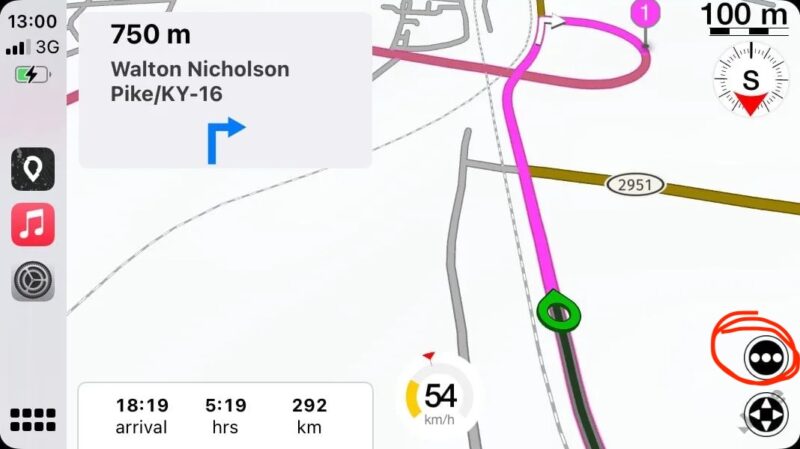
If you can't operate the screen, even with the handlebar controls, I would complain to Honda about that😉. But seriously, there's nothing I can do in that case.
Quote from Paul on 16.08.2023, 16:25Thank for the suggestion,
Its possible to change apps , control Spotify etc from the handle bar controls on the NT1100,
will try Scenic tomorrow. Had hoped for a simple toggle or voice command (Siri?) since doing multiple moves and selections with the handlebar controls when riding can be quite distracting. So many controls on the handlebar. Like an Airbus 380 .....
Thank for the suggestion,
Its possible to change apps , control Spotify etc from the handle bar controls on the NT1100,
will try Scenic tomorrow. Had hoped for a simple toggle or voice command (Siri?) since doing multiple moves and selections with the handlebar controls when riding can be quite distracting. So many controls on the handlebar. Like an Airbus 380 .....
Quote from Paul on 17.08.2023, 11:42Hi again Guido,
Tried it now and yes it works by using a series of handle bar control clicks to reach the correct menu.
Quite intuitive when you get the hang of it.
Thank you for a great app and excellent support !!!
Paul
Hi again Guido,
Tried it now and yes it works by using a series of handle bar control clicks to reach the correct menu.
Quite intuitive when you get the hang of it.
Thank you for a great app and excellent support !!!
Paul

Quote from Sampleman on 12.09.2023, 14:17I ride a Honda CRF1100L Africa Twin which apparently has the same Apple CarPlay hardware as the NT1100. As far as it seems the buttons for navigating in Apple Car Play are very limited. You can only use the up and down buttons to scroll through all clickable elements - and the ENT button for "Enter".
When I found out this, navigating through an app became easier for me.
I hope this helps
I ride a Honda CRF1100L Africa Twin which apparently has the same Apple CarPlay hardware as the NT1100. As far as it seems the buttons for navigating in Apple Car Play are very limited. You can only use the up and down buttons to scroll through all clickable elements - and the ENT button for "Enter".
When I found out this, navigating through an app became easier for me.
I hope this helps


