
The best of the best places you’re riding through

Quote from jcs37 on 05.03.2024, 00:11Hi. Would it be possible to easily “like” a place you’re riding through, a village you want to visit later or a nice road you want to remember for another trip… without stopping ? Just by rapidly touching the GPS screen while riding ?
We could even plan a trip through those “best of places” to generate a terrific trip.
Anyway, thanks for this fantastic app Guido ! Can’t stop using it. A must-have.
Hi. Would it be possible to easily “like” a place you’re riding through, a village you want to visit later or a nice road you want to remember for another trip… without stopping ? Just by rapidly touching the GPS screen while riding ?
We could even plan a trip through those “best of places” to generate a terrific trip.
Anyway, thanks for this fantastic app Guido ! Can’t stop using it. A must-have.

Quote from Guido on 05.03.2024, 00:28Thanks @jcs37,
A feature like this has been n the list for quite some time. Over just not had the time to look into it yet. It would be something like a “thumbs up” and “thumbs down” feature where you can mark a spot with just a quick tap. Then later go back and add some comments to that location.
I hope I will have time to add this feature this year.
Thanks @jcs37,
A feature like this has been n the list for quite some time. Over just not had the time to look into it yet. It would be something like a “thumbs up” and “thumbs down” feature where you can mark a spot with just a quick tap. Then later go back and add some comments to that location.
I hope I will have time to add this feature this year.
Quote from jcs37 on 05.03.2024, 00:40Thanks for this quick answer Guido. That’s exactly what I need. I just hope I’m not the only one 😀
Thanks for this quick answer Guido. That’s exactly what I need. I just hope I’m not the only one 😀

Quote from GHJ on 05.03.2024, 03:37For the moment you can use the Photo button to save the location. It will save the location on the ride and can be used later.
For the moment you can use the Photo button to save the location. It will save the location on the ride and can be used later.

Quote from massi on 05.03.2024, 06:31Another solution is to make a shortcut with the shortcut App and put it to the navigation Menu.
I 've created a shortcut for myself, when you tap the shortcut button in the navigation menu, a note will be created in the Notes App, with the name of the street and the coordinates.
Another solution is to make a shortcut with the shortcut App and put it to the navigation Menu.
I 've created a shortcut for myself, when you tap the shortcut button in the navigation menu, a note will be created in the Notes App, with the name of the street and the coordinates.
Quote from Darth_Fazer on 29.03.2024, 12:08Yes, that'a great idea - I was hoping for such a function s well. When riding a very nice road, jut make a thumbs up, those thumbs up could be collected as POI category, and later when planning a new route you can take a look at all those thumbs up sections, and plan a route thru them.
BR
Mario
Yes, that'a great idea - I was hoping for such a function s well. When riding a very nice road, jut make a thumbs up, those thumbs up could be collected as POI category, and later when planning a new route you can take a look at all those thumbs up sections, and plan a route thru them.
BR
Mario

Quote from Old Man Emu on 06.04.2024, 16:36Yes, Apple Shortcuts are very good, I wish I had two more spaces.
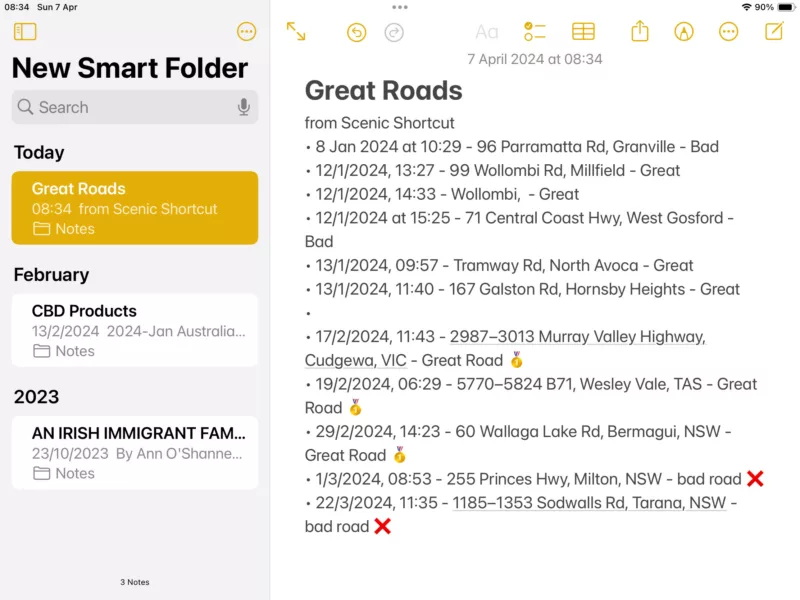
Access via the Control Panel during a ride;
Great Roads - customize to your liking
Create an Apple Shortcut (its a horrible process but you’ll get used to it after a week !)
Actions for each menu item
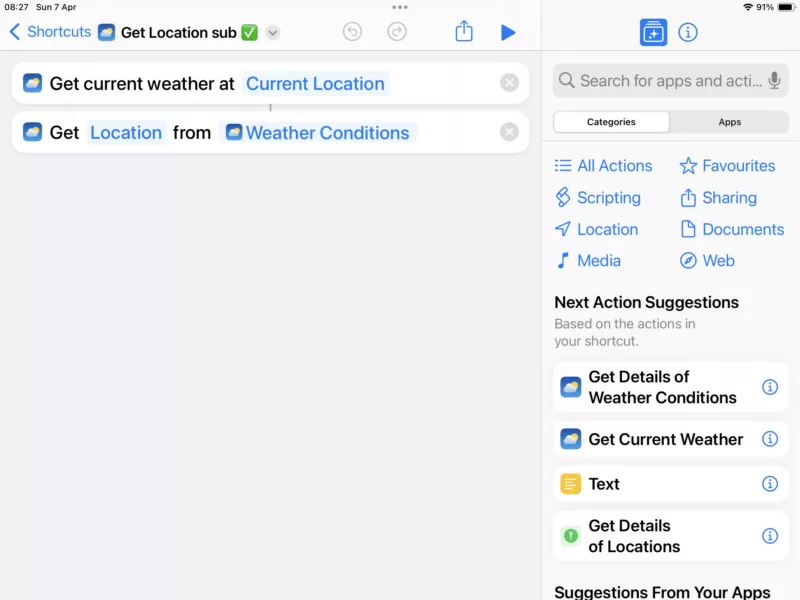
this is the subroutine to get your current location
and sample output
Yes, Apple Shortcuts are very good, I wish I had two more spaces.
Access via the Control Panel during a ride;
Great Roads - customize to your liking
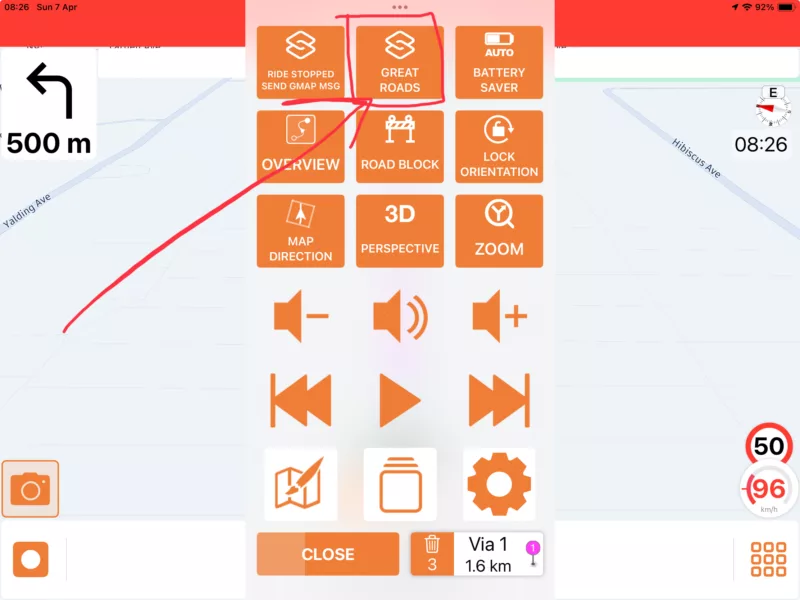
Create an Apple Shortcut (its a horrible process but you’ll get used to it after a week !)
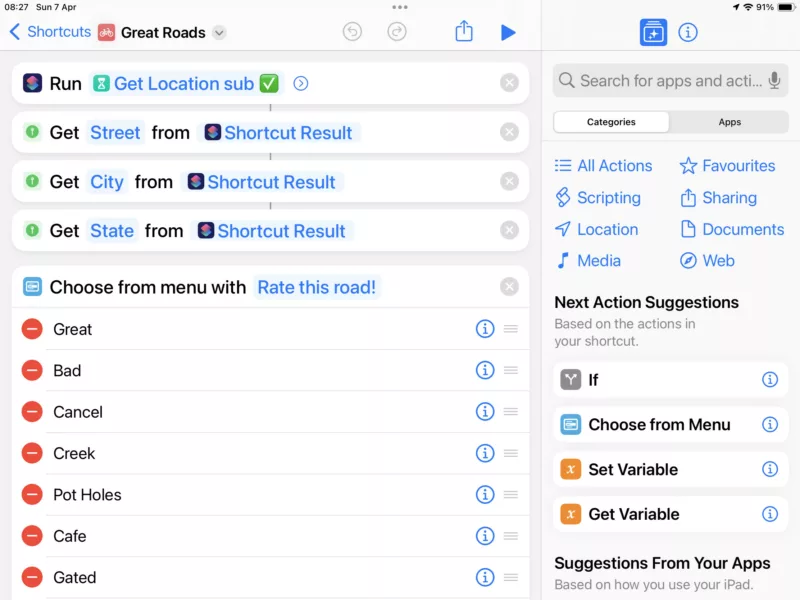
Actions for each menu item
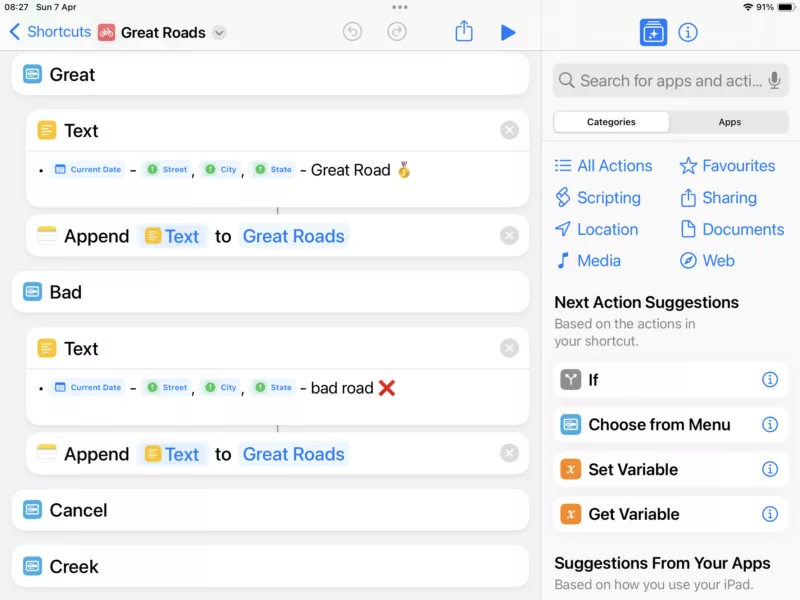
this is the subroutine to get your current location
and sample output
Quote from Darth_Fazer on 07.04.2024, 01:59Unimpressive work around, mate
but it appears that this is just getting street name addresses. What happens when you’re outside on the countryside? The main idea would be to re-import those points to Scenic and be able to plan a tour using these road sections.
can you do that with your work around.?BR
Mario
Unimpressive work around, mate
but it appears that this is just getting street name addresses. What happens when you’re outside on the countryside? The main idea would be to re-import those points to Scenic and be able to plan a tour using these road sections.
can you do that with your work around.?
BR
Mario
Quote from Old Man Emu on 07.04.2024, 18:07Quote from Darth_Fazer on 07.04.2024, 01:59Unimpressive work around, mate
but it appears that this is just getting street name addresses. What happens when you’re outside on the countryside? The main idea would be to re-import those points to Scenic and be able to plan a tour using these road sections.
can you do that with your work around.?BR
Mario
Hi Mario, I gather that you meant “impressive” ! In any case the idea was someone else’s somewhere on the interweb.
The shortcut will get the best location details it can from your satellite connection. If you select Cafe from the menu it adds Cafe to the location.
A code mod to write out the GPX data would be easy and then these can be imported to Scenic as Waypoints.
Quote from Darth_Fazer on 07.04.2024, 01:59Unimpressive work around, mate
but it appears that this is just getting street name addresses. What happens when you’re outside on the countryside? The main idea would be to re-import those points to Scenic and be able to plan a tour using these road sections.
can you do that with your work around.?BR
Mario
Hi Mario, I gather that you meant “impressive” ! In any case the idea was someone else’s somewhere on the interweb.
The shortcut will get the best location details it can from your satellite connection. If you select Cafe from the menu it adds Cafe to the location.
A code mod to write out the GPX data would be easy and then these can be imported to Scenic as Waypoints.
Quote from Darth_Fazer on 08.04.2024, 00:37Yes, of course I meant impressive. Stupid auto correct , sorry
ok then this could be a first step and then we need to re-import these waypoints.
BRmario
Yes, of course I meant impressive. Stupid auto correct , sorry
ok then this could be a first step and then we need to re-import these waypoints.
BR
mario
Quote from massi on 08.04.2024, 05:36I made this Shortcut (sorry it's german, hope you get it although you're not german)
It generates a CSV file, which I save on iCloudDrive. Than I can load this to Garmin POI Loader and let generate a GPI file. I than convert this with "GPSBabel" https://www.gpsbabel.org/ to a GPX file which I can load into Garmin Basecamp. It's not a direct way, but it works.
See it as a basis for your own POI file generator.
I made this Shortcut (sorry it's german, hope you get it although you're not german)
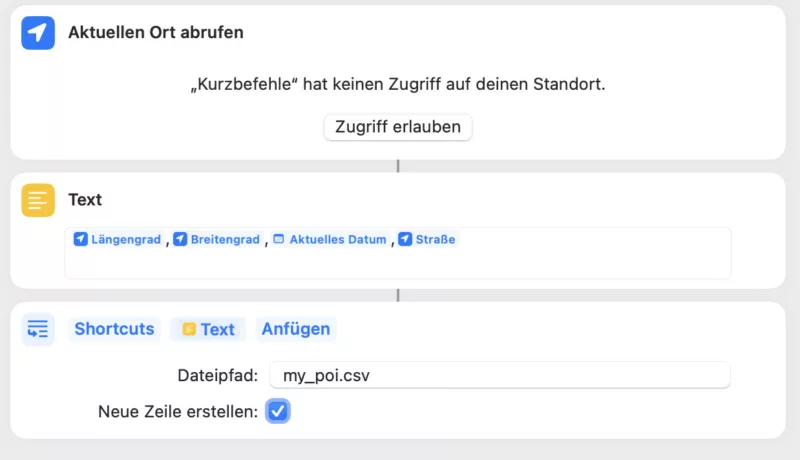
It generates a CSV file, which I save on iCloudDrive. Than I can load this to Garmin POI Loader and let generate a GPI file. I than convert this with "GPSBabel" https://www.gpsbabel.org/ to a GPX file which I can load into Garmin Basecamp. It's not a direct way, but it works.
See it as a basis for your own POI file generator.
Quote from massi on 09.04.2024, 06:40I extended my shortcut a bit, now you get a menu where you can choose the poi category.
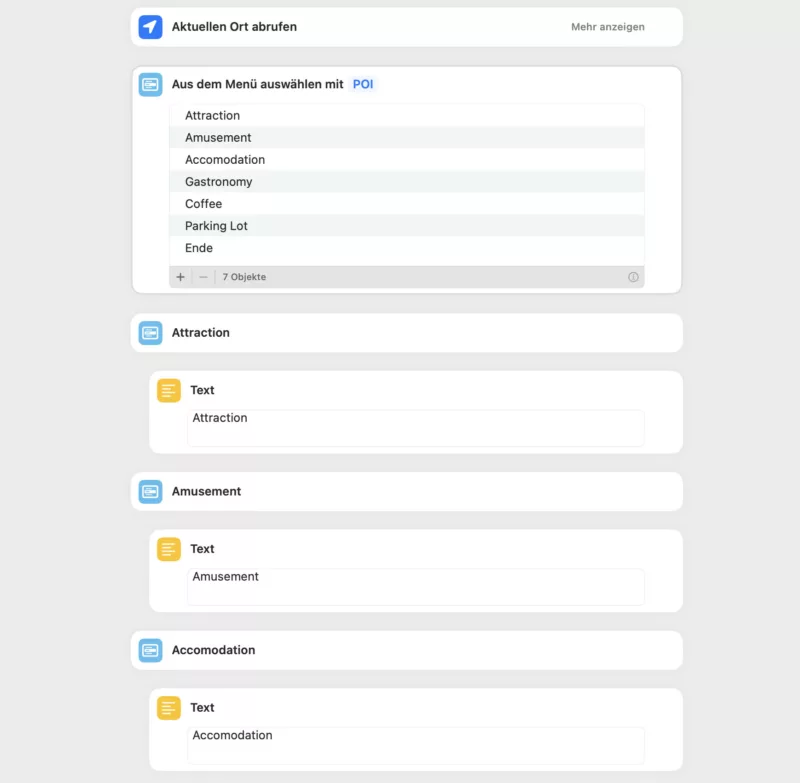
I put the shortcut file to this post.
massi
I extended my shortcut a bit, now you get a menu where you can choose the poi category.
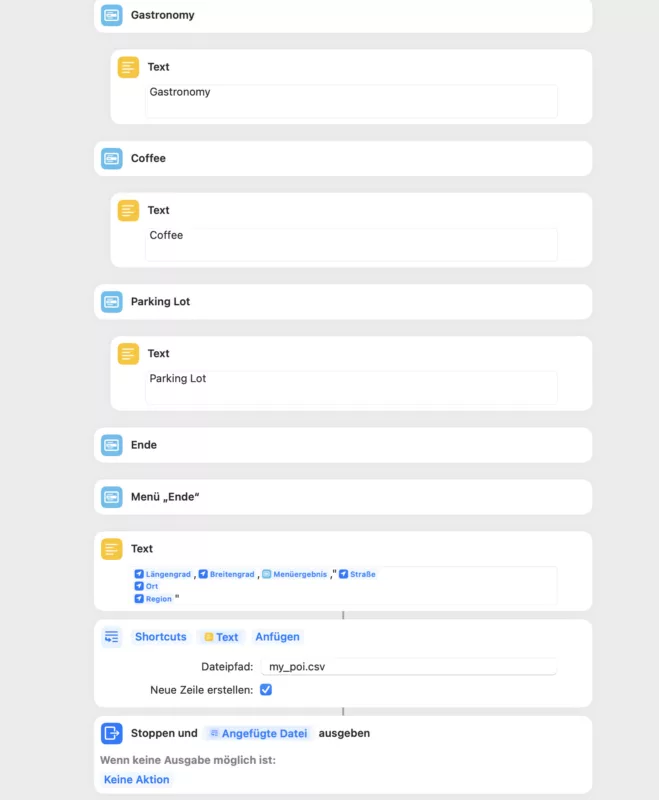
I put the shortcut file to this post.
massi


