
Switching to Scenic?

Quote from Klonko on 28.03.2022, 03:47I came across this interesting app. Unfortunately, there are some issues preventing me from switching to Scenic. It's not the cost.
I have been planning motorcycle tours for years. I manage 4000+ passes (passknacker.com), other waypoints/POI and 4000+ tracks (BBR bestbikingroads.com) for offline planning. I also use Michelin.de to find scenic roads. When I reduced my IT infrastructure to iPad (and iPhone), I replaced Garmin's Basecamp with GuruMaps Pro for planning and GajaGPS for converting exported GPX routes into a format readable by the Honda Goldwing's navigation system. I have no need for curvy and round tour functions, but rely on my planning experience.
I tried the Scenic app and unfortunately had to stop for following reasons:
- When importing waypoints as POI, the POI name is not displayed on the map
- I was only able to import one BBR track at a time (actually, I would prefer an overlay that could be switched on/off).
- The travel time is sometimes calculated considerably longer than with GoogleMaps. I have never exceeded Google's travel time estimates on backcountry roads.
- The map keeps centering itself on the current position (Thailand). Only avoidable in the Power Planner
I believe Scenic has a lot of potential compared to other apps like Calimoto, InRoute etc. I like the look & feel and the speed. Coloring scenic roads like Michelin would be nice. Closing submenus by also clicking outside of the submenu more comfortable.
Regarding Apple CarPlay, I hope the Scenic app will avoid the unacceptable bugs I encountered with Sygic and TomTom Go. The app needs to recalculate without freezing or crashing after losing GPS and/or cellular signal for some time. Waypoints must be able to be deleted and map zoom changeable while riding.
I would be happy to switch to Scenic in a not too distant future.
I came across this interesting app. Unfortunately, there are some issues preventing me from switching to Scenic. It's not the cost.
I have been planning motorcycle tours for years. I manage 4000+ passes (passknacker.com), other waypoints/POI and 4000+ tracks (BBR bestbikingroads.com) for offline planning. I also use Michelin.de to find scenic roads. When I reduced my IT infrastructure to iPad (and iPhone), I replaced Garmin's Basecamp with GuruMaps Pro for planning and GajaGPS for converting exported GPX routes into a format readable by the Honda Goldwing's navigation system. I have no need for curvy and round tour functions, but rely on my planning experience.
I tried the Scenic app and unfortunately had to stop for following reasons:
- When importing waypoints as POI, the POI name is not displayed on the map
- I was only able to import one BBR track at a time (actually, I would prefer an overlay that could be switched on/off).
- The travel time is sometimes calculated considerably longer than with GoogleMaps. I have never exceeded Google's travel time estimates on backcountry roads.
- The map keeps centering itself on the current position (Thailand). Only avoidable in the Power Planner
I believe Scenic has a lot of potential compared to other apps like Calimoto, InRoute etc. I like the look & feel and the speed. Coloring scenic roads like Michelin would be nice. Closing submenus by also clicking outside of the submenu more comfortable.
Regarding Apple CarPlay, I hope the Scenic app will avoid the unacceptable bugs I encountered with Sygic and TomTom Go. The app needs to recalculate without freezing or crashing after losing GPS and/or cellular signal for some time. Waypoints must be able to be deleted and map zoom changeable while riding.
I would be happy to switch to Scenic in a not too distant future.

Quote from Guido on 28.03.2022, 04:52Hi Klonko,
Thanks for giving Scenic a try. Here some reactions to your points:
When importing waypoints as POI, the POI name is not displayed on the map
During navigation you can double tap on the map to go to edit mode. In edit mode (and on all other screens) in the app, you can tap on a poi marker to bring up the name. I still need to implement the POI proximity alerts (getting an alert when getting close to POI during navigation) this alert is a bar at the top of screen displaying POI name)
I was only able to import one BBR track at a time (actually, I would prefer an overlay that could be switched on/off).
Scenic tries to make navigable routes from tracks. This requires checking and perhaps correcting by the user (moving/adding/removing via points). That is why batch is not p’supported at the moment. Technically it’s possible of course but you would have to do the checking anyway at some point before riding the route. If you want to batch import tracks as track (so, with ‘follow the line’ navigation only … tracks are just drawn on the map, no guidance instructions), then that is something that I can add in the future.
The travel time is sometimes calculated considerably longer than with GoogleMaps. I have never exceeded Google's travel time estimates on backcountry roads.
Yep. A known issue in some regions / countries I’m afraid. Unfortunately the issue lies with Scenic’s map provider (HERE). It is related to avg/max speeds not being known or being incorrect on these back country roads and the routing algorithm taking a too low avg value. It needs to be resolved by the routing provider.
The map keeps centering itself on the current position (Thailand). Only avoidable in the Power Planner
Double tapping the map during navigation brings you to edit mode, where the map does not center itself automatically. You can also reach edit mode by using the ‘overview’ button in the navigation (big-button) menu.
Hooe this helps/explains. If you have any other / follow up questions please let me know
cheers,
Guido
Hi Klonko,
Thanks for giving Scenic a try. Here some reactions to your points:
When importing waypoints as POI, the POI name is not displayed on the map
During navigation you can double tap on the map to go to edit mode. In edit mode (and on all other screens) in the app, you can tap on a poi marker to bring up the name. I still need to implement the POI proximity alerts (getting an alert when getting close to POI during navigation) this alert is a bar at the top of screen displaying POI name)
I was only able to import one BBR track at a time (actually, I would prefer an overlay that could be switched on/off).
Scenic tries to make navigable routes from tracks. This requires checking and perhaps correcting by the user (moving/adding/removing via points). That is why batch is not p’supported at the moment. Technically it’s possible of course but you would have to do the checking anyway at some point before riding the route. If you want to batch import tracks as track (so, with ‘follow the line’ navigation only … tracks are just drawn on the map, no guidance instructions), then that is something that I can add in the future.
The travel time is sometimes calculated considerably longer than with GoogleMaps. I have never exceeded Google's travel time estimates on backcountry roads.
Yep. A known issue in some regions / countries I’m afraid. Unfortunately the issue lies with Scenic’s map provider (HERE). It is related to avg/max speeds not being known or being incorrect on these back country roads and the routing algorithm taking a too low avg value. It needs to be resolved by the routing provider.
The map keeps centering itself on the current position (Thailand). Only avoidable in the Power Planner
Double tapping the map during navigation brings you to edit mode, where the map does not center itself automatically. You can also reach edit mode by using the ‘overview’ button in the navigation (big-button) menu.
Hooe this helps/explains. If you have any other / follow up questions please let me know
cheers,
Guido
Quote from Klonko on 30.03.2022, 19:16Thank you for your reply and your insight.
As regards POI: I know that the name is shown by pointing on it. However, I usually plan my routes via passes, which from I often know their names but not exact locations, and it is too cumbersome to click all the many passes around the passes which I want to include in my route. It is a pity that the names do not automatically show depending on the zoom level.
Further, if e.g. my easily imported BBR tracks and Michelin scenic roads could be switched on/off on the map, route planning with the Scenic app would deserve a ***** rating. An additional stable CarPlay integration would make Scenic the best app by far.
I am very impressed how you have developed a navigation app which excels many other apps from well established navigation providers.
Thank you for your reply and your insight.
As regards POI: I know that the name is shown by pointing on it. However, I usually plan my routes via passes, which from I often know their names but not exact locations, and it is too cumbersome to click all the many passes around the passes which I want to include in my route. It is a pity that the names do not automatically show depending on the zoom level.
Further, if e.g. my easily imported BBR tracks and Michelin scenic roads could be switched on/off on the map, route planning with the Scenic app would deserve a ***** rating. An additional stable CarPlay integration would make Scenic the best app by far.
I am very impressed how you have developed a navigation app which excels many other apps from well established navigation providers.
Quote from Guido on 30.03.2022, 19:39It is a pity that the names do not automatically show depending on the zoom level.
I have to be honest. I don’t think this is something that will be implemented soon. It’s not an ‘out of the box’ feature and would require quite some customization.
if e.g. my easily imported BBR tracks and Michelin scenic roads could be switched on/off on the map,
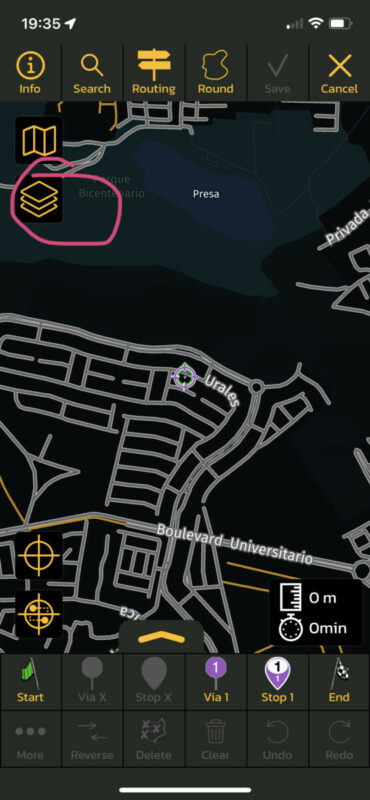
This is possible. Through the ‘layers’ button you can choose which route folders you want to show on the map. So the only thing you need to do is save those routes in a specific folder
stable CarPlay integration would make Scenic the best app by far.
Is being developed at the moment. Beta test for CarPlay has started already (sorry… no more beta slots available)
I am very impressed how you have developed a navigation app which excels many other apps from well established navigation providers.
Thank you 😊
It is a pity that the names do not automatically show depending on the zoom level.
I have to be honest. I don’t think this is something that will be implemented soon. It’s not an ‘out of the box’ feature and would require quite some customization.
if e.g. my easily imported BBR tracks and Michelin scenic roads could be switched on/off on the map,
This is possible. Through the ‘layers’ button you can choose which route folders you want to show on the map. So the only thing you need to do is save those routes in a specific folder
stable CarPlay integration would make Scenic the best app by far.
Is being developed at the moment. Beta test for CarPlay has started already (sorry… no more beta slots available)
I am very impressed how you have developed a navigation app which excels many other apps from well established navigation providers.
Thank you 😊


