
Some thoughts / suggestions

Quote from 2BTSquared on 12.12.2022, 17:51Since I primarily swim in the Android ecosystem, I dabble with other navigation apps. One such app is MyRoute-app (aka MRA). MRA is currently developing a new version of their mobile navigation app (they also have a web based route planner). I thought I might note a few thing's that I'm seeing in the new MRA mobile (beta) app that I like but don't find in Scenic. So here goes...
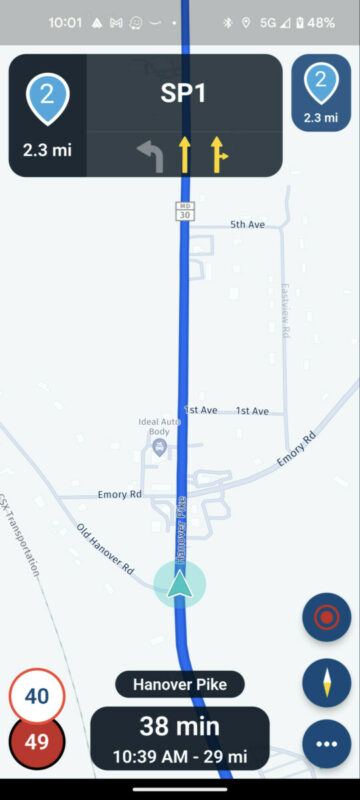
I use the terms shaping points and stops vs vias and waypoints because the terms are used differently depending on what site your on or what app you are using. Anyway... MRA displays the given stop/shaping point name. In this case above I called the upcoming stop Via 1 (it could be Fuel Stop for example). I find being able to name and display the stop handy. I believe with Scenic that you only get an indication - spoken (and perhaps visually?) - of the stops name right before you reach it. MRA will display the shaping point or stop name way in advance/persistently if there is no other navigation point in between the current location and the shaping point/stop - see here (shaping point name SP1)...
MRA will also display the shaping point/stop icon (with distance to) persistently in the icon to the right. You'll know it's coming well in advance.
Another item that's nice is that MRA allows the user to change the color of the shaping points/stops. I find this handy too. For example, I might give planned fuel stops a different color - say yellow - so that I'm certain it grabs my attention. With the yellow color (big yellow hand) and long, persistent display that it's coming up, I shouldn't miss it. This is a huge improvement for MRA (beta). MRA's current version will easily let you go zooming by your planned - but unnoticed - fuel stop. Not good - ask me how I know. Another use case off the top of my head - I might use this feature when photo mapping. In that scenario a route may have several shaping points/stops used to indicate the start (colored green) of a photo run and a stop (colored red).
Don't get me wrong... Scenic definitely lets you know about an upcoming stop. I'm just noting the enhancements (which I find to be nice/useful touches) that MRA adds to this feature.
Another nice feature that MRA is tossing into the mix is the display (on the left) of the next turn (after the current)...
MRA almost always displays this... You'll know the next two turns well in advance...
Then there is lane assist. I do find it handy...
I don't know if lane assist is on the Radar for Scenic, but it would be a nice-to-have.
Once last thing... The time and distance field at the bottom. It's configurable in MRA as it is in Scenic. Here's the nice touch in MRA though... You can tap the field in MRA and it will toggle between time and distance to destination (as shown), shaping point or stop. With this you can easily change what it displays while riding.
One thing I doubt that MRA will ever have that Scenic does nicely is the interoperability/integration with leading trip/route planners (i.e. Furkot). I say this because MRA has it's own route planner (way inferior to Furkot in my opinion), so they wouldn't have motivation to do so. I am beta testing MRA on my android device and using Scenic as my main go to on my work iPhone. While using both I've caught myself thinking a few times... Gee I wish Scenic did that. Of course I'm not a Scenic veteran so it's possible I've missed something. Anyway...
For what it's worth... My 2 cents.
Since I primarily swim in the Android ecosystem, I dabble with other navigation apps. One such app is MyRoute-app (aka MRA). MRA is currently developing a new version of their mobile navigation app (they also have a web based route planner). I thought I might note a few thing's that I'm seeing in the new MRA mobile (beta) app that I like but don't find in Scenic. So here goes...
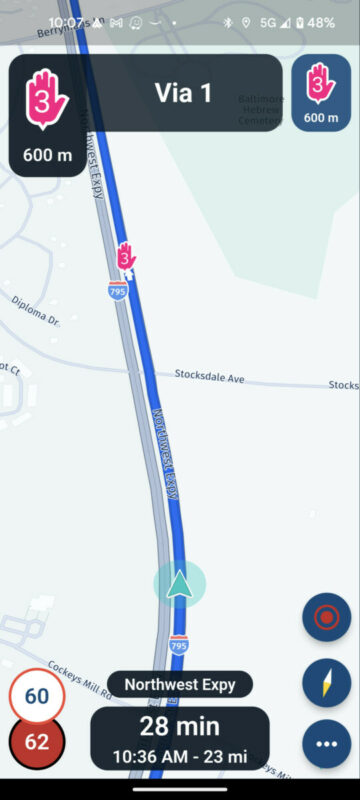
I use the terms shaping points and stops vs vias and waypoints because the terms are used differently depending on what site your on or what app you are using. Anyway... MRA displays the given stop/shaping point name. In this case above I called the upcoming stop Via 1 (it could be Fuel Stop for example). I find being able to name and display the stop handy. I believe with Scenic that you only get an indication - spoken (and perhaps visually?) - of the stops name right before you reach it. MRA will display the shaping point or stop name way in advance/persistently if there is no other navigation point in between the current location and the shaping point/stop - see here (shaping point name SP1)...
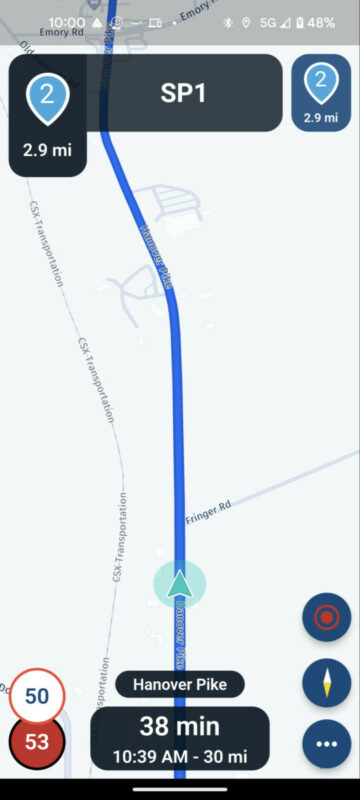
MRA will also display the shaping point/stop icon (with distance to) persistently in the icon to the right. You'll know it's coming well in advance.
Another item that's nice is that MRA allows the user to change the color of the shaping points/stops. I find this handy too. For example, I might give planned fuel stops a different color - say yellow - so that I'm certain it grabs my attention. With the yellow color (big yellow hand) and long, persistent display that it's coming up, I shouldn't miss it. This is a huge improvement for MRA (beta). MRA's current version will easily let you go zooming by your planned - but unnoticed - fuel stop. Not good - ask me how I know. Another use case off the top of my head - I might use this feature when photo mapping. In that scenario a route may have several shaping points/stops used to indicate the start (colored green) of a photo run and a stop (colored red).
Don't get me wrong... Scenic definitely lets you know about an upcoming stop. I'm just noting the enhancements (which I find to be nice/useful touches) that MRA adds to this feature.
Another nice feature that MRA is tossing into the mix is the display (on the left) of the next turn (after the current)...
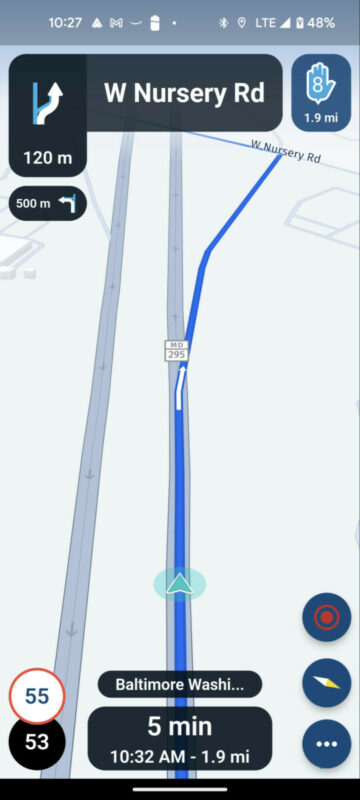
MRA almost always displays this... You'll know the next two turns well in advance...
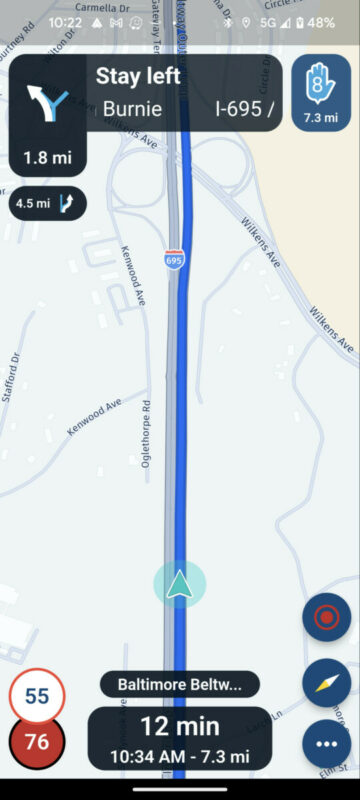
Then there is lane assist. I do find it handy...
I don't know if lane assist is on the Radar for Scenic, but it would be a nice-to-have.
Once last thing... The time and distance field at the bottom. It's configurable in MRA as it is in Scenic. Here's the nice touch in MRA though... You can tap the field in MRA and it will toggle between time and distance to destination (as shown), shaping point or stop. With this you can easily change what it displays while riding.
One thing I doubt that MRA will ever have that Scenic does nicely is the interoperability/integration with leading trip/route planners (i.e. Furkot). I say this because MRA has it's own route planner (way inferior to Furkot in my opinion), so they wouldn't have motivation to do so. I am beta testing MRA on my android device and using Scenic as my main go to on my work iPhone. While using both I've caught myself thinking a few times... Gee I wish Scenic did that. Of course I'm not a Scenic veteran so it's possible I've missed something. Anyway...
For what it's worth... My 2 cents.

Quote from Guido on 13.12.2022, 08:39Thanks very much for your suggestions. I appreciate you taking the time to write and helping me make Scenic better. Below are my reactions to you individual points:
I believe with Scenic that you only get an indication - spoken (and perhaps visually?) - of the stops name right before you reach it.
Scenic does tell you about an upcoming stop as a turn instruction as well, but I agree it could be more clear. Somehow the screenshots you attached did not come through, so I'm not sure how MRA is doing it in their new app. Once I have some more time I'll take a look at their new nav app myself. Here is a forum post on how is currently works in Scenic: https://scenic.app/forum/topic/stop-in-route-text#postid-4189
Another nice feature that MRA is tossing into the mix is the display (on the left) of the next turn (after the current)...
Scenic also does this, but only when the next turn is very close to the upcoming/current turn. I followed Waze in this. My reasoning was that there is no real use in seeing the next turn if you still have enough time and distance to see it after the upcoming turn. As an extreme example: If the upcoming turn is to take the highway in 10km, and the turn after that is to exit the highway after 20 km, then my reasoning is that it's a waste of screen space and rider attention to show the upcoming turn. But, an option to make this configurable would definitely be possible. I'm migrating Scenic to the new HERE framework over winter and will see if I can add this.
I don't know if lane assist is on the Radar for Scenic, but it would be a nice-to-have.
Yes. Lane assist is part of the new HERE framework, but it's not a priority item at the moment to integrate it into Scenic. There are more highly-requested features I want to add first. Like speed-cameras for example.
You can tap the field in MRA and it will toggle between time and distance to destination (as shown), shaping point or stop.
That's a nice feature indeed. Should be easy enough to add to Scenic. I'll try and add it during the migration over winter.
interoperability/integration with leading trip/route planners (i.e. Furkot).
Yes. They'll probably never add that since they have their own web-based route planner. It's on the roadmap to add one for Scenic too, but again, not a priority item for the moment.
Thanks again for your suggestions. I think they are worth a lot more than 2 cents 🙂.
Thanks very much for your suggestions. I appreciate you taking the time to write and helping me make Scenic better. Below are my reactions to you individual points:
I believe with Scenic that you only get an indication - spoken (and perhaps visually?) - of the stops name right before you reach it.
Scenic does tell you about an upcoming stop as a turn instruction as well, but I agree it could be more clear. Somehow the screenshots you attached did not come through, so I'm not sure how MRA is doing it in their new app. Once I have some more time I'll take a look at their new nav app myself. Here is a forum post on how is currently works in Scenic: https://scenic.app/forum/topic/stop-in-route-text#postid-4189
Another nice feature that MRA is tossing into the mix is the display (on the left) of the next turn (after the current)...
Scenic also does this, but only when the next turn is very close to the upcoming/current turn. I followed Waze in this. My reasoning was that there is no real use in seeing the next turn if you still have enough time and distance to see it after the upcoming turn. As an extreme example: If the upcoming turn is to take the highway in 10km, and the turn after that is to exit the highway after 20 km, then my reasoning is that it's a waste of screen space and rider attention to show the upcoming turn. But, an option to make this configurable would definitely be possible. I'm migrating Scenic to the new HERE framework over winter and will see if I can add this.
I don't know if lane assist is on the Radar for Scenic, but it would be a nice-to-have.
Yes. Lane assist is part of the new HERE framework, but it's not a priority item at the moment to integrate it into Scenic. There are more highly-requested features I want to add first. Like speed-cameras for example.
You can tap the field in MRA and it will toggle between time and distance to destination (as shown), shaping point or stop.
That's a nice feature indeed. Should be easy enough to add to Scenic. I'll try and add it during the migration over winter.
interoperability/integration with leading trip/route planners (i.e. Furkot).
Yes. They'll probably never add that since they have their own web-based route planner. It's on the roadmap to add one for Scenic too, but again, not a priority item for the moment.
Thanks again for your suggestions. I think they are worth a lot more than 2 cents 🙂.
Quote from 2BTSquared on 13.12.2022, 10:56Quote from Guido on 13.12.2022, 08:39Thanks very much for your suggestions. I appreciate you taking the time to write and helping me make Scenic better. Below are my reactions to you individual points:
I believe with Scenic that you only get an indication - spoken (and perhaps visually?) - of the stops name right before you reach it.
Scenic does tell you about an upcoming stop as a turn instruction as well, but I agree it could be more clear. Somehow the screenshots you attached did not come through, so I'm not sure how MRA is doing it in their new app. Once I have some more time I'll take a look at their new nav app myself. Here is a forum post on how is currently works in Scenic: https://scenic.app/forum/topic/stop-in-route-text#postid-4189
Another nice feature that MRA is tossing into the mix is the display (on the left) of the next turn (after the current)...
Scenic also does this, but only when the next turn is very close to the upcoming/current turn. I followed Waze in this. My reasoning was that there is no real use in seeing the next turn if you still have enough time and distance to see it after the upcoming turn. As an extreme example: If the upcoming turn is to take the highway in 10km, and the turn after that is to exit the highway after 20 km, then my reasoning is that it's a waste of screen space and rider attention to show the upcoming turn. But, an option to make this configurable would definitely be possible. I'm migrating Scenic to the new HERE framework over winter and will see if I can add this.
I don't know if lane assist is on the Radar for Scenic, but it would be a nice-to-have.
Yes. Lane assist is part of the new HERE framework, but it's not a priority item at the moment to integrate it into Scenic. There are more highly-requested features I want to add first. Like speed-cameras for example.
You can tap the field in MRA and it will toggle between time and distance to destination (as shown), shaping point or stop.
That's a nice feature indeed. Should be easy enough to add to Scenic. I'll try and add it during the migration over winter.
interoperability/integration with leading trip/route planners (i.e. Furkot).
Yes. They'll probably never add that since they have their own web-based route planner. It's on the roadmap to add one for Scenic too, but again, not a priority item for the moment.
Thanks again for your suggestions. I think they are worth a lot more than 2 cents
.
Thanks Guido for getting back.
I think I know what happened with the screenshots. Let me know if you can see them now.
About the user selectable colors for stops and shaping points... Any thoughts?
I get your point about the next turn information. I know that Scenic does this too. I've noted with Waze that there are times that it doesn't display when I really wished that it did. I suppose I might encounter similar scenarios with Scenic. I agree, perhaps the right answer is to have it user configurable. I noted on a couple of occasions that MRA wasn't displaying it. I don't know the logic they follow for this function or if they have plans to make it user configurable. Time will tell.
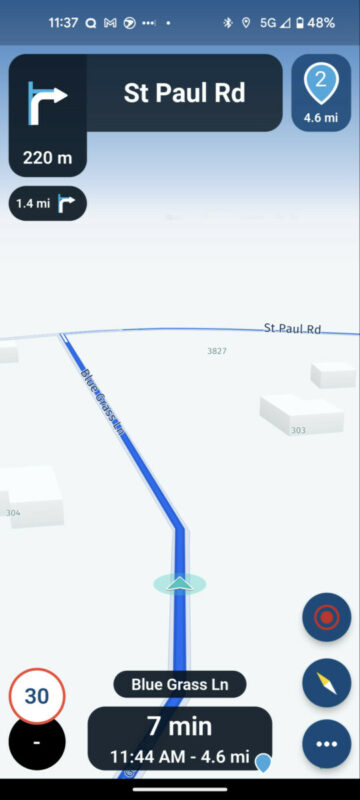
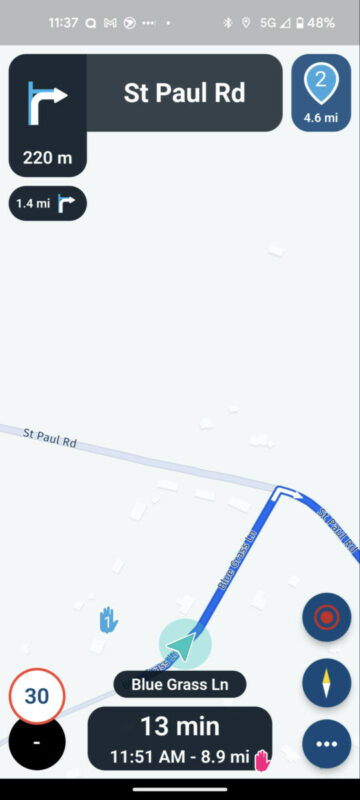
As to the ability to change the time and distance to go field on the fly... What was shown in the previous post was time/distance to go to and arrival time at final destination (no icon in the bottom right). This is what it looks like for shaping points and stops, respectively...
As you can see they put the little shaping point or stop icon in the bottom right of the field so that you can tell at a glance what you are looking at. Another nice touch I thought.
Edit...
Personally... I don't know if I see a use case/value for seeing shaping points during navigation. Stops absolutely. Shaping points... IDK. I mentioned this on the MRA forums and others chimed in stating that they do want to see shaping points during navigation (for whatever reason or use case they have). My retort was - fine - but make their display (display or not to display) user configurable. So far in the MRA beta, there is no option. Both stops and shaping points are displayed always. If that's how in ends up in the end, I'm good with that. Seeing the shaping points doesn't really hurt anything I guess.
Quote from Guido on 13.12.2022, 08:39Thanks very much for your suggestions. I appreciate you taking the time to write and helping me make Scenic better. Below are my reactions to you individual points:
I believe with Scenic that you only get an indication - spoken (and perhaps visually?) - of the stops name right before you reach it.
Scenic does tell you about an upcoming stop as a turn instruction as well, but I agree it could be more clear. Somehow the screenshots you attached did not come through, so I'm not sure how MRA is doing it in their new app. Once I have some more time I'll take a look at their new nav app myself. Here is a forum post on how is currently works in Scenic: https://scenic.app/forum/topic/stop-in-route-text#postid-4189
Another nice feature that MRA is tossing into the mix is the display (on the left) of the next turn (after the current)...
Scenic also does this, but only when the next turn is very close to the upcoming/current turn. I followed Waze in this. My reasoning was that there is no real use in seeing the next turn if you still have enough time and distance to see it after the upcoming turn. As an extreme example: If the upcoming turn is to take the highway in 10km, and the turn after that is to exit the highway after 20 km, then my reasoning is that it's a waste of screen space and rider attention to show the upcoming turn. But, an option to make this configurable would definitely be possible. I'm migrating Scenic to the new HERE framework over winter and will see if I can add this.
I don't know if lane assist is on the Radar for Scenic, but it would be a nice-to-have.
Yes. Lane assist is part of the new HERE framework, but it's not a priority item at the moment to integrate it into Scenic. There are more highly-requested features I want to add first. Like speed-cameras for example.
You can tap the field in MRA and it will toggle between time and distance to destination (as shown), shaping point or stop.
That's a nice feature indeed. Should be easy enough to add to Scenic. I'll try and add it during the migration over winter.
interoperability/integration with leading trip/route planners (i.e. Furkot).
Yes. They'll probably never add that since they have their own web-based route planner. It's on the roadmap to add one for Scenic too, but again, not a priority item for the moment.
Thanks again for your suggestions. I think they are worth a lot more than 2 cents
Thanks Guido for getting back.
I think I know what happened with the screenshots. Let me know if you can see them now.
About the user selectable colors for stops and shaping points... Any thoughts?
I get your point about the next turn information. I know that Scenic does this too. I've noted with Waze that there are times that it doesn't display when I really wished that it did. I suppose I might encounter similar scenarios with Scenic. I agree, perhaps the right answer is to have it user configurable. I noted on a couple of occasions that MRA wasn't displaying it. I don't know the logic they follow for this function or if they have plans to make it user configurable. Time will tell.
As to the ability to change the time and distance to go field on the fly... What was shown in the previous post was time/distance to go to and arrival time at final destination (no icon in the bottom right). This is what it looks like for shaping points and stops, respectively...
As you can see they put the little shaping point or stop icon in the bottom right of the field so that you can tell at a glance what you are looking at. Another nice touch I thought.
Edit...
Personally... I don't know if I see a use case/value for seeing shaping points during navigation. Stops absolutely. Shaping points... IDK. I mentioned this on the MRA forums and others chimed in stating that they do want to see shaping points during navigation (for whatever reason or use case they have). My retort was - fine - but make their display (display or not to display) user configurable. So far in the MRA beta, there is no option. Both stops and shaping points are displayed always. If that's how in ends up in the end, I'm good with that. Seeing the shaping points doesn't really hurt anything I guess.
Quote from Guido on 13.12.2022, 17:15I can see the screenshots now 👍. It looks nice I have to say. Definitely a step up from their current nav app. And some inspiration for Scenic 🙂. I will keep this in mind while I'm migrating to the next HERE framework. Distance and time to a via point (or shaping point as MRA calls it): I don't see a need for that either, unless someone places them in the route on purpose, simply to get that info. E.g. the hallway point, or a decision point (continue or turn back). But then again, I would personally place a stop for those scenarios. I'll give it some thought and keep all this in mind while I'm migrating. Thanks again! Really appreciate it!
I can see the screenshots now 👍. It looks nice I have to say. Definitely a step up from their current nav app. And some inspiration for Scenic 🙂. I will keep this in mind while I'm migrating to the next HERE framework. Distance and time to a via point (or shaping point as MRA calls it): I don't see a need for that either, unless someone places them in the route on purpose, simply to get that info. E.g. the hallway point, or a decision point (continue or turn back). But then again, I would personally place a stop for those scenarios. I'll give it some thought and keep all this in mind while I'm migrating. Thanks again! Really appreciate it!


