
Siri phone call locks phone during Nav

Quote from Sconn7 on 04.02.2022, 22:49Hi All,
hopefully I am missing something… If I ask Siri to call someone, the scenic GUI disappears then the screen locks during the call 🤦🏽♂️.. this is a PITA while on a ride.. is this a glitch? Or operator error 🤔. Would be great if Scenic resumed after a Siri call.
Hi All,
hopefully I am missing something… If I ask Siri to call someone, the scenic GUI disappears then the screen locks during the call 🤦🏽♂️.. this is a PITA while on a ride.. is this a glitch? Or operator error 🤔. Would be great if Scenic resumed after a Siri call.

Quote from Guido on 04.02.2022, 23:01I don’t believe this is a Scenic bug. Rather an iOS/Siri thing.
If Siri brings an app to the foreground (in this case the phone app), it automatically pushes the active app (in this case Scenic) to the background. As far as I know, the background app is no longer in control and can’t prevent screen lock. Also apps can’t bring themself back to the foreground automatically.
I might be wrong though. Have you tried this with other (navigation) apps?
Workaround: create a Siri shortcut to open Scenic.
I don’t believe this is a Scenic bug. Rather an iOS/Siri thing.
If Siri brings an app to the foreground (in this case the phone app), it automatically pushes the active app (in this case Scenic) to the background. As far as I know, the background app is no longer in control and can’t prevent screen lock. Also apps can’t bring themself back to the foreground automatically.
I might be wrong though. Have you tried this with other (navigation) apps?
Workaround: create a Siri shortcut to open Scenic.
Quote from Sconn7 on 05.02.2022, 00:53Thanks Guido,
Looks like IOS won’t let you use Siri to unlock iPhone by voice- even with automations.
I think I need an Automation to change my Lock Screen time from “instantly” to 10mins while Scenic is open.. and keep calls short!thanks for the reply, has given me something to look at.
awesome App 👍🏽👍🏽
Thanks Guido,
Looks like IOS won’t let you use Siri to unlock iPhone by voice- even with automations.
I think I need an Automation to change my Lock Screen time from “instantly” to 10mins while Scenic is open.. and keep calls short!
thanks for the reply, has given me something to look at.
awesome App 👍🏽👍🏽

Quote from gcp on 09.02.2022, 00:07Hi, if you go into settings - display and brightness - auto lock and set to “never” when out and about and using Scenic, your iPhone won’t lock during the call, and returns to the Scenic app once outbound call is finished.
Hi, if you go into settings - display and brightness - auto lock and set to “never” when out and about and using Scenic, your iPhone won’t lock during the call, and returns to the Scenic app once outbound call is finished.

Quote from GHJ on 22.02.2023, 06:57Hi Guido,
How do I prevent Scenic from going into screenlock during a phone call? I cannot switch back to Scenic while riding.
When I receive a call (or call myself) while navigating, the phone takes over the screen. After some time, the screen goes black and locks.I prefer to keep seeing the navigation on the screen when I have a call.
Switching back to scenic after the call is also an option. Do you have a handsfree solution for that (without setting the autolock to never)?Regards, Geert-Henk
Hi Guido,
How do I prevent Scenic from going into screenlock during a phone call? I cannot switch back to Scenic while riding.
When I receive a call (or call myself) while navigating, the phone takes over the screen. After some time, the screen goes black and locks.
I prefer to keep seeing the navigation on the screen when I have a call.
Switching back to scenic after the call is also an option. Do you have a handsfree solution for that (without setting the autolock to never)?
Regards, Geert-Henk
Quote from Guido on 22.02.2023, 08:36Hi Geert-Henk,
Very few things changed since the conversation above. Still, only the foreground app has the power to prevent screen-auto-lock. When the phone app takes the foreground, Scenic can no longer prevent auto-lock. Scenic can't prevent other apps from taking the foreground either. iOS Does not allow any app to have that "power".
There are a few things though that you might want to try:
- For incoming calls you can set them to not come in as full screen, but as a banner. This should keep Scenic in the foreground and in control of the auto-lock.
iOS Settings > Phone > Incoming calls.- For outgoing calls I would recommend to bring Scenic to foreground immediately after the connection has been established (phone app will move to background). Unfortunately, Siri doesn't work during calls so you can't use "Hey Siri, open Scenic" or "Hey Siri, switch to Scenic" as you normally can, so the only way I know of to bring Scenic to foreground during a call, is to use touch.
- Another possibility I have not explored, but perhaps you or someone here can look into that, is creating a siri shortcut like "switch to scenic in 20 seconds" in Apples shortcuts app. You could initiate that shortcut through Scenic before making or answering the call, and then answer the call. It's just an idea. I don't know if this is possible to be honest.
There is one other way. I could basically integrate a phone function in Scenic, so that Scenic itself can handle your calls. But that would basically mean building a phone app inside Scenic. I don't want to go that route. Hope you understand.
Cheers,
Guido
Hi Geert-Henk,
Very few things changed since the conversation above. Still, only the foreground app has the power to prevent screen-auto-lock. When the phone app takes the foreground, Scenic can no longer prevent auto-lock. Scenic can't prevent other apps from taking the foreground either. iOS Does not allow any app to have that "power".
There are a few things though that you might want to try:
- For incoming calls you can set them to not come in as full screen, but as a banner. This should keep Scenic in the foreground and in control of the auto-lock.
iOS Settings > Phone > Incoming calls. - For outgoing calls I would recommend to bring Scenic to foreground immediately after the connection has been established (phone app will move to background). Unfortunately, Siri doesn't work during calls so you can't use "Hey Siri, open Scenic" or "Hey Siri, switch to Scenic" as you normally can, so the only way I know of to bring Scenic to foreground during a call, is to use touch.
- Another possibility I have not explored, but perhaps you or someone here can look into that, is creating a siri shortcut like "switch to scenic in 20 seconds" in Apples shortcuts app. You could initiate that shortcut through Scenic before making or answering the call, and then answer the call. It's just an idea. I don't know if this is possible to be honest.
There is one other way. I could basically integrate a phone function in Scenic, so that Scenic itself can handle your calls. But that would basically mean building a phone app inside Scenic. I don't want to go that route. Hope you understand.
Cheers,
Guido
Quote from GHJ on 22.02.2023, 10:21Thanks Guido,
Incoming calls are solved now!!
I will try nr 3 later. It might work if Siri listenes to me.
Nr 2 with gloves is tricky.
Thanks Guido,
Incoming calls are solved now!!
I will try nr 3 later. It might work if Siri listenes to me.
Nr 2 with gloves is tricky.
Quote from GHJ on 22.02.2023, 12:26Option 2 works:
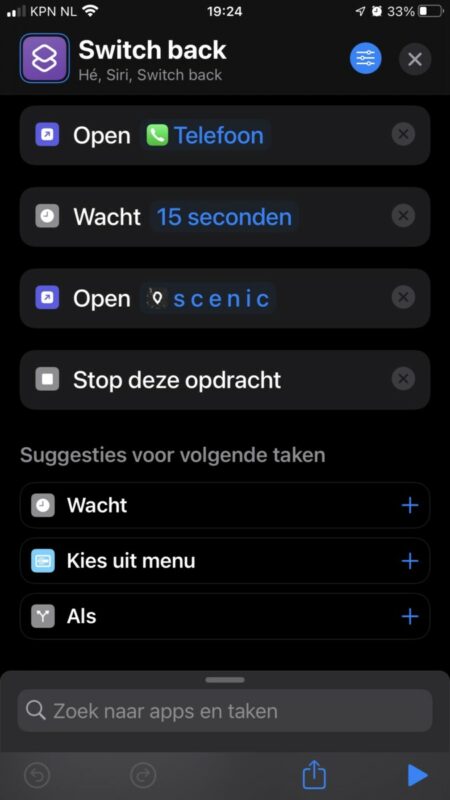
I created a command script “Switch back”
Open 📞 Telephone
Wait 15 sec
Open Scenic
Stop
”He Siri, Switch back” gives you 15 sec to say “He Siri, call ..contact..”
Option 2 works:
I created a command script “Switch back”
Open 📞 Telephone
Wait 15 sec
Open Scenic
Stop
”He Siri, Switch back” gives you 15 sec to say “He Siri, call ..contact..”
Quote from Guido on 22.02.2023, 12:43Awesome!
Awesome!


