
Sharing and saving: no file

Quote from Tombal on 05.05.2024, 01:34
Hi
Just switched to the iPhone 15. Strangely enough, the gpx export no longer works: the file does not seem to be available either when saving locally or sharing the file.
Whats different? Any settings I never used before?
Thanks Tom
Hi
Just switched to the iPhone 15. Strangely enough, the gpx export no longer works: the file does not seem to be available either when saving locally or sharing the file.
Whats different? Any settings I never used before?
Thanks Tom

Quote from Guido on 05.05.2024, 04:13Hi Tom,
Not sure. This is an alert from the files app. How did you get to this screen? What actions did you do in Scenic for this to appear? Are you able to export and choose other apps, like, for example, email?
Best regards,
Guido
Hi Tom,
Not sure. This is an alert from the files app. How did you get to this screen? What actions did you do in Scenic for this to appear? Are you able to export and choose other apps, like, for example, email?
Best regards,
Guido

Quote from Karlchen on 05.05.2024, 04:42Hallo,
nur zur Info, bei mir funktioniert der GPX Export auf iPhone 15 ohne Probleme.
Beste Grüße
Hallo,
nur zur Info, bei mir funktioniert der GPX Export auf iPhone 15 ohne Probleme.
Beste Grüße
Quote from Tombal on 06.05.2024, 14:48Hi Guido
It works fine with other navigation apps like Osmand, with Whatsapp and Email, but not saving in iCloud and sharing with Signal.
Best regards
Tom
Hi Guido
It works fine with other navigation apps like Osmand, with Whatsapp and Email, but not saving in iCloud and sharing with Signal.
Best regards
Tom
Quote from Guido on 06.05.2024, 16:11Hi Tom,
This doesn't seem like a Scenic issue to be honest. What options are you choosing in the export panel? "Save to files"?
What happens if you choose another folder (like a local folder)?
Perhaps there is something wrong with your iCloud settings, or you need to re-enter your iCloud password?
Hi Tom,
This doesn't seem like a Scenic issue to be honest. What options are you choosing in the export panel? "Save to files"?
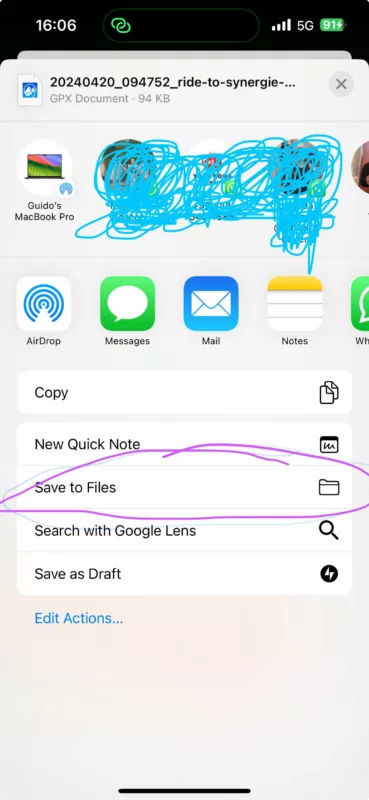
What happens if you choose another folder (like a local folder)?
Perhaps there is something wrong with your iCloud settings, or you need to re-enter your iCloud password?
Quote from Tombal on 07.05.2024, 00:17Hi Guido
Indeed, probably it's not Scenic: yes, I choose 'save to files'. Unlike on the icloud drive, the file now seems to be saved locally: click on it and it opens in Navigation app.
However, when I want to share it, only this link is sent...best regards
Tom
Hi Guido
Indeed, probably it's not Scenic: yes, I choose 'save to files'. Unlike on the icloud drive, the file now seems to be saved locally: click on it and it opens in Navigation app.
However, when I want to share it, only this link is sent...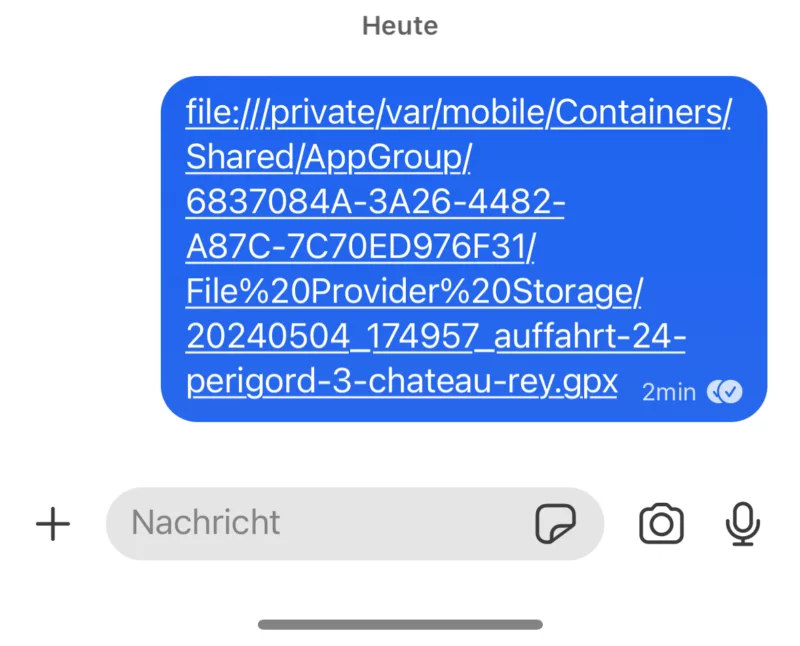 best regards
Tom
Quote from Guido on 07.05.2024, 02:31Hi Tom,
There must be something wrong with your iCloud Drive. Perhaps you need to re-login, or perhaps your iCloud Drive is full, or, if it’s a company phone, there might be a policy preventing saving files. Perhaps try googling the error message.
If you want to share a link to the route with someone else, try the “share” button in Scenic (in stead of the Export GPX button). This will generate a link to the route which others can open. Here’s a help article with short video on that: https://scenic.app/help/sharing-routes-rides/
Hi Tom,
There must be something wrong with your iCloud Drive. Perhaps you need to re-login, or perhaps your iCloud Drive is full, or, if it’s a company phone, there might be a policy preventing saving files. Perhaps try googling the error message.
If you want to share a link to the route with someone else, try the “share” button in Scenic (in stead of the Export GPX button). This will generate a link to the route which others can open. Here’s a help article with short video on that: https://scenic.app/help/sharing-routes-rides/


