
shared a finished route via link / gpx export

Quote from mfeske on 13.09.2021, 02:06Hello, everyone. I don't know if only I have the problem. I shared a finished route via link https://scenicapp.space/viewRoute.php?rid=kmAgHkMY and then exported it as a gpx. I then had to make a change, this is also displayed correctly in the split map. But not with gpx export and import. https://www.google.com/maps/d/u/0/edit?mid=1RCi9gLsHXf2ScvqWMhkNrkqPeRlCUhfn&usp=sharing
Hello, everyone. I don't know if only I have the problem. I shared a finished route via link https://scenicapp.space/viewRoute.php?rid=kmAgHkMY and then exported it as a gpx. I then had to make a change, this is also displayed correctly in the split map. But not with gpx export and import. https://www.google.com/maps/d/u/0/edit?mid=1RCi9gLsHXf2ScvqWMhkNrkqPeRlCUhfn&usp=sharing

Quote from Guido on 13.09.2021, 03:26Hmmm. That link indeed looks very weird. Definitely something wrong with the html page. I will take a look at that.
Regarding the changes… I am not sure I understand correctly. A few follow up questions:
So, 1) you created or imported a route in Scenic and saved it. 2) And then you used the share button to create the share link. 3) Then you made some changes in Scenic, which are correctly reflected in the share link? 4) But if you then export the GPX file from Scenic, it has the old ‘unchanged’ route?
Where does import come in? And what do the different colors in the Google maps link represent?
Hmmm. That link indeed looks very weird. Definitely something wrong with the html page. I will take a look at that.
Regarding the changes… I am not sure I understand correctly. A few follow up questions:
So, 1) you created or imported a route in Scenic and saved it. 2) And then you used the share button to create the share link. 3) Then you made some changes in Scenic, which are correctly reflected in the share link? 4) But if you then export the GPX file from Scenic, it has the old ‘unchanged’ route?
Where does import come in? And what do the different colors in the Google maps link represent?
Quote from Guido on 13.09.2021, 03:29Regarding the html page layout: I just tried with one of my own routes and that looked fine. Do you perhaps have html code in the name or description of the route?
Regarding the html page layout: I just tried with one of my own routes and that looked fine. Do you perhaps have html code in the name or description of the route?
Quote from mfeske on 13.09.2021, 11:14Hello Guido,
yes for the two on the left there is html code in the description. Isn't that allowed? But that shouldn't be related to the gpx problem.
1) I have driven a route (ride) https://scenicapp.space/viewRide.php?rid=TOItDXeq
2) I then did a gpx export
3) I imported the gpx import into google Maps (red Shell - Brodowin - Shell drove)
4) I made a route out of the trip, unfortunately there were already changes in the route, I adjusted the points. https://scenicapp.space/viewRoute.php?rid=WMRrRSzR
5) I made a GPX export of the route, but this does not contain the changes green Shell - Brodowin - Shell planned. That doesn’t agree with what has been done.
Hello Guido,
yes for the two on the left there is html code in the description. Isn't that allowed? But that shouldn't be related to the gpx problem.
1) I have driven a route (ride) https://scenicapp.space/viewRide.php?rid=TOItDXeq
2) I then did a gpx export
3) I imported the gpx import into google Maps (red Shell - Brodowin - Shell drove)
4) I made a route out of the trip, unfortunately there were already changes in the route, I adjusted the points. https://scenicapp.space/viewRoute.php?rid=WMRrRSzR
5) I made a GPX export of the route, but this does not contain the changes green Shell - Brodowin - Shell planned. That doesn’t agree with what has been done.
Quote from mfeske on 13.09.2021, 12:27konkret hätte ich also am liebsten einen korrekten gpx export von https://scenicapp.space/viewRoute.php?rid=kmAgHkMY
konkret hätte ich also am liebsten einen korrekten gpx export von https://scenicapp.space/viewRoute.php?rid=kmAgHkMY
Quote from Guido on 13.09.2021, 12:39OK. Thanks for the clarification. I think I understand now.
4) I made a route out of the trip, unfortunately there were already changes in the route, I adjusted the points.
Sometimes there are discrepancies indeed, which need to be manually corrected. In Scenic 3 this should happen less, but until that time manual corrections are necessary.
5) I made a GPX export of the route, but this does not contain the changes green Shell - Brodowin - Shell planned. That doesn’t agree with what has been done.
If I use the 'Download GPX' button on the share link https://scenicapp.space/viewRoute.php?rid=WMRrRSzR , I get a correct GPX file:
The GPX file contains 1 track and 2 routes. All three represent the route, but are structured different to be compatible with most GPS devices and other software / websites.
Did you also use this 'Download GPX' button, or did you use the one in the iOS app? If you want, please send me an email through the HELP page above (there is an 'email me' button at the bottom. Then we can exchange and compare GPX files.
OK. Thanks for the clarification. I think I understand now.
4) I made a route out of the trip, unfortunately there were already changes in the route, I adjusted the points.
Sometimes there are discrepancies indeed, which need to be manually corrected. In Scenic 3 this should happen less, but until that time manual corrections are necessary.
5) I made a GPX export of the route, but this does not contain the changes green Shell - Brodowin - Shell planned. That doesn’t agree with what has been done.
If I use the 'Download GPX' button on the share link https://scenicapp.space/viewRoute.php?rid=WMRrRSzR , I get a correct GPX file:
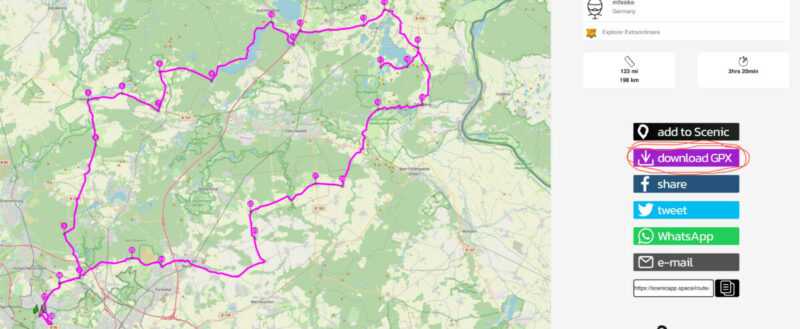
The GPX file contains 1 track and 2 routes. All three represent the route, but are structured different to be compatible with most GPS devices and other software / websites.
Did you also use this 'Download GPX' button, or did you use the one in the iOS app? If you want, please send me an email through the HELP page above (there is an 'email me' button at the bottom. Then we can exchange and compare GPX files.
Quote from mfeske on 14.09.2021, 04:42Hello Guido,
I used the export link from the app, but now also the one from the web interface as a test. I still think that something is wrong.
At https://scenicapp.space/viewRoute.php?rid=kmAgHkMY you can see that the road to Brodowin forks shortly after Bernau north. When exporting gpx and re-importing it into google maps https://www.google.com/maps/d/u/0/edit?mid=1RCi9gLsHXf2ScvqWMhkNrkqPeRlCUhfn&usp=sharing green it differs from the red and only divides at Beiersdorf. Should I repeat the whole procedure or can I send you the data directly for comparison?
Hello Guido,
I used the export link from the app, but now also the one from the web interface as a test. I still think that something is wrong.
At https://scenicapp.space/viewRoute.php?rid=kmAgHkMY you can see that the road to Brodowin forks shortly after Bernau north. When exporting gpx and re-importing it into google maps https://www.google.com/maps/d/u/0/edit?mid=1RCi9gLsHXf2ScvqWMhkNrkqPeRlCUhfn&usp=sharing green it differs from the red and only divides at Beiersdorf. Should I repeat the whole procedure or can I send you the data directly for comparison?
Quote from Guido on 14.09.2021, 16:40OK. Sorry for the confusion. I was confused because the Vorschalg Brodowin route (share URL: https://scenicapp.space/viewRoute.php?rid=WMRrRSzR) seems to be fine and that's the one I was looking at.
There is indeed a problem with the Shell - Brodowin - Shell route (share URL: https://scenicapp.space/viewRoute.php?rid=kmAgHkMY) Currently the GPX file of this route does not contain the changes you made indeed.
This is because the GPX file is generated when you share the route with the 'Share URL' button. You need to tap the 'Share URL' button again after you made a change. When you do that the GPX file on the Scenic server will be updated with the changes. The share link will stay the same. I will fix this in the future so that this GPX is updated automatically upon a change, but for now, it's a manual action.
Could you give that a try please?
Also, I fixed the layout issues for this route. It was indeed caused by the html tags in the description. You can still use HTML tags.
Sorry for the confusion. Hope this is solved now?
OK. Sorry for the confusion. I was confused because the Vorschalg Brodowin route (share URL: https://scenicapp.space/viewRoute.php?rid=WMRrRSzR) seems to be fine and that's the one I was looking at.
There is indeed a problem with the Shell - Brodowin - Shell route (share URL: https://scenicapp.space/viewRoute.php?rid=kmAgHkMY) Currently the GPX file of this route does not contain the changes you made indeed.
This is because the GPX file is generated when you share the route with the 'Share URL' button. You need to tap the 'Share URL' button again after you made a change. When you do that the GPX file on the Scenic server will be updated with the changes. The share link will stay the same. I will fix this in the future so that this GPX is updated automatically upon a change, but for now, it's a manual action.
Could you give that a try please?
Also, I fixed the layout issues for this route. It was indeed caused by the html tags in the description. You can still use HTML tags.
Sorry for the confusion. Hope this is solved now?
Quote from mfeske on 15.09.2021, 02:06Hello Guido,
thanks for your work. Now it is okay.
New sharing, new GPX Link. For the Future I know. First cleaning route, than sharing, than gpx export.
Micha
Hello Guido,
thanks for your work. Now it is okay.
New sharing, new GPX Link. For the Future I know. First cleaning route, than sharing, than gpx export.
Micha


