
Share route via Messages (text) to Android recipient issue

Quote from 2BTSquared on 11.11.2022, 13:39I've been trying out/playing around with Scenic. Something I came across... I can "share" a route via text message to another iPhone (used my wife's for the test) and it seems to work as it should. However, sending a route via text to my Android phone doesn't appear to work. The text message recieved by my Android phone only contains the text added to the message before sending.
Odd.
I've been trying out/playing around with Scenic. Something I came across... I can "share" a route via text message to another iPhone (used my wife's for the test) and it seems to work as it should. However, sending a route via text to my Android phone doesn't appear to work. The text message recieved by my Android phone only contains the text added to the message before sending.
Odd.

Quote from Guido on 12.11.2022, 12:18Are you using the share or the export GPX button? For Android I recommend to use the export GPX button. As Scenic is not yet available on Android the link that is sent with the Share button is not of much use.
Are you using the share or the export GPX button? For Android I recommend to use the export GPX button. As Scenic is not yet available on Android the link that is sent with the Share button is not of much use.
Quote from 2BTSquared on 12.11.2022, 17:42Quote from Guido on 12.11.2022, 12:18Are you using the share or the export GPX button? For Android I recommend to use the export GPX button. As Scenic is not yet available on Android the link that is sent with the Share button is not of much use.
I'm using the "Share" button...
Sharing via text to an iPhone produces this...
Which when you click on it, you are sent here...
Where you can add it to Scenic, download the GPX etc...
Sending to an Android phone... Note I've added some test comment text to the message...
As you can see, all that is received on the Android phone is the test comment text...
No link. Nothing. Why wouldn't one - using an Android phone - receive a link to the scenic website where one is given a route overview, option to download the GPX file, etc.?
Quote from Guido on 12.11.2022, 12:18Are you using the share or the export GPX button? For Android I recommend to use the export GPX button. As Scenic is not yet available on Android the link that is sent with the Share button is not of much use.
I'm using the "Share" button...
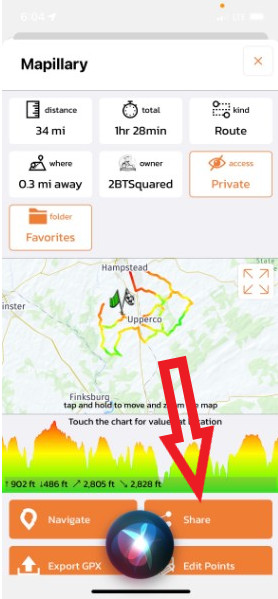
Sharing via text to an iPhone produces this...
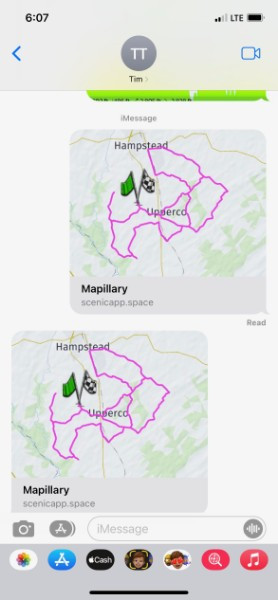
Which when you click on it, you are sent here...
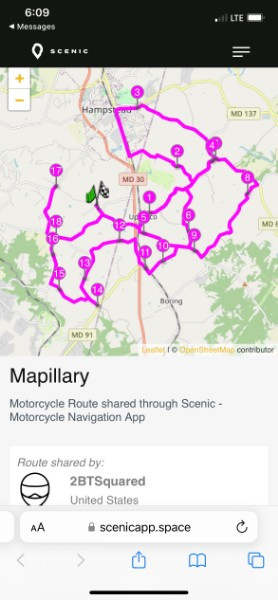
Where you can add it to Scenic, download the GPX etc...
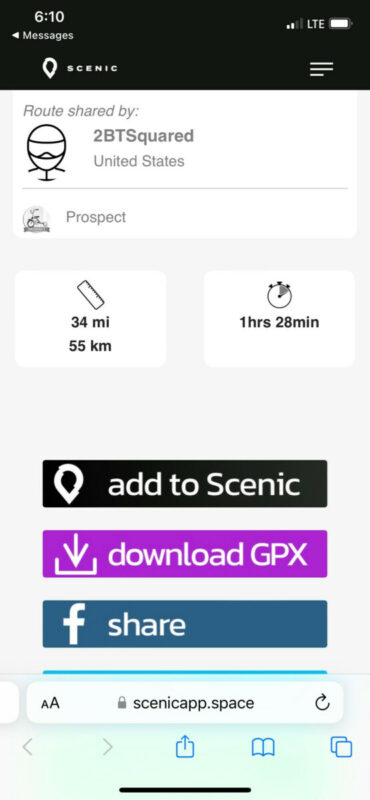
Sending to an Android phone... Note I've added some test comment text to the message...
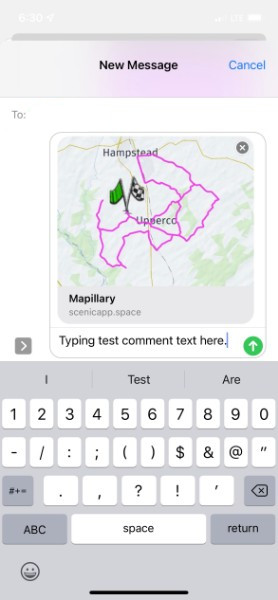
As you can see, all that is received on the Android phone is the test comment text...
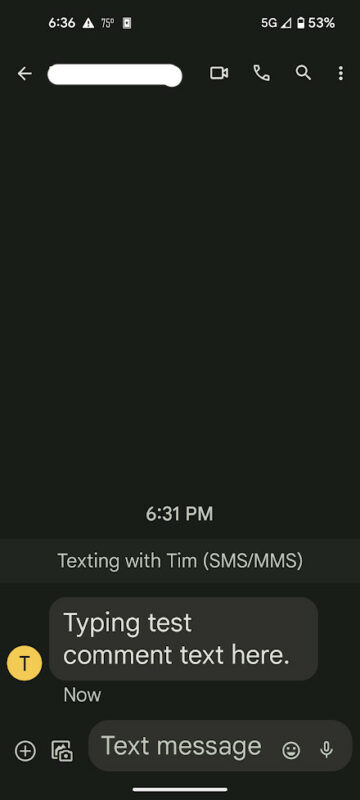
No link. Nothing. Why wouldn't one - using an Android phone - receive a link to the scenic website where one is given a route overview, option to download the GPX file, etc.?
Quote from PeteRT on 13.11.2022, 03:58Simple because Android at the moment is not supported. There is no Scenic Android app so your Android phone cannot decode the link. The latest info from Guido is that an Android version of Scenic will be launched early next year. So until then you cannot send a route to an Android phone.
However you can save a GPX file of your route from Scenic. You could then send this to your Android phone. Once on the phone if you have a navigation app that excepts GPX imports you could just import the file. So in your post first screen shot use Export GPX not Share.
Hope this helps.
Simple because Android at the moment is not supported. There is no Scenic Android app so your Android phone cannot decode the link. The latest info from Guido is that an Android version of Scenic will be launched early next year. So until then you cannot send a route to an Android phone.
However you can save a GPX file of your route from Scenic. You could then send this to your Android phone. Once on the phone if you have a navigation app that excepts GPX imports you could just import the file. So in your post first screen shot use Export GPX not Share.
Hope this helps.
Quote from 2BTSquared on 13.11.2022, 08:54Quote from PeteRT on 13.11.2022, 03:58Simple because Android at the moment is not supported. There is no Scenic Android app so your Android phone cannot decode the link. The latest info from Guido is that an Android version of Scenic will be launched early next year. So until then you cannot send a route to an Android phone.
However you can save a GPX file of your route from Scenic. You could then send this to your Android phone. Once on the phone if you have a navigation app that excepts GPX imports you could just import the file. So in your post first screen shot use Export GPX not Share.
Hope this helps.
Sure, exporting the GPX file and sharing that is an alternative, but the "share" feature only working for iOS still seems odd to me. First, it seems to require one to be aware of the recipients operating system before choosing to "share". Do you know what OS - or navigation app/device for that matter - is used by all the folks you may want to "share" with? Second, the links shared via iOS appear to simply take you to the Scenic website where you can - amongst other things - see and overview and download the GPX file. Why wouldn't an Android user be taken to the same place and see the same thing - minus the option to "add to Scenic"?
Quote from PeteRT on 13.11.2022, 03:58Simple because Android at the moment is not supported. There is no Scenic Android app so your Android phone cannot decode the link. The latest info from Guido is that an Android version of Scenic will be launched early next year. So until then you cannot send a route to an Android phone.
However you can save a GPX file of your route from Scenic. You could then send this to your Android phone. Once on the phone if you have a navigation app that excepts GPX imports you could just import the file. So in your post first screen shot use Export GPX not Share.
Hope this helps.
Sure, exporting the GPX file and sharing that is an alternative, but the "share" feature only working for iOS still seems odd to me. First, it seems to require one to be aware of the recipients operating system before choosing to "share". Do you know what OS - or navigation app/device for that matter - is used by all the folks you may want to "share" with? Second, the links shared via iOS appear to simply take you to the Scenic website where you can - amongst other things - see and overview and download the GPX file. Why wouldn't an Android user be taken to the same place and see the same thing - minus the option to "add to Scenic"?
Quote from Guido on 13.11.2022, 16:51@2btsquared
You are right that you could use the share button. The link if the share text should open in the chrome browser in your Android device. What app are choosing in the share panel?
Could you perhaps send me a screenshot of how the message looks like on your iOS device, and a screenshot of how it looks like when you receive it on your Android device?
You are right that you could use the share button. The link if the share text should open in the chrome browser in your Android device. What app are choosing in the share panel?
Could you perhaps send me a screenshot of how the message looks like on your iOS device, and a screenshot of how it looks like when you receive it on your Android device?
Quote from Guido on 13.11.2022, 17:05Sorry … I missed you message above where you posted the screenshot.
what message app are you using? Could it be that app that is removing the link?
Could you try to use the copy function and then just paste the link in the message app?
Sorry … I missed you message above where you posted the screenshot.
what message app are you using? Could it be that app that is removing the link?
Could you try to use the copy function and then just paste the link in the message app?
Quote from Guido on 13.11.2022, 17:09If you are using Apple’s iMessage to send to your Android phone then I have an explanation. iMessage sends messages as SMS to android devices. This is because there is no iMessage app on android.
If you would use any other message app (like WhatsApp or Facebook messenger) then it should work.
If you are using Apple’s iMessage to send to your Android phone then I have an explanation. iMessage sends messages as SMS to android devices. This is because there is no iMessage app on android.
If you would use any other message app (like WhatsApp or Facebook messenger) then it should work.
Quote from 2BTSquared on 13.11.2022, 17:30Quote from Guido on 13.11.2022, 17:05Sorry … I missed you message above where you posted the screenshot.
what message app are you using? Could it be that app that is removing the link?
Could you try to use the copy function and then just paste the link in the message app?
I'm using the box stock message apps the come with phone/OS. That would be Messages on my Android phone, and likewise, Messages on the iPhone.
So I tested the copy function and just pasted the message into the iPhone's Messages app and sent it to my Android phone. This worked. Got the link and was able to click and go to the website.
Retested Scenic's share function... Selected route/clicked share/selected Messages/entered recipient/entered test comment text/hit send up arrow. Again, only received the test comment text. No link etc. received on Android phone.
Can't say if either of the messaging app on iPhone or Android is stripping/removing the link. How would I tell?
Quote from Guido on 13.11.2022, 17:05Sorry … I missed you message above where you posted the screenshot.
what message app are you using? Could it be that app that is removing the link?
Could you try to use the copy function and then just paste the link in the message app?
I'm using the box stock message apps the come with phone/OS. That would be Messages on my Android phone, and likewise, Messages on the iPhone.
So I tested the copy function and just pasted the message into the iPhone's Messages app and sent it to my Android phone. This worked. Got the link and was able to click and go to the website.
Retested Scenic's share function... Selected route/clicked share/selected Messages/entered recipient/entered test comment text/hit send up arrow. Again, only received the test comment text. No link etc. received on Android phone.
Can't say if either of the messaging app on iPhone or Android is stripping/removing the link. How would I tell?
Quote from 2BTSquared on 13.11.2022, 18:00Quote from Guido on 13.11.2022, 17:09If you are using Apple’s iMessage to send to your Android phone then I have an explanation. iMessage sends messages as SMS to android devices. This is because there is no iMessage app on android.
If you would use any other message app (like WhatsApp or Facebook messenger) then it should work.
I am new to iOS... So... Anyway, was unaware of iMessage and did a quick search on what it's about. Did a couple more quick test. Disabled iMessage in settings. Tried Scenic again. Same result. Tried sending an image (with iMessage tuned off, then again with in on) to my Android phone. That worked (received the image in both cases). Presume that images sent (and received) to Android went over MMS.
Am I missing something?
Quote from Guido on 13.11.2022, 17:09If you are using Apple’s iMessage to send to your Android phone then I have an explanation. iMessage sends messages as SMS to android devices. This is because there is no iMessage app on android.
If you would use any other message app (like WhatsApp or Facebook messenger) then it should work.
I am new to iOS... So... Anyway, was unaware of iMessage and did a quick search on what it's about. Did a couple more quick test. Disabled iMessage in settings. Tried Scenic again. Same result. Tried sending an image (with iMessage tuned off, then again with in on) to my Android phone. That worked (received the image in both cases). Presume that images sent (and received) to Android went over MMS.
Am I missing something?
Quote from Guido on 13.11.2022, 19:20I also had to do some research about this to be honest. I’m not an Android user 🙂.
So, you are not missing anything. If you have MMS Messaging turned on in Settings > Messages you can indeed send media files to android users. MMS is the ‘multimedia’ version of SMS.
However these embedded ‘thumbnail’ links that Messages produces (Scenic passes the link to Messages and Messages turns it into this ‘thumbnail’ link) are not multimedia, nor are they text. They are a special data type for use with the Apple Messages app. The sending and receiving party needs the Apple Messages app in order for those ‘thumbnail’ links to come through.
If you use the copy/paste method the link is simply copied as text. This is why this works, and sharing directly by tapping the Messages icon in the share panel, doesn’t
Here’s an article I found about SMS and MMS in relation to iMessage: https://www.lifewire.com/what-is-sms-mms-iphone-2000247 Perhaps it will give you some more background info
From Scenic perspective, this is working as it should. With the copy/paste method I believe you have reasonable workaround for your situation. (Until the Android version is out 🙂)
I also had to do some research about this to be honest. I’m not an Android user 🙂.
So, you are not missing anything. If you have MMS Messaging turned on in Settings > Messages you can indeed send media files to android users. MMS is the ‘multimedia’ version of SMS.
However these embedded ‘thumbnail’ links that Messages produces (Scenic passes the link to Messages and Messages turns it into this ‘thumbnail’ link) are not multimedia, nor are they text. They are a special data type for use with the Apple Messages app. The sending and receiving party needs the Apple Messages app in order for those ‘thumbnail’ links to come through.
If you use the copy/paste method the link is simply copied as text. This is why this works, and sharing directly by tapping the Messages icon in the share panel, doesn’t
Here’s an article I found about SMS and MMS in relation to iMessage: https://www.lifewire.com/what-is-sms-mms-iphone-2000247 Perhaps it will give you some more background info
From Scenic perspective, this is working as it should. With the copy/paste method I believe you have reasonable workaround for your situation. (Until the Android version is out 🙂)
Quote from 2BTSquared on 13.11.2022, 19:35Thanks. That makes sense. I guess - if uncertain about your recipients - your best bet is not to use the Share/Messages option.
Thanks. That makes sense. I guess - if uncertain about your recipients - your best bet is not to use the Share/Messages option.
Quote from Guido on 13.11.2022, 19:39You can tell by the color of the bubble / send button. If it’s blue it’s a receiver that has iMessage. If it’s green, the receiver doesn’t.
You can tell by the color of the bubble / send button. If it’s blue it’s a receiver that has iMessage. If it’s green, the receiver doesn’t.
Quote from 2BTSquared on 13.11.2022, 19:41Yup. Caught that. Good point.
Yup. Caught that. Good point.


