
Setup and tips for Scenic on CarPlay

Quote from GHJ on 19.05.2024, 03:12Hi Guido and community,
I am very enthusiastic about the combination of Scenic and CarPlay and have a some of useful experiences that I would like to share with you. I saw on the forum that various devices have already been tested. I can add an interesting one.
CarPlay and setup
I recently installed a 7” motorcycle CarPlay from Podofo and connected it to Scenic. The results are astonishing. Podofo.com delivers directly from China (approximately €180) and also officially franchised via Ali (approximately €80)! So I thought it was worth a try.
I linked it as follows. The CarPlay via BT/Wi-Fi with my iPhone and the iPhone via BT linked to my Cardo 4+. So Cardo remains connected, even when CarPlay is turned off. Connecting and starting up went without any problems.Audio routing CarPlay
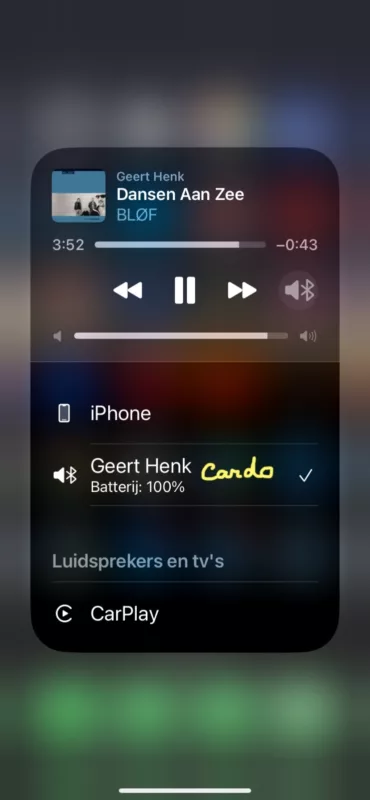
The challenge was controlling the audio. There are output options on your iPhone. On route you can select the 3 devices: CarPlay, iPhone and Cardo. I solved this with a custom command.“Hey Siri, sound to Cardo.”
Sorry for the Dutch version.
This tackles a number of common audio problems at start-up and while on the road. The sound of Scenic (set as audio), music and Flitsmeister arrive neatly in my helmet.
In addition to “Sound to Cardo” I have of course also added a “Sound to CarPlay” and a “Sound to iPhone”. This is more for testing.Another helpful tip
“Hey Siri, take a screenshot.” This takes a photo of your iPhone screen AND your CarPlay screen during the ride.I hope this is of some use to you and let it be an invitation to share more tips.
Greeting,
Geert-Henk
Hi Guido and community,
I am very enthusiastic about the combination of Scenic and CarPlay and have a some of useful experiences that I would like to share with you. I saw on the forum that various devices have already been tested. I can add an interesting one.
CarPlay and setup
I recently installed a 7” motorcycle CarPlay from Podofo and connected it to Scenic. The results are astonishing. Podofo.com delivers directly from China (approximately €180) and also officially franchised via Ali (approximately €80)! So I thought it was worth a try.
I linked it as follows. The CarPlay via BT/Wi-Fi with my iPhone and the iPhone via BT linked to my Cardo 4+. So Cardo remains connected, even when CarPlay is turned off. Connecting and starting up went without any problems.
Audio routing CarPlay
The challenge was controlling the audio. There are output options on your iPhone. On route you can select the 3 devices: CarPlay, iPhone and Cardo. I solved this with a custom command.
“Hey Siri, sound to Cardo.”
Sorry for the Dutch version.
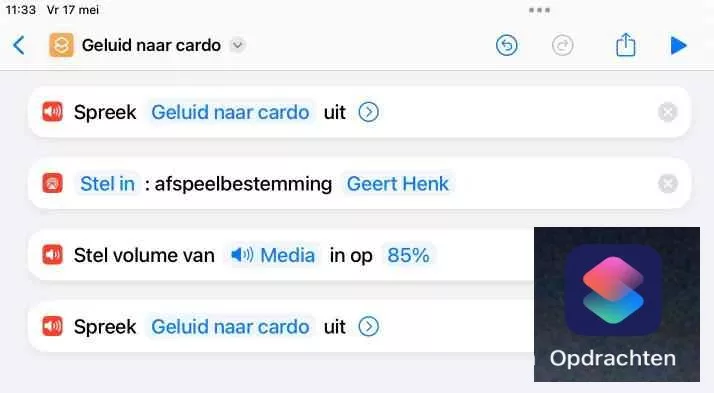
This tackles a number of common audio problems at start-up and while on the road. The sound of Scenic (set as audio), music and Flitsmeister arrive neatly in my helmet.
In addition to “Sound to Cardo” I have of course also added a “Sound to CarPlay” and a “Sound to iPhone”. This is more for testing.
Another helpful tip
“Hey Siri, take a screenshot.” This takes a photo of your iPhone screen AND your CarPlay screen during the ride.
I hope this is of some use to you and let it be an invitation to share more tips.
Greeting,
Geert-Henk

Quote from Karlchen on 19.05.2024, 03:39Hallo,
eine Frage, können Sie jetzt mit den iPhone sagen, das zb die Musik von iPhone über CarPlay und dem Lautsprecher läuft und das Scenic auf CarPlay zu sehen ist aber nur und auf das Headset zu hören ist?
Meine Wunschvorstellung ist, das alles über CarPlay läuft, aber ich wählen kann was über die Lautsprecher und was über dem Headset laufen soll.Da ist mein Stand, das es so nicht geht.
Beste Grüße
Karlchen
Hallo,
eine Frage, können Sie jetzt mit den iPhone sagen, das zb die Musik von iPhone über CarPlay und dem Lautsprecher läuft und das Scenic auf CarPlay zu sehen ist aber nur und auf das Headset zu hören ist?
Meine Wunschvorstellung ist, das alles über CarPlay läuft, aber ich wählen kann was über die Lautsprecher und was über dem Headset laufen soll.
Da ist mein Stand, das es so nicht geht.
Beste Grüße
Karlchen
Quote from GHJ on 19.05.2024, 05:35Interesting question. I set Scenic as audio, not as voice.
All audios follow the same route. I don't know which route voice follows. It didn't produce any sound for me, so who knows....
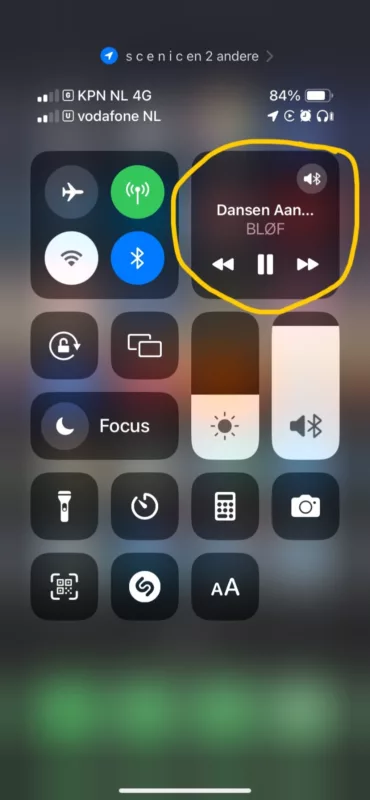
Interesting question. I set Scenic as audio, not as voice.
All audios follow the same route. I don't know which route voice follows. It didn't produce any sound for me, so who knows....
Quote from Karlchen on 19.05.2024, 07:27Ich denke das wird leider nicht getrennt gehen.
ich habe mal Guido die Frage gestellt, nach mit einen Test mit einer anderen Navi App es leider nicht hinbekommen.
Aber danke für die Rückmeldung
Ich denke das wird leider nicht getrennt gehen.
ich habe mal Guido die Frage gestellt, nach mit einen Test mit einer anderen Navi App es leider nicht hinbekommen.
Aber danke für die Rückmeldung


