
Senic hangs when using search in active route

Quote from massi on 10.05.2024, 11:48Hi,
I‘m on a tour in the moment and had two times the problem, that when in active navigation mode, moving the map and choosing search, the upcoming search window is not useable. No input is possible, it‘s only possible to close the search window.
The only solution is to stop the navigation and start it again.
The problem seems to occur only when the navigation lasts a while. Direct after starting the navigation search works as expected.
Regards
Marc-Antón
Hi,
I‘m on a tour in the moment and had two times the problem, that when in active navigation mode, moving the map and choosing search, the upcoming search window is not useable. No input is possible, it‘s only possible to close the search window.
The only solution is to stop the navigation and start it again.
The problem seems to occur only when the navigation lasts a while. Direct after starting the navigation search works as expected.
Regards
Marc-Antón

Quote from Guido on 10.05.2024, 11:51Hi Marc Anton,
Does the virtual keyboard appear? If no, do you perhaps have a handlebar controller? (They act like a keyboard and thus virtual keyboard won’t appear).
Or am i misunderstanding?
Cheers,
Guido
Hi Marc Anton,
Does the virtual keyboard appear? If no, do you perhaps have a handlebar controller? (They act like a keyboard and thus virtual keyboard won’t appear).
Or am i misunderstanding?
Cheers,
Guido
Quote from massi on 11.05.2024, 02:07Hi Guido,
no, the keyboard does not appear and I do not have a handlebar controller.
I‘m on a tour, I will upload screenshots, when I‘m at home.
Regards
Marc-Antón
Hi Guido,
no, the keyboard does not appear and I do not have a handlebar controller.
I‘m on a tour, I will upload screenshots, when I‘m at home.
Regards
Marc-Antón

Quote from johansw on 11.05.2024, 02:33Same thing here, both on my Mac and my iPhone.
I choose option petrol stations for planning and navigation. They show when planning but disappear when starting a trip.
Same thing here, both on my Mac and my iPhone.
I choose option petrol stations for planning and navigation. They show when planning but disappear when starting a trip.
Quote from Guido on 11.05.2024, 08:17I think we are talking about two different things here if I'm not mistaken.
First Built-In pois not showing on map while navigating: I'm looking into it now. Had more reports on this. Will release an update asap with a fix.
Then, the unresponsive search screen for @massi. I've not been able to reproduce this yet. Marc-Anton, could you also check if you perhaps accidentally enabled "I have a controller" under Settings > Handlebar Controller.
I think we are talking about two different things here if I'm not mistaken.
First Built-In pois not showing on map while navigating: I'm looking into it now. Had more reports on this. Will release an update asap with a fix.
Then, the unresponsive search screen for @massi. I've not been able to reproduce this yet. Marc-Anton, could you also check if you perhaps accidentally enabled "I have a controller" under Settings > Handlebar Controller.
Quote from massi on 11.05.2024, 08:48Hi Guido,
no, I don‘t have the handlebar controller enabled, I will have an eye on it tomorrow, when riding home.
It seems to be a sporadic bug, I know that are the most annoying bugs.
Regards
Marc-Antón
Hi Guido,
no, I don‘t have the handlebar controller enabled, I will have an eye on it tomorrow, when riding home.
It seems to be a sporadic bug, I know that are the most annoying bugs.
Regards
Marc-Antón
Quote from Guido on 11.05.2024, 08:52Ok. Thanks Marc-Anton. The virtual keyboard not showing is a weird one. When you are riding tomorrow, also check if there is some relation with being close to someone else that perhaps had a bluetooth keyboard and/or a controller that acts like that. That device would have to be paired with your phone for it to work though, so this is probably not the case, but just though I'd mention in to be sure.
Ok. Thanks Marc-Anton. The virtual keyboard not showing is a weird one. When you are riding tomorrow, also check if there is some relation with being close to someone else that perhaps had a bluetooth keyboard and/or a controller that acts like that. That device would have to be paired with your phone for it to work though, so this is probably not the case, but just though I'd mention in to be sure.
Quote from massi on 12.05.2024, 08:06Hi Guido,
I'm back from my tour and found the reproduceable problem, it seems, it has something to do with carplay.
Here is what I did to reproduce the problem:
- Start my carplay screen
- After the iPhone is connected, I start scenic and choose a planned route
- I start navigation
- Now I turn off the carplay device, wait until the Scenic is ready on the iPhone
- Now I go to "Übersicht & Bearbeitungsmodus"(don't know how it's named in english) and choose "Search"
- I get this Screen, it looks a little bit weird
I can't do anything than closing the window.
I tested it also with deactivating Bluetooth, when switched of the Carply device, same issue
Another scenario is, with switched off Carplay device, I choose a preplanned route on my iPhone. If I go to "Übersicht & Bearbeitungsmodus" I can choose search with no problem. But when I start the Carplay device and wait until it's connected and switch off the Carplay device again, it has the same behaviour as described above. The strange search window appears and I can't choose anything except the close button.
Hope this helps.
Regards
Marc-Antón
Hi Guido,
I'm back from my tour and found the reproduceable problem, it seems, it has something to do with carplay.
Here is what I did to reproduce the problem:
- Start my carplay screen
- After the iPhone is connected, I start scenic and choose a planned route
- I start navigation
- Now I turn off the carplay device, wait until the Scenic is ready on the iPhone
- Now I go to "Übersicht & Bearbeitungsmodus"(don't know how it's named in english) and choose "Search"
- I get this Screen, it looks a little bit weird
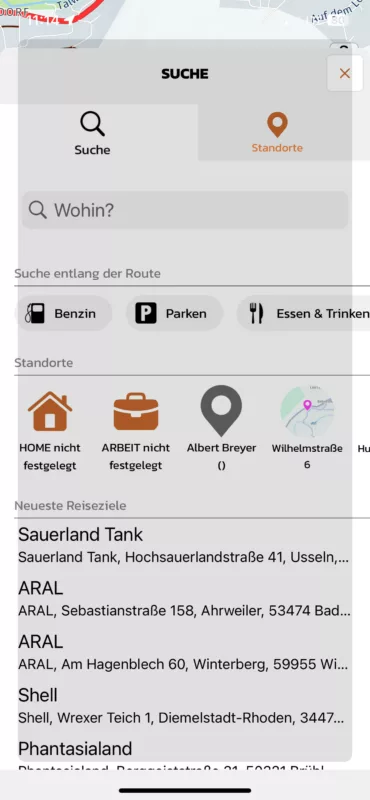
I can't do anything than closing the window.
I tested it also with deactivating Bluetooth, when switched of the Carply device, same issue
Another scenario is, with switched off Carplay device, I choose a preplanned route on my iPhone. If I go to "Übersicht & Bearbeitungsmodus" I can choose search with no problem. But when I start the Carplay device and wait until it's connected and switch off the Carplay device again, it has the same behaviour as described above. The strange search window appears and I can't choose anything except the close button.
Hope this helps.
Regards
Marc-Antón
Quote from Guido on 12.05.2024, 13:09Thanks very much Marc-Anton,
This is very helpful.
I will look in detail tomorrow and fix this in the upcoming update.
Best regards,
Guido
Thanks very much Marc-Anton,
This is very helpful.
I will look in detail tomorrow and fix this in the upcoming update.
Best regards,
Guido
Quote from massi on 14.05.2024, 10:12Hi Guido,
just for your information, the problem isn't fixed in new version 3.61
Regards
Marc-Antón
Hi Guido,
just for your information, the problem isn't fixed in new version 3.61
Regards
Marc-Antón
Quote from Guido on 14.05.2024, 10:13Thanks. I'm aware. 3.61 was more of an emergency update as there was a frequest crash with curvy routing and importing. Will take a look at this for the next update.
Thanks. I'm aware. 3.61 was more of an emergency update as there was a frequest crash with curvy routing and importing. Will take a look at this for the next update.


