
Seeing timing per step

Quote from Smout on 06.08.2024, 08:27If I plan a route, I can’t see how long it takes to get to the interim route points, only the total time the route it takes. Can this be added or offered as a hover or shown when tapped on the route point?
If I plan a route, I can’t see how long it takes to get to the interim route points, only the total time the route it takes. Can this be added or offered as a hover or shown when tapped on the route point?

Quote from Guido on 06.08.2024, 08:33Tap this button to see the route timeline:
Tap this button to see the route timeline:
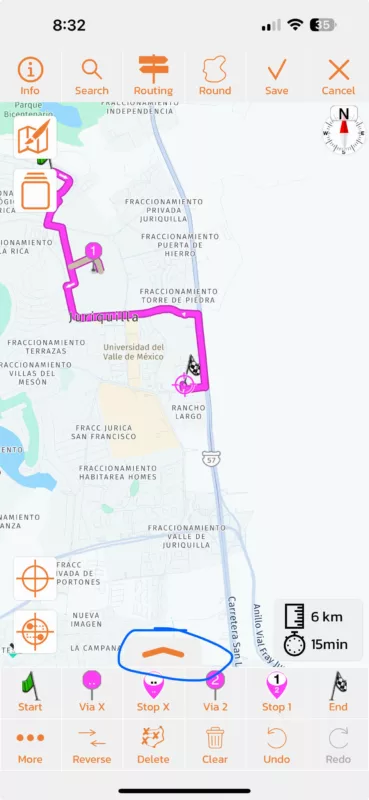
Quote from Smout on 06.08.2024, 10:19Great! Never spotted that. I think I assumed it would only provide extended menu options.
Great! Never spotted that. I think I assumed it would only provide extended menu options.
Quote from Mauli2904 on 23.09.2024, 12:36Aber die Funktion ist leider nicht mehr während der Navigation verfügbar.
vor dem letzten großen Update ging das noch.
Gibts die Funktion in der Version 4 wieder?
Aber die Funktion ist leider nicht mehr während der Navigation verfügbar.
vor dem letzten großen Update ging das noch.
Gibts die Funktion in der Version 4 wieder?
Quote from Guido on 23.09.2024, 13:13To see the route timeline during navigation, tap the bottom bar where you see distance and time to destination. This will bring up a panel with route timeline.
To see the route timeline during navigation, tap the bottom bar where you see distance and time to destination. This will bring up a panel with route timeline.
Quote from Mauli2904 on 23.09.2024, 13:36This shows me the Route-Start and the Route-End, with km and the time to the Rout-End, but not the distance and time to the way-points. 😕
This shows me the Route-Start and the Route-End, with km and the time to the Rout-End, but not the distance and time to the way-points. 😕
Quote from Guido on 23.09.2024, 13:37It will show Stops only. Not via points.
https://scenic.app/help/stops-vs-via-points-whats-the-difference/
It will show Stops only. Not via points.
https://scenic.app/help/stops-vs-via-points-whats-the-difference/
Quote from Mauli2904 on 23.09.2024, 14:03Thanx for the link 👍
Before the last great update, the menu show‘s also the viapoints.
This was sometimes very helpful.
Thanx for the link 👍
Before the last great update, the menu show‘s also the viapoints.
This was sometimes very helpful.

Quote from MjK on 03.10.2024, 12:51Hi Mauli,
what you could do, to at least see your VIA Points while you are navigating, even so there is no time and distance info per VIA, is to open the big button menu, enter „edit route“ and select the button Guido highlighted above - then tap on „show VIAs“ - not ideal, but a workaround if needed.
personally I am no longer using VIAs, simply as I don’t like that I can’t name them and with that skipping a number vs skipping a named stop isn’t for me.
also I just love how Guido now integrated power planner not only for planning, but deeply into the navigation mode. That’s a new functionality where I believe I have not yet even scratched the surface of its power.
Here a quick example of what I think could be a workaround for you
ScreenRecording_10-03-2024 20-00-40_1
best, Markus
Hi Mauli,
what you could do, to at least see your VIA Points while you are navigating, even so there is no time and distance info per VIA, is to open the big button menu, enter „edit route“ and select the button Guido highlighted above - then tap on „show VIAs“ - not ideal, but a workaround if needed.
personally I am no longer using VIAs, simply as I don’t like that I can’t name them and with that skipping a number vs skipping a named stop isn’t for me.
also I just love how Guido now integrated power planner not only for planning, but deeply into the navigation mode. That’s a new functionality where I believe I have not yet even scratched the surface of its power.
Here a quick example of what I think could be a workaround for you
ScreenRecording_10-03-2024 20-00-40_1
best, Markus


