
Search for POIs in navigation mode

Quote from TigerOnTour on 09.10.2023, 02:02Hi, I am looking for a possibility to add a new waypoint or stop during an active navigation. I'm using the following steps:
- Navigation Menu
- Overview
- Search
Now I can search free text (from online resources or offline maps) or pick from Locations.
It would be great, if the "Search" part could be extended to include items from POI groups or Locations directly as search results or if there would be a 3rd option to select items from POI groups. (I'm using Passknacker POIs by country as individual POI groups)
Thanks
Thomas
Hi, I am looking for a possibility to add a new waypoint or stop during an active navigation. I'm using the following steps:
- Navigation Menu
- Overview
- Search
Now I can search free text (from online resources or offline maps) or pick from Locations.
It would be great, if the "Search" part could be extended to include items from POI groups or Locations directly as search results or if there would be a 3rd option to select items from POI groups. (I'm using Passknacker POIs by country as individual POI groups)
Thanks
Thomas
Quote from TigerOnTour on 09.10.2023, 05:41Same if I use the direct change to edit mode with double click from an active navigation and then the search button.
Same if I use the direct change to edit mode with double click from an active navigation and then the search button.

Quote from Guido on 09.10.2023, 08:40I'll add searching for the POIs to the feature request list.
Meanwhile, there is already a working way to add POIs while you are navigating/tracking:
- Make sure that the POI layer is question is activated during navigation. Through this button:
This is not the same button you see in the main/start screen. The button in the main/start screen activates the layer while you are planning, but not while navigating. To activate this layer while navigating, you need to use the button above (realize this is confusing and this will change in the big update I'm working on)- Once the layer is active you will see the POI markers on the map while you are navigating.
- If you then go to edit/overview mode, you can tap those markers and add them to the route.
I'll add searching for the POIs to the feature request list.
Meanwhile, there is already a working way to add POIs while you are navigating/tracking:
- Make sure that the POI layer is question is activated during navigation. Through this button:
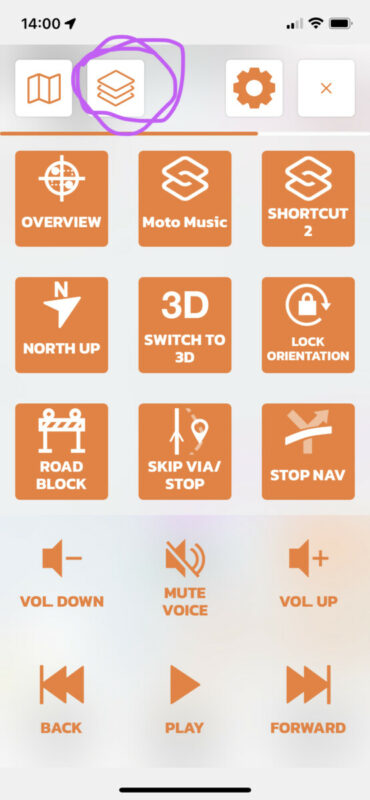
This is not the same button you see in the main/start screen. The button in the main/start screen activates the layer while you are planning, but not while navigating. To activate this layer while navigating, you need to use the button above (realize this is confusing and this will change in the big update I'm working on) - Once the layer is active you will see the POI markers on the map while you are navigating.
- If you then go to edit/overview mode, you can tap those markers and add them to the route.


