
Scenic won't recalculate route when departing from the planned route

Quote from Marts on 26.03.2024, 18:16I got the chance to test Scenic out this past weekend. Had four glorious days exploring the Snowy Mountains and Victorian High Country (South East and North east Victoria, Australia). I spent a few days liaising with the folks that I was going away with and planning our routes.
Note: all planned routes were done using Power Planner.
Note 2: I'm using Scenic via a CarPlay unit called Chigee AIO-5 LiteThe first one was an epic fail.
5 minutes after leaving home we decided to take a different route to the one that I planned. However, for the next 2 hours or 150 km, Scenic kept trying to get me back to the original route. As I knew where we were going I ignored it but time and distance to destination increased the further I rode as I think it thought that I was going too far away (but I wasn't).
Anyway, on the second stop, about 250km from home and about 200 km from our destination, I stopped the navigation, saved the recorded file and in the main window where it asks "where to?" I typed in the destination and it programmed the route accordingly.
About 2 km out of that town on our way, it started to tell me to turn left (or right) for the next 100 km in order to get me to some other route. I don't know where it wanted to take me but trust me, there were no roads going to where we were going other than the one that I was on.
Now, I'm suspecting that it may be the HERE map data which is doing this as the Garmin Zumo XT, which also uses HERE maps, often does this (and why I am not using the Garmin any more).
Or maybe there are settings in the app that I have to change. Hopefully Guido can help me here.
Day 2, I planned a simple route in two stages. That seemed to work OK.
Day 3, I opened one of the planned routes to our next destination, and as what happened on Day 1, it kept trying to take me off-route. I stoppped navigating with it at our first fuel stop and programmed the next stage into Google Maps. That worked but it's a basic nav and doesn't have the cool features of Scenic.That night I programmed in my route home. Instead of using via points I programmed in 2 Stops, each of which were for coffee and fuel. That worked and it counted down the km or distance to the next intersection.
Thanks for reading. Hope that someone can point me in the right direction to get this working as it should.
I got the chance to test Scenic out this past weekend. Had four glorious days exploring the Snowy Mountains and Victorian High Country (South East and North east Victoria, Australia). I spent a few days liaising with the folks that I was going away with and planning our routes.
Note: all planned routes were done using Power Planner.
Note 2: I'm using Scenic via a CarPlay unit called Chigee AIO-5 Lite
The first one was an epic fail.
5 minutes after leaving home we decided to take a different route to the one that I planned. However, for the next 2 hours or 150 km, Scenic kept trying to get me back to the original route. As I knew where we were going I ignored it but time and distance to destination increased the further I rode as I think it thought that I was going too far away (but I wasn't).
Anyway, on the second stop, about 250km from home and about 200 km from our destination, I stopped the navigation, saved the recorded file and in the main window where it asks "where to?" I typed in the destination and it programmed the route accordingly.
About 2 km out of that town on our way, it started to tell me to turn left (or right) for the next 100 km in order to get me to some other route. I don't know where it wanted to take me but trust me, there were no roads going to where we were going other than the one that I was on.
Now, I'm suspecting that it may be the HERE map data which is doing this as the Garmin Zumo XT, which also uses HERE maps, often does this (and why I am not using the Garmin any more).
Or maybe there are settings in the app that I have to change. Hopefully Guido can help me here.
Day 2, I planned a simple route in two stages. That seemed to work OK.
Day 3, I opened one of the planned routes to our next destination, and as what happened on Day 1, it kept trying to take me off-route. I stoppped navigating with it at our first fuel stop and programmed the next stage into Google Maps. That worked but it's a basic nav and doesn't have the cool features of Scenic.
That night I programmed in my route home. Instead of using via points I programmed in 2 Stops, each of which were for coffee and fuel. That worked and it counted down the km or distance to the next intersection.
Thanks for reading. Hope that someone can point me in the right direction to get this working as it should.

Quote from Guido on 26.03.2024, 18:57Hi @marts,
Hope I can help you out. Let's see:
5 minutes after leaving home we decided to take a different route to the one that I planned. However, for the next 2 hours or 150 km, Scenic kept trying to get me back to the original route. As I knew where we were going I ignored it but time and distance to destination increased the further I rode as I think it thought that I was going too far away (but I wasn't).
This is very likely due to the new detour behaviour settings. Have a look here for the explanation, options available, including demo videos: https://scenic.app/help/detour-behaviour-scenic-v3-5-and-higher/
About 2 km out of that town on our way, it started to tell me to turn left (or right) for the next 100 km in order to get me to some other route. I don't know where it wanted to take me but trust me, there were no roads going to where we were going other than the one that I was on.
Now, I'm suspecting that it may be the HERE map data which is doing this as the Garmin Zumo XT, which also uses HERE maps, often does this (and why I am not using the Garmin any more).
Since there were no via points involved here, I suspect this is indeed map data and routing algorithm-related. You could try switching between fast and short routing mode (while navigating, move the map to go to edit mode and then tap the routing button at the bottom), but not sure that would have helped. If you want I can have a detailed look. In that case, could you give me your departure location and destination of that stretch?
Day 3, I opened one of the planned routes to our next destination, and as what happened on Day 1, it kept trying to take me off-route. I stoppped navigating with it at our first fuel stop
I suspect this is the same reason (detour behaviour) as day 1.
Hi @marts,
Hope I can help you out. Let's see:
5 minutes after leaving home we decided to take a different route to the one that I planned. However, for the next 2 hours or 150 km, Scenic kept trying to get me back to the original route. As I knew where we were going I ignored it but time and distance to destination increased the further I rode as I think it thought that I was going too far away (but I wasn't).
This is very likely due to the new detour behaviour settings. Have a look here for the explanation, options available, including demo videos: https://scenic.app/help/detour-behaviour-scenic-v3-5-and-higher/
About 2 km out of that town on our way, it started to tell me to turn left (or right) for the next 100 km in order to get me to some other route. I don't know where it wanted to take me but trust me, there were no roads going to where we were going other than the one that I was on.
Now, I'm suspecting that it may be the HERE map data which is doing this as the Garmin Zumo XT, which also uses HERE maps, often does this (and why I am not using the Garmin any more).
Since there were no via points involved here, I suspect this is indeed map data and routing algorithm-related. You could try switching between fast and short routing mode (while navigating, move the map to go to edit mode and then tap the routing button at the bottom), but not sure that would have helped. If you want I can have a detailed look. In that case, could you give me your departure location and destination of that stretch?
Day 3, I opened one of the planned routes to our next destination, and as what happened on Day 1, it kept trying to take me off-route. I stoppped navigating with it at our first fuel stop
I suspect this is the same reason (detour behaviour) as day 1.
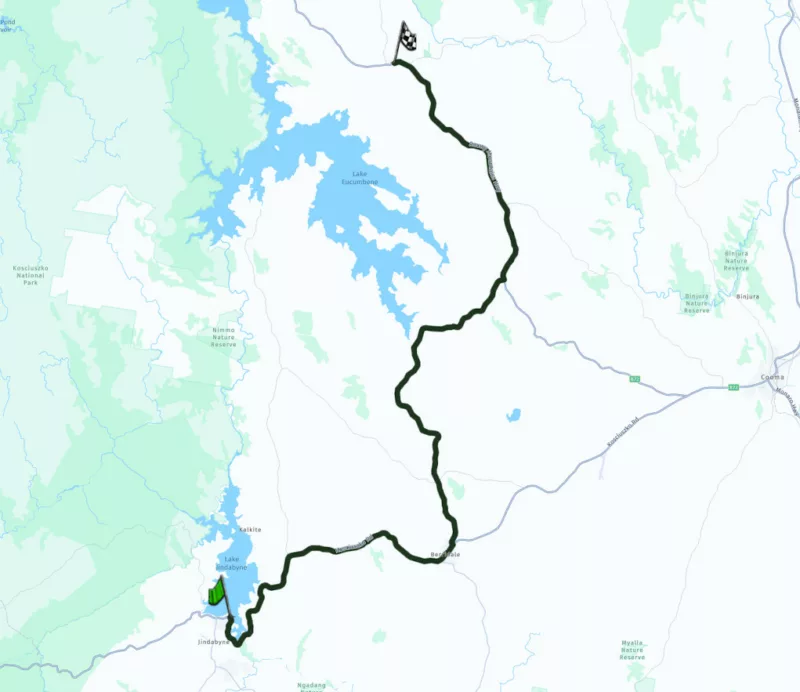
Quote from Marts on 26.03.2024, 19:17Here is the route that was recorded for Day 3. Jindabyne to Tumbarumba to Harrietville. As you can see I stopped it way before then.
Here is a screen shot of the route as it was planned in Power Planner.
I think that it wanted me to take the road to the west after leaving Jindabyne (SE New South Wales, Australia).
Anyway, see if you can work out what went on. I'll look up those instructions and see if the app is configured the same way.
Thanks.
Martin
Here is the route that was recorded for Day 3. Jindabyne to Tumbarumba to Harrietville. As you can see I stopped it way before then.
Here is a screen shot of the route as it was planned in Power Planner.
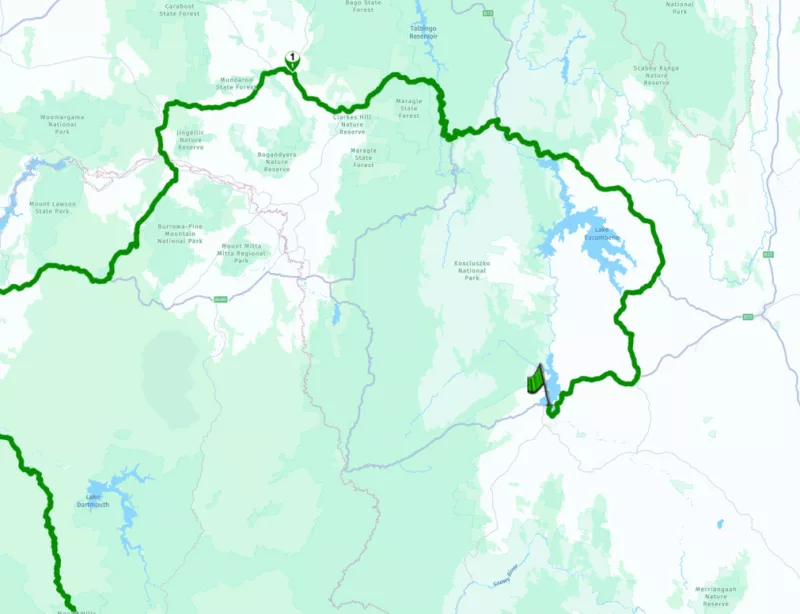
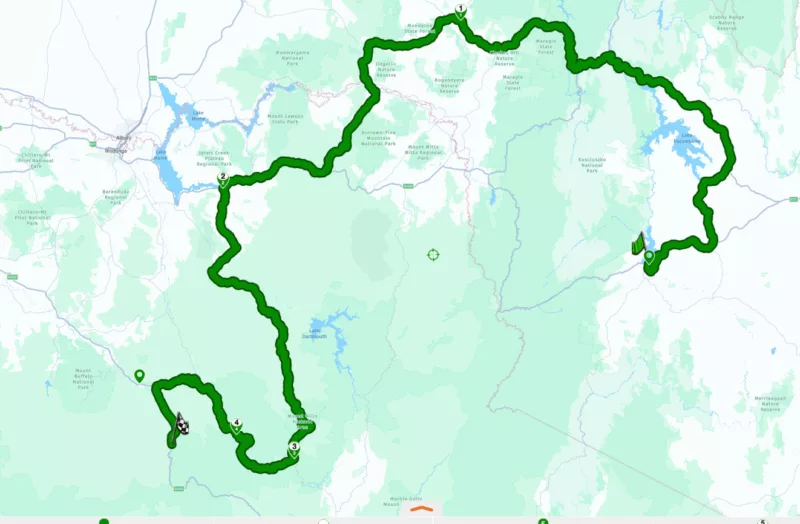
I think that it wanted me to take the road to the west after leaving Jindabyne (SE New South Wales, Australia).
Anyway, see if you can work out what went on. I'll look up those instructions and see if the app is configured the same way.
Thanks.
Martin
Quote from Guido on 26.03.2024, 19:35Hi Martin,
I was referring to the day 1 route, where you stopped the navigation and just entered the destination and it started sending you a completely different way. What was your start point (where did you enter just the destination) and what was the destination you entered?
One other question? Do you have the offline maps installed on the device you are planning and the device you are navigating on? It's possible that the offline and online routing engine returned different results (this is a bug in the HERE framework... working with them to get this resolved). I recommend installing the offline maps to prevent any differences.
Cheers,
Guido
Hi Martin,
I was referring to the day 1 route, where you stopped the navigation and just entered the destination and it started sending you a completely different way. What was your start point (where did you enter just the destination) and what was the destination you entered?
One other question? Do you have the offline maps installed on the device you are planning and the device you are navigating on? It's possible that the offline and online routing engine returned different results (this is a bug in the HERE framework... working with them to get this resolved). I recommend installing the offline maps to prevent any differences.
Cheers,
Guido
Quote from Marts on 26.03.2024, 19:49Uh, OK.
When on Day 1 I stopped the nav I was in a town called Orbost in eastern Victoria. I entered in the single destination into "where do you want to go" field which was Jindabyne in SE New South Wales. The road that we took is called the Bonang Highway or Bonang Way which leaves Orbost to the north. As soon as we left Orbost it was asking me to turn left down roads and some were dirt tracks. I haven't looked at any detailed maps to see where they went so I don't know where it wanted me to go. When I get time I'll check it out with a detailed map.
Our route took us from Orbost to a town called Bombala in New South Wales where we stopped for lunch. I think that from there I used Google Maps. I can't remember for sure.
And yes, I have the offline map of Australia on the iPhone. I did this knowing that a lot of the trip would have been in areas of no mobile phone coverage.
I discovered that this is necessary before I installed Scenic as I was trialling an app called Detecht. It doesn't have offline maps and relies on mobile coverage. It went crazy as soon as I went into a mobile black spot (no coverage). Another reason why I opted to go with Scenic. Australia has a lot of areas which have poor mobile signals. And mostly this is where we want to go riding.
It'll be a few weeks now before I can test this again.
Uh, OK.
When on Day 1 I stopped the nav I was in a town called Orbost in eastern Victoria. I entered in the single destination into "where do you want to go" field which was Jindabyne in SE New South Wales. The road that we took is called the Bonang Highway or Bonang Way which leaves Orbost to the north. As soon as we left Orbost it was asking me to turn left down roads and some were dirt tracks. I haven't looked at any detailed maps to see where they went so I don't know where it wanted me to go. When I get time I'll check it out with a detailed map.
Our route took us from Orbost to a town called Bombala in New South Wales where we stopped for lunch. I think that from there I used Google Maps. I can't remember for sure.
And yes, I have the offline map of Australia on the iPhone. I did this knowing that a lot of the trip would have been in areas of no mobile phone coverage.
I discovered that this is necessary before I installed Scenic as I was trialling an app called Detecht. It doesn't have offline maps and relies on mobile coverage. It went crazy as soon as I went into a mobile black spot (no coverage). Another reason why I opted to go with Scenic. Australia has a lot of areas which have poor mobile signals. And mostly this is where we want to go riding.
It'll be a few weeks now before I can test this again.
Quote from Guido on 26.03.2024, 20:21Thank Martin. Wittg this info I can analyze further. I will do so tomorrow and report back.
One more double check: so you downloaded offline maps on your iPhone. Your screenshots seem to be from an iPad or Mac, or are they also from your iPhone? On which device did you create the routes? And does that device also have the offline maps?
Thank Martin. Wittg this info I can analyze further. I will do so tomorrow and report back.
One more double check: so you downloaded offline maps on your iPhone. Your screenshots seem to be from an iPad or Mac, or are they also from your iPhone? On which device did you create the routes? And does that device also have the offline maps?
Quote from Marts on 26.03.2024, 20:58Yes, that's correct, I did screen shots from the app that's installed on my Mac Mini M2 Pro.
All of the routes, except for the one that worked for the ride home, were done on the Mac under Power Planner. That last one was done on my iphone the night before coming home.
No, I didn't download the maps to the Mac. Should I have done this?
Do you think that maybe creating the routes in the Mac's copy of Scenic is causing problems?
Yes, that's correct, I did screen shots from the app that's installed on my Mac Mini M2 Pro.
All of the routes, except for the one that worked for the ride home, were done on the Mac under Power Planner. That last one was done on my iphone the night before coming home.
No, I didn't download the maps to the Mac. Should I have done this?
Do you think that maybe creating the routes in the Mac's copy of Scenic is causing problems?
Quote from Marts on 26.03.2024, 21:01I just had a look. the Australia map has been downloaded to the Mac version of Scenic. I don't remember doing that. Would it have done it after I downloaded it to the iPhone (copying the profile settings across)?
I just had a look. the Australia map has been downloaded to the Mac version of Scenic. I don't remember doing that. Would it have done it after I downloaded it to the iPhone (copying the profile settings across)?


