
Scenic u Apple CarPlay

Quote from Ktm300 on 13.04.2024, 08:12Seit der neusten Version muss man nach einem Stop auf dem Handy „Route fortsetzen „ drücken. Bei der alten Version ging das noch unter CarPlay. Sehr lästig.
Since the latest version, you have to press "Continue route" on your phone after a stop. In the old version, this was still possible under CarPlay. Very annoying.
Seit der neusten Version muss man nach einem Stop auf dem Handy „Route fortsetzen „ drücken. Bei der alten Version ging das noch unter CarPlay. Sehr lästig.
Since the latest version, you have to press "Continue route" on your phone after a stop. In the old version, this was still possible under CarPlay. Very annoying.
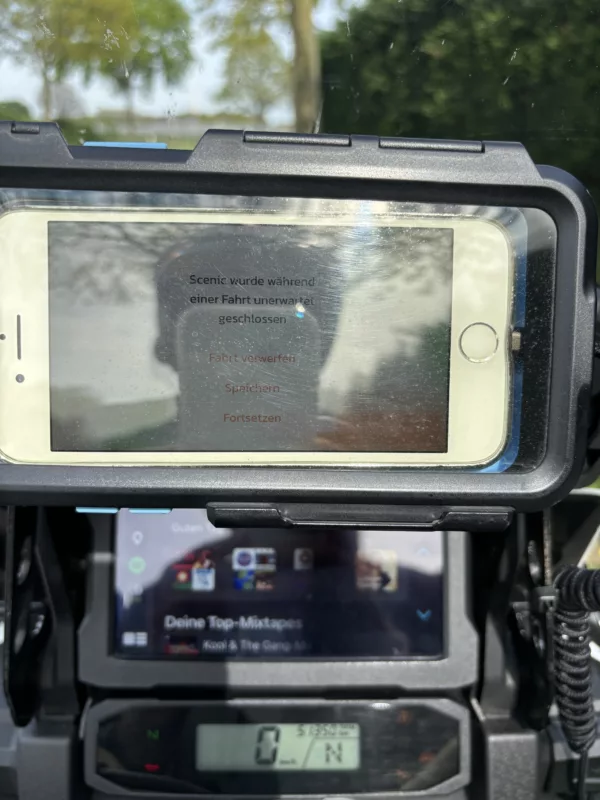

Quote from Mex on 13.04.2024, 08:37Hi Ktm300.
Als ich am Mittwoch Scenic benutzt habe und getankt habe, erkannte die App die Weiterfahrt automatisch. Hatte aber nicht Carplay am Start.
Linke zum Gruß, Mex
As i rode on wendnesday Scenic continued automatically after a fuel stop. But i didnt use carplay.
Regards, Mex
Hi Ktm300.
Als ich am Mittwoch Scenic benutzt habe und getankt habe, erkannte die App die Weiterfahrt automatisch. Hatte aber nicht Carplay am Start.
Linke zum Gruß, Mex
As i rode on wendnesday Scenic continued automatically after a fuel stop. But i didnt use carplay.
Regards, Mex

Quote from Guido on 13.04.2024, 08:45Thanks Mex,
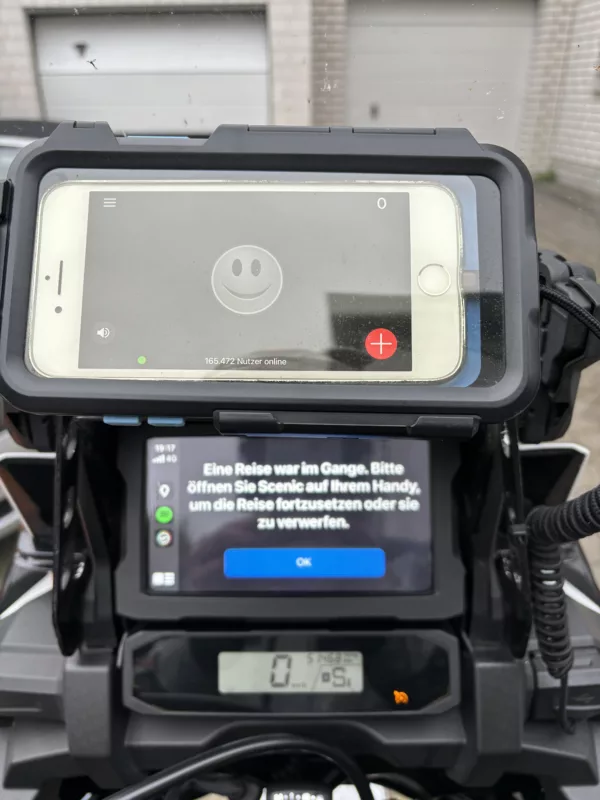
In der Tat zeigt diese Meldung nur an, wenn Scenic abgestürzt ist oder wenn es während Ihres Stopps vollständig geschlossen wurde. Wenn Sie Scenic während eines Stopps auf Ihrem iPhone laufen lassen, sollte die Fahrt einfach fortgesetzt werden, ohne dass Sie auf eine Taste auf dem iPhone tippen müssen.
Wenn Scenic abgestürzt ist, habe ich einen Absturzbericht erhalten und werde einen Blick auf den Grund werfen, warum dies passiert ist.
Mit freundlichen Grüßen,
Guido
*****
Indeed, this message only shows if Scenic crashed or if it was completely shut down during your stop. If you keep Scenic running on your iPhone during a stop, the ride should just continue without you needing to tap a button on the iPhone.
If Scenic crashed, I will have gotten a crash report and I'll take a look at the reason why this happened.
Best regards,
Guido
Thanks Mex,
In der Tat zeigt diese Meldung nur an, wenn Scenic abgestürzt ist oder wenn es während Ihres Stopps vollständig geschlossen wurde. Wenn Sie Scenic während eines Stopps auf Ihrem iPhone laufen lassen, sollte die Fahrt einfach fortgesetzt werden, ohne dass Sie auf eine Taste auf dem iPhone tippen müssen.
Wenn Scenic abgestürzt ist, habe ich einen Absturzbericht erhalten und werde einen Blick auf den Grund werfen, warum dies passiert ist.
Mit freundlichen Grüßen,
Guido
*****
Indeed, this message only shows if Scenic crashed or if it was completely shut down during your stop. If you keep Scenic running on your iPhone during a stop, the ride should just continue without you needing to tap a button on the iPhone.
If Scenic crashed, I will have gotten a crash report and I'll take a look at the reason why this happened.
Best regards,
Guido
Quote from Guido on 14.04.2024, 12:20@ktm300
When you start the ride. Do you start in on the iPhone or on CarPlay? Is Scenic already running on iPhone if you start it on CarPlay?
Lastly, what Phone and iOS version are you running?
Best regards,
guido
When you start the ride. Do you start in on the iPhone or on CarPlay? Is Scenic already running on iPhone if you start it on CarPlay?
Lastly, what Phone and iOS version are you running?
Best regards,
guido
Quote from Ktm300 on 14.04.2024, 12:56Starte auf dem Iphone
Ja Senic läuft und dann starte ich meine Africa Twin, es dauert einen Augenblick bis CarPlay startet
iPhone 8 iOS 16.7.7
Starte auf dem Iphone
Ja Senic läuft und dann starte ich meine Africa Twin, es dauert einen Augenblick bis CarPlay startet
iPhone 8 iOS 16.7.7
Quote from Guido on 15.04.2024, 10:46OK. Die Meldung sagt mir, dass Scenic während Ihres Stopps abgestürzt ist (oder geschlossen wurde). Ich nehme an, Sie haben Scenic während Ihres Stopps nicht vollständig geschlossen... also muss es abgestürzt sein. Ich werde untersuchen, warum das passiert ist. Ich habe den Verdacht, dass dies mit iOS16 zusammenhängt, sonst hätte ich wahrscheinlich mehr Berichte darüber erhalten. Auf jeden Fall werde ich nachforschen und berichten. Vielen Dank für die zusätzlichen Fotos und Informationen.
****
OK. The message tells me that Scenic crashed (or was closed) during your stop. I assume you didn't close Scenic completely during your stop... so it must have crashed. I'll investigate why this happened. I have a suspicion this is iOS16 related, otherwise I would probably have gotten more reports about it. In any case, I will investigate and will report back. Thank you for the additiona. photos and info.
OK. Die Meldung sagt mir, dass Scenic während Ihres Stopps abgestürzt ist (oder geschlossen wurde). Ich nehme an, Sie haben Scenic während Ihres Stopps nicht vollständig geschlossen... also muss es abgestürzt sein. Ich werde untersuchen, warum das passiert ist. Ich habe den Verdacht, dass dies mit iOS16 zusammenhängt, sonst hätte ich wahrscheinlich mehr Berichte darüber erhalten. Auf jeden Fall werde ich nachforschen und berichten. Vielen Dank für die zusätzlichen Fotos und Informationen.
****
OK. The message tells me that Scenic crashed (or was closed) during your stop. I assume you didn't close Scenic completely during your stop... so it must have crashed. I'll investigate why this happened. I have a suspicion this is iOS16 related, otherwise I would probably have gotten more reports about it. In any case, I will investigate and will report back. Thank you for the additiona. photos and info.
Quote from Guido on 16.04.2024, 15:52Hi @ktm300,
I can not reproduce the crash you are experiencing. Perhpas I'm doing something differently then you. Could you answer following questions please? I know you answered some already, but just to be complete:
- Does your phone connect wirelessly or wired to CarPlay?
- Do you start Scenic before you connect to CarPlay?
- Where do you select the route/destination for navigation? On iPhone or on CarPlay? If on iPhone, is CarPlay already connected when you do that?
- Where do you start the navigation? (where do you tap the "Start Navigation" button). On iPhone or on CarPlay? If on iPhone, is CarPlay already connected when you do that?
- When you stop, what is the sequence of events and what are the actions you perform with your bike and with your phone?
- I noticed in the pictures that you have an older iPhone in a case. Is it being charged through your bike? During your stop, does your iPhone run out of battery (completely shuts down)?
- Do you take the iPhone out of the case and perform actions on the iPhone during your stop? If so, do you open Scenic during your stop? If yes, what screen does Scenic show?
- What is the sequence of events when you start riding again?
Sorry for the many questions, but CarPlay is very complicated and as you can tell, there are many many scenarios that each can have different results.
Thank you and best regards,
Guido
Hi @ktm300,
I can not reproduce the crash you are experiencing. Perhpas I'm doing something differently then you. Could you answer following questions please? I know you answered some already, but just to be complete:
- Does your phone connect wirelessly or wired to CarPlay?
- Do you start Scenic before you connect to CarPlay?
- Where do you select the route/destination for navigation? On iPhone or on CarPlay? If on iPhone, is CarPlay already connected when you do that?
- Where do you start the navigation? (where do you tap the "Start Navigation" button). On iPhone or on CarPlay? If on iPhone, is CarPlay already connected when you do that?
- When you stop, what is the sequence of events and what are the actions you perform with your bike and with your phone?
- I noticed in the pictures that you have an older iPhone in a case. Is it being charged through your bike? During your stop, does your iPhone run out of battery (completely shuts down)?
- Do you take the iPhone out of the case and perform actions on the iPhone during your stop? If so, do you open Scenic during your stop? If yes, what screen does Scenic show?
- What is the sequence of events when you start riding again?
Sorry for the many questions, but CarPlay is very complicated and as you can tell, there are many many scenarios that each can have different results.
Thank you and best regards,
Guido
Quote from Ktm300 on 17.04.2024, 07:35
- Does your phone connect wirelessly or wired to CarPlay? Wired
- Do you start Scenic before you connect to CarPlay? Yes
- Where do you select the route/destination for navigation? On iPhone or on CarPlay? Iphone If on iPhone, is CarPlay already connected when you do that? No
- Where do you start the navigation? (where do you tap the "Start Navigation" button). On iPhone or on CarPlay? Iphne If on iPhone, is CarPlay already connected when you do that? No
- When you stop, what is the sequence of events and what are the actions you perform with your bike and with your phone?
- In this case I turn off the motorcycle and put the iPhone in my pocket
- I noticed in the pictures that you have an older iPhone in a case. Is it being charged through your bike? yes During your stop, does your iPhone run out of battery (completely shuts down)? No
- Do you take the iPhone out of the case and perform actions on the iPhone during your stop? If so, do you open Scenic during your stop? If yes, what screen does Scenic show?
- Unfortunately I don't know that anymore. But it could be that I entered a new destination in Senic and then returned to Route. Then I put the iPhone back in the case on the motorcycle and turned on the ignition
- What is the sequence of events when you start riding again?
- Unfortunately I can no longer say that exactly. But when the weather gets better here in Germany, I'll test it again 🙂
- Does your phone connect wirelessly or wired to CarPlay? Wired
- Do you start Scenic before you connect to CarPlay? Yes
- Where do you select the route/destination for navigation? On iPhone or on CarPlay? Iphone If on iPhone, is CarPlay already connected when you do that? No
- Where do you start the navigation? (where do you tap the "Start Navigation" button). On iPhone or on CarPlay? Iphne If on iPhone, is CarPlay already connected when you do that? No
- When you stop, what is the sequence of events and what are the actions you perform with your bike and with your phone?
- In this case I turn off the motorcycle and put the iPhone in my pocket
- I noticed in the pictures that you have an older iPhone in a case. Is it being charged through your bike? yes During your stop, does your iPhone run out of battery (completely shuts down)? No
- Do you take the iPhone out of the case and perform actions on the iPhone during your stop? If so, do you open Scenic during your stop? If yes, what screen does Scenic show?
- Unfortunately I don't know that anymore. But it could be that I entered a new destination in Senic and then returned to Route. Then I put the iPhone back in the case on the motorcycle and turned on the ignition
- What is the sequence of events when you start riding again?
- Unfortunately I can no longer say that exactly. But when the weather gets better here in Germany, I'll test it again 🙂
Quote from Guido on 17.04.2024, 11:28Thanks for the details.
So, I tried to reproduce with my old iPhone 8, also running iOS 16.7.7. Tried to follow the steps as you indicated. Tried a few different scenarios. Unfortunately I could not get it to crash.
This makes me believe the crash is not related to connecting and disconnecting from CarPlay. There must be another reason why Scenic crashed. There IS currently a bug where Scenic sometimes crashes when using the search function. Perhaps that is what happened.
I assume this does not happen every time you stop? Or does it?
In any case, I will fix as many crash-related bugs as possible for the next Scenic version.
Additionally, I will also make it possible again to resume rides from CarPlay after a crash (without the need to open Scenic on your iPhone).
Thanks for the details.
So, I tried to reproduce with my old iPhone 8, also running iOS 16.7.7. Tried to follow the steps as you indicated. Tried a few different scenarios. Unfortunately I could not get it to crash.
This makes me believe the crash is not related to connecting and disconnecting from CarPlay. There must be another reason why Scenic crashed. There IS currently a bug where Scenic sometimes crashes when using the search function. Perhaps that is what happened.
I assume this does not happen every time you stop? Or does it?
In any case, I will fix as many crash-related bugs as possible for the next Scenic version.
Additionally, I will also make it possible again to resume rides from CarPlay after a crash (without the need to open Scenic on your iPhone).


