
Scenic for Android app

Quote from GL700Wing on 23.12.2025, 00:39Hi Guido,
I've been eagerly waiting for the Android version of this app so that I can use it in my car!
I successfully installed the Scenic for Android app on the in-dash Android GPS unit in my car earlier today but after entering all my details to create a new account (ie, name, email and password) there was no option for me to continue (ie, there was no submit button on the screen even when I scrolled up) and although I realise this issue may be specific to non-phone Android devices I thought I'd let you know anyway.
Fortunately I later found an option to login and as I already have a Scenic account I use with my iOS devices I was very pleased to discover that not only did the Scenic for Android app accept my login details but once I was logged in I was able to access all my saved information and also download the offline maps I normally use so a big thanks for providing cross-platform account support (this is fantastic as it will enable me to plan routes for the drives I want to do using my iPad - which is a much more user friendly device to use than the in-dash unit in my car - and save them for use in my car).
Thanks for continuing to develop such a great product!
Kathy
Hi Guido,
I've been eagerly waiting for the Android version of this app so that I can use it in my car!
I successfully installed the Scenic for Android app on the in-dash Android GPS unit in my car earlier today but after entering all my details to create a new account (ie, name, email and password) there was no option for me to continue (ie, there was no submit button on the screen even when I scrolled up) and although I realise this issue may be specific to non-phone Android devices I thought I'd let you know anyway.
Fortunately I later found an option to login and as I already have a Scenic account I use with my iOS devices I was very pleased to discover that not only did the Scenic for Android app accept my login details but once I was logged in I was able to access all my saved information and also download the offline maps I normally use so a big thanks for providing cross-platform account support (this is fantastic as it will enable me to plan routes for the drives I want to do using my iPad - which is a much more user friendly device to use than the in-dash unit in my car - and save them for use in my car).
Thanks for continuing to develop such a great product!
Kathy

Quote from Guido on 23.12.2025, 11:49Hi Kathy,
Indeed we only tested Android for phone and tablet Android devices for the moment. I know you already passed this step, but could you perhaps send us some pictures of the missing submit button when you get the chance (you'll probably have to logout and attempt to create a new account again). You can use the "email me" button at the bottom of scenic.app/help to send us the picture. I'll make sure it will end up with the Android team.
Thanks and best regards,
Guido
Hi Kathy,
Indeed we only tested Android for phone and tablet Android devices for the moment. I know you already passed this step, but could you perhaps send us some pictures of the missing submit button when you get the chance (you'll probably have to logout and attempt to create a new account again). You can use the "email me" button at the bottom of scenic.app/help to send us the picture. I'll make sure it will end up with the Android team.
Thanks and best regards,
Guido
Quote from GL700Wing on 23.12.2025, 21:52Hi Guido,
Thanks for your reply - as requested I've sent you an email with a photo of the account creation screen (and also a photo of a screen with some system information).
Questions : Is there a reason the offline maps I'd already downloaded had to be deleted when I logged out and would it be possible to be given the option to retain them? I can understand deleting the offline maps if I was deleting my Scenic account (or uninstalling the app) but it would have been useful if they had been retained when I was just logging out.
Thanks,
Kathy
Hi Guido,
Thanks for your reply - as requested I've sent you an email with a photo of the account creation screen (and also a photo of a screen with some system information).
Questions : Is there a reason the offline maps I'd already downloaded had to be deleted when I logged out and would it be possible to be given the option to retain them? I can understand deleting the offline maps if I was deleting my Scenic account (or uninstalling the app) but it would have been useful if they had been retained when I was just logging out.
Thanks,
Kathy

Quote from GruenesZimmerhuhn on 13.02.2026, 11:51Hello Guido,
I would like to jump on this topic, because my question fits to the title and reduce the amount of threads.
Since some years I am using Scenic on iOS, and everything is fine. Currently I am thinking of switching from iPhone/iOS to Android. One of the top criteria for that is scenic will run on it :-). Of course I know, Scenic is running on Android since December or at least since summer. Is it still in Beta mode or would you say the Android version is stable as the iOS version and all functions will be available as on iOS? Are there are some functions missing which needs some further time to implement?
Greetings Frank
Hello Guido,
I would like to jump on this topic, because my question fits to the title and reduce the amount of threads.
Since some years I am using Scenic on iOS, and everything is fine. Currently I am thinking of switching from iPhone/iOS to Android. One of the top criteria for that is scenic will run on it :-). Of course I know, Scenic is running on Android since December or at least since summer. Is it still in Beta mode or would you say the Android version is stable as the iOS version and all functions will be available as on iOS? Are there are some functions missing which needs some further time to implement?
Greetings Frank
Quote from Guido on 13.02.2026, 12:42https://scenic.app/android

Quote from Karlchen on 13.02.2026, 14:05Hallo zusammen,
wenn man für das iPhone premium für immer hat, zählt das dann auch für Android?
Beste Grüße
Karlchen
Hallo zusammen,
wenn man für das iPhone premium für immer hat, zählt das dann auch für Android?
Beste Grüße
Karlchen
Quote from Guido on 13.02.2026, 14:49yes
yes
Quote from GL700Wing on 02.03.2026, 17:24I have encountered an issue when planning a route on my car's in-dash Android unit.
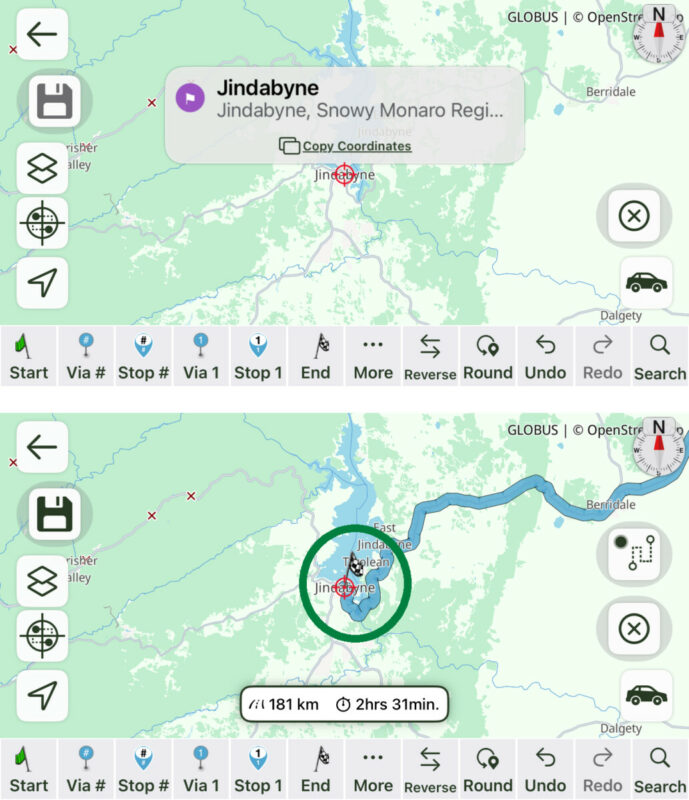
With the iOS version when I search for a destination the 'locating' circle is centered on the destination which makes it easy to set this location as the 'end' point ('locating' circle and 'end' point both circled in green) before I save the route (this works with my iPhone in either portrait or landscape mode).
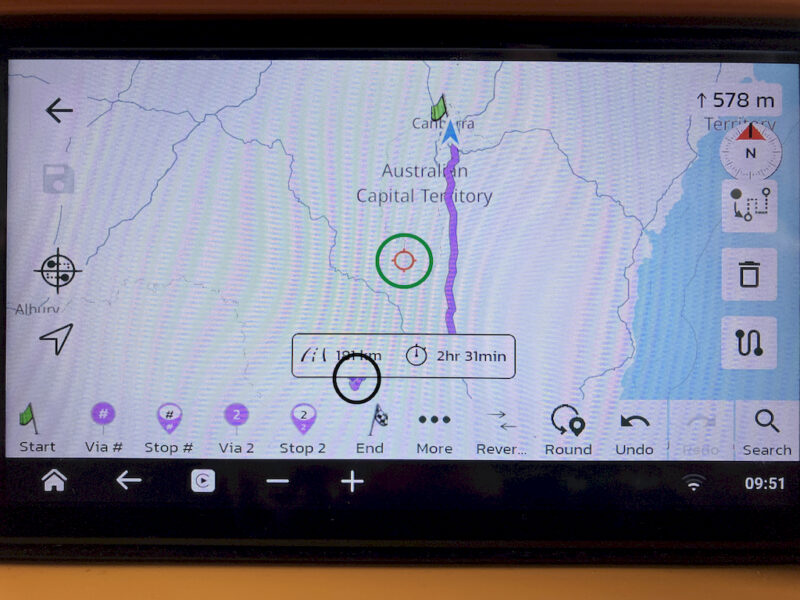
However, with the Android version (landscape only) when I search for a destination the 'locating' circle appears to be centered both vertically and horizontally in the screen (circled in green) instead of on the destination (circled in black behind the route info bar) which means I have to use my fingers to manually zoom in to the destination so that I can set it as the 'end' point (and save the route).
I have encountered an issue when planning a route on my car's in-dash Android unit.
With the iOS version when I search for a destination the 'locating' circle is centered on the destination which makes it easy to set this location as the 'end' point ('locating' circle and 'end' point both circled in green) before I save the route (this works with my iPhone in either portrait or landscape mode).
However, with the Android version (landscape only) when I search for a destination the 'locating' circle appears to be centered both vertically and horizontally in the screen (circled in green) instead of on the destination (circled in black behind the route info bar) which means I have to use my fingers to manually zoom in to the destination so that I can set it as the 'end' point (and save the route).
Quote from Guido on 02.03.2026, 18:46Ok. Thanks for the report. We’ll have a look.
Ok. Thanks for the report. We’ll have a look.
Quote from GL700Wing on 03.03.2026, 01:22Quote from Guido on 02.03.2026, 18:46Ok. Thanks for the report. We’ll have a look.
Thanks.
Also, and in relation to my previous message, is there a way for me to delete two images I uploaded but ended up not using because I replaced them with other images?
Quote from Guido on 02.03.2026, 18:46Ok. Thanks for the report. We’ll have a look.
Thanks.
Also, and in relation to my previous message, is there a way for me to delete two images I uploaded but ended up not using because I replaced them with other images?
Quote from Guido on 03.03.2026, 14:16To delete images, go to your recorded rides, select the ride, scroll down to where you see the images. Below the image there's a delete image button. You can also add images from your photo library there. Hope I understood correctly. If not, please let me know.
To delete images, go to your recorded rides, select the ride, scroll down to where you see the images. Below the image there's a delete image button. You can also add images from your photo library there. Hope I understood correctly. If not, please let me know.
Quote from GL700Wing on 03.03.2026, 14:43Quote from Guido on 03.03.2026, 14:16Hope I understood correctly. If not, please let me know.
Thanks for your reply - the image files I want to delete are attached to an earlier forum message: https://scenic.app/forum/topic/scenic-for-android-app/#postid-15391
Quote from Guido on 03.03.2026, 14:16Hope I understood correctly. If not, please let me know.
Thanks for your reply - the image files I want to delete are attached to an earlier forum message: https://scenic.app/forum/topic/scenic-for-android-app/#postid-15391
Quote from Guido on 03.03.2026, 15:51Ah... I clearly misunderstood 😊. You can edit your post by clicking the 'edit' button in the post header.
Ah... I clearly misunderstood 😊. You can edit your post by clicking the 'edit' button in the post header.
Quote from GL700Wing on 03.03.2026, 16:40Quote from Guido on 03.03.2026, 15:51Ah... I clearly misunderstood
. You can edit your post by clicking the 'edit' button in the post header.
I tried that but when I go into "Add Media" I can't find a way to delete image files - only to add or insert them.
Quote from Guido on 03.03.2026, 15:51Ah... I clearly misunderstood
I tried that but when I go into "Add Media" I can't find a way to delete image files - only to add or insert them.
Quote from Guido on 03.03.2026, 16:46You can just leave the media, but just delete it from your post (and add new ones if you like). No-one can see your media except if you add it to one of your posts. So if you delete it from your post, that's it.
You can just leave the media, but just delete it from your post (and add new ones if you like). No-one can see your media except if you add it to one of your posts. So if you delete it from your post, that's it.
Quote from GL700Wing on 03.03.2026, 16:54Quote from Guido on 03.03.2026, 16:46You can just leave the media, but just delete it from your post (and add new ones if you like). No-one can see your media except if you add it to one of your posts. So if you delete it from your post, that's it.
Thanks - I wasn't concerned about who could see the images - I just didn't want them to unnecessarily use your web hosting storage ...
Quote from Guido on 03.03.2026, 16:46You can just leave the media, but just delete it from your post (and add new ones if you like). No-one can see your media except if you add it to one of your posts. So if you delete it from your post, that's it.
Thanks - I wasn't concerned about who could see the images - I just didn't want them to unnecessarily use your web hosting storage ...


