
Scenic 4.06 Scenic Navigator and divorces Scenic Route Planner (a bug? a feature?

Quote from cgriell on 28.11.2024, 11:53It seems that the Navigator has its own soul and takes its decisions.
I had planned this route. After Waypoint 9 there is a T junction, the planned route goes to waypoint 10, 11, 12, 13 to the Stop number 2.
And this is a detail of the T junction, you'll see a road that goes towards a village called Ulldemolins, and it continues to Stop number 2
The navigator, at the T-junction has decided to send me direct to Waypoint 2!!! Apparently he has decided to "optimize" the route, so, instead of marking a right turn at the T-Junction, he has marked a left turn, sending me (and the rest of the group) direct to the restaurant
You may see that
It seems that the Navigator has its own soul and takes its decisions.
I had planned this route. After Waypoint 9 there is a T junction, the planned route goes to waypoint 10, 11, 12, 13 to the Stop number 2.
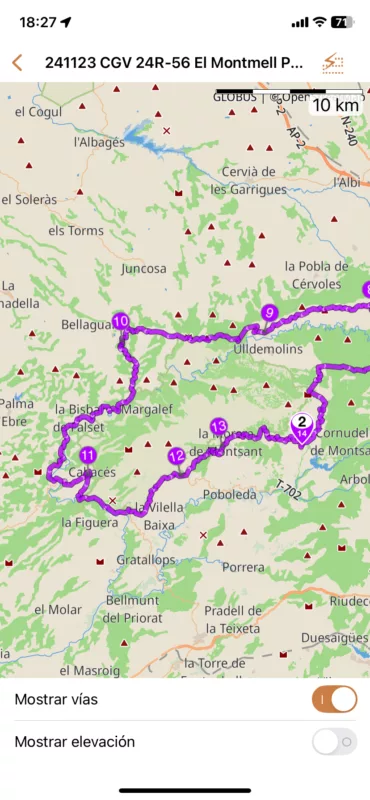
And this is a detail of the T junction, you'll see a road that goes towards a village called Ulldemolins, and it continues to Stop number 2
The navigator, at the T-junction has decided to send me direct to Waypoint 2!!! Apparently he has decided to "optimize" the route, so, instead of marking a right turn at the T-Junction, he has marked a left turn, sending me (and the rest of the group) direct to the restaurant
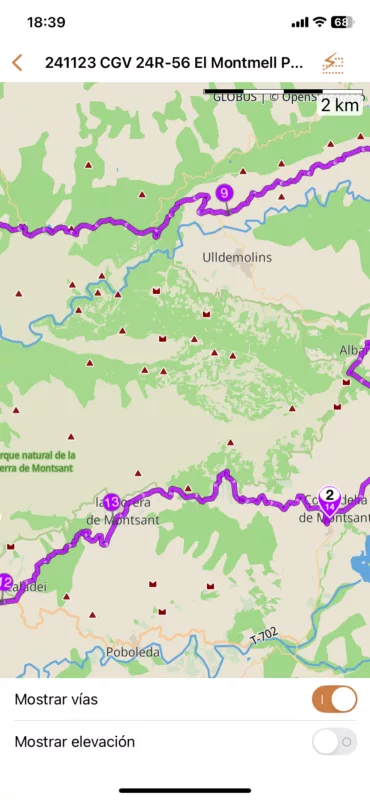
You may see that

Quote from Guido on 28.11.2024, 11:58What is your auto-skip via point setting on? (Settings > Navigation & Tracking > Detour behavior)
What is your auto-skip via point setting on? (Settings > Navigation & Tracking > Detour behavior)
Quote from cgriell on 28.11.2024, 15:02Guide me until next Stop (in Spanish "Guiame hasta la primera Stop inalcanzada" (BTW, text should be "Guiame hasta el primer Stop no alcanzado"). Two considerations... I have changed the default value "guide me to the next unreached waypoint" to "guide me to the next Stop" because it was almost impossible to use the navigation, the system was stuck in sending me to the next unreached waypoint. And of course, if you take a detour because the road is closed (for instance, you have passed wpt 8, wpt 9 is on a closed lane, and you are back on track in wpt 10, the navigator insisted in sending me to wpt 9, after reaching 10, 11, etc. And same if the road was not closed, but the waypoint was slightly positioned off the road. In both cases I needed to stop, take out my gloves, and skip the waypoint manually.
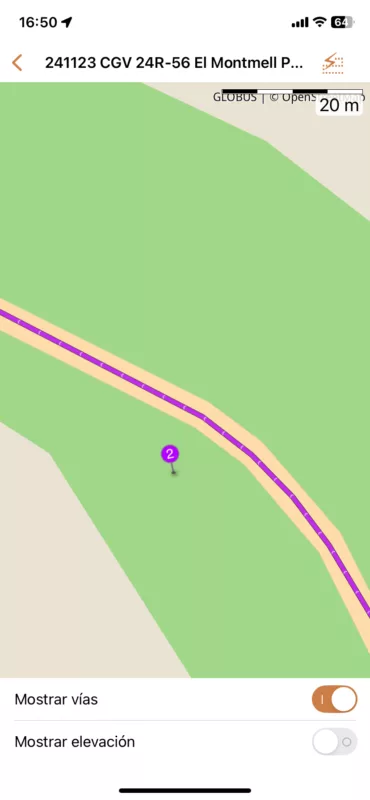
So, I went to see if waypoint 9 on my route was misplaced, and for this reason the Navigator has decided that I've made a detour. And this is what I see
So, yes, waypoint 9 is misplaced. Slightly. It is not directly above the green line, but considering the scale of the map, it is at less than one meter. I suppose that the waypoint has a radius and the vehicle too, and if the circles touch each other, then the WPT has been reached. In any case maybe you should reconsider the parameters of the algorithm
Guide me until next Stop (in Spanish "Guiame hasta la primera Stop inalcanzada" (BTW, text should be "Guiame hasta el primer Stop no alcanzado"). Two considerations... I have changed the default value "guide me to the next unreached waypoint" to "guide me to the next Stop" because it was almost impossible to use the navigation, the system was stuck in sending me to the next unreached waypoint. And of course, if you take a detour because the road is closed (for instance, you have passed wpt 8, wpt 9 is on a closed lane, and you are back on track in wpt 10, the navigator insisted in sending me to wpt 9, after reaching 10, 11, etc. And same if the road was not closed, but the waypoint was slightly positioned off the road. In both cases I needed to stop, take out my gloves, and skip the waypoint manually.
So, I went to see if waypoint 9 on my route was misplaced, and for this reason the Navigator has decided that I've made a detour. And this is what I see 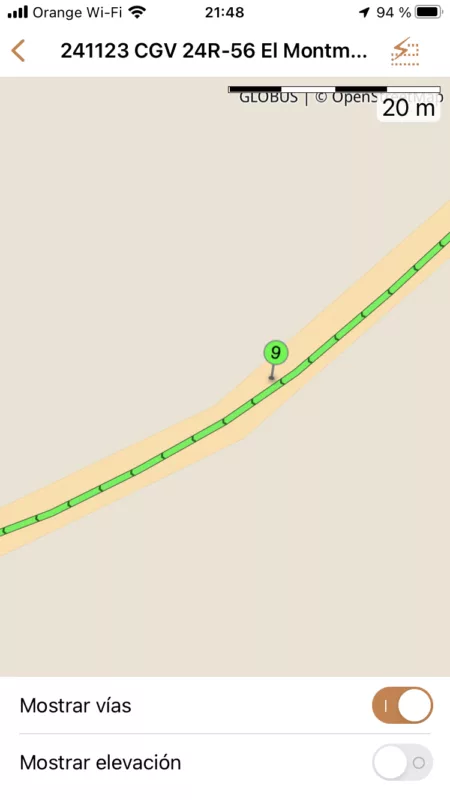
So, yes, waypoint 9 is misplaced. Slightly. It is not directly above the green line, but considering the scale of the map, it is at less than one meter. I suppose that the waypoint has a radius and the vehicle too, and if the circles touch each other, then the WPT has been reached. In any case maybe you should reconsider the parameters of the algorithm
Quote from Guido on 28.11.2024, 15:59Thanks Carlos. Yes. The 1 meter should have definitely been enough to mark the waypoint as “reached”.
I think something else might have gone wrong, maybe even before this point. I’ll have a look.
Meanwhile, the auto-skip next via setting mentioned above might actually help ( in stead of setting to ‘guide me to next stop’) At least it could decrease the need for taking of gloves to skip a waypoint manually.
Thanks Carlos. Yes. The 1 meter should have definitely been enough to mark the waypoint as “reached”.
I think something else might have gone wrong, maybe even before this point. I’ll have a look.
Meanwhile, the auto-skip next via setting mentioned above might actually help ( in stead of setting to ‘guide me to next stop’) At least it could decrease the need for taking of gloves to skip a waypoint manually.
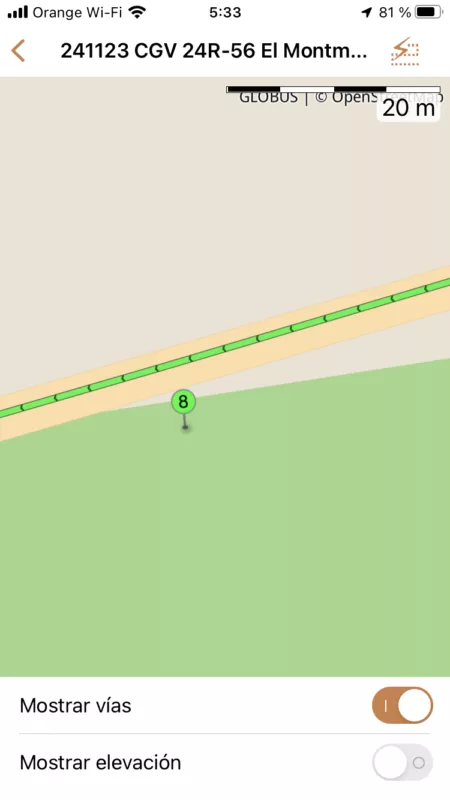
Quote from cgriell on 28.11.2024, 22:55Looking back, wpt 8 is a little more far away from the road. May be at this point the navigator has decided that it must go into "detour mode", and from this moment on, he was driving me to the next stop, so, it has not even considered waypoint 9... If this is the case, in "detour mode" probably the navigator must revert to "normal mode" if it finds a waypoint (eventually, this may be a settings option, "In detour mode, when "going to the next stop" has been selected, (i.) ignore all the waypoints until the Stop has been reached, then resume navigation (ii.) passing any waypoint resumes navigation (iii.)passing a waypoint of higher number than the one which has caused the detour resumes navigation " ).
Looking back, wpt 8 is a little more far away from the road. May be at this point the navigator has decided that it must go into "detour mode", and from this moment on, he was driving me to the next stop, so, it has not even considered waypoint 9... If this is the case, in "detour mode" probably the navigator must revert to "normal mode" if it finds a waypoint (eventually, this may be a settings option, "In detour mode, when "going to the next stop" has been selected, (i.) ignore all the waypoints until the Stop has been reached, then resume navigation (ii.) passing any waypoint resumes navigation (iii.)passing a waypoint of higher number than the one which has caused the detour resumes navigation " ).
Quote from Guido on 29.11.2024, 00:35I understand your suggestion, and it would make sense for the typical A to B to C route.
However this would not work for routes that overlap themselves / have the same stretch in it twice. And this is a quite regular use case for Scenic, where users generate a round trip.
Option (i) you mention is already the option “guide me to the next stop”.
For option (ii) and (iii), a round trip could already be marked as mostly complete, when you are just getting started. In fact, this was actually a bug a few versions back and I had to adjust the logic.
Nevertheless, I’ll see if I can adjust the logic a bit more. E.g. for this specific scenario, mark 8 AND 9 as ‘reached’ if you reach 9, but only if 7 was already reached. I’ll give it some more thought.
Thank you!
I understand your suggestion, and it would make sense for the typical A to B to C route.
However this would not work for routes that overlap themselves / have the same stretch in it twice. And this is a quite regular use case for Scenic, where users generate a round trip.
Option (i) you mention is already the option “guide me to the next stop”.
For option (ii) and (iii), a round trip could already be marked as mostly complete, when you are just getting started. In fact, this was actually a bug a few versions back and I had to adjust the logic.
Nevertheless, I’ll see if I can adjust the logic a bit more. E.g. for this specific scenario, mark 8 AND 9 as ‘reached’ if you reach 9, but only if 7 was already reached. I’ll give it some more thought.
Thank you!
Quote from cgriell on 29.11.2024, 10:26This is very interesting indeed!! because now I understand what I considered a glitch of the navigation that I had yesterday. I went through wpt 2, wpt 3, and then, instead of bringing me to wpt 4, it just abandoned the route. I did not understand why, I followed the navigator instructions, that drove me far away of wpt 4. I know rather well the region, so, instead of going back, I rode on country roads directly to wpt 4, and I forgot about,.
But not the rest of the group, (I lead a group of riders, and they load my track on their navigators, BMW, Garmin, Calimoto)... and during the lunch they asked me why I have not followed my own track that appeared on their navigator . They liked the country roads detour more than the original gpx, so they were happy with it. (and with me as the "road sensei" of the group)
But now I understand what has happened.. see the image !! I did not reach wpt 2, and the navigator went to "detour mode" and it was sending me direct to Stop 1, even if I passed wpt 3 correctly. First thing that I will do now, is to review my next route to verify that the waypoints are correctly placed.
But there is another question... what should be the distance to consider a wpt as "reached"?. You maybe know that I am an early user of Scenic, and I always placed the waypoints roughly over the road not precisely over it. It seems that V4.x demands a more accurate positioning.
This brings two suggestions ... (i.) Attitude Indicator in aviation includes the status of the Autopilot. Would'nt be nice that Scenic show in the navigation screen the mode (normal/detour) it is in, as well the next wpt or Stop number? maybe a different colour for the route will be enough... if the navigator enters "detour mode" then it changes the color of the route to a "detour color" selected in settings
ii.) I had a look to my last travel to check if my theory that the navigator was in detour mode since wpt2 and waypoints do not appear.... it would be useful to be able to verify if the route has followed them or not
This is very interesting indeed!! because now I understand what I considered a glitch of the navigation that I had yesterday. I went through wpt 2, wpt 3, and then, instead of bringing me to wpt 4, it just abandoned the route. I did not understand why, I followed the navigator instructions, that drove me far away of wpt 4. I know rather well the region, so, instead of going back, I rode on country roads directly to wpt 4, and I forgot about,.
But not the rest of the group, (I lead a group of riders, and they load my track on their navigators, BMW, Garmin, Calimoto)... and during the lunch they asked me why I have not followed my own track that appeared on their navigator . They liked the country roads detour more than the original gpx, so they were happy with it. (and with me as the "road sensei" of the group)
But now I understand what has happened.. see the image !! I did not reach wpt 2, and the navigator went to "detour mode" and it was sending me direct to Stop 1, even if I passed wpt 3 correctly. First thing that I will do now, is to review my next route to verify that the waypoints are correctly placed.
But there is another question... what should be the distance to consider a wpt as "reached"?. You maybe know that I am an early user of Scenic, and I always placed the waypoints roughly over the road not precisely over it. It seems that V4.x demands a more accurate positioning.
This brings two suggestions ... (i.) Attitude Indicator in aviation includes the status of the Autopilot. Would'nt be nice that Scenic show in the navigation screen the mode (normal/detour) it is in, as well the next wpt or Stop number? maybe a different colour for the route will be enough... if the navigator enters "detour mode" then it changes the color of the route to a "detour color" selected in settings
ii.) I had a look to my last travel to check if my theory that the navigator was in detour mode since wpt2 and waypoints do not appear.... it would be useful to be able to verify if the route has followed them or not


