
Scenic 3 - I cannot find public routes

Quote from Andy on 01.11.2021, 04:04Been playing with Scenic3. I usually hate big UI changes to software that I use a lot, but this all seems good and worthwhile. I'm sure I'll be using it without thinking in no time. Really like it.
There's one feature I can no longer find though: the ‘Find Scenic Routes’. I can no longer find/browse public routes that I've not previously interacted with.
Been playing with Scenic3. I usually hate big UI changes to software that I use a lot, but this all seems good and worthwhile. I'm sure I'll be using it without thinking in no time. Really like it.
There's one feature I can no longer find though: the ‘Find Scenic Routes’. I can no longer find/browse public routes that I've not previously interacted with.
Quote from PeteRT on 01.11.2021, 04:30I think Guido has made the UI much cleaner and clearer. I love the changes. Looks more modern now. Looking forward to my first ride to try out the navigation UI. However like you I cannot find the 'Find Scenic Routes' either. I'm sure all will be revealed shortly.
I think Guido has made the UI much cleaner and clearer. I love the changes. Looks more modern now. Looking forward to my first ride to try out the navigation UI. However like you I cannot find the 'Find Scenic Routes' either. I'm sure all will be revealed shortly.

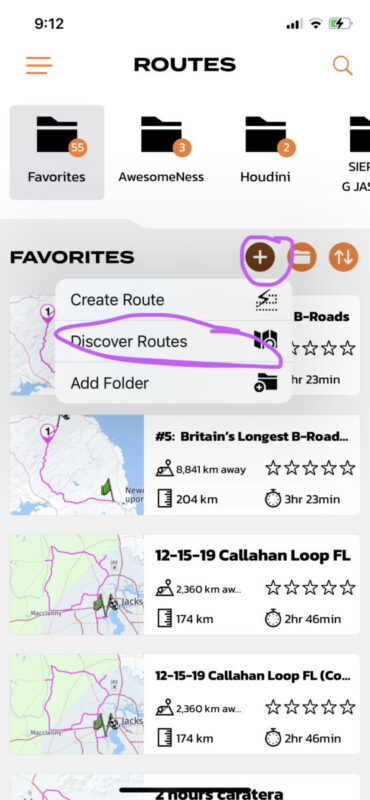
Quote from Guido on 01.11.2021, 09:13Hi guys... happy you like the UI so far. If you go to your routes, then tap the little + button, a menu will pop up. There's the 'Discover Routes' entry, which will bring you to the trusted "Find Scenic Routes' screen.
Did you see this menu before? Was it the new terminology "Discover Routes' that was unclear? If so, that's easily changed again.
Hi guys... happy you like the UI so far. If you go to your routes, then tap the little + button, a menu will pop up. There's the 'Discover Routes' entry, which will bring you to the trusted "Find Scenic Routes' screen.
Did you see this menu before? Was it the new terminology "Discover Routes' that was unclear? If so, that's easily changed again.
Quote from Richin501 on 01.11.2021, 13:29I had that problem as well, but did find it.
IMO discovering Routes is a key feature of the app and should have a pronounced button, not just a drop-down which, evidently, could be easily overlooked.
I had that problem as well, but did find it.
IMO discovering Routes is a key feature of the app and should have a pronounced button, not just a drop-down which, evidently, could be easily overlooked.
Quote from Guido on 01.11.2021, 13:31Point taken...will add to list to make it more prominent and more discoverable
Point taken...will add to list to make it more prominent and more discoverable
Quote from Andy on 01.11.2021, 16:24Quote from Guido on 01.11.2021, 09:13Did you see this menu before? Was it the new terminology "Discover Routes' that was unclear?It's perfectly well named, and in a sensible place once found. I think I may just have failed to try that + button.
I agree it deserves to be more prominent. When looking for it I sort of wanted it to be with the "show on map" layers, but can see that it wouldn't play nice with the others. Also thought it might have been a big "fake folder" at the top of routes even though that wouldn't be entirely consistent.
Quote from Guido on 01.11.2021, 09:13Did you see this menu before? Was it the new terminology "Discover Routes' that was unclear?
It's perfectly well named, and in a sensible place once found. I think I may just have failed to try that + button.
I agree it deserves to be more prominent. When looking for it I sort of wanted it to be with the "show on map" layers, but can see that it wouldn't play nice with the others. Also thought it might have been a big "fake folder" at the top of routes even though that wouldn't be entirely consistent.
Quote from PCortes on 15.12.2021, 10:52For what it's worth, I also had trouble finding it and also think it should be more pronounced. Also, when I looked for public routes in a certain area it told me there were too many to display and that I should add some filters. I added a filter to return only routes ranked 3 stars or higher. When I searched again the filter setting box wouldn't go away and it blocked the map until I pressed "clear filters." Then it would say that it found 23 routes but only displayed 4 on the map. I could see all the routs listed as a list, but only a few on the map. Is this normal? Absolutely love the app and new UI though and recommend it to everyone I know who rides!
For what it's worth, I also had trouble finding it and also think it should be more pronounced. Also, when I looked for public routes in a certain area it told me there were too many to display and that I should add some filters. I added a filter to return only routes ranked 3 stars or higher. When I searched again the filter setting box wouldn't go away and it blocked the map until I pressed "clear filters." Then it would say that it found 23 routes but only displayed 4 on the map. I could see all the routs listed as a list, but only a few on the map. Is this normal? Absolutely love the app and new UI though and recommend it to everyone I know who rides!
Quote from Duker1111 on 20.06.2022, 21:09
There is no + sign on my screen. I’m with many of the other posters - have been using Scenic for quite a while and am frustrated that ‘find local routes’ isn’t an option anymore. 🙁
There is no + sign on my screen. I’m with many of the other posters - have been using Scenic for quite a while and am frustrated that ‘find local routes’ isn’t an option anymore. 🙁
Quote from Guido on 20.06.2022, 21:39You need to go to your routes through the side menu (tap upper left button to open side menu, then choose routes). Then you’ll see the + button like in screenshot a couple of posts up.
You need to go to your routes through the side menu (tap upper left button to open side menu, then choose routes). Then you’ll see the + button like in screenshot a couple of posts up.
Quote from RumHam on 20.08.2022, 21:52Wow, I had no idea this was a thing. Just found out from browsing the forum.
I will be honest I did not expect such a feature under the "+" sign menu! Glad I found it now as there are a lot of routes around me.
Wow, I had no idea this was a thing. Just found out from browsing the forum.
I will be honest I did not expect such a feature under the "+" sign menu! Glad I found it now as there are a lot of routes around me.


