
Save "Saved Rides" to existing folders?

Quote from Marts on 26.05.2024, 19:26Went for a ride yesterday. I had the route planned and entered. But, as they do, the ride leader decided to go home in another direction.
When I got home (the planned route updated as I rode and progressed), I was asked to save the ride, which I did.
Later, I looked at it on the app (iPhone), and decided to give it a name and a description to use in future rides as it was a good run that I'd not ridden before. All good, but then there's the option into which folder to save it. It showed me "Favorites" and "New Folder". I wanted to save it to an existing folder that I use for club runs and in which my club's ride routes are presently saved, but it doesn't allow me to do this.
Can this be looked at in a future update, please?
Thanks.
Went for a ride yesterday. I had the route planned and entered. But, as they do, the ride leader decided to go home in another direction.
When I got home (the planned route updated as I rode and progressed), I was asked to save the ride, which I did.
Later, I looked at it on the app (iPhone), and decided to give it a name and a description to use in future rides as it was a good run that I'd not ridden before. All good, but then there's the option into which folder to save it. It showed me "Favorites" and "New Folder". I wanted to save it to an existing folder that I use for club runs and in which my club's ride routes are presently saved, but it doesn't allow me to do this.
Can this be looked at in a future update, please?
Thanks.

Quote from massi on 27.05.2024, 02:34This is possible now, tap your saved ride, then a window should open with several squares with statistics of the ride. In the last square you should see the folder where this ride is saved, if you tap this, you get a list of your folders and choose the one whereit should be saved. Or did I misunderstood you?
This is possible now, tap your saved ride, then a window should open with several squares with statistics of the ride. In the last square you should see the folder where this ride is saved, if you tap this, you get a list of your folders and choose the one whereit should be saved. Or did I misunderstood you?

Quote from Marts on 27.05.2024, 17:43Quote from massi on 27.05.2024, 02:34Or did I misunderstood you?
Yes.
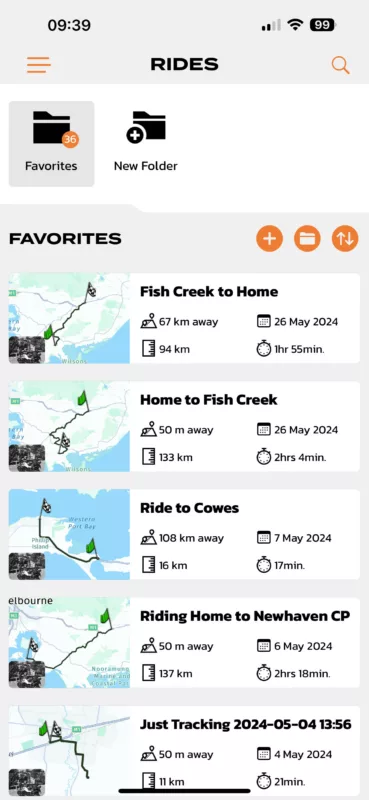
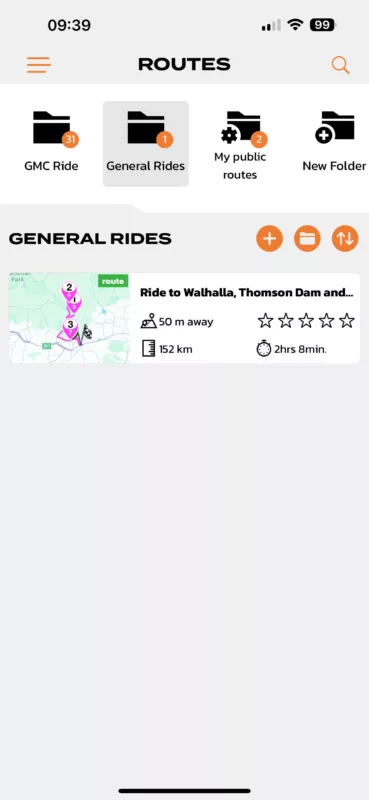
I'm talking about existing folders in which I save planned routes, or routes which are imported from external GPX files.See the attached screen shots. One is for ROUTES (rides planned or imported), the other is for RIDES (saved tracked rides).
Each has its own set of folders. I was asking why I can't save the "saved rides" to the same folders as my planned routes.
Quote from massi on 27.05.2024, 02:34Or did I misunderstood you?
Yes.
I'm talking about existing folders in which I save planned routes, or routes which are imported from external GPX files.
See the attached screen shots. One is for ROUTES (rides planned or imported), the other is for RIDES (saved tracked rides).
Each has its own set of folders. I was asking why I can't save the "saved rides" to the same folders as my planned routes.

Quote from Guido on 27.05.2024, 17:55In the Scenic database a folder can only contain one type of element (routes, rides or locations). Route folders are not the same as ride folders. If you'd like a folder to store your recorded rides then you'll have to create a folder with the same name in the recorded rides section.
I know what you mean though. There are apps out there, that use these combined folders (also sometimes referred to as 'collections'). It's on the feature request list to make this possible in Scenic. However, this is a very big change that requires a change in the dataabase structure. Not something I want to do in the peak motorcycle season, so this will have to wait a bit longer.
In the Scenic database a folder can only contain one type of element (routes, rides or locations). Route folders are not the same as ride folders. If you'd like a folder to store your recorded rides then you'll have to create a folder with the same name in the recorded rides section.
I know what you mean though. There are apps out there, that use these combined folders (also sometimes referred to as 'collections'). It's on the feature request list to make this possible in Scenic. However, this is a very big change that requires a change in the dataabase structure. Not something I want to do in the peak motorcycle season, so this will have to wait a bit longer.
Quote from Marts on 27.05.2024, 18:55Quote from Guido on 27.05.2024, 17:55In the Scenic database a folder can only contain one type of element (routes, rides or locations). Route folders are not the same as ride folders. If you'd like a folder to store your recorded rides then you'll have to create a folder with the same name in the recorded rides section.
Thanks Guido. I'll go with that. As long as I know what the situation is with separate folders it's no big deal.
Thanks.
Quote from Guido on 27.05.2024, 17:55In the Scenic database a folder can only contain one type of element (routes, rides or locations). Route folders are not the same as ride folders. If you'd like a folder to store your recorded rides then you'll have to create a folder with the same name in the recorded rides section.
Thanks Guido. I'll go with that. As long as I know what the situation is with separate folders it's no big deal.
Thanks.


