
Routing problems. Unwanted U-turns, side roads, etc.

Quote from Bikeopath on 01.03.2025, 08:28I’ve noticed that when I create a route and select Motorcycle, curvy roads, if a particular section of the route is straight with very little curves, the software will create curves by inserting turns down roadways that make no sense and always requires a U-turn. My observation is this happens when the road traveled has a straight section of 1 mile or more. I live in Florida, a/k/a ‘Flatistan’.
I’ve noticed that when I create a route and select Motorcycle, curvy roads, if a particular section of the route is straight with very little curves, the software will create curves by inserting turns down roadways that make no sense and always requires a U-turn. My observation is this happens when the road traveled has a straight section of 1 mile or more. I live in Florida, a/k/a ‘Flatistan’.
Quote from clarkml72 on 02.03.2025, 10:50I wanted to jump in on this one. Went on a 300 mile ride and used a route created in Scenic of course. I have carplay on my 2022 goldwing and of course really like to use that method. But I was coming across an issue.
If from CarPlay I loaded the route and asked it to start I would get all these little side route detours but only for like 50 feet, asked ot uturn and then continue. It did this the entire way. I had to stop the route, disconnect my phone from carplay and then load scenic on my phone, load the route, and start the route all on my iphone. Then I would connect it to carplay and no issue.
I also yesterday ran into the scenic app via carplay NOT tracking or progressing when moving, it was stuck. I had to switch (via voice) to Waze and then back to Scenic (carplay) and it resolved.
This is 4.13
I wanted to jump in on this one. Went on a 300 mile ride and used a route created in Scenic of course. I have carplay on my 2022 goldwing and of course really like to use that method. But I was coming across an issue.
If from CarPlay I loaded the route and asked it to start I would get all these little side route detours but only for like 50 feet, asked ot uturn and then continue. It did this the entire way. I had to stop the route, disconnect my phone from carplay and then load scenic on my phone, load the route, and start the route all on my iphone. Then I would connect it to carplay and no issue.
I also yesterday ran into the scenic app via carplay NOT tracking or progressing when moving, it was stuck. I had to switch (via voice) to Waze and then back to Scenic (carplay) and it resolved.
This is 4.13

Quote from Guido on 02.03.2025, 12:14The loops are added sometimes when a via point is placed on a junction (Scenic can interpret the via point as being on the “other” road, sending you into that road to reach that via point, only to turn you around later to reach the next via point). Curvy routing ads via points. I’ve added something to move via points away from junctions. I’ll take another look to see if I can improve that algorithm.
Quote from clarkml72 on 02.03.2025, 13:24I also got those "loops" as you call it when starting the route in CarPlay (for me). However I did see it more on roads that had many side roads (not 4 way intersections) or parallel roads. In my case no via points, but still the loops....
In this screenshot from the very beginning of my ride Saturday, between 2 and 3 I was getting hit with many turn right, turn left, then uturn and continue straight, when in CarPlay.
I also got those "loops" as you call it when starting the route in CarPlay (for me). However I did see it more on roads that had many side roads (not 4 way intersections) or parallel roads. In my case no via points, but still the loops....
In this screenshot from the very beginning of my ride Saturday, between 2 and 3 I was getting hit with many turn right, turn left, then uturn and continue straight, when in CarPlay.

Quote from Guido on 02.03.2025, 14:57Hmmm. That’s strange.
Did you notice any via points being added when you started the route? If so, that’s a bug. If not, then it might be GPS inaccuracy thinking causing Scenic to think you deviated from the route.I don’t think it’s CarPlay only. The routing is exactly the same on CarPlay and iPhone. (think of CarPlay as just another screen from this perspective).
Next time, after you start the route on CarPlay, could you check if the loops are added upon starting the navigation, or they just appear while riding. (If it’s the latter it’s GPS inaccuracy and I need to increase the threshold distance when Scenic starts thinking you are off route.
Hmmm. That’s strange.
Did you notice any via points being added when you started the route? If so, that’s a bug. If not, then it might be GPS inaccuracy thinking causing Scenic to think you deviated from the route.
I don’t think it’s CarPlay only. The routing is exactly the same on CarPlay and iPhone. (think of CarPlay as just another screen from this perspective).
Next time, after you start the route on CarPlay, could you check if the loops are added upon starting the navigation, or they just appear while riding. (If it’s the latter it’s GPS inaccuracy and I need to increase the threshold distance when Scenic starts thinking you are off route.
Quote from clarkml72 on 03.03.2025, 15:17So I am on my Mac and planning a route. Using Curvy. You can see in the screenshot that just asking to place a waypoint from start to another place ends up doing all these little dips off the main road and back on again...this is what I was seeing when riding the route this past weekend.
However this is the first time I have seen it when planning. I am on my mac using the planning.
So I am on my Mac and planning a route. Using Curvy. You can see in the screenshot that just asking to place a waypoint from start to another place ends up doing all these little dips off the main road and back on again...this is what I was seeing when riding the route this past weekend.
However this is the first time I have seen it when planning. I am on my mac using the planning.
Quote from Guido on 03.03.2025, 15:32Ah. It’s taking the exits to get off and back in the main road in stead of staying in the main road. I can solve that I believe. Will try to for the next update.
Ah. It’s taking the exits to get off and back in the main road in stead of staying in the main road. I can solve that I believe. Will try to for the next update.
Quote from Guido on 03.03.2025, 16:10Could you share the location of your screenshot either me? (long-press map, tap "copy coordinates" in the callout bubble and copy the DEC coordinates).
And s screenshot of your routing settings please?
Could you share the location of your screenshot either me? (long-press map, tap "copy coordinates" in the callout bubble and copy the DEC coordinates).
And s screenshot of your routing settings please?

Quote from Marts on 03.03.2025, 18:58Quote from Guido on 03.03.2025, 15:32Ah. It’s taking the exits to get off and back in the main road in stead of staying in the main road. I can solve that I believe. Will try to for the next update.
This happened to me the other day. I planned a simple route from home to the hospital in the next town. Straight down the highway out of town, stay on the highway (it veers off to the freeway to Melbourne (capital of Victoria, Australia for those who wonder, eh?) then turn right onto a street and to the hospital.
Scenic, when I got to the bit where the highway splits off to go to the town or to Melbourne, for a few seconds wanted me to go onto the freeway, then it recalculated back to the correct route. Thing is, road-wise, there's no easy way, once you're on the freeway that you can get to the hospital without detouring a few kilometres away then turning back.
The purpose of this route was to see how VIAs appeared on the map. I wanted to see how they looked and if easily visible on the CarPlay screen. I have made a POI and a location of that crash site that I mentioned recently and on our next ride up that way I want to make sure that we stop there briefly.
Quote from Guido on 03.03.2025, 15:32Ah. It’s taking the exits to get off and back in the main road in stead of staying in the main road. I can solve that I believe. Will try to for the next update.
This happened to me the other day. I planned a simple route from home to the hospital in the next town. Straight down the highway out of town, stay on the highway (it veers off to the freeway to Melbourne (capital of Victoria, Australia for those who wonder, eh?) then turn right onto a street and to the hospital.
Scenic, when I got to the bit where the highway splits off to go to the town or to Melbourne, for a few seconds wanted me to go onto the freeway, then it recalculated back to the correct route. Thing is, road-wise, there's no easy way, once you're on the freeway that you can get to the hospital without detouring a few kilometres away then turning back.
The purpose of this route was to see how VIAs appeared on the map. I wanted to see how they looked and if easily visible on the CarPlay screen. I have made a POI and a location of that crash site that I mentioned recently and on our next ride up that way I want to make sure that we stop there briefly.
Quote from Guido on 04.03.2025, 08:37@marts. Was this also with Curvy routing?
@marts. Was this also with Curvy routing?
Quote from Marts on 04.03.2025, 18:02Quote from Guido on 04.03.2025, 08:37@marts. Was this also with Curvy routing?
I don't know. Is that a setting? If so, I can't seem to find it. Note, I'm looking at it on the Mac, not the iPhone.
Anyway, here's a couple of screen shots of the route in question from that day.
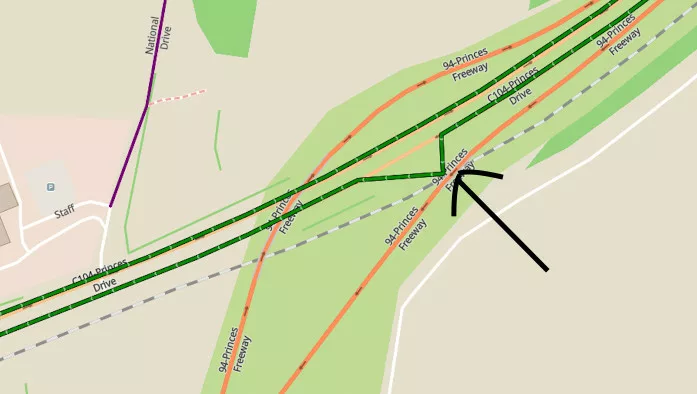
The arrow in one shot points to where Scenic wanted me to go then it corrected itself shortly after. As you can see, there is no possible way to drive or ride that way (you'd slam into a bridge and trying to cross a railway line).
If you go to google maps (or even look at it in Scenic) and type in "Morwell, Australia", then zoom around to view this road which is between Morwell and Traralgon where I live you can see how the Princes Highway veers off to the left and becomes the M1 Princes Freeway and the road heading into Morwell becomes Princes Drive.
[caption id="attachment_8757" align="alignnone" width="800"]
Route going from Traralgon to Morwell[/caption]
Quote from Guido on 04.03.2025, 08:37@marts. Was this also with Curvy routing?
I don't know. Is that a setting? If so, I can't seem to find it. Note, I'm looking at it on the Mac, not the iPhone.
Anyway, here's a couple of screen shots of the route in question from that day.
The arrow in one shot points to where Scenic wanted me to go then it corrected itself shortly after. As you can see, there is no possible way to drive or ride that way (you'd slam into a bridge and trying to cross a railway line).
If you go to google maps (or even look at it in Scenic) and type in "Morwell, Australia", then zoom around to view this road which is between Morwell and Traralgon where I live you can see how the Princes Highway veers off to the left and becomes the M1 Princes Freeway and the road heading into Morwell becomes Princes Drive.
[caption id="attachment_8757" align="alignnone" width="800"] Route going from Traralgon to Morwell[/caption]
Quote from Guido on 04.03.2025, 18:20Hi @marts,
sorry for the trouble. I actually already found the cause. It will be fixed in the version v4.14
Hi @marts,
sorry for the trouble. I actually already found the cause. It will be fixed in the version v4.14
Quote from Marts on 09.11.2025, 18:57Yesterday I entered "home" for my destination from a rest stop on a bike ride. For the most part it was good until close to home.
I was taking a back road to town. When I was getting to about 8km from home Scenic wanted me to go off-route to the main highway which runs parallel to the road that I was on.
There are 4 major roads that connect the back road and the highway along the route and Scenic wanted me to go down each one as I passed them, or instructed me to do a U-turn to go back, then recalculated to turn right at the next turn. This occured up until I turned onto my street then it navigated correctly.
It did this the last time that I rode this route a month or so ago and I posted that in here, but cannot find the post.
Attached is the screen shot of the route and I've written in where it wanted me to turn.
Detour behavior iss set to "guide me to the first unreached via point".
What other settings do I need to look at?I just planned the route on the Mac, starting with the place where we stopped and my house as the destination. It wanted me to head to the highway at the closest point to my departure. I then added in via points along the way to tell it to continue on the back roads. Each time after each via it recalculated the route to take me back to the highway, that is, turning right onto the roads that lead to the highway.
The red arrows show where the navigator wanted to take me. The orange is the actual recorded route to home.
See where it says "Newborough". That's where it wanted me to head to to get into the freeway to go home.
I tried it in Google Maps. It offered me the highway route and an alternative route down the back roads.
Interestingly, when I altered the destination address (my house is close to the highway) to the other end closer to the back road, Google changed the route, but Scenic didn't.
Thing is, yesterday's ride wasn't an issue as I know the area quite well. But it could be a problem when I'm navigating somewhere unfamiliar, such as an inner Melbourne suburb. But to date, it's been good in that respect.
Yesterday I entered "home" for my destination from a rest stop on a bike ride. For the most part it was good until close to home.
I was taking a back road to town. When I was getting to about 8km from home Scenic wanted me to go off-route to the main highway which runs parallel to the road that I was on.
There are 4 major roads that connect the back road and the highway along the route and Scenic wanted me to go down each one as I passed them, or instructed me to do a U-turn to go back, then recalculated to turn right at the next turn. This occured up until I turned onto my street then it navigated correctly.
It did this the last time that I rode this route a month or so ago and I posted that in here, but cannot find the post.
Attached is the screen shot of the route and I've written in where it wanted me to turn.
Detour behavior iss set to "guide me to the first unreached via point".
What other settings do I need to look at?
I just planned the route on the Mac, starting with the place where we stopped and my house as the destination. It wanted me to head to the highway at the closest point to my departure. I then added in via points along the way to tell it to continue on the back roads. Each time after each via it recalculated the route to take me back to the highway, that is, turning right onto the roads that lead to the highway.
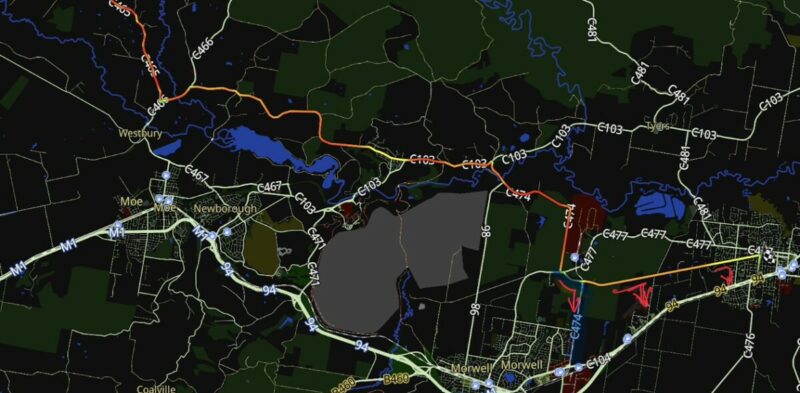
The red arrows show where the navigator wanted to take me. The orange is the actual recorded route to home.
See where it says "Newborough". That's where it wanted me to head to to get into the freeway to go home.
I tried it in Google Maps. It offered me the highway route and an alternative route down the back roads.
Interestingly, when I altered the destination address (my house is close to the highway) to the other end closer to the back road, Google changed the route, but Scenic didn't.
Thing is, yesterday's ride wasn't an issue as I know the area quite well. But it could be a problem when I'm navigating somewhere unfamiliar, such as an inner Melbourne suburb. But to date, it's been good in that respect.
Quote from Guido on 09.11.2025, 19:56was this the post: https://scenic.app/forum/topic/scenic-auto-routing-not-playing-the-game/#postid-14694
Check my answer on that post too. It might apply here too.
was this the post: https://scenic.app/forum/topic/scenic-auto-routing-not-playing-the-game/#postid-14694
Check my answer on that post too. It might apply here too.
Quote from Marts on 09.11.2025, 20:01Quote from Guido on 09.11.2025, 19:56was this the post: https://scenic.app/forum/topic/scenic-auto-routing-not-playing-the-game/#postid-14694
Check my answer on that post too. It might apply here too.
No, that wasn't it. In the case yesterday, all I did was to tap on "Search" then I tapped on "home" and started navigating. No vias, stops, etc..
Quote from Guido on 09.11.2025, 19:56was this the post: https://scenic.app/forum/topic/scenic-auto-routing-not-playing-the-game/#postid-14694
Check my answer on that post too. It might apply here too.
No, that wasn't it. In the case yesterday, all I did was to tap on "Search" then I tapped on "home" and started navigating. No vias, stops, etc..
Quote from Guido on 10.11.2025, 07:06Yes. But my reasoning still applies. Scenic want you to go to the highway because it thinks it’s the fastest route, even if that means it will become a bit longer distance-wise.
Yes. But my reasoning still applies. Scenic want you to go to the highway because it thinks it’s the fastest route, even if that means it will become a bit longer distance-wise.
Quote from Marts on 10.11.2025, 19:50Quote from Guido on 10.11.2025, 07:06Yes. But my reasoning still applies. Scenic want you to go to the highway because it thinks it’s the fastest route, even if that means it will become a bit longer distance-wise.
Thanks. Makes sense. Thing is, it's 80 km/h speed limits down either route with a short 60 k then the 50 k up my street.
I did a test. I changed the destination from my end of the street to the other end which is 800m shorter going the back route. Still wanted to go down the highway, then up my street, past my house to the end.
Anyway, what I was going to ask - some navigators like Garmin, TomTom and so on have nav preferences for "shortest route", "quickest or fastest", etc.. Is this able to be changed in Scenic?
One thing that's common across all the navs that I used is one particular route to the high country which would normally be ridden down the main highway, then turning off to head up into the mountains. Both Scenic, Garmin and Google Maps wanted me to take a more direct route which meant going up a dirt road towards the destination.
Short of setting the "avoid unsealed roads" to yes, I have to add a via point to avoid heading up that track. The Garmin Zumo's insistance that I keep turning back, even 20 to 30 km past the turn-off point was what convinced me to sell it, get a Chigee and set up Scenic. Garmin just would not recalculate the route despite being many kms past that point.
Quote from Guido on 10.11.2025, 07:06Yes. But my reasoning still applies. Scenic want you to go to the highway because it thinks it’s the fastest route, even if that means it will become a bit longer distance-wise.
Thanks. Makes sense. Thing is, it's 80 km/h speed limits down either route with a short 60 k then the 50 k up my street.
I did a test. I changed the destination from my end of the street to the other end which is 800m shorter going the back route. Still wanted to go down the highway, then up my street, past my house to the end.
Anyway, what I was going to ask - some navigators like Garmin, TomTom and so on have nav preferences for "shortest route", "quickest or fastest", etc.. Is this able to be changed in Scenic?
One thing that's common across all the navs that I used is one particular route to the high country which would normally be ridden down the main highway, then turning off to head up into the mountains. Both Scenic, Garmin and Google Maps wanted me to take a more direct route which meant going up a dirt road towards the destination.
Short of setting the "avoid unsealed roads" to yes, I have to add a via point to avoid heading up that track. The Garmin Zumo's insistance that I keep turning back, even 20 to 30 km past the turn-off point was what convinced me to sell it, get a Chigee and set up Scenic. Garmin just would not recalculate the route despite being many kms past that point.
Quote from Guido on 10.11.2025, 20:58In Scenic you can also choose shortest, and much more settings. It’s under the vehicle icon on the main screen and power planner.
The reason why chosen routes might sometimes be not logical, is the speed limits or average historical speeds along the roads. This is being used to calculate the fastest route. If that speed data is wrong, missing or outdated, this can lead to “wrong” routes.
In the end, it all comes down to the map data. And in the end, there are just 4 map providers that I know of (Google, TomTom, HERE and OpenStreetMap) who make their data available to 3rd party apps like Scenic. I can write a whole book about this as I have tried them all over the years 🙂. They all have their advantages and disadvantages, and shortcomings and strong points.
In Scenic you can also choose shortest, and much more settings. It’s under the vehicle icon on the main screen and power planner.
The reason why chosen routes might sometimes be not logical, is the speed limits or average historical speeds along the roads. This is being used to calculate the fastest route. If that speed data is wrong, missing or outdated, this can lead to “wrong” routes.
In the end, it all comes down to the map data. And in the end, there are just 4 map providers that I know of (Google, TomTom, HERE and OpenStreetMap) who make their data available to 3rd party apps like Scenic. I can write a whole book about this as I have tried them all over the years 🙂. They all have their advantages and disadvantages, and shortcomings and strong points.
Quote from Marts on 10.11.2025, 21:11Quote from Guido on 10.11.2025, 20:58In Scenic you can also choose shortest, and much more settings. It’s under the vehicle icon on the main screen and power planner.
Ah, more options of which I was unaware. You are truly a guru, Guido!
I changed it from Highways to more adventurous. I plotted the same route but it still wanted to go via the highway. I made it even more adventurous. This time it changed from the highway to the back roads to home.
I've made it a preset.
Thanks.
Martin
Quote from Guido on 10.11.2025, 20:58In Scenic you can also choose shortest, and much more settings. It’s under the vehicle icon on the main screen and power planner.
Ah, more options of which I was unaware. You are truly a guru, Guido!
I changed it from Highways to more adventurous. I plotted the same route but it still wanted to go via the highway. I made it even more adventurous. This time it changed from the highway to the back roads to home.
I've made it a preset.
Thanks.
Martin


