
Routing problem - Bug in the OSM map or Scenic App

Quote from HJD on 29.03.2025, 12:30Hi Guido
I have been planing a Scotland tour for 5000 km the past week and are always absolutely thrilled how easy that is with Scenic. Congratulations for a fantastic App and thank you for all your efforts and hard work during the past month. I am very happy with it.
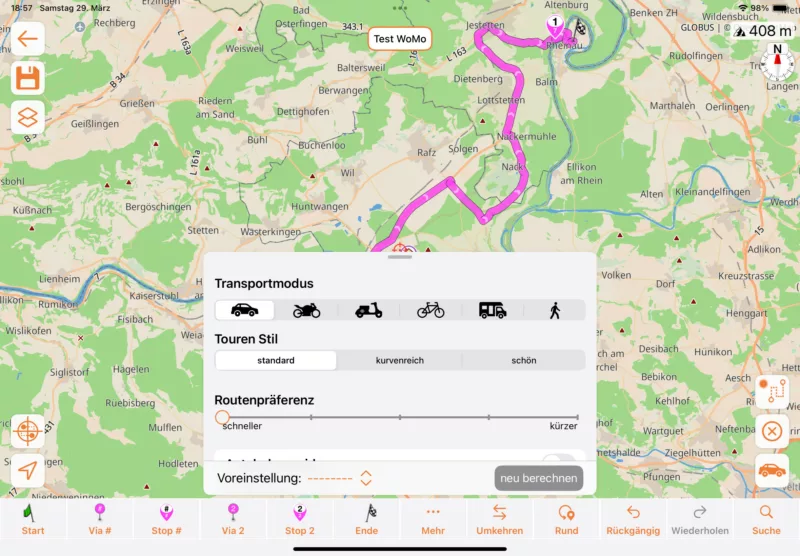
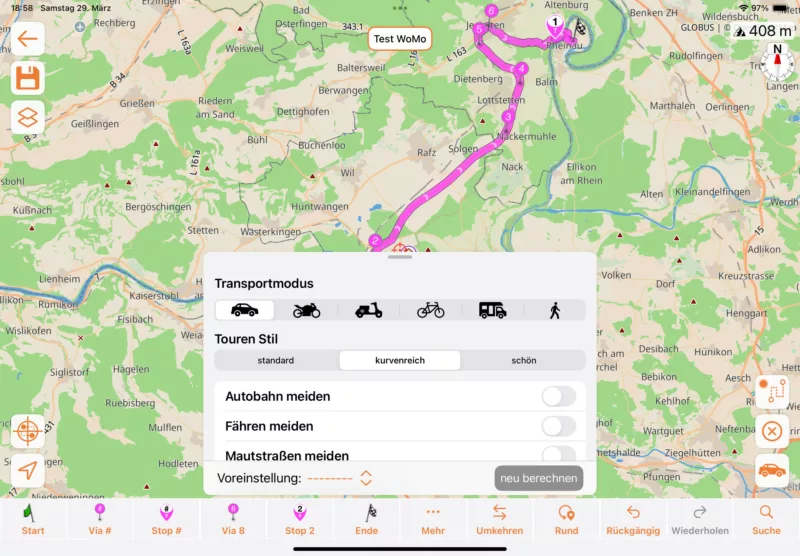
I went out today for a test drive with Scenic and came across a very strange routing. It is a very simple and strait route. With the setting on standard it took quite a big detour on a very narrow road. With the setting on “curvy” it was working correctly.
Is Kurviger using a different map or a different routing? If it is a problem with the map, don’t worry about it. If it is a bug, you might want to know about it.
Hi Guido
I have been planing a Scotland tour for 5000 km the past week and are always absolutely thrilled how easy that is with Scenic. Congratulations for a fantastic App and thank you for all your efforts and hard work during the past month. I am very happy with it.
I went out today for a test drive with Scenic and came across a very strange routing. It is a very simple and strait route. With the setting on standard it took quite a big detour on a very narrow road. With the setting on “curvy” it was working correctly.
Is Kurviger using a different map or a different routing? If it is a problem with the map, don’t worry about it. If it is a bug, you might want to know about it.

Quote from MjK on 29.03.2025, 14:21Hi HJD,
being super happy with scenic myself and plan and route a lot with it, I am really interested in all those kinds of potential issues. So I tried to replicate to learn.
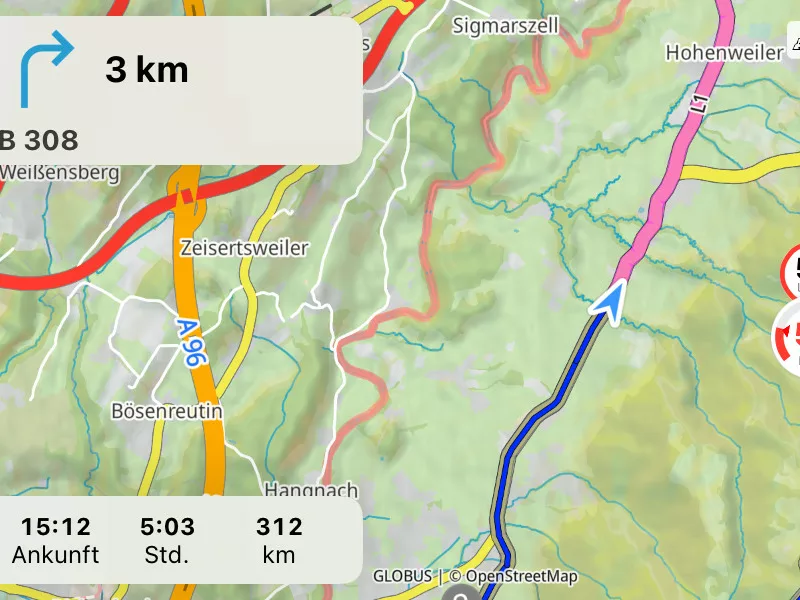
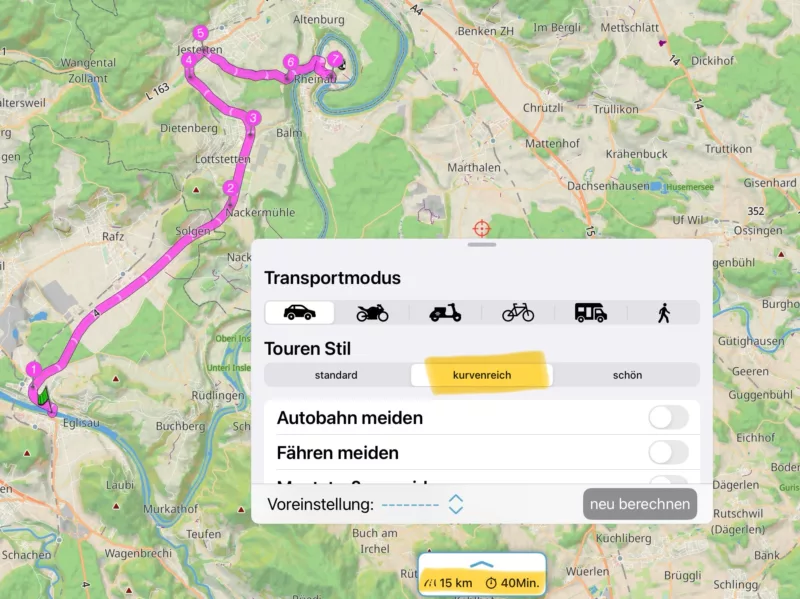
the following screenshots may speak for themselves, but in essence:
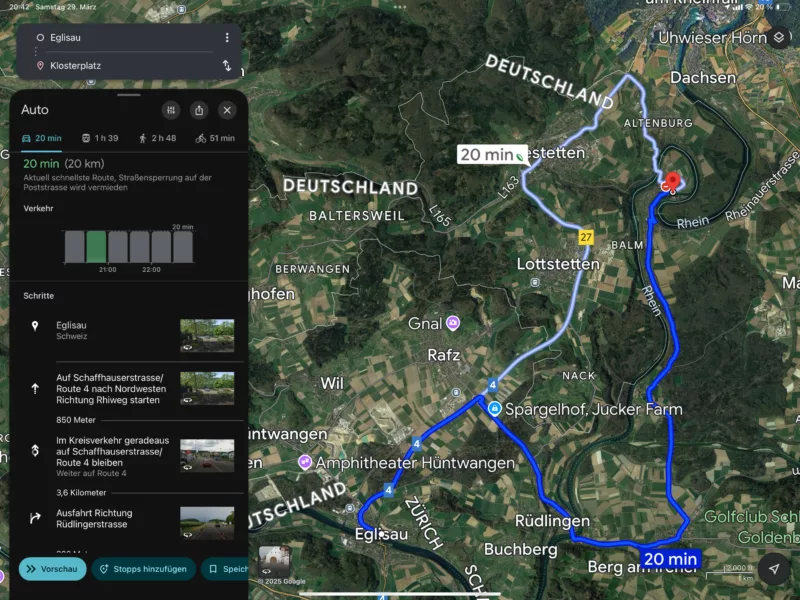
- the longer route is the preferred route also by Google maps - even so Google maps does always show shorter times in general
- timing : your preferred route in comparison to Google maps shows significantly longer times needed - this might be an OSM issue on that road in particular
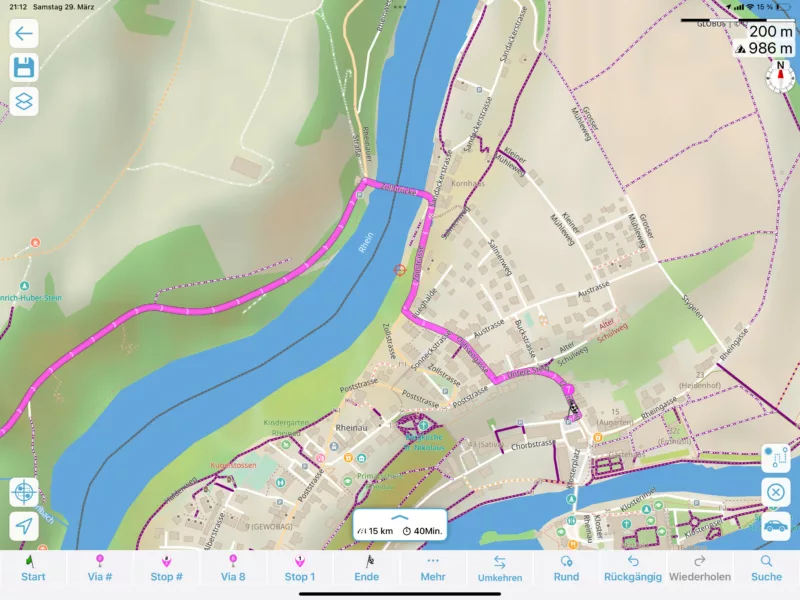
- Curvy routing shows 40min and your preferred route
- standard routing fast shows 29 min and a significant detour from your preferred track
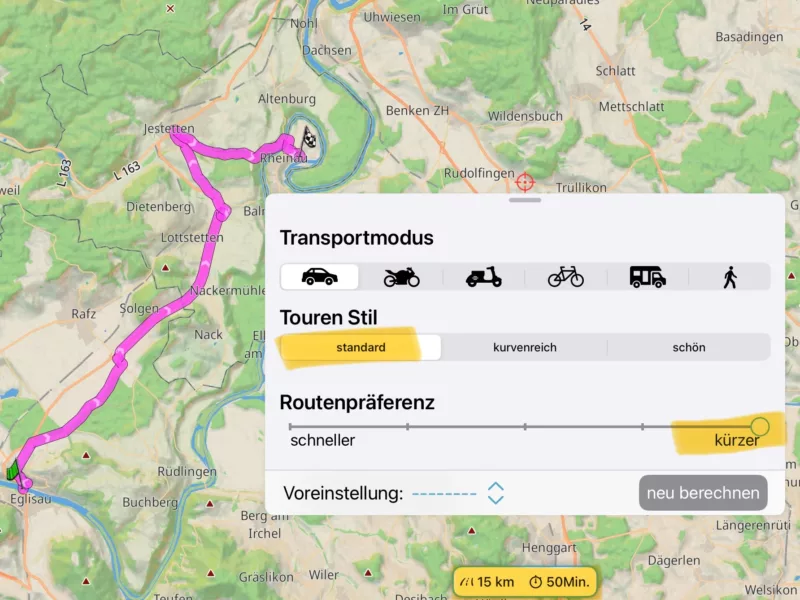
- standard routing short results in 50min and your preferred route
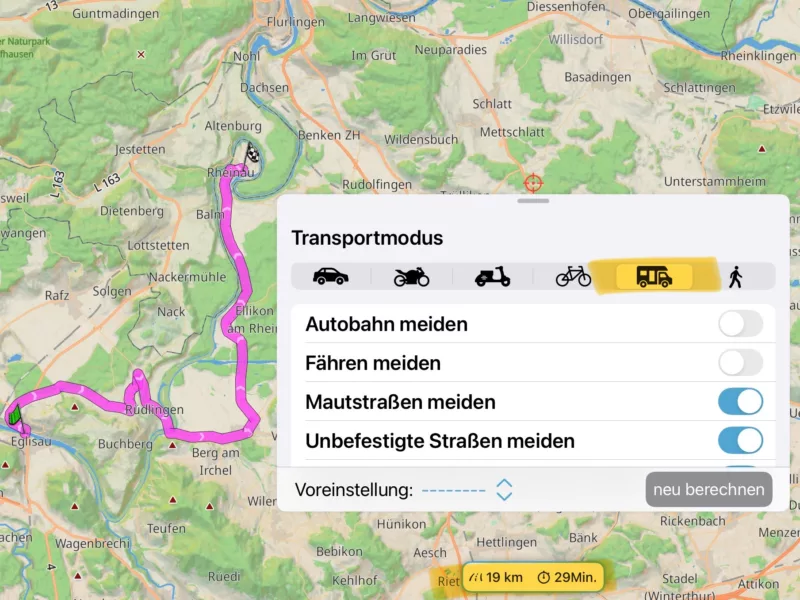
- As you called your tour „Test WoMo“ I did the same with the caravan routing, where it’s actually cool to even enter weight now not just size, it results in the same route and timing as standard fast, but for a Wohnmobil/ Camper Tour with all the benefits of size and weight.
so Guido should be able to verify if it’s an OSM issue, but my take is: it works as designed, because
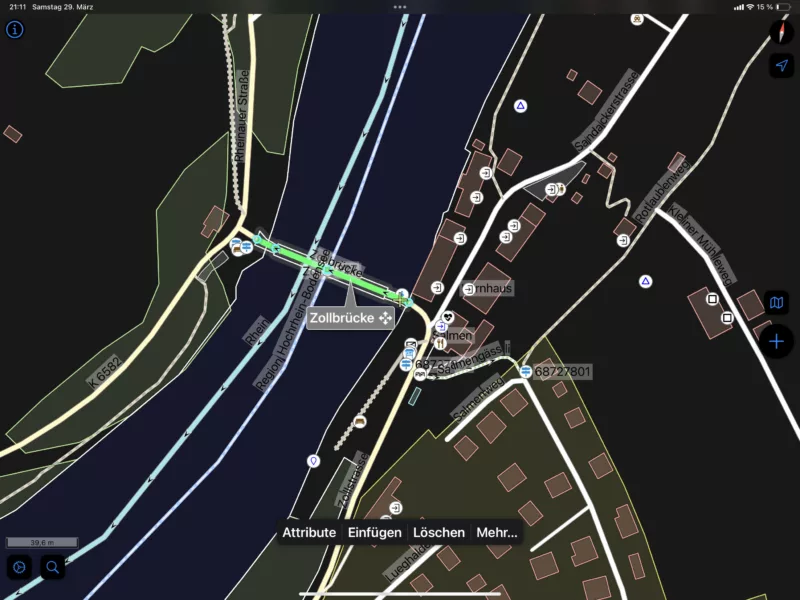
in your preferred route you need to cross the old toll bridge (Alte Zollbrücke) to get to Rheinau and that’s a single lane road allowing traffic in both directions. I would bet the routing engine is taking this into account and adds a potential delay (penalty on this segment of the route). That lets scenic suggest you the other route.
lets see what Guidos view is on this!
Gruß, Markus.
Hi HJD,
being super happy with scenic myself and plan and route a lot with it, I am really interested in all those kinds of potential issues. So I tried to replicate to learn.
the following screenshots may speak for themselves, but in essence:
- the longer route is the preferred route also by Google maps - even so Google maps does always show shorter times in general
- timing : your preferred route in comparison to Google maps shows significantly longer times needed - this might be an OSM issue on that road in particular
- Curvy routing shows 40min and your preferred route
- standard routing fast shows 29 min and a significant detour from your preferred track
- standard routing short results in 50min and your preferred route
- As you called your tour „Test WoMo“ I did the same with the caravan routing, where it’s actually cool to even enter weight now not just size, it results in the same route and timing as standard fast, but for a Wohnmobil/ Camper Tour with all the benefits of size and weight.
so Guido should be able to verify if it’s an OSM issue, but my take is: it works as designed, because
in your preferred route you need to cross the old toll bridge (Alte Zollbrücke) to get to Rheinau and that’s a single lane road allowing traffic in both directions. I would bet the routing engine is taking this into account and adds a potential delay (penalty on this segment of the route). That lets scenic suggest you the other route.
lets see what Guidos view is on this!
Gruß, Markus.

Quote from Guido on 29.03.2025, 14:45I’m not near my computer now, so can’t look in detail. But, if Google Maps shows the same route as Scenic - car - fastest then I’m inclined to say this is not a OSM / map data issue, but rather working as expected.
The curvy routing uses the same map data, but a different routing engine and different configuration option that allow it to prefer curvy roads and “less travelled” roads, by sacrificing speed.
I’m not near my computer now, so can’t look in detail. But, if Google Maps shows the same route as Scenic - car - fastest then I’m inclined to say this is not a OSM / map data issue, but rather working as expected.
The curvy routing uses the same map data, but a different routing engine and different configuration option that allow it to prefer curvy roads and “less travelled” roads, by sacrificing speed.
Quote from HJD on 29.03.2025, 18:51Hi Markus
Thank you very much for taking the time to investigate. I must admit, that I tested the Motorhome Mode in Rheinau with the low bridge and Scenic would work perfectly in Motorhome Mode, not going over the low bridge but taking me a long way round. Top. The problem I noticed at the beginning of the routing and that is in Car, motorbike and Motorhome mode the same.
In order not to confuse the issue, I set up the comparison on the same road just going from Eglisau to Jestetten, 11km straight road, crossing the border from Switzerland to Germany.
Here my findings:
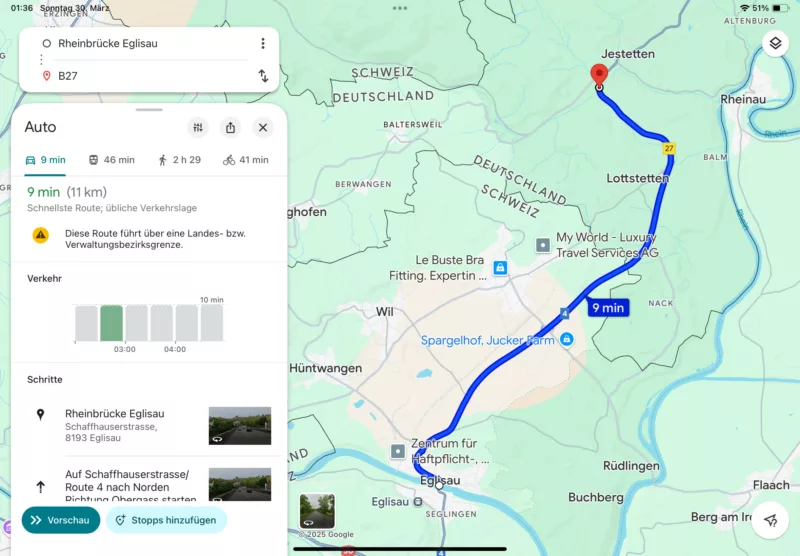
Google maps: 11km - 9 min
Apple maps: 11km - 10 min
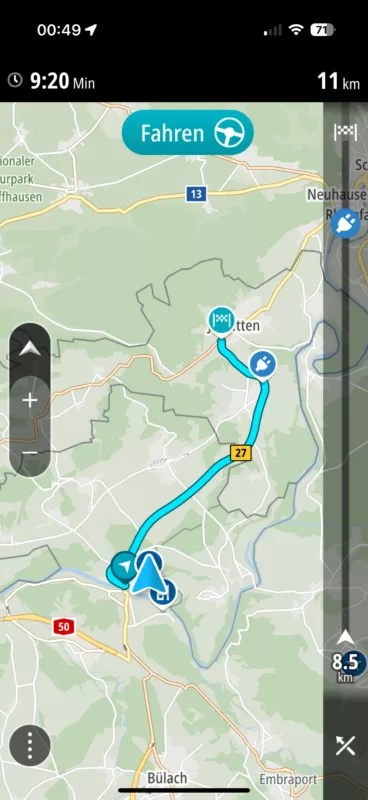
TomTom: 11km - 9:20 min
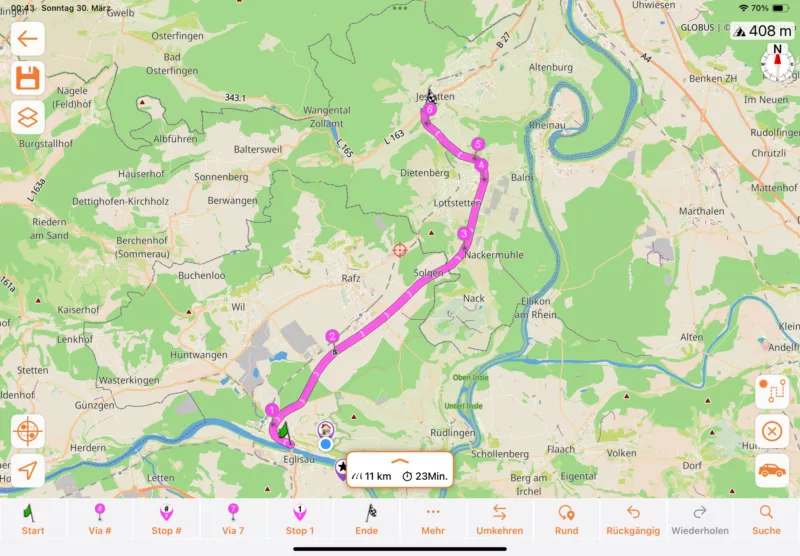
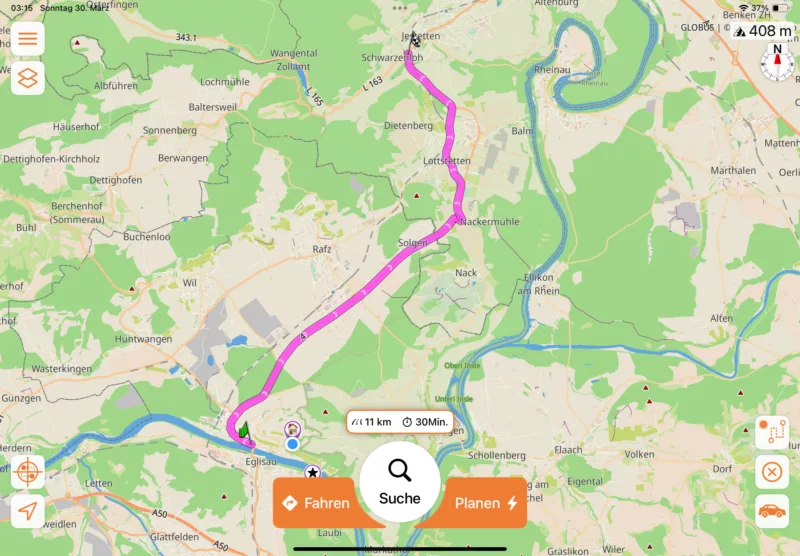
Scenic curvy: 11km - 23min
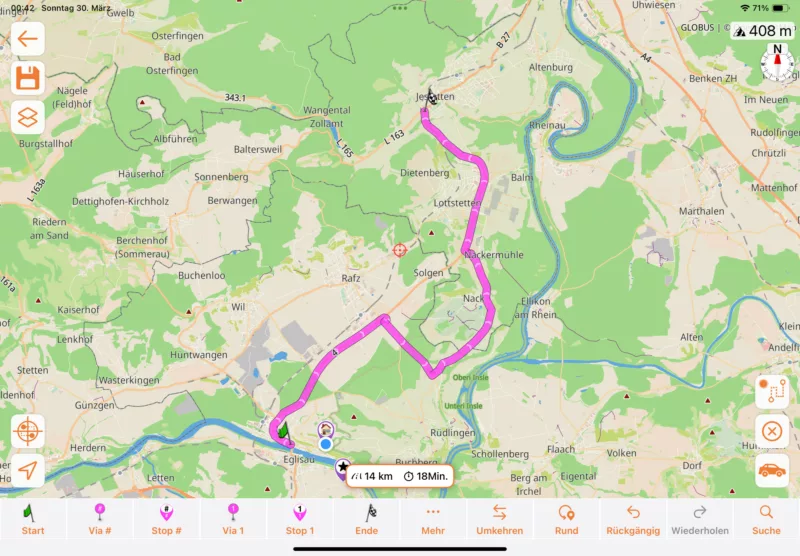
Scenic Standard: 14km - 18min -> with a useless detour on a single track road. Scenic is using the same detour routing on Car, Motorhome and Motorbike.
It looks to me, that the useless detour is caused by the useless time calculation. Scenic is right to use the shorter arrival time as “standard”. Garbage in = Garbage out. In that case I guess the incorrect time calculations, some people were complaining about, is not just cosmetics, but causes bad routing. Correct?
I can test Tesla, BMW and Zenec In Car systems, but I am sure they will come up with the same result as Apple, Google and TomTom.
See what Guido thinks about that.
Hi Markus
Thank you very much for taking the time to investigate. I must admit, that I tested the Motorhome Mode in Rheinau with the low bridge and Scenic would work perfectly in Motorhome Mode, not going over the low bridge but taking me a long way round. Top. The problem I noticed at the beginning of the routing and that is in Car, motorbike and Motorhome mode the same.
In order not to confuse the issue, I set up the comparison on the same road just going from Eglisau to Jestetten, 11km straight road, crossing the border from Switzerland to Germany.
Here my findings:
Google maps: 11km - 9 min
Apple maps: 11km - 10 min
TomTom: 11km - 9:20 min
Scenic curvy: 11km - 23min
Scenic Standard: 14km - 18min -> with a useless detour on a single track road. Scenic is using the same detour routing on Car, Motorhome and Motorbike.
It looks to me, that the useless detour is caused by the useless time calculation. Scenic is right to use the shorter arrival time as “standard”. Garbage in = Garbage out. In that case I guess the incorrect time calculations, some people were complaining about, is not just cosmetics, but causes bad routing. Correct?
I can test Tesla, BMW and Zenec In Car systems, but I am sure they will come up with the same result as Apple, Google and TomTom.
See what Guido thinks about that.
Quote from HJD on 29.03.2025, 19:23Markus
One more input I forgot:
The suggested setting Standard -> “shorter” as opposed to “quicker” does not solve the problem. The route will go through smaller streets at another part, will be still 11 km but 30 Minutes.
Markus
One more input I forgot:
The suggested setting Standard -> “shorter” as opposed to “quicker” does not solve the problem. The route will go through smaller streets at another part, will be still 11 km but 30 Minutes.
Quote from Guido on 29.03.2025, 19:42I will investigate Monday and report back.
I will investigate Monday and report back.
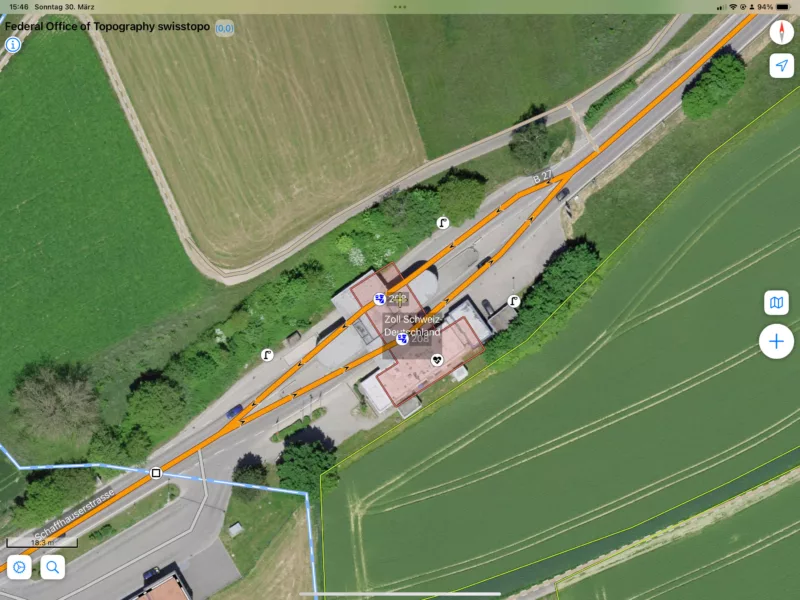
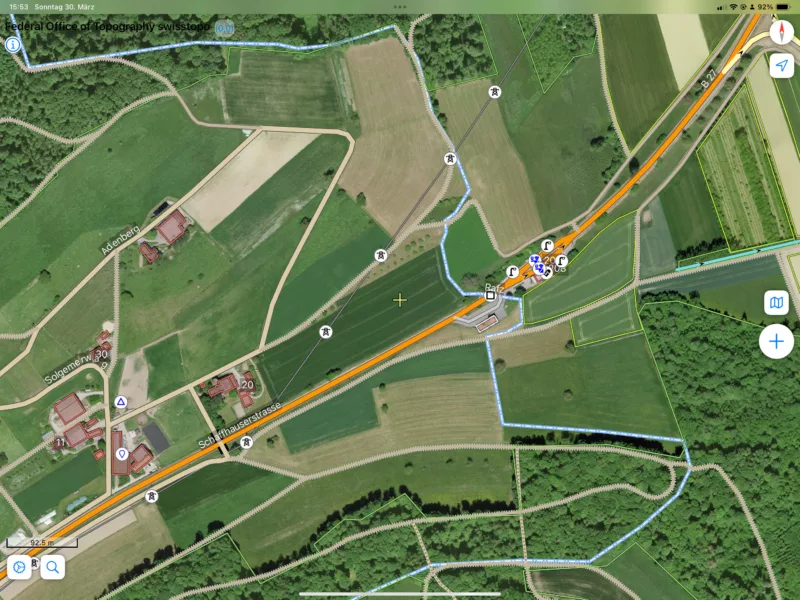
Quote from LaszloK on 30.03.2025, 07:51Hat dies möglicherweise mit der Zollstation zu tun? Dort gilt eine Höchstgeschwindigkeit von 20 km/h.
Laszlo
Hat dies möglicherweise mit der Zollstation zu tun? Dort gilt eine Höchstgeschwindigkeit von 20 km/h.
Laszlo
Quote from MjK on 30.03.2025, 09:27Super Punkt Laszlo,
Die habe ich völlig übersehen, leider nur die Brücke ..
Für die 300m Zollstation liefert es dann 10min Verlust - hab gecheckt von Eglisau zur Grenze 7min, nach der Grenze nach Jesstetten 5min .. sind dann 12 min vs 9 min von Google Maps…
Das ist dann scho realistischer - bzw. wir warten auf den Karten-Update von dem Guido gesprochen hat
schönen Sonntag, Markus
Super Punkt Laszlo,
Die habe ich völlig übersehen, leider nur die Brücke ..
Für die 300m Zollstation liefert es dann 10min Verlust - hab gecheckt von Eglisau zur Grenze 7min, nach der Grenze nach Jesstetten 5min .. sind dann 12 min vs 9 min von Google Maps…
Das ist dann scho realistischer - bzw. wir warten auf den Karten-Update von dem Guido gesprochen hat
schönen Sonntag, Markus
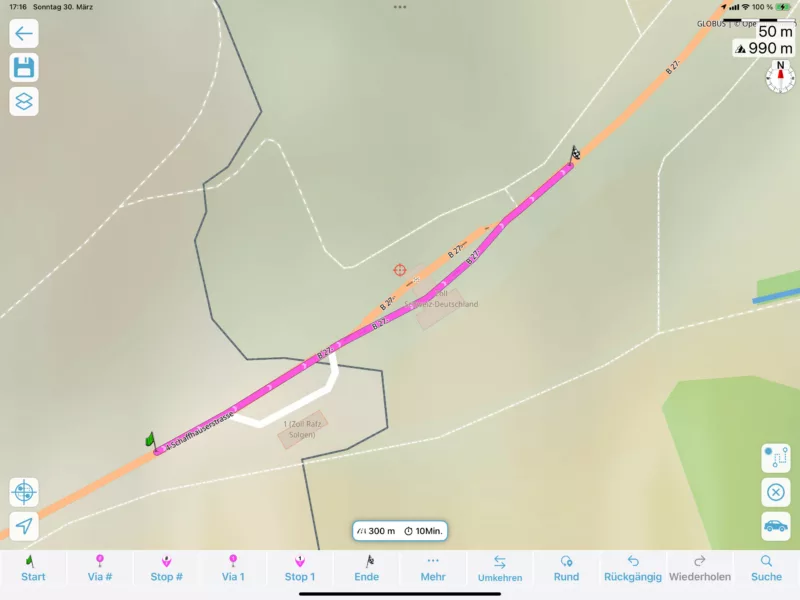
Quote from LaszloK on 30.03.2025, 10:44Und mit den 10 Minuten für die 300 m macht auch der Umweg - ohne Zollstation - auch rechnerisch Sinn.
Und mit den 10 Minuten für die 300 m macht auch der Umweg - ohne Zollstation - auch rechnerisch Sinn.
Quote from HJD on 01.04.2025, 03:10Hi Guido
Yesterday I added “Sygic” to the test. It is using the same route as Apple Maps, Goggle Maps, TomTom and Scenic curvy.
All of them show 11km and about 10 Minutes. Scenic uses this route on curvy with 23 min - more than double the time - and uses a detour on a single track road in standard mode /quick with 14km / 18min
I think we have a problem in the routing and time calculation or both. The roads haven’t changed for > 30 years, so a map update will not fix it.
@MjK and Laszlo
Thank you for your input. The customs station with speed limit of 20km/h is probably less than 100 m in real life and takes only some seconds. (passing it every day). So I can’t see why Scenic should not route on “standard/quick” like all the others, calculating the correct time and using the correct route.
Guido is the only one who can see why Scenic does what is does.
Hans Jürgen
Hi Guido
Yesterday I added “Sygic” to the test. It is using the same route as Apple Maps, Goggle Maps, TomTom and Scenic curvy.
All of them show 11km and about 10 Minutes. Scenic uses this route on curvy with 23 min - more than double the time - and uses a detour on a single track road in standard mode /quick with 14km / 18min
I think we have a problem in the routing and time calculation or both. The roads haven’t changed for > 30 years, so a map update will not fix it.
@MjK and Laszlo
Thank you for your input. The customs station with speed limit of 20km/h is probably less than 100 m in real life and takes only some seconds. (passing it every day). So I can’t see why Scenic should not route on “standard/quick” like all the others, calculating the correct time and using the correct route.
Guido is the only one who can see why Scenic does what is does.
Hans Jürgen
Quote from MjK on 01.04.2025, 03:59Hi Hans Jürgen,
really eager to understand the root cause of this ...
my understanding is that scenic helps to shape the route, but the map provider with its data leveraging a routing engine is responsible for calculating the time.
If thats the case the issue is in the data section of the map provider and if he thinks it takes 10min I guess there is not a lot scenic as an app can do about it - and living next to the Swiss, Austrian, German boarder myself I fully understand why you question the delay
We will see whats Guidos take on this, but good exchange to better understand those timing issues in general
Thanks, Markus
Hi Hans Jürgen,
really eager to understand the root cause of this ...
my understanding is that scenic helps to shape the route, but the map provider with its data leveraging a routing engine is responsible for calculating the time.
If thats the case the issue is in the data section of the map provider and if he thinks it takes 10min I guess there is not a lot scenic as an app can do about it - and living next to the Swiss, Austrian, German boarder myself I fully understand why you question the delay
We will see whats Guidos take on this, but good exchange to better understand those timing issues in general
Thanks, Markus
Quote from Guido on 01.04.2025, 06:35Hello Hans-Jurgen,
Im afraid the duration calculation is also somewhat of a black box for me. It’s done by the map framework that Scenic uses.
From what I understand, the duration calculation currently uses historical speeds (the avg speed driven on a road based on real logged data that was collected).
It turns out this historical data does not represent reality for every region/road. It’s good for some regions/roads, but it’s bad in others.
And yes, you are right that this duration is a factor in the roads that the routing algorithm chooses.
There are several other forum entries around this topic and I get emails about it every day. So this is one of my highest priorities at the moment.
Im working with the map provider on a solution, but unfortunately it’s mostly out of my hands, other than to follow up with them. Last time they told me they would have an improvement in March, but march has passed so I’m guessing it will be April. I will continue following up.
Hello Hans-Jurgen,
Im afraid the duration calculation is also somewhat of a black box for me. It’s done by the map framework that Scenic uses.
From what I understand, the duration calculation currently uses historical speeds (the avg speed driven on a road based on real logged data that was collected).
It turns out this historical data does not represent reality for every region/road. It’s good for some regions/roads, but it’s bad in others.
And yes, you are right that this duration is a factor in the roads that the routing algorithm chooses.
There are several other forum entries around this topic and I get emails about it every day. So this is one of my highest priorities at the moment.
Im working with the map provider on a solution, but unfortunately it’s mostly out of my hands, other than to follow up with them. Last time they told me they would have an improvement in March, but march has passed so I’m guessing it will be April. I will continue following up.
Quote from Guido on 01.04.2025, 06:46A map update can fix this because the map update also contains the routing data (including what speeds to use in the route/duration calculation)
A map update can fix this because the map update also contains the routing data (including what speeds to use in the route/duration calculation)
Quote from HJD on 01.04.2025, 07:04Hi Guido
Thank you very much for your explanation. Now I understand what is going on.
The way you describe it means, the map has got, so to speak, “traffic information” build in to it. 🙂 For me it is quite important to understand how it works, to stay confidence and use Scenic in the correct way.
As it turns out, my test route has got customs in the middle of the route which causes slow traffic at some times of the day especially on Saturday.
If this is a good way to go, is another discussion, at least it is an explanation I can live with. Thank you again for taking the time.
Hans Jürgen
Hi Guido
Thank you very much for your explanation. Now I understand what is going on.
The way you describe it means, the map has got, so to speak, “traffic information” build in to it. 🙂 For me it is quite important to understand how it works, to stay confidence and use Scenic in the correct way.
As it turns out, my test route has got customs in the middle of the route which causes slow traffic at some times of the day especially on Saturday.
If this is a good way to go, is another discussion, at least it is an explanation I can live with. Thank you again for taking the time.
Hans Jürgen


