
Routes and tracks on map

Quote from Milos on 23.05.2022, 07:18When I am recording a ride I see all the old tracks and routes on the map, which is disturbing. Is there any way to hide those? I have a only found a way to change the colors of them, but not to hide them on the map…
When I am recording a ride I see all the old tracks and routes on the map, which is disturbing. Is there any way to hide those? I have a only found a way to change the colors of them, but not to hide them on the map…

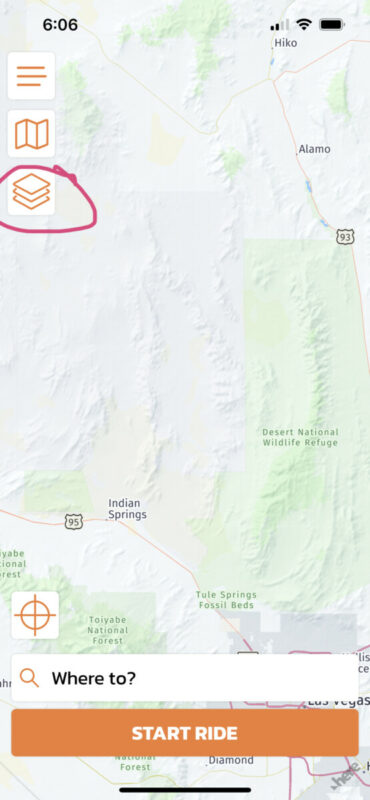
Quote from massi on 23.05.2022, 07:42When you look on the main screen to the left there arr three icons. Touch on the third icon, the three squares, there you will find the possibility to choose which POIs and routes will be shown on the map.
When you look on the main screen to the left there arr three icons. Touch on the third icon, the three squares, there you will find the possibility to choose which POIs and routes will be shown on the map.
Quote from Milos on 23.05.2022, 08:01Yes, I found that.
But all routes and rides that are in the Favorite folders (where all rides are stored if you do not manually move them) are shown on the map when recording a ride, even if the Favorite folders are unchecked in that settings.
It is only when browsing the map, before pushing the Record ride button, that those rides and routes are not shown when not selected. But when pushing Record ride they all appear…A bug…?
Yes, I found that.
But all routes and rides that are in the Favorite folders (where all rides are stored if you do not manually move them) are shown on the map when recording a ride, even if the Favorite folders are unchecked in that settings.
It is only when browsing the map, before pushing the Record ride button, that those rides and routes are not shown when not selected. But when pushing Record ride they all appear…
A bug…?

Quote from Guido on 23.05.2022, 09:00This is the button you want:
Scenic remembers two settings for the layers that are shown on the map. One for navigating and one for non-navigation screens.
Thought that made sense as during planning you might want to see old tracks and routes while you don’t want to see those during riding
This is the button you want:
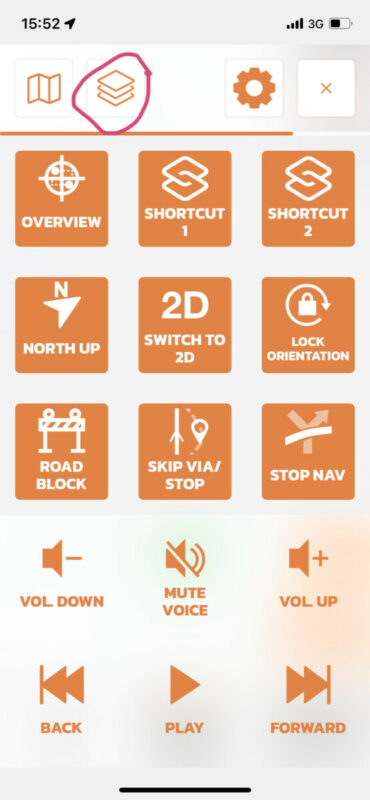
Scenic remembers two settings for the layers that are shown on the map. One for navigating and one for non-navigation screens.
Thought that made sense as during planning you might want to see old tracks and routes while you don’t want to see those during riding
Quote from Milos on 23.05.2022, 09:18Ah, now I get it. Didn’t know these were two different settings. Yes now it works just fine. Thank you!
Ah, now I get it. Didn’t know these were two different settings. Yes now it works just fine. Thank you!


