
Route start moved and auto skip not working

Quote from Atticuscat on 19.03.2025, 11:374.16, route planned in Scenic on iPad Pro iOS 18.3.2 and executed on iPhone X iOS 16.7.10. No CarPlay.
The planned route start point was moved (by Scenic?, certainly not be me) from the road just outside my house, to an access road for other properties behind my house. I didn’t notice this and set off and the initial start of the route is very familiar so I wasn’t paying much attention to Scenic until I realised it was being much more verbose than usual and constantly trying to turn me around to the start point it hadn’t registered as passing (because I didn’t, because it had been moved.). Detour behaviour is set to auto-skip unreached via points after 3 recalculations. I kept going figuring it may need to pass via1 and recalculate 3 times before skipping but after this Scenic was still adamant I needed to return to the route start (I was a good 14 miles into the ride by then). I stopped and deleted the start and via1 and it continued to navigate as expected.
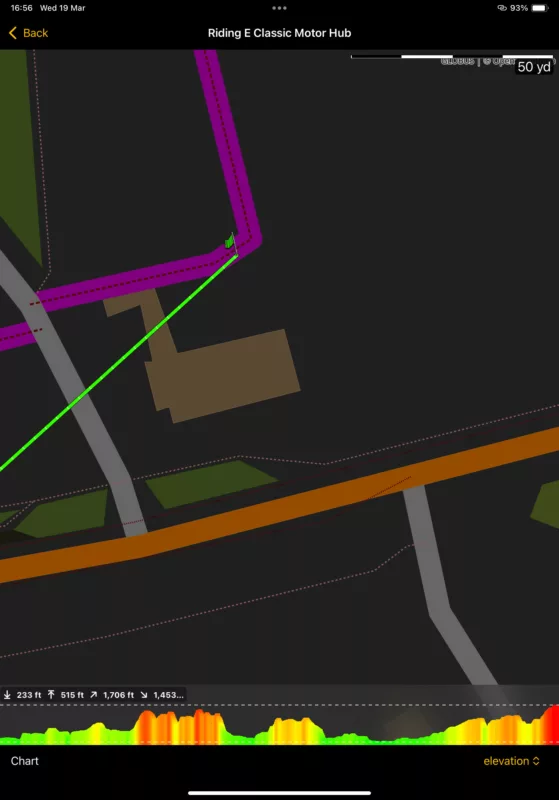
Planned route start, and the course I actually took.
Recorded ride start, which isn’t what I physically did.
4.16, route planned in Scenic on iPad Pro iOS 18.3.2 and executed on iPhone X iOS 16.7.10. No CarPlay.
The planned route start point was moved (by Scenic?, certainly not be me) from the road just outside my house, to an access road for other properties behind my house. I didn’t notice this and set off and the initial start of the route is very familiar so I wasn’t paying much attention to Scenic until I realised it was being much more verbose than usual and constantly trying to turn me around to the start point it hadn’t registered as passing (because I didn’t, because it had been moved.). Detour behaviour is set to auto-skip unreached via points after 3 recalculations. I kept going figuring it may need to pass via1 and recalculate 3 times before skipping but after this Scenic was still adamant I needed to return to the route start (I was a good 14 miles into the ride by then). I stopped and deleted the start and via1 and it continued to navigate as expected.
Planned route start, and the course I actually took.
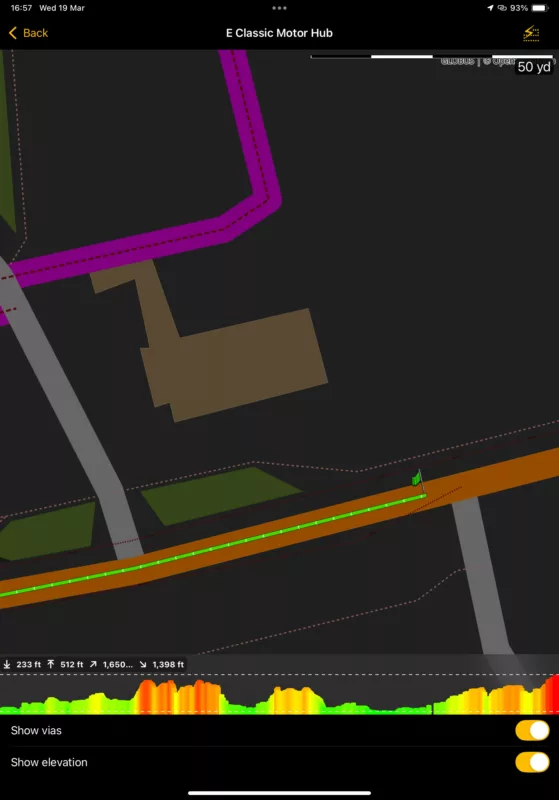
Recorded ride start, which isn’t what I physically did.

Quote from Guido on 19.03.2025, 12:15When you are following a route, Scenic tries to snap your location to the route (if your raw locaction received from the GPS is within 40 meters from that route). Scenic does this to account for GPS inaccuracies.
It looks like this is what happened.
Typically, when outside, with good GPS reception, GPS accuracy is between 5 and 10 meters, meaning the received coordinate can be max 5 to 10 meters away from your real location. However, if you are inside, GPS accuracy can drop to 50, and even 150 meters.
When you are following a route, Scenic tries to snap your location to the route (if your raw locaction received from the GPS is within 40 meters from that route). Scenic does this to account for GPS inaccuracies.
It looks like this is what happened.
Typically, when outside, with good GPS reception, GPS accuracy is between 5 and 10 meters, meaning the received coordinate can be max 5 to 10 meters away from your real location. However, if you are inside, GPS accuracy can drop to 50, and even 150 meters.
Quote from Dae on 19.03.2025, 12:24Correct me if I’m wrong @guidomm, but to answer the OP’s point about expecting it to skip the start point - the start wouldn’t auto skip as it’s a stop and not a via, hence the constant navigation back to the start.
Correct me if I’m wrong @guidomm, but to answer the OP’s point about expecting it to skip the start point - the start wouldn’t auto skip as it’s a stop and not a via, hence the constant navigation back to the start.
Quote from Atticuscat on 19.03.2025, 12:58Quote from Guido on 19.03.2025, 12:15When you are following a route, Scenic tries to snap your location to the route (if your raw locaction received from the GPS is within 40 meters from that route). Scenic does this to account for GPS inaccuracies.
My driveway outside my garage sits about halfway between the planned (main road) and recorded (unpaved road, which I have set to avoid) start points and if I plan a route start from directly outside my garage Scenic historically has routed me via the paved road to the west of my house. This is why I start routes on the main road outside my driveway. I have never before seen the behaviour exhibited today, maybe it was a GPS anomaly (I note my position wasn’t recorded for some considerable distance along the main road). I hope it’s an anomaly because in the UK it is illegal to physically interact with a phone while driving even if my gloves/screen protector combo would allow it so it’s a stop and gloves off task to rectify this.
Quote from Guido on 19.03.2025, 12:15When you are following a route, Scenic tries to snap your location to the route (if your raw locaction received from the GPS is within 40 meters from that route). Scenic does this to account for GPS inaccuracies.
My driveway outside my garage sits about halfway between the planned (main road) and recorded (unpaved road, which I have set to avoid) start points and if I plan a route start from directly outside my garage Scenic historically has routed me via the paved road to the west of my house. This is why I start routes on the main road outside my driveway. I have never before seen the behaviour exhibited today, maybe it was a GPS anomaly (I note my position wasn’t recorded for some considerable distance along the main road). I hope it’s an anomaly because in the UK it is illegal to physically interact with a phone while driving even if my gloves/screen protector combo would allow it so it’s a stop and gloves off task to rectify this.
Quote from Guido on 19.03.2025, 13:29I understand, and I a suggestions (and thanks @dae for pointing this out):
The start location of your recorded ride suggests that your location was at that point on the unpaved road (and not snapped to the route). In other words, you were further away than 40 meters from the route, so your location was not snapped to the route, and as a result, your raw location was logged. The only way this could have happened is because of GPS inaccuracy.
What I think happened is that, because of this inaccuracy, you never reached the start point either, and Scenic kept trying to guide you back to it.
What I recommend next time, is, when you start a route, to make sure that guidance to the route start point is not included. Here's how to do that: https://scenic.app/forum/topic/begin-at-a-certain-waypoint-stop/#postid-11477
When you do that, Scenic will not start navigation immediately. It will say "go to route". And only when you reach the route, the navigation will start. If you reach the route "behind" the start point, the start point will automatically be skipped without any screen interaction required.
As for the GPS signal. Some background info: Typically, getting a precise location is pretty fast, within like 10 seconds (if you are outside). However, if your iPhone has been shut down and/or has not used its GPS receiver for a while and/or was moved considerably since last GPS use, then it can take longer to get a precise position because it still needs to find and connect to satellites to triangulate your position. Once it finds 3 satellites, your position is very precise (5 to 10 meters, again, if you are outside with clear line of sight to the sky). Finding satellites can take anywhere between seconds to minutes. Until it finds the satellites, your position is approximate, only based on nearby wifi signals and cell towers.
I understand, and I a suggestions (and thanks @dae for pointing this out):
The start location of your recorded ride suggests that your location was at that point on the unpaved road (and not snapped to the route). In other words, you were further away than 40 meters from the route, so your location was not snapped to the route, and as a result, your raw location was logged. The only way this could have happened is because of GPS inaccuracy.
What I think happened is that, because of this inaccuracy, you never reached the start point either, and Scenic kept trying to guide you back to it.
What I recommend next time, is, when you start a route, to make sure that guidance to the route start point is not included. Here's how to do that: https://scenic.app/forum/topic/begin-at-a-certain-waypoint-stop/#postid-11477
When you do that, Scenic will not start navigation immediately. It will say "go to route". And only when you reach the route, the navigation will start. If you reach the route "behind" the start point, the start point will automatically be skipped without any screen interaction required.
As for the GPS signal. Some background info: Typically, getting a precise location is pretty fast, within like 10 seconds (if you are outside). However, if your iPhone has been shut down and/or has not used its GPS receiver for a while and/or was moved considerably since last GPS use, then it can take longer to get a precise position because it still needs to find and connect to satellites to triangulate your position. Once it finds 3 satellites, your position is very precise (5 to 10 meters, again, if you are outside with clear line of sight to the sky). Finding satellites can take anywhere between seconds to minutes. Until it finds the satellites, your position is approximate, only based on nearby wifi signals and cell towers.
Quote from Dae on 19.03.2025, 13:56Quote from Atticuscat on 19.03.2025, 12:58in the UK it is illegal to physically interact with a phone while driving even if my gloves/screen protector combo would allow it so it’s a stop and gloves off task to rectify this.
You can physically interact with the phone for navigation purposes in the UK, providing it is in a physical holder and you don’t hold it in your hand
https://www.gov.uk/using-mobile-phones-when-driving-the-law
I’m not saying you should, but you could if it’s mounted. That’s why I use CarPlay with the BMW Wonderwheel.
Quote from Atticuscat on 19.03.2025, 12:58
in the UK it is illegal to physically interact with a phone while driving even if my gloves/screen protector combo would allow it so it’s a stop and gloves off task to rectify this.
You can physically interact with the phone for navigation purposes in the UK, providing it is in a physical holder and you don’t hold it in your hand
https://www.gov.uk/using-mobile-phones-when-driving-the-law
I’m not saying you should, but you could if it’s mounted. That’s why I use CarPlay with the BMW Wonderwheel.
Quote from Atticuscat on 19.03.2025, 16:04Quote from Guido on 19.03.2025, 13:29What I recommend next time, is, when you start a route, to make sure that guidance to the route start point is not included. Here's how to do that: https://scenic.app/forum/topic/begin-at-a-certain-waypoint-stop/#postid-11477
This is how I thought I had Scenic set up, and maybe why I’ve never seen this behaviour before, but I’ve just checked and guide to route start was on. (Maybe I had touched the button without realizing.). FWIW my phone location services are always on and I’d been outside prepping bikes for the ride for 10 to 15 minutes before setting off.
Thank you Guido, and DAE, for your input.
Quote from Guido on 19.03.2025, 13:29What I recommend next time, is, when you start a route, to make sure that guidance to the route start point is not included. Here's how to do that: https://scenic.app/forum/topic/begin-at-a-certain-waypoint-stop/#postid-11477
This is how I thought I had Scenic set up, and maybe why I’ve never seen this behaviour before, but I’ve just checked and guide to route start was on. (Maybe I had touched the button without realizing.). FWIW my phone location services are always on and I’d been outside prepping bikes for the ride for 10 to 15 minutes before setting off.
Thank you Guido, and DAE, for your input.
Quote from Guido on 19.03.2025, 17:20This is not a setting that is remembered. Every time you load a route from the start screen this option is turned ON.
This is not a setting that is remembered. Every time you load a route from the start screen this option is turned ON.


