
Route planning strangeness

Quote from DuncanS on 06.02.2024, 13:40
This is the famous Transfagarasan in Romania. The fastest and shortest route from the start to end is to simply ride the road. But if I remove waypoint 1, Scenic chooses to go back to the A1 motorway on the left, down to the bottom, up past the finish to waypoint 2 and then back down to the finish. This makes the route 1 1/2 hours longer in duration and 60 miles longer in distance. I don’t understand why the routing engine would do this, so I’m wondering if I have changed a setting that’s causing it.
I’ve got the routing set to ‘fastest’ but I’ve also tried ‘shortest’ and it does exactly the same. I have also ensured I have all avoidances turned off (including ‘seasonally closed roads’ and ‘unpaved roads’).
I’ve downloaded the appropriate country map and made sure it’s up to date. I’ve zoomed right in to the map and I can’t see any break in the road which Scenic might interpret as a no-through-road and try to go around. So what could be causing it?
Also, if I remove point 2, the planner decides to take a long mountain detour to the right on what look like very small roads to get to the finish, instead of simply carrying on directly on the main road.
I am sure this is something I have got set wrong, but what could it be…?
This is the famous Transfagarasan in Romania. The fastest and shortest route from the start to end is to simply ride the road. But if I remove waypoint 1, Scenic chooses to go back to the A1 motorway on the left, down to the bottom, up past the finish to waypoint 2 and then back down to the finish. This makes the route 1 1/2 hours longer in duration and 60 miles longer in distance. I don’t understand why the routing engine would do this, so I’m wondering if I have changed a setting that’s causing it.
I’ve got the routing set to ‘fastest’ but I’ve also tried ‘shortest’ and it does exactly the same. I have also ensured I have all avoidances turned off (including ‘seasonally closed roads’ and ‘unpaved roads’).
I’ve downloaded the appropriate country map and made sure it’s up to date. I’ve zoomed right in to the map and I can’t see any break in the road which Scenic might interpret as a no-through-road and try to go around. So what could be causing it?
Also, if I remove point 2, the planner decides to take a long mountain detour to the right on what look like very small roads to get to the finish, instead of simply carrying on directly on the main road.
I am sure this is something I have got set wrong, but what could it be…?

Quote from Guido on 06.02.2024, 15:14It's not you. It's still considering seasonal closures somehow. I'm working with HERE maps to get this resolved ASAP.
It's not you. It's still considering seasonal closures somehow. I'm working with HERE maps to get this resolved ASAP.

Quote from TheDriver79 on 07.02.2024, 10:21To be honest, the routing issues do not always apply to temporary road closures but seem to happen just randomly.
During usage of the Beta those problems happened and vanished from version to version. Sometimes it was absolutely not possible to create a useful navigation. And this is what also happens today - a totally weired route created by Scenic when trying to drive on the B27 and want to stay on that road and it‘s impossible to fix that even by adding additional waypoints.
To be honest, the routing issues do not always apply to temporary road closures but seem to happen just randomly.
During usage of the Beta those problems happened and vanished from version to version. Sometimes it was absolutely not possible to create a useful navigation. And this is what also happens today - a totally weired route created by Scenic when trying to drive on the B27 and want to stay on that road and it‘s impossible to fix that even by adding additional waypoints.

Quote from Guido on 07.02.2024, 10:27Could you download the offline maps for this region and try again?
The problem lies with the HERE online routing engine I believe. When you have the offline maps installed, it will use the offline routing engine.
Let me know how it goes?
Could you download the offline maps for this region and try again?
The problem lies with the HERE online routing engine I believe. When you have the offline maps installed, it will use the offline routing engine.
Let me know how it goes?

Quote from Mex on 07.02.2024, 10:58Hi folks.
planned a route today. After saving the route i decided to change it to curvy-fast.
Below you see the result. No big prob for me cause i edit the routes anyway. But when you just follow the track it might be confusing.
Are we able to change settings for parts of a trip, like 200 km on highway and curvy afterwards? Couldn’t find it yet.
Beside my profil there is a red dot. Already saved may settings but it doesnt disappear.
Regards, Mex
Hi folks.
planned a route today. After saving the route i decided to change it to curvy-fast.
Below you see the result. No big prob for me cause i edit the routes anyway. But when you just follow the track it might be confusing.
Are we able to change settings for parts of a trip, like 200 km on highway and curvy afterwards? Couldn’t find it yet.
Beside my profil there is a red dot. Already saved may settings but it doesnt disappear.
Regards, Mex
Quote from TheDriver79 on 08.02.2024, 02:24Quote from Guido on 07.02.2024, 10:27Could you download the offline maps for this region and try again?
The problem lies with the HERE online routing engine I believe. When you have the offline maps installed, it will use the offline routing engine.
Let me know how it goes?
Hey Guido,
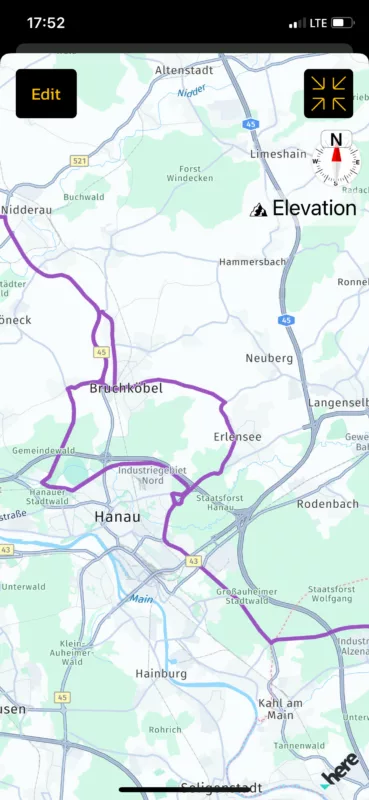
at the moment I created the route I did not have Offline Maps. Today I downloaded the offline map for Germany and tried again as you suggested, however the result is the same. The route is generated with a totally strange direction and ignores my straight away waypoint.
The only thing that changed between the offline and the online maps is the routing at the "Bodensee". Using the online map it was directing me driving around the sea and now it's using the ferry to pass it in a more direct way. That generated two new "Stopps" (it's just the type of marker that looks like a stopp but it's blue), which is totally new in Scenic. I did a road trip using a ferry last year which did not show me the change of the transporation vehicle.
Quote from Guido on 07.02.2024, 10:27Could you download the offline maps for this region and try again?
The problem lies with the HERE online routing engine I believe. When you have the offline maps installed, it will use the offline routing engine.
Let me know how it goes?
Hey Guido,
at the moment I created the route I did not have Offline Maps. Today I downloaded the offline map for Germany and tried again as you suggested, however the result is the same. The route is generated with a totally strange direction and ignores my straight away waypoint.
The only thing that changed between the offline and the online maps is the routing at the "Bodensee". Using the online map it was directing me driving around the sea and now it's using the ferry to pass it in a more direct way. That generated two new "Stopps" (it's just the type of marker that looks like a stopp but it's blue), which is totally new in Scenic. I did a road trip using a ferry last year which did not show me the change of the transporation vehicle.
Quote from Guido on 08.02.2024, 08:31@thedriver79,
See below screenshot.
Would you mind sending me the share link to your route? I'm not sure why this is happening so I need to investigate further. If you don't want to post it here, you can use the "email" button at the bottom of the Scenic HELP page.
Best regards,
Guido
See below screenshot.
Would you mind sending me the share link to your route? I'm not sure why this is happening so I need to investigate further. If you don't want to post it here, you can use the "email" button at the bottom of the Scenic HELP page.
Best regards,
Guido
Quote from TheDriver79 on 08.02.2024, 09:37Hello Guido, I‘ve just sent an email with the link to the route.
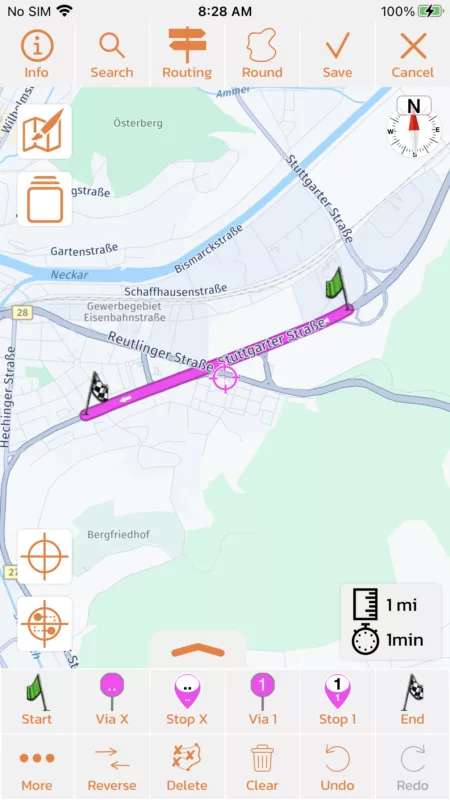
While trying to modify the route even more another strange routing behavior happende, where a straight road gets left to drive through a village and come back to the straight road about 1km later.
That all makes no sense and seems to be an issue produced by the routing logic in the new HERE API.
Hello Guido, I‘ve just sent an email with the link to the route.
While trying to modify the route even more another strange routing behavior happende, where a straight road gets left to drive through a village and come back to the straight road about 1km later.
That all makes no sense and seems to be an issue produced by the routing logic in the new HERE API.
Quote from Guido on 08.02.2024, 09:41I received your email with the route, and will have a look and discuss with HERE. I'll report back here.
I received your email with the route, and will have a look and discuss with HERE. I'll report back here.


