Route planning and chinese character bugs

Quote from ogroggo on 11.01.2025, 16:12Hi Guido,
Encountered 2 bugs.
None of them interfering too much with my use of v4.09, just that you know.1. Powerplanner,
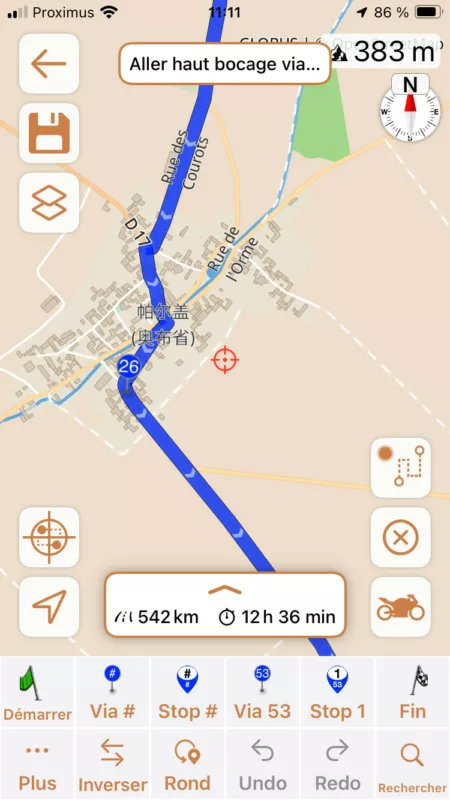
when creating a route by sequentially adding via’s along an intended route: after having entered a number which are added correctly, suddenly ‘add via’ puts the via not on the spot where I put the crosshairs but at an ‘upstream’ location along the already defined part of the route.Workaround is the long press on ‘add via’ to force tapping the previous point. Then point is added correctly.
2 Chinese names for larger cities.
Still happening in my set-up. I tried removing the language from the prefs (then all city names are in latin chars again) and reinstalling it -> chinese names again.
Chinese was and is last in my list.
I need the keyboard because I’m learning Chinese ( but my Chinese is not yet to the level that I can read city names 😉)I am very happy with v4.09 by the way.
Most functionality restored !!Thanks for that,
Georges
Hi Guido,
Encountered 2 bugs.
None of them interfering too much with my use of v4.09, just that you know.
1. Powerplanner,
when creating a route by sequentially adding via’s along an intended route: after having entered a number which are added correctly, suddenly ‘add via’ puts the via not on the spot where I put the crosshairs but at an ‘upstream’ location along the already defined part of the route.
Workaround is the long press on ‘add via’ to force tapping the previous point. Then point is added correctly.
2 Chinese names for larger cities.
Still happening in my set-up. I tried removing the language from the prefs (then all city names are in latin chars again) and reinstalling it -> chinese names again.
Chinese was and is last in my list.
I need the keyboard because I’m learning Chinese ( but my Chinese is not yet to the level that I can read city names 😉)
I am very happy with v4.09 by the way.
Most functionality restored !!
Thanks for that,
Georges

Quote from Guido on 12.01.2025, 08:52suddenly ‘add via’ puts the via not on the spot where I put the crosshairs but at an ‘upstream’ location along the already defined part of the route.
OK. That's a new one for me. Will have a look.
Chinese names for larger cities.
Hmmm. I'm starting to think there might be a bug. Could you perhaps send me a screenshot of (1) the map where you see the chinese names (I imagine that's in China?) and (2) your preferred language list?
suddenly ‘add via’ puts the via not on the spot where I put the crosshairs but at an ‘upstream’ location along the already defined part of the route.
OK. That's a new one for me. Will have a look.
Chinese names for larger cities.
Hmmm. I'm starting to think there might be a bug. Could you perhaps send me a screenshot of (1) the map where you see the chinese names (I imagine that's in China?) and (2) your preferred language list?
Quote from ogroggo on 08.02.2025, 17:45Sorry Guido, late reply, have been busy lately
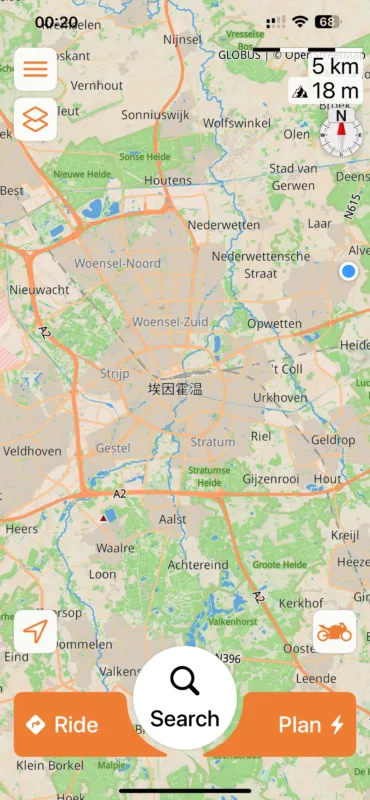
Chinese characters occur for larger cities all over Europe, could be capitals of provinces, départéments in France, regional capitals in Spain, etc could be anything above a certain nr. of inhabitants.
Example below: Eindhoven, NL, close to my home village.
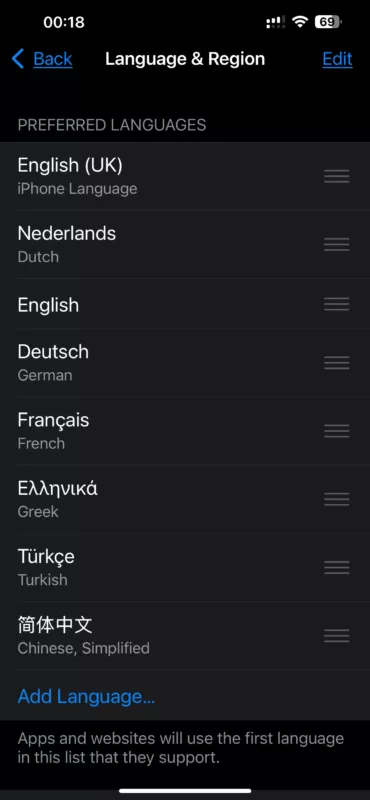
also attached screenshot of my language and region preferences
BR,
Georges
Sorry Guido, late reply, have been busy lately
Chinese characters occur for larger cities all over Europe, could be capitals of provinces, départéments in France, regional capitals in Spain, etc could be anything above a certain nr. of inhabitants.
Example below: Eindhoven, NL, close to my home village.
also attached screenshot of my language and region preferences
BR,
Georges
Quote from Guido on 10.02.2025, 10:19Thank you Georges... I investigated, and I know what's going on.
Scenic goes through the preferred language that "Eindhoven" (in this case) has a translation available. Even "Eindhoven" does not have a translation for any of the languages, it uses the general name (usually the local name). In this case, there is a translation in Chinese, but none for the other languages. The "eindhoven" name is there, but it's the "general" name, not the "Dutch" translated name (that's not present).To resolve this, I will have to build preferred language list in Scenic, so that you can choose to prefer the "general" name above any of the other preferred languages. I will try to get that in there for the next update.
Thank you for your help!
Thank you Georges... I investigated, and I know what's going on.
Scenic goes through the preferred language that "Eindhoven" (in this case) has a translation available. Even "Eindhoven" does not have a translation for any of the languages, it uses the general name (usually the local name). In this case, there is a translation in Chinese, but none for the other languages. The "eindhoven" name is there, but it's the "general" name, not the "Dutch" translated name (that's not present).
To resolve this, I will have to build preferred language list in Scenic, so that you can choose to prefer the "general" name above any of the other preferred languages. I will try to get that in there for the next update.
Thank you for your help!

Quote from tcherpeti on 19.03.2025, 04:41Thank you, I found it !
I had that before, now it's ok.
(the setting can be found
in the Iphone settings NOT in the scenic app )
Thanks for the work done Guido, waiting for speed camera now 😉
Thank you, I found it !
I had that before, now it's ok.
(the setting can be found in the Iphone settings NOT in the scenic app )
Thanks for the work done Guido, waiting for speed camera now 😉